
IdentityServer4之Resource Owner Password Credentials(资源拥有者密码凭据许可)
IdentityServer4之Resource Owner Password Credentials(资源拥有者密码凭据许可)
参考
官方文档:2_resource_owner_passwords
概念:资源拥有者密码凭据许可
认证服务端配置
认证服务ApiResource配置
new ApiResource("api1", "api项目 一")

{

    ApiSecrets = { new Secret("api1pwd".Sha256()) }

},
认证服务Client配置
//resource owner password grant client

new Client

{

    ClientId = "ro.client",

    AllowedGrantTypes = GrantTypes.ResourceOwnerPassword,

    AccessTokenType = AccessTokenType.Reference,

    ClientSecrets =

    {

        new Secret("secret".Sha256())

    },

    AllowedScopes = { "api1" }

},
认证服务Startup配置
public void ConfigureServices(IServiceCollection services)

{

    // configure identity server with in-memory stores, keys, clients and scopes

    services.AddIdentityServer()

        .AddDeveloperSigningCredential()

        .AddInMemoryApiResources(Config.GetApiResources())

        .AddInMemoryClients(Config.GetClients())

        .AddTestUsers(Config.GetUsers());

}
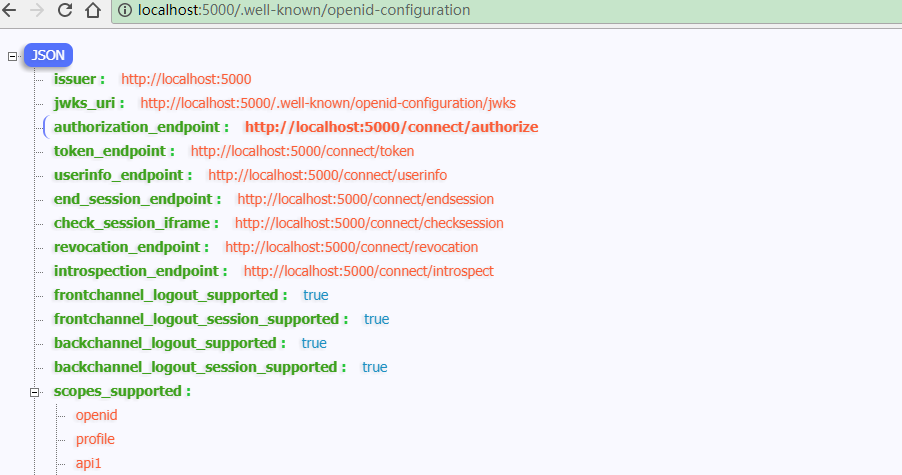
配置完成启动访问http://localhost:5000/.well-known/openid-configuration
资源服务Api配置
资源服务器Startup配置
services.AddMvcCore()

    .AddAuthorization()

    .AddJsonFormatters();

services.AddAuthentication("Bearer")

    .AddIdentityServerAuthentication(options =>

    {

        options.Authority = "http://localhost:5000";

        options.RequireHttpsMetadata = false;

        options.ApiName = "api1";

        options.ApiSecret = "api1pwd";  //对应ApiResources中的密钥

    });
添加接口
[Route("[controller]")]

[Authorize]

public class IdentityController : ControllerBase

{

    [HttpGet]

    public IActionResult Get()

    {

        var info = from c in User.Claims select new { c.Type, c.Value };

        var list = info.ToList();

        list.Add(new { Type = "api1返回", Value = DateTime.Now.ToString("yyyy-MM-dd HH:mm:ss") });

        return new JsonResult(list);

    }

}
Client客户端
(A)资源拥有者提供给客户端它的用户名和密码。
(B)通过包含从资源拥有者处接收到的凭据,客户端从授权服务器的令牌端点请求访问令牌。当发起请求时,客户端与授权服务器进行身份验证。
(C)授权服务器对客户端进行身份验证,验证资源拥有者的凭证,如果有效,颁发访问令牌。
//resource owner password grant client

private void btnROAuth_Click(object sender, EventArgs e)

{

    Task<DiscoveryResponse> discoTask = DiscoveryClient.GetAsync(txtROAuthSer.Text);

    discoTask.Wait();

    var disco = discoTask.Result;

    if (disco.IsError)

    {

        MessageBox.Show(disco.Error, "提示信息", MessageBoxButtons.OK, MessageBoxIcon.Information);

        txtROResult.Text = string.Empty;

        txtAccessToken.Text = string.Empty;

        return;

    }

    // request token

    var tokenClient = new TokenClient(disco.TokenEndpoint, txtROClient.Text, txtROSecret.Text);

    Task<TokenResponse> tokenTask = tokenClient.RequestResourceOwnerPasswordAsync(txtROUser.Text, txtROPwd.Text, txtROScopes.Text);

    tokenTask.Wait();

    var tokenResponse = tokenTask.Result;

    if (tokenResponse.IsError)

    {

        MessageBox.Show(tokenResponse.Error, "提示信息", MessageBoxButtons.OK, MessageBoxIcon.Information);

        txtROResult.Text = string.Empty;

        txtAccessToken.Text = string.Empty;

        return;

    }

    txtROResult.Text = tokenResponse.Json.ToString();

    txtAccessToken.Text = tokenResponse.AccessToken;

}
调用Api
private void btnCallApi_Click(object sender, EventArgs e)

{

    // call api

    var client = new HttpClient();

    client.SetBearerToken(txtAccessToken.Text);

    var responseTask = client.GetAsync(txtCCApiUrl.Text);

    responseTask.Wait();

    var response = responseTask.Result;

    if (!response.IsSuccessStatusCode)

    {

        MessageBox.Show(response.StatusCode.ToString(), "提示信息", MessageBoxButtons.OK, MessageBoxIcon.Information);

        txtApiResult.Text = string.Empty;

    }

    else

    {

        var contentTask = response.Content.ReadAsStringAsync();

        contentTask.Wait();

        var content = contentTask.Result;

        txtApiResult.Text = JArray.Parse(content).ToString();

    }

}
获取token过程解析
Jwt形式获取access_token、客户端身份验证两种方式,参考上一篇获取token过程解析。
Reference形式获取access_token
将client的AccessTokenType设置为1
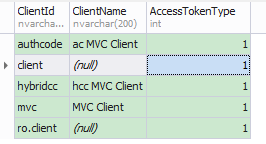
再次获取的access_token不包含Claim信息。
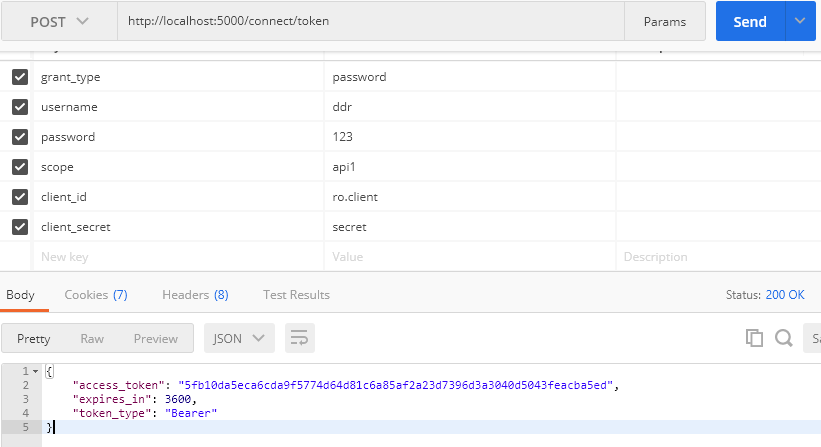
此时获取的access_token(加密后)对应PersistedGrants表中的key

调用Api资源服务过程解析
调用过程与上一篇调用Api资源服务过程解析一样。
IdentityServer4之Resource Owner Password Credentials(资源拥有者密码凭据许可)的更多相关文章
- IdentityServer4 之 Resource Owner Password Credentials 其实有点尴尬
前言 接着IdentityServer4的授权模式继续聊,这篇来说说 Resource Owner Password Credentials授权模式,这种模式在实际应用场景中使用的并不多,只怪其太开放 ...
- asp.net core IdentityServer4 实现 resource owner password credentials(密码凭证)
前言 OAuth 2.0默认四种授权模式(GrantType) 授权码模式(authorization_code) 简化模式(implicit) 密码模式(resource owner passwor ...
- OAuth2.0学习(1-6)授权方式3-密码模式(Resource Owner Password Credentials Grant)
授权方式3-密码模式(Resource Owner Password Credentials Grant) 密码模式(Resource Owner Password Credentials Grant ...
- 不要使用Resource Owner Password Credentials
不要使用Resource Owner Password Credentials 文章链接在这里 前言 最近公司项目在做一些重构,因为公司多个业务系统各自实现了一套登录逻辑,比较混乱.所以,现在需要做一 ...
- 基于OWIN WebAPI 使用OAuth授权服务【客户端验证授权(Resource Owner Password Credentials Grant)】
适用范围 前面介绍了Client Credentials Grant ,只适合客户端的模式来使用,不涉及用户相关.而Resource Owner Password Credentials Grant模 ...
- 使用Resource Owner Password Credentials Grant授权发放Token
对应的应用场景是:为自家的网站开发手机 App(非第三方 App),只需用户在 App 上登录,无需用户对 App 所能访问的数据进行授权. 客户端获取Token: public string Get ...
- 基于 IdentityServer3 实现 OAuth 2.0 授权服务【密码模式(Resource Owner Password Credentials)】
密码模式(Resource Owner Password Credentials Grant)中,用户向客户端提供自己的用户名和密码.客户端使用这些信息,向"服务商提供商"索要授权 ...
- IdentityServer4专题之六:Resource Owner Password Credentials
实现代码: (1)IdentityServer4授权服务器代码: public static class Config { public static IEnumerable<Identity ...
- ABP中使用OAuth2(Resource Owner Password Credentials Grant模式)
ABP目前的认证方式有两种,一种是基于Cookie的登录认证,一种是基于token的登录认证.使用Cookie的认证方式一般在PC端用得比较多,使用token的认证方式一般在移动端用得比较多.ABP自 ...
随机推荐
- Beginning Python Games Development
Like music and movies, video games are rapidly becoming an integral part of our lives. Over the year ...
- 我的BO之强类型
弱类型的缺点 有些程序员对类型比较随意,从前端传来的数据,不管应该是什么类型,都以String接收.然后在什么地方转成应该有的类型则要"看心情",在Controller, Serv ...
- html网页调用本地exe程序
1.使用记事本(或其他文本编辑器)创建一个protocal.reg文件,并写入以下内容 Windows Registry Editor Version 5.00 [HKEY_CLASSES_ROOT\ ...
- sql预编译&动态语句静态语句
https://www.cnblogs.com/micrari/p/7112781.html https://www.cnblogs.com/MarsDing/p/9871703.html https ...
- Burnside引理和Polya定理之间的联系
最近,研究了两天的Burnside引理和Polya定理之间的联系,百思不得其解,然后直到遇到下面的问题: 对颜色限制的染色 例:对正五边形的三个顶点着红色,对其余的两个顶点着蓝色,问有多少种非等价的着 ...
- linux中sogou输入法崩溃重启
经常在linux中搜狗输入法用着用着就崩溃了,无法输入中文,又不想重启电脑,照着下面在终端输入命令可以重启输入法: 1.先关闭fcitx(小企鹅输入法,提供了良好的中文输入法环境) # killall ...
- Gatsby上手指南 - 让你的静态网站用react来高逼格的写
注意:Gatsby V2版本安装及使用问题请移步<Gastby V2安装过程中常见问题>,此文较旧,主要针对V1版Gatsby而介绍 前言 一直以来都是用之前比较流行的静态网站生成器Hex ...
- git cannot lock ref
参考博客:https://blog.csdn.net/lindexi_gd/article/details/79213042 错误原文: cannot lock ref ‘refs/remotes/o ...
- 调用获取学生信息的接口,保存到excel里面
# 2.http: // doc.nnzhp.cn / index.php?s = / 6 & page_id = 14# 调用获取学生信息的接口,保存到excel里面 import requ ...
- ssh 连接失败 sz rz 安装
sz 下载命令, rz上传命令的安装 sudo apt-get install lrzsz 1. 检查sshd服务的状态以及端口是否正常, 如下为正常状态 sudo netstat -nlp | gr ...