
DiyCode开源项目 AboutActivity分析
1.首先看一下效果
这是手机上显示的效果:
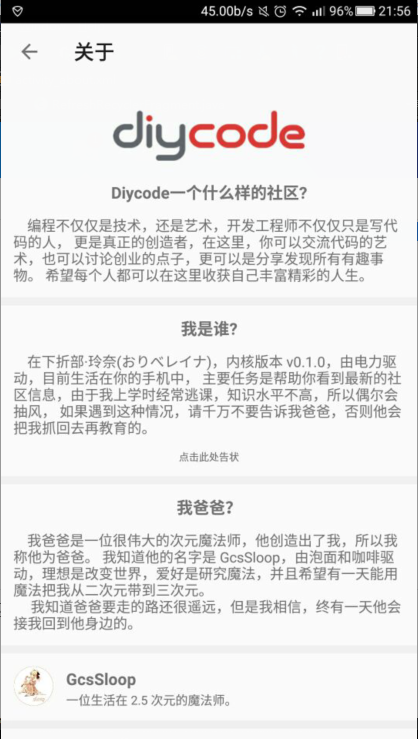
1.1首先是一个标题栏,左侧一个左箭头,然后一个图标。
1.2然后下方是一个可以滑动的页面。
1.3分成了7个部分。
1.4DiyCode的图标。
1.5然后是Diycode一个什么样的社区?
1.6我是谁?
1.7我爸爸?
1.8GcsSloop==>一个生活在2.5次元的魔法师。
1.9捐赠一杯咖啡。
1.10License
1.11--diycode--
2.分析一下布局文件
布局文件:activity_about.
<?xml version="1.0" encoding="utf-8"?>

<!--

  ~ Copyright 2017 GcsSloop

  ~

  ~ Licensed under the Apache License, Version 2.0 (the "License");

  ~ you may not use this file except in compliance with the License.

  ~ You may obtain a copy of the License at

  ~

  ~    http://www.apache.org/licenses/LICENSE-2.0

  ~

  ~ Unless required by applicable law or agreed to in writing, software

  ~ distributed under the License is distributed on an "AS IS" BASIS,

  ~ WITHOUT WARRANTIES OR CONDITIONS OF ANY KIND, either express or implied.

  ~ See the License for the specific language governing permissions and

  ~ limitations under the License.

  ~

  ~ Last modified 2017-03-25 02:42:10

  ~

  ~ GitHub:  https://github.com/GcsSloop

  ~ Website: http://www.gcssloop.com

  ~ Weibo:   http://weibo.com/GcsSloop

  -->

<RelativeLayout

    xmlns:android="http://schemas.android.com/apk/res/android"

    xmlns:tools="http://schemas.android.com/tools"

    android:id="@+id/activity_about"

    android:layout_width="match_parent"

    android:layout_height="match_parent"

    tools:context="com.gcssloop.diycode.activity.AboutActivity">

    <android.support.v7.widget.Toolbar

        android:id="@+id/toolbar"

        android:layout_width="match_parent"

        android:layout_height="wrap_content"/>

    <android.support.v4.widget.NestedScrollView

        android:layout_below="@id/toolbar"

        android:layout_width="match_parent"

        android:layout_height="match_parent">

        <LinearLayout

            android:layout_width="match_parent"

            android:layout_height="match_parent"

            android:orientation="vertical">

            <ImageView

                android:layout_width="match_parent"

                android:layout_height="50dp"

                android:layout_marginTop="30dp"

                android:src="@drawable/ic_logo"/>

            <TextView

                android:layout_width="match_parent"

                android:layout_height="wrap_content"

                android:layout_marginTop="20dp"

                android:gravity="center"

                android:text="@string/about_diycode_title"

                android:textSize="16sp"

                android:textStyle="bold"/>

            <TextView

                android:id="@+id/textView2"

                android:layout_width="match_parent"

                android:layout_height="wrap_content"

                android:padding="12dp"

                android:text="@string/about_diycode_desc"

                android:textSize="14sp"/>

            <View

                android:layout_width="match_parent"

                android:layout_height="8dp"

                android:layout_marginBottom="10dp"

                android:background="@color/diy_white_bg"/>

            <TextView

                android:layout_width="match_parent"

                android:layout_height="wrap_content"

                android:layout_marginTop="2dp"

                android:gravity="center"

                android:text="@string/about_me_title"

                android:textSize="16sp"

                android:textStyle="bold"/>

            <RelativeLayout

                android:layout_width="match_parent"

                android:layout_height="wrap_content">

                <TextView

                    android:id="@+id/my_desc"

                    android:layout_width="match_parent"

                    android:layout_height="wrap_content"

                    android:paddingLeft="12dp"

                    android:paddingRight="12dp"

                    android:paddingTop="12dp"

                    android:text="@string/about_me_desc"

                    android:textSize="14sp"/>

                <TextView

                    android:id="@+id/feed_back"

                    android:layout_width="match_parent"

                    android:layout_height="wrap_content"

                    android:layout_below="@id/my_desc"

                    android:gravity="center"

                    android:paddingBottom="12dp"

                    android:paddingTop="12dp"

                    android:text="点击此处告状"

                    android:textSize="10sp"/>

            </RelativeLayout>

            <View

                android:layout_width="match_parent"

                android:layout_height="8dp"

                android:layout_marginBottom="10dp"

                android:background="@color/diy_white_bg"/>

            <TextView

                android:layout_width="match_parent"

                android:layout_height="wrap_content"

                android:layout_marginTop="2dp"

                android:gravity="center"

                android:text="@string/about_father"

                android:textSize="16sp"

                android:textStyle="bold"/>

            <TextView

                android:layout_width="match_parent"

                android:layout_height="wrap_content"

                android:paddingLeft="12dp"

                android:paddingRight="12dp"

                android:paddingTop="12dp"

                android:text="@string/about_father_desc"

                android:textSize="14sp"/>

            <View

                android:layout_width="match_parent"

                android:layout_height="8dp"

                android:layout_marginTop="12dp"

                android:background="@color/diy_white_bg"/>

            <RelativeLayout

                android:id="@+id/github"

                android:layout_width="match_parent"

                android:layout_height="wrap_content"

                android:padding="12dp">

                <ImageView

                    android:id="@+id/image"

                    android:layout_width="40dp"

                    android:layout_height="40dp"

                    android:layout_marginRight="12dp"

                    android:src="@drawable/about_sloop"/>

                <TextView

                    android:id="@+id/name"

                    android:layout_width="wrap_content"

                    android:layout_height="wrap_content"

                    android:layout_marginTop="2dp"

                    android:layout_toRightOf="@+id/image"

                    android:gravity="center"

                    android:text="GcsSloop"

                    android:textSize="16sp"

                    android:textStyle="bold"/>

                <TextView

                    android:id="@+id/desc"

                    android:layout_width="wrap_content"

                    android:layout_height="wrap_content"

                    android:layout_below="@+id/name"

                    android:layout_marginTop="2dp"

                    android:layout_toRightOf="@+id/image"

                    android:gravity="center"

                    android:text="一位生活在 2.5 次元的魔法师。"

                    android:textSize="12sp"

                    />

            </RelativeLayout>

            <View

                android:layout_width="match_parent"

                android:layout_height="8dp"

                android:background="@color/diy_white_bg"/>

            <TextView

                android:id="@+id/contribute"

                android:layout_width="match_parent"

                android:layout_height="wrap_content"

                android:layout_marginTop="2dp"

                android:gravity="center"

                android:padding="12dp"

                android:text="¥ 捐赠一杯咖啡"

                android:textColor="#4AC432"

                android:textSize="16sp"/>

            <View

                android:layout_width="match_parent"

                android:layout_height="8dp"

                android:background="@color/diy_white_bg"/>

            <TextView

                android:layout_width="match_parent"

                android:layout_height="wrap_content"

                android:layout_marginTop="12dp"

                android:gravity="center"

                android:text="License"

                android:textSize="16sp"

                android:textStyle="bold"/>

            <TextView

                android:layout_width="match_parent"

                android:layout_height="wrap_content"

                android:padding="12dp"

                android:text="@string/about_license_desc"

                android:textSize="14sp"/>

            <TextView

                android:layout_width="match_parent"

                android:layout_height="wrap_content"

                android:background="@color/diy_white_bg"

                android:gravity="center_horizontal"

                android:paddingBottom="16dp"

                android:paddingTop="12dp"

                android:text="-- diycode --"/>

        </LinearLayout>

    </android.support.v4.widget.NestedScrollView>

</RelativeLayout>
外层:RelativeLayout
然后是一个Toolbar和一个NestedScrollView并列。
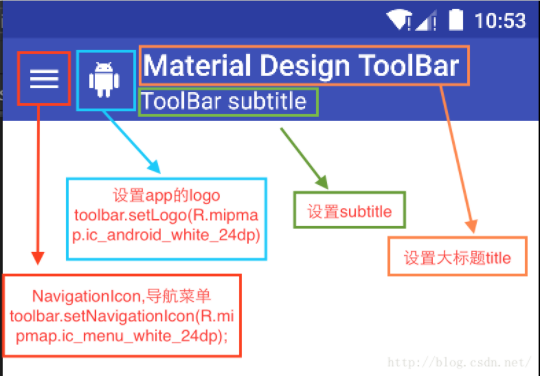
2.1.android.support.v7.widget.Toolbar
2.2.android.support.v4.widget.NestedScrollView
不懂NestedScrollView,可以参考一下这篇文章。
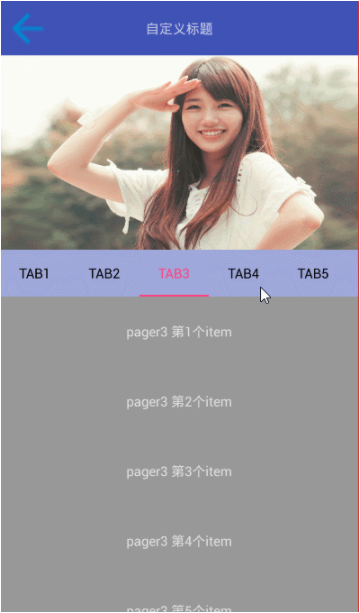
浅黑色==>TabLayout
深黑色==>NestedScrollView
3.实现抽象方法
3.1实现一个protected int getLayoutId()

可以知道,这个关于的活动的布局名为:activity_about.
它有一个toolbar。然后就是一些文字东西了。
在BaseActivity中已经有关初始化ActivoinBar的东西了,因为只有一个返回的左箭头,所以就不需要其他东西了。
3.2实现一个initViews()
直接调用了一个函数 setTitle("关于")==>在Activity中可以直接这样调用。
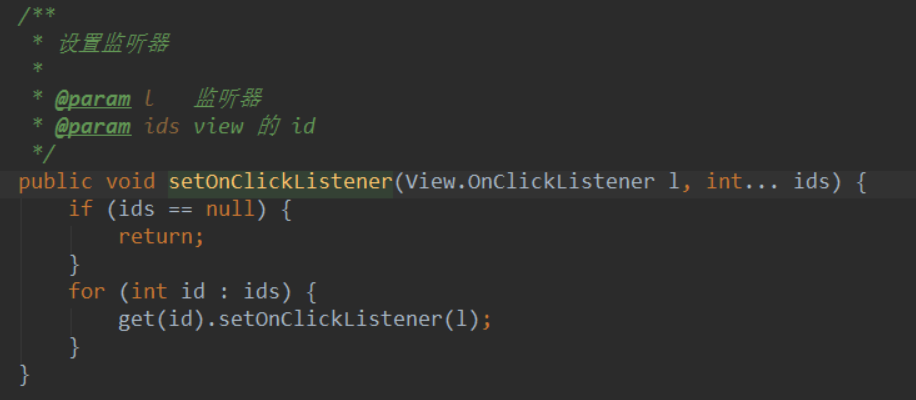
如果想要为多个控件添加点击事件,可以参考一下源代码。
第一张图是ViewHolder中的方法,第二张图是AboutActivity中实现BaseActivity中的抽象方法。

4.实现点击事件
4.1添加了添加事件后是不够的,还要做什么?
所以这里实现了一个View.OnClickListener接口。所以这个AboutActivity被赋予了一个可以点击的功能。
4.2复写一个onClick函数,就是implements View.OnClickListener后必须要实现的方法。
因为给3个资源id都赋予了可以被点击的权限,所以这3个资源id都要相应点击后的事件,这里采用了
switch(v.getId())...case...case...case...
截图如下:
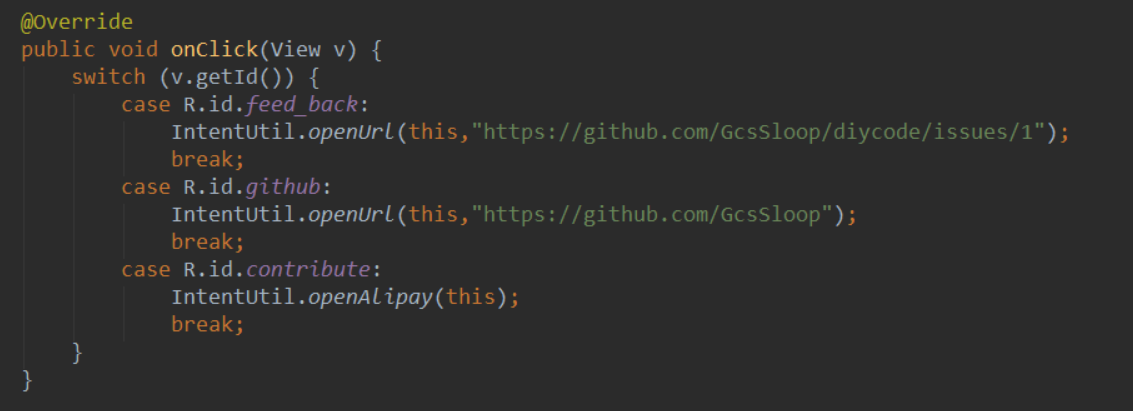
意思就是打开一个网页,前两个控件的点击事件都是打开一个网页(用默认的浏览器)
后者的点击事件是转账,跳转到支付宝的转账的页面,而且已经确定好转账人。
5.看一下这个通用类IntentUtil
5.1==>上面点击事件用到了一个通用类IntentUtil,首先看看源代码。
/*

 * Copyright 2017 GcsSloop

 *

 * Licensed under the Apache License, Version 2.0 (the "License");

 * you may not use this file except in compliance with the License.

 * You may obtain a copy of the License at

 *

 *    http://www.apache.org/licenses/LICENSE-2.0

 *

 * Unless required by applicable law or agreed to in writing, software

 * distributed under the License is distributed on an "AS IS" BASIS,

 * WITHOUT WARRANTIES OR CONDITIONS OF ANY KIND, either express or implied.

 * See the License for the specific language governing permissions and

 * limitations under the License.

 *

 * Last modified 2017-03-28 04:45:19

 *

 * GitHub:  https://github.com/GcsSloop

 * Website: http://www.gcssloop.com

 * Weibo:   http://weibo.com/GcsSloop

 */

package com.gcssloop.diycode.utils;

import android.content.Context;

import android.content.Intent;

import android.net.Uri;

import android.util.Log;

import android.widget.Toast;

import com.gcssloop.diycode.utils.customtabs.CustomTabsHelper;

public class IntentUtil {

    /**

     * 打开链接

     * 根据设置判断是用那种方式打开

     *

     * @param context 上下文

     * @param url     url

     */

    public static void openUrl(Context context, String url) {

        // TODO Chrome Custom Tabs

        if (null == url || url.isEmpty()) {

            Log.i("Diyocde", "Url地址错误");

            return;

        }

        CustomTabsHelper.openUrl(context, url);

    }

    /**

     * 打开支付宝

     */

    public static void openAlipay(Context context) {

        if (AppUtil.isAvailable(context, "com.eg.android.AlipayGphone")) {

            Intent intent = new Intent(Intent.ACTION_VIEW);

            String QRCode = "HTTPS://QR.ALIPAY.COM/FKX07101FYSJGTNCAPQW39";

            intent.setData(Uri.parse("alipayqr://platformapi/startapp?saId=10000007&qrcode=" + QRCode));

            context.startActivity(intent);

        } else {

            Toast.makeText(context, "你没有捐赠的权限", Toast.LENGTH_SHORT).show();

        }

    }

}
5.2==>第一个函数打开链接
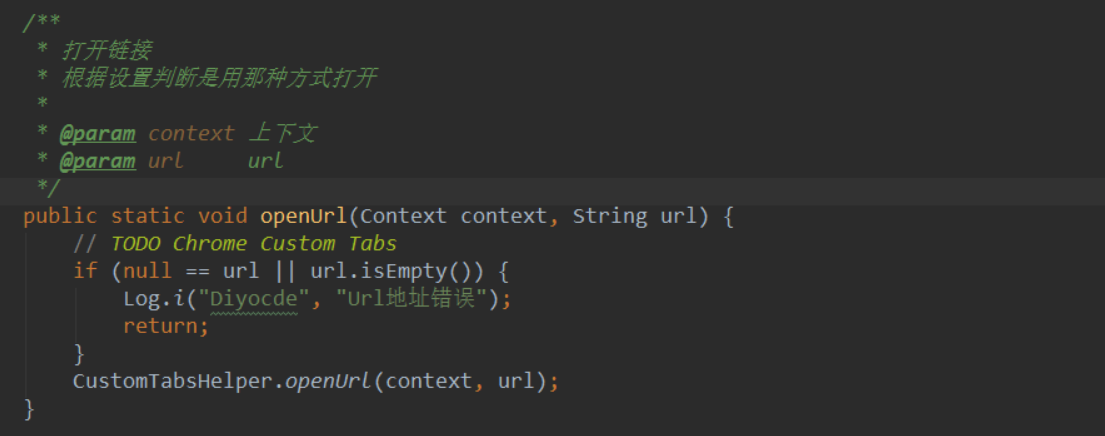
5.3==>分析一下CustomTabsHelper类
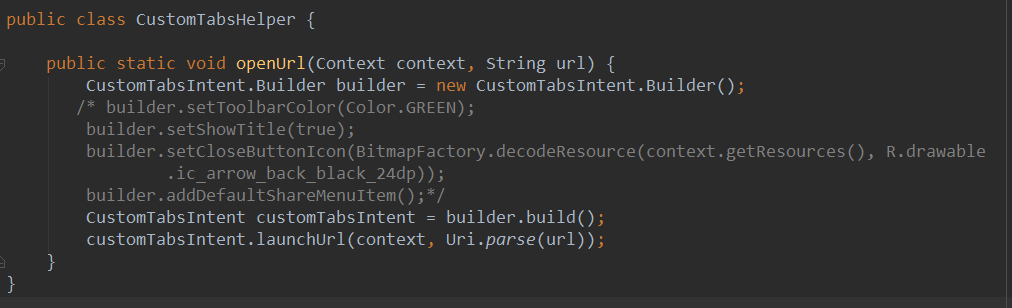
这个类就一个函数,而且作用简单,就是打开一个网页,也不用做什么判断。
我注释了一些东西,效果一样,对于我这台手机没有什么特殊的效果。
有用的东西就是这三行吧!
注意这个:CustomTabsIntent就是系统的一个类。
5.4==>分析第二个函数==>打开支付宝并转账
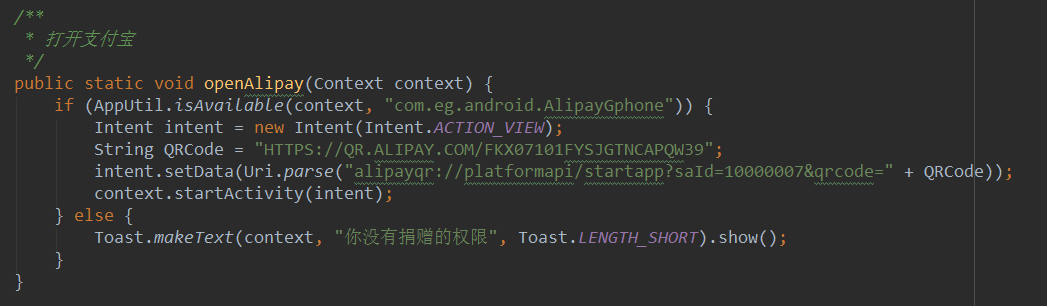
5.4.1.先搞一个支付宝账户的收钱的二维码
5.4.2.在网站上进入:二维码扫描器
5.4.3.得到一个支付宝收钱的QRCode==>HTTPS://QR.ALIPAY.COM/FKX02087VITTLOP18Z8F9D
5.4.4.然后就可以进行intent跳转了。这里采用的是intent.setData(Uri.parse(...));
5.4.5.注意了,这里Uri必须是这个了,才能打开支付宝,把QRCode换成自己的就可以了。
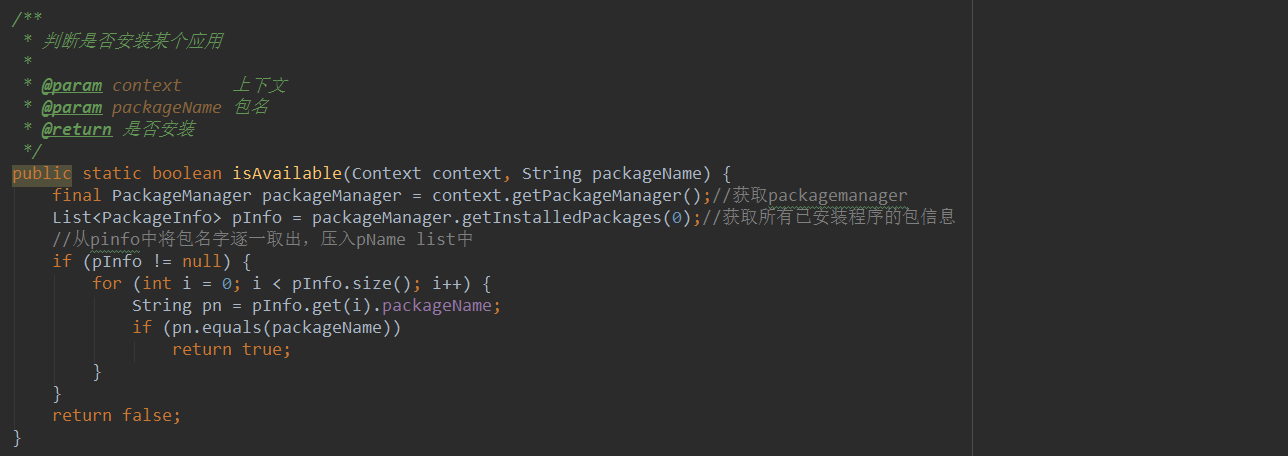
5.4.6.注意了,实现要判断手机有没有安装支付宝,支付宝的包名是:com.eg.android.AlipayGphone
6.总结一下
6.1.可以说,AboutActivity是这个项目最简单的一个活动了。其实懂了就应该从简单的开始,这样才能更好地由浅入深
不然直接入木三分后出不来了。
6.2.知道了为什么会在BaseActivity中定义两个抽象函数。getLayoutId就是获得一个整体的布局文件,包括toolbar,
我曾经以为toolbar仅仅在BaseActivity中定义就好了,其他活动继承后就不管了,其实不是这样的,它可以在
BaseActivity中直接添加点击事件,反正名字对应上就好。所以在AboutActivity中,根本看不到back的点击事件。
6.3.在AboutActivity中必须要实现两个抽象函数,其中有一个是initViews,作用很明显,首先是设置标题“关于”,
现在知道了要在这里设置了,而且有一个给多个资源id添加监听事件学到了,采用int...这里可以无限个参数。
6.4.然后就是知道了它是如何调转到一个网页的。采用了一个通用类,因为很多情况下都要跳转到一个网页嘛,所以这里
直接就封装起来了。首先判断url是否为null或者为空,然后利用CustomTabsIntent.Builder,来lauchUrl网址即可。
6.5.最后知道了如何打开支付宝,并给某人转账。首先要得到一个二维码,然后解析,生成一个URL,这里称之为QRCode,
然后intent.setData(Url.parse(...))这个网址就可以了。学到了判断是否安装某个应用。详情参考一下上文即可。
DiyCode开源项目 AboutActivity分析的更多相关文章
- Diycode开源项目 BaseApplication分析+LeakCanary第三方+CrashHandler自定义异常处理
1.BaseApplication整个应用的开始 1.1.看一下代码 /* * Copyright 2017 GcsSloop * * Licensed under the Apache Licens ...
- DiyCode开源项目 BaseActivity 分析
1.首先将这个项目的BaseActivity源码拷贝过来. /* * Copyright 2017 GcsSloop * * Licensed under the Apache License, Ve ...
- Diycode开源项目 MainActivity分析
1.分析MainActivity整体结构 1.1.首先看一下这个界面的整体效果. 1.2.活动源代码如下 /* * Copyright 2017 GcsSloop * * Licensed under ...
- Diycode开源项目 ImageActivity分析
1.首先看一下效果 1.1做成了一个GIF 1.2.我用格式工厂有点问题,大小无法调到手机这样的大小,目前还没有解决方案. 1.3.网上有免费的MP4->GIF,参考一下这个网站吧. 1.4.讲 ...
- Diycode开源项目 UserActivity分析
1.效果预览 1.1.实际界面预览 1.2. 这是MainActivity中的代码 这里执行了跳转到自己的用户界面的功能. 1.3.点击头像或者用户名跳转到别人的页面 UserActivity的结构由 ...
- Diycode开源项目 TopicContentActivity分析
1.效果预览以及布局分析 1.1.实际效果预览 左侧话题列表的布局是通过TopicProvider来实现的,所以当初分析话题列表就没有看到布局. 这里的话题内容不是一个ListView,故要自己布局. ...
- Diycode开源项目 LoginActivity分析
1.首先看一下效果 1.1.预览一下真实页面 1.2.分析一下: 要求输入Email或者用户名,点击编辑框,弹出键盘,默认先进入输入Email或用户名编辑框. 点击密码后,密码字样网上浮动一段距离,E ...
- DiyCode开源项目 TopicActivity 分析
1.首先看看TopActivity效果. 2.TopicActivity是一个继承BaseActivity的.前面分析过BaseActivity了.主要有一个标题栏,有返回的图标. 3.贴一下T ...
- Diycode开源项目 SitesListFragment分析
1.效果预览 1.1.网站列表实际界面 1.2.注意这个界面没有继承SimpleRefreshRecycleFragment 前面的话题和新闻继承了SimpleRefreshRecyclerFragm ...
随机推荐
- WPF OnApplyTemplate 不执行 或者执行滞后的疑惑
OnApplyTemplate 不执行 平时如何开发自定义控件的 在WPF自定义控件开发的过程中遇到了这样一个问题,属性更改事件在OnApplyTemplate之前执行.我在写自定义控件的时候,喜欢通 ...
- uLua学习之调用Lua函数(五)
前言 在我开始这个系列的第一篇文章中,我就提到了Lua脚本用来实现宿主脚本的配置性和扩展性.上节说到的调用外部Lua脚本就对应了它的两大特性之一的配置性,那么另一大特性如何来体现呢?这就要说我们今天的 ...
- java核心技术 要点笔记3
1.类,超类和子类 2.Object:所有类的超类 3.泛型数组列表 4.对象包装器和自动装箱 5.参数数量可变的方法 6.枚举类 7.反射 8.继承设计的技巧
- 往ABAP gateway system上和Cloud Foundry上部署HTML5应用
ABAP Gateway system 在我的公众号文章里有详细介绍:SAP Fiori应用的三种部署方式 用WebIDE部署 用Eclipse Team provider部署 执行report /U ...
- IOS UIView动画(封装动画)
● UIKit直接将动画集成到UIView类中,当内部的一些属性发生改变时,UIView 将为这些改变提供动画支持 ● 执行动画所需要的工作由UIView类自动完成,但仍要在希望执行动画时通知视 图, ...
- 利用Python实现 队列的算法
以下内容都是来自“悟空“大神的讲解,听他的视频课,利用Python实现堆栈的算法,自己做了一些小总结,可能会存在自己理解的一些误区, 1.栈的实现 队列的特征是先进先出,同我们生活中的队列具有相同的特 ...
- 【洛谷2257】YY的GCD(莫比乌斯反演)
点此看题面 大致题意: 求\(\sum_{x=1}^N\sum_{y=1}^MIsPrime(gcd(x,y))\). 莫比乌斯反演 听说此题是莫比乌斯反演入门题? 一些定义 首先,我们可以定义\(f ...
- java基础——类加载与反射
第1章 类加载器 1.1 类的加载 当程序要使用某个类时,如果该类还未被加载到内存中,则系统会通过加载,连接,初始化三步来实现对这个类进行初始化. (1)加载 就是指将class文件读入内存,并为之创 ...
- 循环 -----JavaScript
本文摘要:http://www.liaoxuefeng.com/ JavaScript的循环有两种,一种是for循环,通过初始条件.结束条件和递增条件来循环执行语句块: var x = 0; var ...
- Jquery LigerUI
http://www.ligerui.com/index.aspx http://api.ligerui.com/ 分享一个基于ligerui的系统应用案例ligerRM V2(权限管理系统)(提供下 ...