
activiti部署流程定义时出错:INSERT INTO ACT_GE_BYTEARRAY,修改数据库编码
activiti部署流程定义时出错
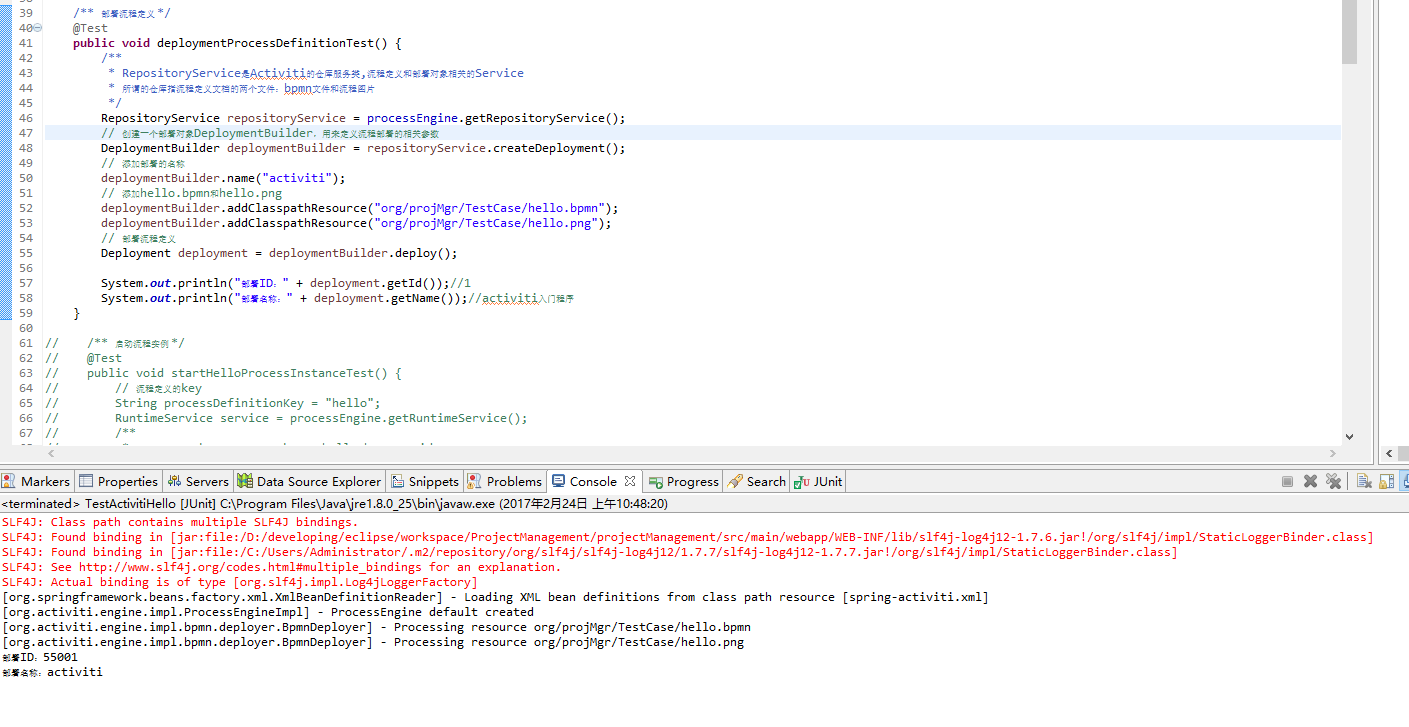
// 部署流程定义 Deployment deployment = deploymentBuilder.deploy();
错误信息:(有乱码的...没留下截图...)
 SLF4J: Class path contains multiple SLF4J bindings.

 SLF4J: Found binding in [jar:file:/D:/developing/eclipse/workspace/ProjectManagement/projectManagement/src/main/webapp/WEB-INF/lib/slf4j-log4j12-1.7.6.jar!/org/slf4j/impl/StaticLoggerBinder.class]

 SLF4J: Found binding in [jar:file:/C:/Users/Administrator/.m2/repository/org/slf4j/slf4j-log4j12/1.7.7/slf4j-log4j12-1.7.7.jar!/org/slf4j/impl/StaticLoggerBinder.class]

 SLF4J: See http://www.slf4j.org/codes.html#multiple_bindings for an explanation.

 SLF4J: Actual binding is of type [org.slf4j.impl.Log4jLoggerFactory]

 [org.springframework.beans.factory.xml.XmlBeanDefinitionReader] - Loading XML bean definitions from class path resource [spring-activiti.xml]

 [org.springframework.context.support.GenericApplicationContext] - Refreshing org.springframework.context.support.GenericApplicationContext@6b09bb57: startup date [Thu Feb 23 13:33:02 CST 2017]; root of context hierarchy

 [org.springframework.beans.factory.annotation.AutowiredAnnotationBeanPostProcessor] - JSR-330 'javax.inject.Inject' annotation found and supported for autowiring

 [org.activiti.engine.impl.ProcessEngineImpl] - ProcessEngine default created

 [org.springframework.test.context.transaction.TransactionalTestExecutionListener] - Began transaction (1) for test context [DefaultTestContext@192d74fb testClass = BpmDefinitionTest, testInstance = org.projMgr.TestCase.BpmDefinitionTest@4bef0fe3, testMethod = deploymentProcessDefinition@BpmDefinitionTest, testException = [null], mergedContextConfiguration = [MergedContextConfiguration@62ea3440 testClass = BpmDefinitionTest, locations = '{classpath:spring-activiti.xml}', classes = '{}', contextInitializerClasses = '[]', activeProfiles = '{}', contextLoader = 'org.springframework.test.context.support.DelegatingSmartContextLoader', parent = [null]]]; transaction manager [org.springframework.jdbc.datasource.DataSourceTransactionManager@27953a83]; rollback [false]

 [org.springframework.beans.factory.xml.XmlBeanDefinitionReader] - Loading XML bean definitions from class path resource [spring-activiti.xml]

 [org.activiti.engine.impl.ProcessEngineImpl] - ProcessEngine default created

 [org.activiti.engine.impl.bpmn.deployer.BpmnDeployer] - Processing resource org/projMgr/TestCase/MyProcess.png

 [org.activiti.engine.impl.bpmn.deployer.BpmnDeployer] - Processing resource org/projMgr/TestCase/MyProcess.bpmn

 [org.activiti.engine.impl.interceptor.CommandContext] - Error while closing command context

 org.apache.ibatis.exceptions.PersistenceException:

 ### Error updating database.  Cause: java.sql.SQLException: Column count doesn't match value count at row 1

 ### The error may involve org.activiti.engine.impl.persistence.entity.ResourceEntity.bulkInsertResource-Inline

 ### The error occurred while setting parameters

 ### SQL: INSERT INTO ACT_GE_BYTEARRAY(ID_, REV_, NAME_, BYTES_, DEPLOYMENT_ID_, GENERATED_) VALUES                    (?,          1,          ?,          ?,          ?,          ?)        ,           (?,          1,          ?,          ?,          ?,          ?)

 ### Cause: java.sql.SQLException: Column count doesn't match value count at row 1

     at org.apache.ibatis.exceptions.ExceptionFactory.wrapException(ExceptionFactory.java:30)

     at org.apache.ibatis.session.defaults.DefaultSqlSession.update(DefaultSqlSession.java:172)

     at org.apache.ibatis.session.defaults.DefaultSqlSession.insert(DefaultSqlSession.java:157)

     at org.activiti.engine.impl.db.DbSqlSession.flushBulkInsert(DbSqlSession.java:847)

     at org.activiti.engine.impl.db.DbSqlSession.flushPersistentObjects(DbSqlSession.java:817)

     at org.activiti.engine.impl.db.DbSqlSession.flushInserts(DbSqlSession.java:794)

     at org.activiti.engine.impl.db.DbSqlSession.flush(DbSqlSession.java:615)

     at org.activiti.engine.impl.interceptor.CommandContext.flushSessions(CommandContext.java:212)

     at org.activiti.engine.impl.interceptor.CommandContext.close(CommandContext.java:138)

     at org.activiti.engine.impl.interceptor.CommandContextInterceptor.execute(CommandContextInterceptor.java:66)

     at org.activiti.engine.impl.interceptor.LogInterceptor.execute(LogInterceptor.java:31)

     at org.activiti.engine.impl.cfg.CommandExecutorImpl.execute(CommandExecutorImpl.java:40)

     at org.activiti.engine.impl.cfg.CommandExecutorImpl.execute(CommandExecutorImpl.java:35)

     at org.activiti.engine.impl.RepositoryServiceImpl.deploy(RepositoryServiceImpl.java:79)

     at org.activiti.engine.impl.repository.DeploymentBuilderImpl.deploy(DeploymentBuilderImpl.java:156)

     at org.projMgr.TestCase.BpmDefinitionTest.deploymentProcessDefinition(BpmDefinitionTest.java:35)

     at sun.reflect.NativeMethodAccessorImpl.invoke0(Native Method)

     at sun.reflect.NativeMethodAccessorImpl.invoke(Unknown Source)

     at sun.reflect.DelegatingMethodAccessorImpl.invoke(Unknown Source)

     at java.lang.reflect.Method.invoke(Unknown Source)

     at org.junit.runners.model.FrameworkMethod$1.runReflectiveCall(FrameworkMethod.java:47)

     at org.junit.internal.runners.model.ReflectiveCallable.run(ReflectiveCallable.java:12)

     at org.junit.runners.model.FrameworkMethod.invokeExplosively(FrameworkMethod.java:44)

     at org.junit.internal.runners.statements.InvokeMethod.evaluate(InvokeMethod.java:17)

     at org.springframework.test.context.junit4.statements.RunBeforeTestMethodCallbacks.evaluate(RunBeforeTestMethodCallbacks.java:74)

     at org.springframework.test.context.junit4.statements.RunAfterTestMethodCallbacks.evaluate(RunAfterTestMethodCallbacks.java:83)

     at org.springframework.test.context.junit4.statements.SpringRepeat.evaluate(SpringRepeat.java:72)

     at org.springframework.test.context.junit4.SpringJUnit4ClassRunner.runChild(SpringJUnit4ClassRunner.java:232)

     at org.springframework.test.context.junit4.SpringJUnit4ClassRunner.runChild(SpringJUnit4ClassRunner.java:89)

     at org.junit.runners.ParentRunner$3.run(ParentRunner.java:238)

     at org.junit.runners.ParentRunner$1.schedule(ParentRunner.java:63)

     at org.junit.runners.ParentRunner.runChildren(ParentRunner.java:236)

     at org.junit.runners.ParentRunner.access$000(ParentRunner.java:53)

     at org.junit.runners.ParentRunner$2.evaluate(ParentRunner.java:229)

     at org.springframework.test.context.junit4.statements.RunBeforeTestClassCallbacks.evaluate(RunBeforeTestClassCallbacks.java:61)

     at org.springframework.test.context.junit4.statements.RunAfterTestClassCallbacks.evaluate(RunAfterTestClassCallbacks.java:71)

     at org.junit.runners.ParentRunner.run(ParentRunner.java:309)

     at org.springframework.test.context.junit4.SpringJUnit4ClassRunner.run(SpringJUnit4ClassRunner.java:175)

     at org.eclipse.jdt.internal.junit4.runner.JUnit4TestReference.run(JUnit4TestReference.java:50)

     at org.eclipse.jdt.internal.junit.runner.TestExecution.run(TestExecution.java:38)

     at org.eclipse.jdt.internal.junit.runner.RemoteTestRunner.runTests(RemoteTestRunner.java:459)

     at org.eclipse.jdt.internal.junit.runner.RemoteTestRunner.runTests(RemoteTestRunner.java:675)

     at org.eclipse.jdt.internal.junit.runner.RemoteTestRunner.run(RemoteTestRunner.java:382)

     at org.eclipse.jdt.internal.junit.runner.RemoteTestRunner.main(RemoteTestRunner.java:192)

 Caused by: java.sql.SQLException: Column count doesn't match value count at row 1

     at com.mysql.jdbc.SQLError.createSQLException(SQLError.java:1084)

     at com.mysql.jdbc.MysqlIO.checkErrorPacket(MysqlIO.java:4232)

     at com.mysql.jdbc.MysqlIO.checkErrorPacket(MysqlIO.java:4164)

     at com.mysql.jdbc.MysqlIO.sendCommand(MysqlIO.java:2615)

     at com.mysql.jdbc.MysqlIO.sqlQueryDirect(MysqlIO.java:2776)

     at com.mysql.jdbc.ConnectionImpl.execSQL(ConnectionImpl.java:2838)

     at com.mysql.jdbc.PreparedStatement.executeInternal(PreparedStatement.java:2082)

     at com.mysql.jdbc.PreparedStatement.execute(PreparedStatement.java:1307)

     at org.apache.commons.dbcp.DelegatingPreparedStatement.execute(DelegatingPreparedStatement.java:172)

     at org.apache.commons.dbcp.DelegatingPreparedStatement.execute(DelegatingPreparedStatement.java:172)

     at org.apache.ibatis.executor.statement.PreparedStatementHandler.update(PreparedStatementHandler.java:45)

     at org.apache.ibatis.executor.statement.RoutingStatementHandler.update(RoutingStatementHandler.java:73)

     at org.apache.ibatis.executor.SimpleExecutor.doUpdate(SimpleExecutor.java:49)

     at org.apache.ibatis.executor.BaseExecutor.update(BaseExecutor.java:115)

     at org.apache.ibatis.executor.CachingExecutor.update(CachingExecutor.java:75)

     at org.apache.ibatis.session.defaults.DefaultSqlSession.update(DefaultSqlSession.java:170)

     ... 42 more

 [org.springframework.test.context.transaction.TransactionalTestExecutionListener] - Committed transaction after test execution for test context [DefaultTestContext@192d74fb testClass = BpmDefinitionTest, testInstance = org.projMgr.TestCase.BpmDefinitionTest@4bef0fe3, testMethod = deploymentProcessDefinition@BpmDefinitionTest, testException = org.apache.ibatis.exceptions.PersistenceException:

 ### Error updating database.  Cause: java.sql.SQLException: Column count doesn't match value count at row 1

 ### The error may involve org.activiti.engine.impl.persistence.entity.ResourceEntity.bulkInsertResource-Inline

 ### The error occurred while setting parameters

 ### SQL: INSERT INTO ACT_GE_BYTEARRAY(ID_, REV_, NAME_, BYTES_, DEPLOYMENT_ID_, GENERATED_) VALUES                    (?,          1,          ?,          ?,          ?,          ?)        ,           (?,          1,          ?,          ?,          ?,          ?)

 ### Cause: java.sql.SQLException: Column count doesn't match value count at row 1, mergedContextConfiguration = [MergedContextConfiguration@62ea3440 testClass = BpmDefinitionTest, locations = '{classpath:spring-activiti.xml}', classes = '{}', contextInitializerClasses = '[]', activeProfiles = '{}', contextLoader = 'org.springframework.test.context.support.DelegatingSmartContextLoader', parent = [null]]]

 [org.springframework.test.context.transaction.TransactionalTestExecutionListener] - Began transaction (2) for test context [DefaultTestContext@192d74fb testClass = BpmDefinitionTest, testInstance = org.projMgr.TestCase.BpmDefinitionTest@733c423e, testMethod = test@BaseTestCase, testException = [null], mergedContextConfiguration = [MergedContextConfiguration@62ea3440 testClass = BpmDefinitionTest, locations = '{classpath:spring-activiti.xml}', classes = '{}', contextInitializerClasses = '[]', activeProfiles = '{}', contextLoader = 'org.springframework.test.context.support.DelegatingSmartContextLoader', parent = [null]]]; transaction manager [org.springframework.jdbc.datasource.DataSourceTransactionManager@27953a83]; rollback [false]

 通导test

 [org.springframework.test.context.transaction.TransactionalTestExecutionListener] - Committed transaction after test execution for test context [DefaultTestContext@192d74fb testClass = BpmDefinitionTest, testInstance = org.projMgr.TestCase.BpmDefinitionTest@733c423e, testMethod = test@BaseTestCase, testException = [null], mergedContextConfiguration = [MergedContextConfiguration@62ea3440 testClass = BpmDefinitionTest, locations = '{classpath:spring-activiti.xml}', classes = '{}', contextInitializerClasses = '[]', activeProfiles = '{}', contextLoader = 'org.springframework.test.context.support.DelegatingSmartContextLoader', parent = [null]]]

 [org.springframework.context.support.GenericApplicationContext] - Closing org.springframework.context.support.GenericApplicationContext@6b09bb57: startup date [Thu Feb 23 13:33:02 CST 2017]; root of context hierarchy
主要是
### SQL: INSERT INTO ACT_GE_BYTEARRAY(ID_, REV_, NAME_, BYTES_, DEPLOYMENT_ID_, GENERATED_) VALUES (?, 1, ?, ?, ?, ?) , (?, 1, ?, ?, ?, ?)

### Cause: java.sql.SQLException: Column count doesn't match value count at row 1
网上查询后,认为是数据库编码的问题。
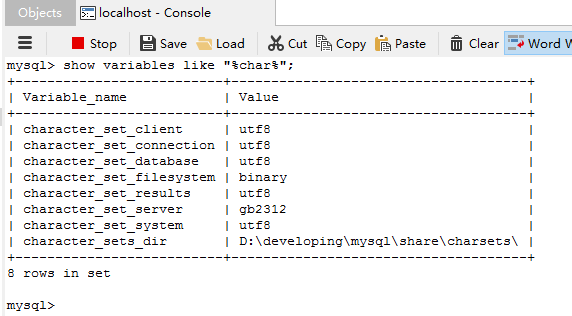
查询后发现character_set_server编码是GBK,修改为gb2312后解决问题
查看、修改数据库(MySQL)编码参考:
http://www.2cto.com/database/201310/248493.html
MySQL数据库出现中文乱码的原因,往往是以下以下客户端、服务器、结果集、数据库的字符集不统一造成的,可以通过:
show variables like "%char%";
语句查询自己数据库当前字符集的配置。
对于数据库字符集,可以通过这个命令更改:
ALTER DATABASE `db_name` CHARACTER SET utf8;
其他的也可以通过这条语句修改:
set character_set_client='utf8';
但是,character_set_server如果默认为latin1,要永久更改,用set命令是行不通的,而更改my.ini文件,也没有效果。
正解是:
在MySQL的安装文件中进入bin目录下,双击MySQLInstanceConfig.exe,重新走一遍server的配置,但需要注意的是,在Character Set环节,要选择第三项,character选择gb2312,(第一项是默认server字符集为latin1)。
修改后查询编码:
activiti流程部署启动:
activiti部署流程定义时出错:INSERT INTO ACT_GE_BYTEARRAY,修改数据库编码的更多相关文章
- Activiti 部署流程定义及相关的表(classpath部署、zip部署)
package com.mycom.processDefinition; import org.activiti.engine.ProcessEngine; import org.activiti.e ...
- activiti自定义流程之整合(四):整合自定义表单部署流程定义
综合前几篇博文内容,我想在整合这一部分中应该会有很多模块会跳过不讲,就如自定义表单的表单列表那一块,因为这些模块在整合的过程中都几乎没有什么改动,再多讲也是重复无用功. 正因为如此,在创建了流程模型之 ...
- activiti自定义流程之Spring整合activiti-modeler5.16实例(四):部署流程定义
注:(1)环境搭建:activiti自定义流程之Spring整合activiti-modeler5.16实例(一):环境搭建 (2)创建流程模型:activiti自定义流程之Spring ...
- activiti自己定义流程之整合(四):整合自己定义表单部署流程定义
综合前几篇博文内容.我想在整合这一部分中应该会有非常多模块会跳过不讲,就如自己定义表单的表单列表那一块,由于这些模块在整合的过程中都差点儿没有什么修改,再多讲也是反复无用功. 正由于如此,在创建了流程 ...
- activiti自己定义流程之Spring整合activiti-modeler5.16实例(四):部署流程定义
注:(1)环境搭建:activiti自己定义流程之Spring整合activiti-modeler5.16实例(一):环境搭建 (2)创建流程模型:activiti自己定义流程之Spr ...
- activiti基础--1------------------------生成.bpmn和.png以及部署流程定义
helloworld.dbmn <?xml version="1.0" encoding="UTF-8"?> <definitions xml ...
- (四)Activiti之流程定义部署之ZIP方式和流程定义查询
一.流程定义部署之ZIP方式 上一章节我们使用classpath的方式加载流程定义文件,这里我们使用ZIP的方式. 1.1 用activiti插件生成bpmn和png图片之后,压缩到一个zip格式的压 ...
- 深入了解Activiti工作流流程定义
深入了解Activiti工作流流程定义 2016-03-27| 发布: | 浏览: 2363 |保存PDF 部署流程定义 部署流程定义的流程: 1. 先获取流程引擎对象:在创建时会自动加载 class ...
- Activiti 删除流程定义
package com.mycom.processDefinition; import java.io.InputStream; import java.util.List; import java. ...
随机推荐
- 深度学习课程笔记(四)Gradient Descent 梯度下降算法
深度学习课程笔记(四)Gradient Descent 梯度下降算法 2017.10.06 材料来自:http://speech.ee.ntu.edu.tw/~tlkagk/courses_MLDS1 ...
- js数组常用方法,含es5
(1)基本的数组方法 1.join() Array.join()方法将数组中所有元素都转化为字符串并连接在一起,返回最后生成的字符串.可以自己指定分隔的符号,如果不指定,默认使用逗号 var arr ...
- 独家 | 蚂蚁金服TRaaS技术风险防控平台解密
小蚂蚁说: 在金融行业,风险防控能力的重要性不言而喻.而蚂蚁金服可实现高达99.999%的异地多活容灾,千亿级资金秒级实时核对“账.证.实”等能力也让业界有目共睹. 今年位于杭州的蚂蚁金服ATEC科技 ...
- Mybatis的SqlSession理解(二)
Mybaits加载执行该xml配置 class SqlSessionFactoryBean implements FactoryBean<SqlSessionFactory>, Initi ...
- 【教程】手写简易web服务器
package com.littlepage.testjdbc; import java.io.BufferedReader; import java.io.FileReader; import ja ...
- 力扣(LeetCode)453. 最小移动次数使数组元素相等
给定一个长度为 n 的非空整数数组,找到让数组所有元素相等的最小移动次数.每次移动可以使 n - 1 个元素增加 1. 示例: 输入: [1,2,3] 输出: 3 解释: 只需要3次移动(注意每次移动 ...
- 虹软人脸识别 arcface2.0 安卓版本
虹软官方网站提供了 AndroidStudio 版本的arcface2.0,我花了 几天的时间整理了一个 ADT版本的源码, 是自己从 官方 2.0 android版本中转换而来的.已经测试了,可 ...
- from import
from A import B # 只导入A里面的B
- ionic+微信js-sdk集成初步融合,在子路由页引入js操作dom节点
.controller('yaoheCtrl',['$scope',function ($scope) { $scope.$watch('$viewContentLoaded',function(ev ...
- webpack踩坑之路 (2)——图片的路径与打包
刚开始用webpack的同学很容易掉进图片打包这个坑里,比如打包出来的图片地址不对或者有的图片并不能打包进我们的目标文件夹里(bundle).下面我们就来分析下在webpack项目中图片的应用场景. ...