
Entity FrameWork 操作使用详情
Entity FrameWork 是以ADO.net为基础发展的ORM解决方案。
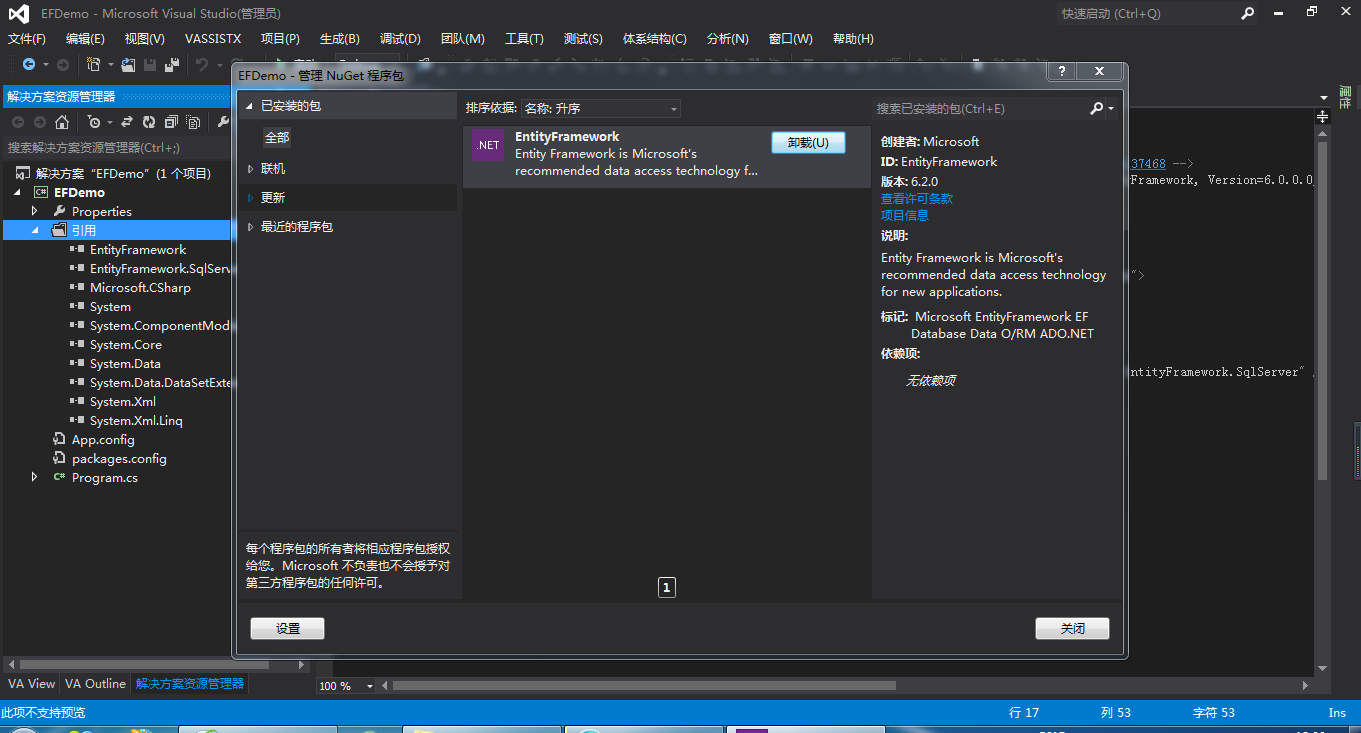
一、安装Entity FrameWork框架
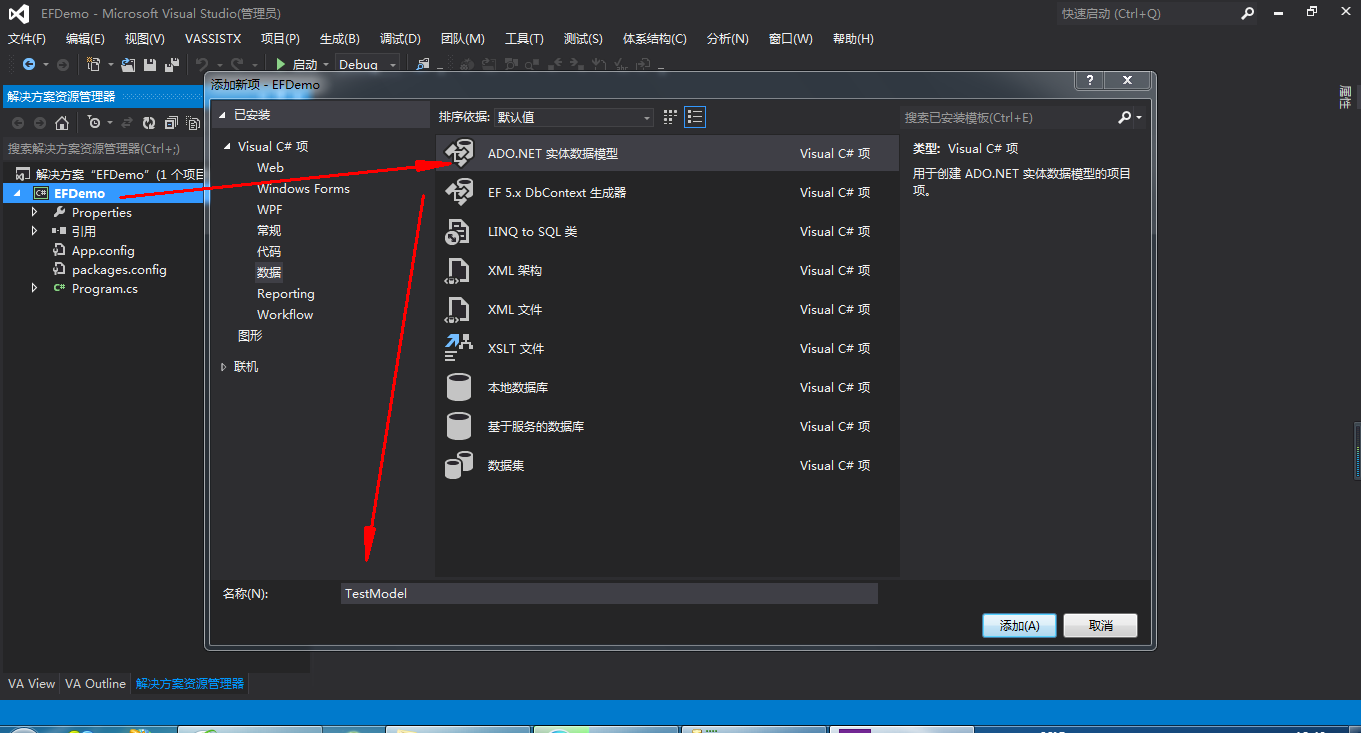
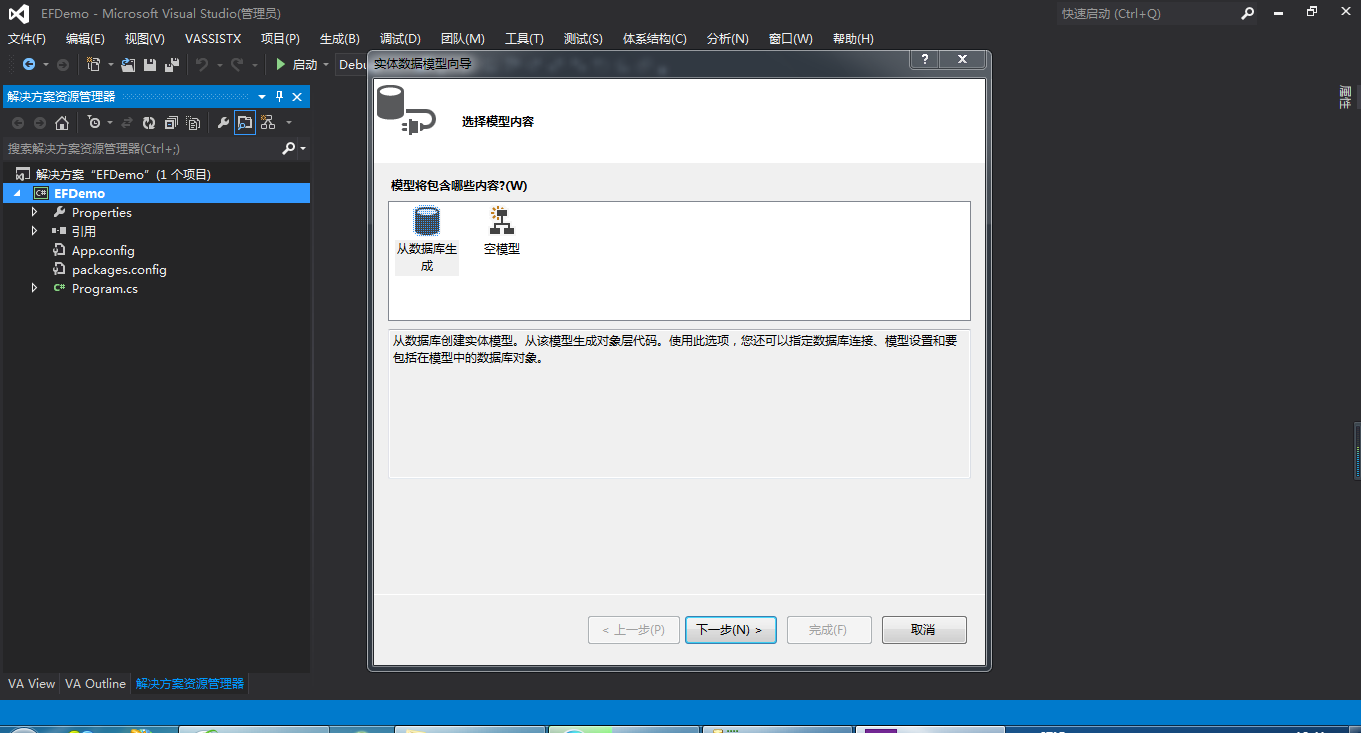
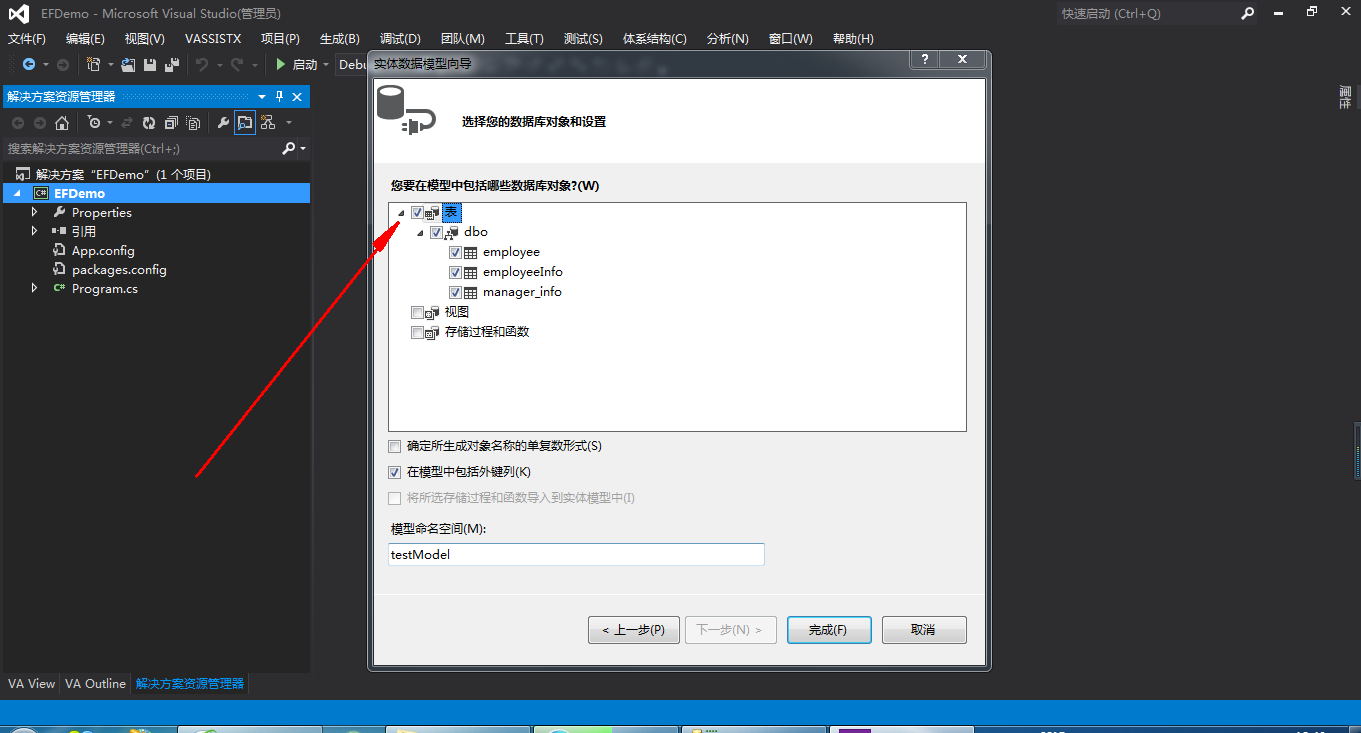
二、添加ADO.Net实体数据模型


三、EF插入数据
using System;

using System.Collections.Generic;

using System.Linq;

using System.Text;

using System.Threading.Tasks;

namespace EFDemo

{

    class Program

    {

        static void Main(string[] args)

        {

            //获取数据库上下文对象

            testContext dbContext = new testContext();

            //创建数据实体

            employee emp = new employee

            {

                name = "yangs",

                passwd = "",

                age =

            };

            dbContext.employee.Add(emp);

            //提交数据

            dbContext.SaveChanges();

            Console.WriteLine(emp.id);

            Console.ReadKey();

        }

    }

}
四、EF删除数据
using System;

using System.Collections.Generic;

using System.Linq;

using System.Text;

using System.Threading.Tasks;

namespace EFDemo

{

    class Program

    {

        static void Main(string[] args)

        {

            //获取id

            employee emp = new employee

            {

                id =

            };

            //获取数据库上下文对象

            testContext dbContext = new testContext();

            //将实体添加到数据库上下文

            dbContext.employee.Attach(emp);

            //对数据删除

            dbContext.employee.Remove(emp);

            //保存

            dbContext.SaveChanges();

        }

    }

}
五、EF修改数据
using System;

using System.Collections.Generic;

using System.Linq;

using System.Text;

using System.Threading.Tasks;

namespace EFDemo

{

    class Program

    {

        static void Main(string[] args)

        {

            //准备实体

            employee emp = new employee

            {

                id = ,

                name = "例子",

                passwd = "",

                age =

            };

            //获取数据库上下文对象

            testContext dbContext = new testContext();

            //将实体添加到数据库上下文

            dbContext.employee.Attach(emp);

            dbContext.Entry(emp).State = System.Data.Entity.EntityState.Modified;

            dbContext.SaveChanges();

        }

    }

}
六、EF 查询数据
1.简单查询
using System;

using System.Collections.Generic;

using System.Linq;

using System.Text;

using System.Threading.Tasks;

namespace EFDemo

{

    class Program

    {

        static void Main(string[] args)

        {

            testContext dbContext = new testContext();

            var list = dbContext.employee;

            foreach (var item in list)

            {

                Console.WriteLine(item.name);

            }

            Console.ReadKey();

        }

    }

}
2.where 查询条件
using System;

using System.Collections.Generic;

using System.Linq;

using System.Text;

using System.Threading.Tasks;

namespace EFDemo

{

    class Program

    {

        static void Main(string[] args)

        {

            testContext dbContext = new testContext();

            var list = dbContext.employee.Where(p => p.id > );

            foreach (var item in list)

            {

                Console.WriteLine(item.name);

            }

            Console.ReadKey();

        }

    }

}
2. skip(10) => 逃过10条数据,take(10) => 获取10条数据
using System;

using System.Collections.Generic;

using System.Linq;

using System.Text;

using System.Threading.Tasks;

namespace EFDemo

{

    class Program

    {

        static void Main(string[] args)

        {

            testContext dbContext = new testContext();

            var list = dbContext.employee.Skip().Take();

            foreach (var item in list)

            {

                Console.WriteLine(item.name);

            }

            Console.ReadKey();

        }

    }

}
3. orderBy 排序
using System;

using System.Collections.Generic;

using System.Linq;

using System.Text;

using System.Threading.Tasks;

namespace EFDemo

{

    class Program

    {

        static void Main(string[] args)

        {

            testContext dbContext = new testContext();

            //降序

            var list = dbContext.employee.OrderByDescending(p => p.id);

            foreach (var item in list)

            {

                Console.WriteLine(item.name);

            }

            Console.ReadKey();

        }

    }

}
4. select 查询某几个字段
using System;

using System.Collections.Generic;

using System.Linq;

using System.Text;

using System.Threading.Tasks;

namespace EFDemo

{

    class Program

    {

        static void Main(string[] args)

        {

            testContext dbContext = new testContext();

            //降序

            var list = dbContext.employee.Select(p => new { p.id, p.name }).Where(p => p.id > );

            foreach (var item in list)

            {

                Console.WriteLine(item.id+" -- "+item.name);

            }

            Console.ReadKey();

        }

    }

}
5. EF高级写法
using System;

using System.Collections.Generic;

using System.Linq;

using System.Text;

using System.Threading.Tasks;

namespace EFDemo

{

    class Program

    {

        static void Main(string[] args)

        {

            testContext dbContext = new testContext();

            //降序

            var list = from o in dbContext.employee where o.id >  select o;

            foreach (var item in list)

            {

                Console.WriteLine(item.id+" -- "+item.name);

            }

            Console.ReadKey();

        }

    }

}
join 联合查询
using System;

using System.Collections.Generic;

using System.Linq;

using System.Text;

using System.Threading.Tasks;

namespace EFDemo

{

    class Program

    {

        static void Main(string[] args)

        {

            testContext dbContext = new testContext();

            //降序

            var list = from e in dbContext.employee

                       join i in dbContext.employeeInfo

                       on e.id equals i.emp_id

                       where e.id >

                       select new {e, i.content};

        }

    }

}
七、延迟加载
using System;

using System.Collections.Generic;

using System.Linq;

using System.Text;

using System.Threading.Tasks;

namespace EFDemo

{

    class Program

    {

        static void Main(string[] args)

        {

            testContext dbContext = new testContext();

            //降序

            var list = dbContext.employee.ToList();

            foreach (var item in list)

            {

            }

        }

    }

}
toList()转换为本地内存数据级别,会请求数据。如果没有toList(),则当数据遍历的时候请求。
Entity FrameWork 操作使用详情的更多相关文章
- Linq实战 之 Linq to Sql及Entity Framework操作详解
Linq实战 之 Linq to Sql及Entity Framework操作详解 一:linq to db的框架 1. linq to sql 2. linq to ado.net entity f ...
- EF ( Entity Framework) 操作ArcCataLog 生成的(Sql Server)空间数据库
因为项目需求,现在需要利用EF 操作由Arccatalog生成的sql server空间数据库..在此之前,一直没有接触过空间数据库,在操作空间数据库时 绕了许多弯... 因此写一篇随笔做一个总结. ...
- Entity FrameWork操作数据库完成登陆、列表显示+验证码
登陆页面 登陆页面的页面结构比较简单,没有写样式. image标签的作用是用来显示验证码. 一般处理程序代码展示 using System; using System.Collections.Gene ...
- Entity Framework 全面教程详解(转)
目录 预备知识 2 LINQ技术 2 LINQ技术的基础 - C#3.0 2 自动属性 2 隐式类型 2 对象初始化器与集合初始化器 3 匿名类 3 扩展方法 ...
- 转载Entity Framework全面教程
转载原地址:http://www.cnblogs.com/lsxqw2004/archive/2009/05/31/1495240.html#_Toc228672754 预备知识 2 LINQ技 ...
- Entity Framework 教程(转)
预备知识 2 LINQ技术 2 LINQ技术的基础 - C#3.0 2 自动属性 2 隐式类型 2 对象初始化器与集合初始化器 3 匿名类 3 扩展方法 ...
- [hystar整理]Entity Framework 教程
参考页面: http://www.yuanjiaocheng.net/entity/entity-relations.html http://www.yuanjiaocheng.net/entity/ ...
- .NET Core开发日志——Entity Framework与PostgreSQL
Entity Framework在.NET Core中被命名为Entity Framework Core.虽然一般会用于对SQL Server数据库进行数据操作,但其实它还支持其它数据库,这里就以Po ...
- Entity Framework的原理及使用方式
ADO.NET Entity Framework操作数据库的过程对用户是透明的(当然我们可以通过一些工具或方法了解发送到数据库的SQL语句等).我们唯一能做的是操作EDM,EDM会将这个操作请求发往数 ...
随机推荐
- ubuntu添加开机自启和sysv-rc-conf
此文ubuntu使用sysvinit,而非upstart UBUNTU添加开机自动启动程序方法 1. 开机启动时自动运行程序 Linux加载后, 它将初始化硬件和设备驱动, 然后运行第一个进程i ...
- hdu 3549 最大流
#include<stdio.h> #include<string.h> #include<queue> #include<iostream> usin ...
- Hadoop2.2.0 注意事项
1.启动前必须把防火墙关了,要不然会导致nodemanager启动不了. 关闭防火墙:service iptables stop 永久关闭(重启后默认关闭):chkconfig iptables of ...
- 【ACM】NYOJ_288_Time_20130725
Time时间限制:1000 ms | 内存限制:65535 KB 难度:2描述 Digital clock use 4 digits to express time, each digit is ...
- [bzoj1855][Scoi2010]股票交易_动态规划_单调队列
股票交易 bzoj-1855 Scoi-2010 题目大意:说不明白题意系列++...题目链接 注释:略. 想法:这个题还是挺难的. 动态规划没跑了 状态:dp[i][j]表示第i天手里有j个股票的最 ...
- 记一次ruby的安装
1,下载rubyinstall 安装包及devkit包 登陆网站 :http://rubyinstaller.org/downloads/ 安装rubyinstall包时添加到环境变量 2,安装完in ...
- HTMLParser in python
You can know form the name that the HTMLParser is something used to parse HTML files. In python, th ...
- 清楚windows 网络密码
在windows上访问其它机器共享的文件时,第一次通常要输入用户名密码. 第二次再访问就不用了,因为windows会记住这个用户名和密码. 这样虽然很方便,不过有时也会有些问题.比如你想用其它的用户 ...
- HDU5526/BestCoder Round #61 (div.1)1004 Lie 背包DP
Lie 问题描述 一个年级总共有N个学生,每个人属于唯一一个班级.现在他们站在一排,同班同学并不一定会站在一起,但每个人都会说一句话:“站在我左边的有Ai个同班同学,右边有Bi个同班同学”.然而并 ...
- C# winform窗体在桌面右下角显示(任务栏上方)
问题描述: 有一个主窗口程序,需要给该程序添加一个通知子窗口.子窗口的位置为右下角. 解决方法: 在子窗口frmPopMsg的代码文件中添加如下代码: public frmPopMsg() { Ini ...