
DSP using MATLAB 示例 Example3.10

用到的性质

上代码:
n = -5:10; x = rand(1,length(n)) + j * rand(1,length(n));

k = -100:100; w = (pi/100)*k;                 % freqency between -pi and +pi  ,   [0,pi] axis divided into 101 points.

X = x * (exp(-j*pi/100)) .^ (n'*k);           % DTFT of x

% conjugation property

y = conj(x);                                  % signal conjugation

Y = y * (exp(-j*pi/100)) .^ (n'*k);           % DTFT of y

magX = abs(X); angX = angle(X); realX = real(X); imagX = imag(X);

magY = abs(Y); angY = angle(Y); realY = real(Y); imagY = imag(Y);

%verification

Y_check = conj(fliplr(X));                    % conj(X(-w))    DTFT flip first, then conjugation

error = max(abs(Y-Y_check));                  % Difference

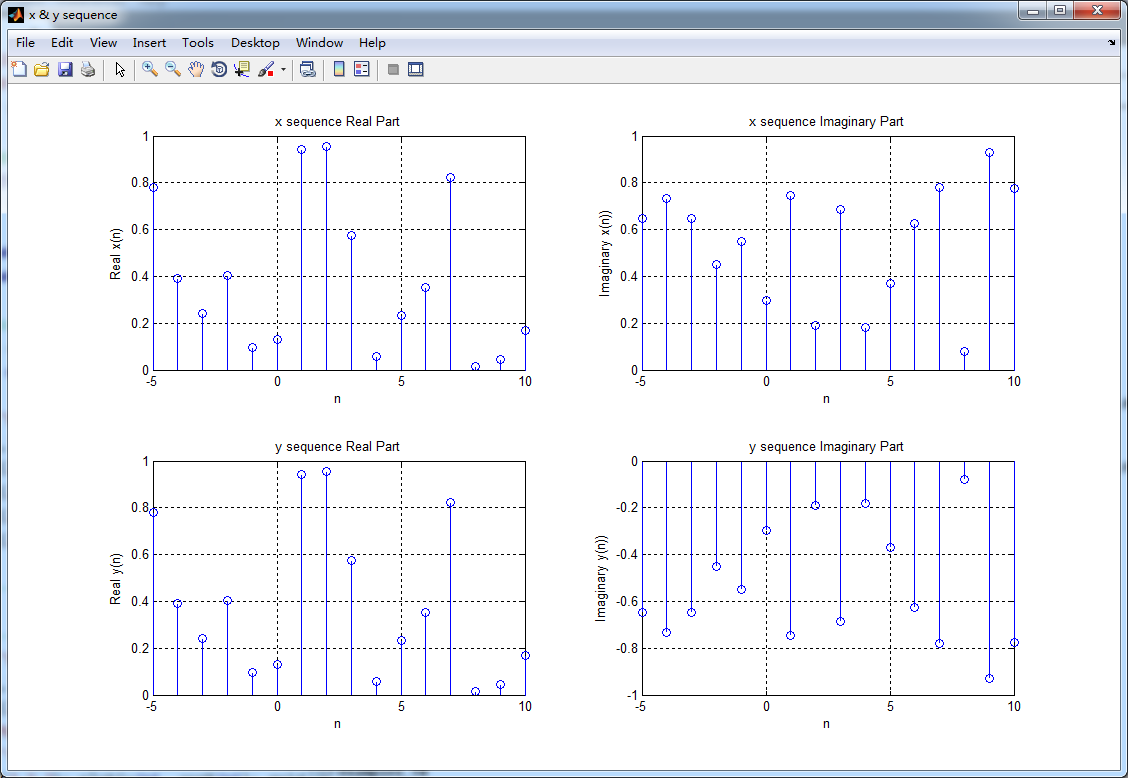
figure('NumberTitle', 'off', 'Name', 'x & y sequence')

set(gcf,'Color','white');

subplot(2,2,1); stem(n,real(x)); title('x sequence Real Part');         xlabel('n'); ylabel('Real x(n)'); grid on;

subplot(2,2,2); stem(n,imag(x)); title('x sequence Imaginary Part');    xlabel('n'); ylabel('Imaginary x(n))'); grid on;

subplot(2,2,3); stem(n,real(y)); title('y sequence Real Part');         xlabel('n'); ylabel('Real y(n)'); grid on;

subplot(2,2,4); stem(n,imag(y)); title('y sequence Imaginary Part');    xlabel('n'); ylabel('Imaginary y(n))'); grid on;

%% ----------------------------------------------------------------

%%        START Graphical verification

%% ----------------------------------------------------------------

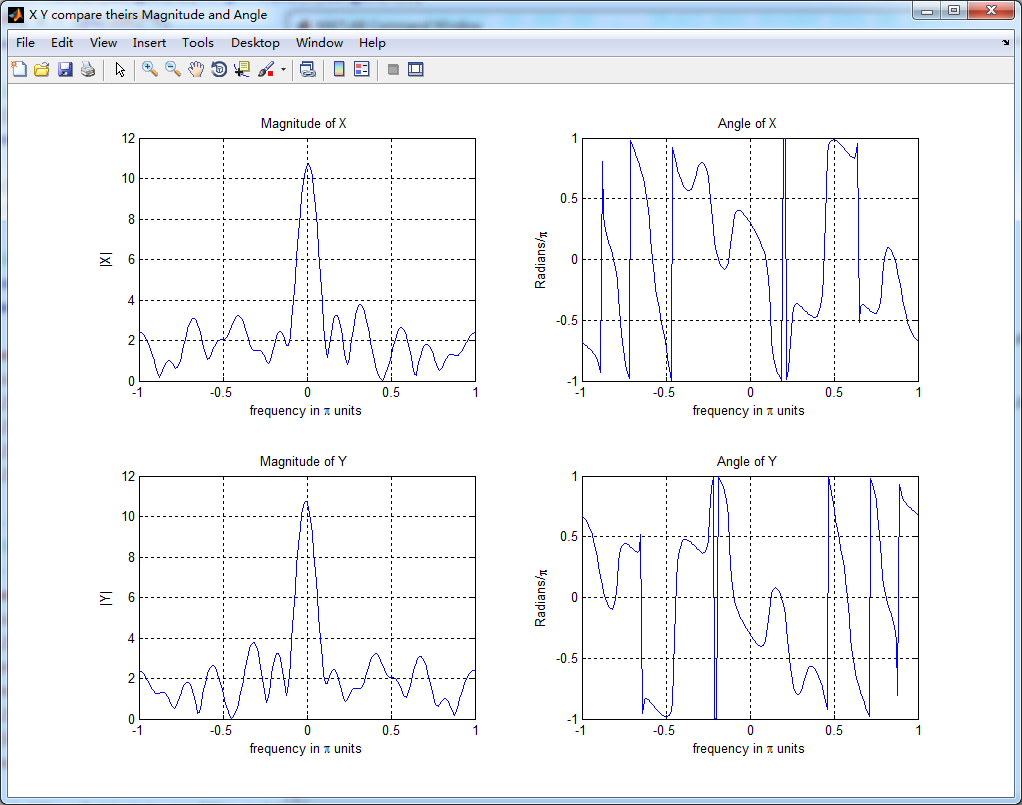
figure('NumberTitle', 'off', 'Name', 'X Y compare theirs Magnitude and Angle');

set(gcf,'Color','white');

subplot(2,2,1); plot(w/pi,magX); grid on; axis([-1,1,0,12]);

xlabel('frequency in \pi units'); ylabel('|X|'); title('Magnitude of X ');

subplot(2,2,2); plot(w/pi,angX/pi); grid on; axis([-1,1,-1,1]);

xlabel('frequency in \pi units'); ylabel('Radians/\pi'); title('Angle of X ');

subplot(2,2,3); plot(w/pi,magY); grid on; axis([-1,1,0,12]);

xlabel('frequency in \pi units'); ylabel('|Y|'); title('Magnitude of Y ');

subplot(2,2,4); plot(w/pi,angY/pi); grid on; axis([-1,1,-1,1]);

xlabel('frequency in \pi units'); ylabel('Radians/\pi'); title('Angle of Y ');

%% ----------------------------------------------------------------

%%        END Graphical verification

%% ----------------------------------------------------------------
运行结果:
DSP using MATLAB 示例 Example3.10的更多相关文章
- DSP using MATLAB 示例Example3.21
代码: % Discrete-time Signal x1(n) % Ts = 0.0002; n = -25:1:25; nTs = n*Ts; Fs = 1/Ts; x = exp(-1000*a ...
- DSP using MATLAB 示例 Example3.19
代码: % Analog Signal Dt = 0.00005; t = -0.005:Dt:0.005; xa = exp(-1000*abs(t)); % Discrete-time Signa ...
- DSP using MATLAB示例Example3.18
代码: % Analog Signal Dt = 0.00005; t = -0.005:Dt:0.005; xa = exp(-1000*abs(t)); % Continuous-time Fou ...
- DSP using MATLAB 示例Example3.23
代码: % Discrete-time Signal x1(n) : Ts = 0.0002 Ts = 0.0002; n = -25:1:25; nTs = n*Ts; x1 = exp(-1000 ...
- DSP using MATLAB示例Example3.16
代码: b = [0.0181, 0.0543, 0.0543, 0.0181]; % filter coefficient array b a = [1.0000, -1.7600, 1.1829, ...
- DSP using MATLAB 示例 Example3.13
上代码: w = [0:1:500]*pi/500; % freqency between 0 and +pi, [0,pi] axis divided into 501 points. H = ex ...
- DSP using MATLAB 示例 Example3.12
用到的性质 代码: n = -5:10; x = sin(pi*n/2); k = -100:100; w = (pi/100)*k; % freqency between -pi and +pi , ...
- DSP using MATLAB 示例 Example3.11
用到的性质 上代码: n = -5:10; x = rand(1,length(n)); k = -100:100; w = (pi/100)*k; % freqency between -pi an ...
- DSP using MATLAB 示例Example3.8
代码: x = rand(1,11); n = 0:10; k = 0:500; w = (pi/500)*k; % [0,pi] axis divided into 501 points. X = ...
随机推荐
- codeforces 507B. Painting Pebbles 解题报告
题目链接:http://codeforces.com/problemset/problem/509/B 题目意思:有 n 个piles,第 i 个 piles有 ai 个pebbles,用 k 种颜色 ...
- windows编程中c语言知识回顾
1.include: #include表示只在系统提供的头文件中查找: #include "Head File"表示先在当前目录中搜索,若不存在,再到系统目录中查找: vs环境中, ...
- HTML 样式表
样式代码 样式代码与属性代码区别 样式代码必须带单位 属性不需要 多个样式代码之间用分号隔开 同一个样式里面 用空格 多个属性之间用空格隔开 举例 1.背景样式 .r { backgr ...
- 【leetcode】Distinct Subsequences(hard)
Given a string S and a string T, count the number of distinct subsequences of T in S. A subsequence ...
- 手动关闭searchDisplayControlelr
两行代码搞定 [searchBar endEditing:YES]; [searchDisplayControllersetActive:NO];
- SlimDX.dll安装之后所在位置
C:\Windows\Microsoft.NET\assembly\GAC_64\SlimDX\v4.0_4.0.13.43__b1b0c32fd1ffe4f9\SlimDX.dll
- 常用js函数整理--common.js
var h = {}; h.get = function (url, data, ok, error) { $.ajax({ url: url, data: data, dataType: 'json ...
- java annotation
import java.lang.annotation.Documented; import java.lang.annotation.ElementType; import java.lang.an ...
- SQLServer基本操作
SQL 全名是结构化查询语言(Structured Query Language),是关系数据库管理系统的标准语言 1.分离数据库:将当前数据库文件和数据库引擎的关系断开,没有任何关系了,这样就可以随 ...
- instanceof、 isinstance 与 isAssignableFrom的区别
instanceof运算符 只被用于对象引用变量,检查左边的被测试对象 是不是 右边类或接口的 实例化.如果被测对象是null值,则测试结果总是false. 形象地:自身实例或子类实例 instanc ...