
在Visual Studio 2015中运行OPENGL
Starting an OpenGL project in VS 2015 is really easy, thanks to the NupenGL.Core nuget package.
Here are really quick steps to start your first OpenGL project using the FreeGlut library to provide a Window toolkit.
Open Visual Studio 2015 Community Edition and create a new Visual Studio C++ Windows Console Application.
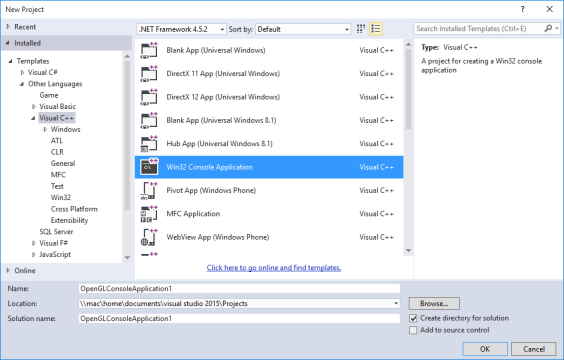
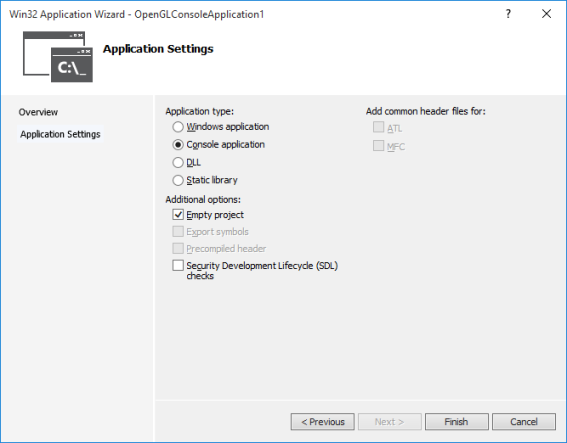
Keep it simple. Choose an empty project template.
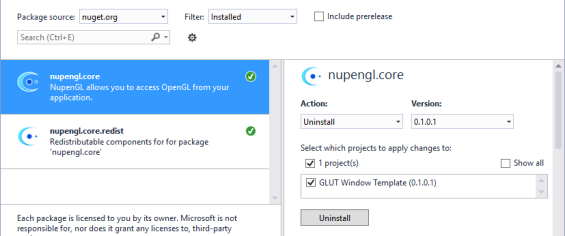
Install the NupenGL.Core nuget package. From Visual Studio, Go to Tools \ NuGet Package Manager \ Manage Nuget Packages for this solution. Search for “NupenGL” and install the package.
测试代码:
// source: http://jingyan.baidu.com/article/d5c4b52bca5005da560dc5d6.html

#include <GL/glut.h>

#include <stdlib.h>

#include <math.h>

#include <stdio.h>

static int year = , spin = , day = ;

static GLint fogMode;

const int n = ;

const GLfloat R = 1.0f;

const GLfloat Pi = 3.1415926536f;

void DrawCircle() {

    int  i;

    glClear(GL_COLOR_BUFFER_BIT);

    glBegin(GL_LINE_LOOP);

    for (i = ; i < n; ++i)

    {

        glColor3f(1.0, 0.0, 0.0);

        glVertex2f(R*cos( * Pi / n*i), R*sin( * Pi / n*i));

    }

    glEnd();

    glFlush();

}

void init(void) {

    GLfloat position[] = { 0.5, 0.5, 3.0, 0.0 };

    glEnable(GL_DEPTH_TEST);                          //防止遮挡

    glLightfv(GL_LIGHT0, GL_POSITION, position);

    glEnable(GL_LIGHTING);

    glEnable(GL_LIGHT0);

    {

        GLfloat mat[] = { 0.1745, 0.01175, 0.01175 };

        glMaterialfv(GL_FRONT, GL_AMBIENT, mat);

        mat[] = 0.61424; mat[] = 0.04136; mat[] = 0.04136;

        glMaterialfv(GL_FRONT, GL_DIFFUSE, mat);

        mat[] = 0.727811; mat[] = 0.626959; mat[] = 0.626959;

        glMaterialfv(GL_FRONT, GL_SPECULAR, mat);

        glMaterialf(GL_FRONT, GL_SHININESS, 0.6*128.0);

    }

    glEnable(GL_FOG);

    {

        GLfloat fogColor[] = { 0.5, 0.5, 0.5, 1.0 };

        fogMode = GL_EXP;

        glFogi(GL_FOG_MODE, fogMode);

        glFogfv(GL_FOG_COLOR, fogColor);

        glFogf(GL_FOG_DENSITY, 0.35);

        glHint(GL_FOG_HINT, GL_DONT_CARE);

        glFogf(GL_FOG_START, 1.0);

        glFogf(GL_FOG_END, 5.0);

    }

    glClearColor(0.5, 0.9, 0.9, 1.0);  /* fog color */

}

void display(void) {

    glClear(GL_COLOR_BUFFER_BIT | GL_DEPTH_BUFFER_BIT);

    glColor3f(0.0, 1.0, 1.0);

    glPushMatrix(); //记住自己的位置

    glutSolidSphere(1.0, , );   /* 画太阳半径、 20经度、16纬度*/

    glRotatef(spin, 0.0, 1.0, 0.0);  //自转,绕着一个向量以给定角度旋转(正的为逆时针)

    glTranslatef(2.0, 1.0, 0.0);

    glRotatef(spin, 1.0, 0.0, 0.0); //公转

    glRectf(0.1, 0.1, 0.5, 0.5);

    glColor3f(0.0, 0.0, 1.0);

    glutWireSphere(0.2, , );    /* 画第一颗小行星 */

    glColor3f(1.0, 0.0, 0.0);

    glTranslatef(2.0, 1.0, 0.0);

    glRotatef( * spin, 0.0, 1.0, 0.0);

    glutSolidSphere(0.5, , );

    glPopMatrix();//回到原来的位置

    glutSwapBuffers();

}

void spinDisplay(void) {

    spin = spin + ;

    if (spin > )

        spin = spin - ;

    glutPostRedisplay();

}

void mouse(int button, int state, int x, int y) {

    switch (button)

    {

    case GLUT_LEFT_BUTTON:

        if (state == GLUT_DOWN)

            glutIdleFunc(spinDisplay);

        break;

    case GLUT_MIDDLE_BUTTON:

        if (state == GLUT_DOWN)

            glutIdleFunc(NULL);

        break;

    default:

        break;

    }

}

void reshape(int w, int h) {

    glViewport(, , (GLsizei)w, (GLsizei)h);

    glMatrixMode(GL_PROJECTION);

    glLoadIdentity();

    gluPerspective(60.0, (GLfloat)w / (GLfloat)h, 0.5, 20.0);

    glMatrixMode(GL_MODELVIEW);

    glLoadIdentity();

    gluLookAt(0.0, 10.0, 10.0, 0.0, 0.0, 0.0, 0.0, 1.0, 0.0);

}

void keyboard(unsigned char key, int x, int y) {

    switch (key) {

    case 'd':

        day = (day + ) % ;

        glutPostRedisplay();

        break;

    case 'D':

        day = (day - ) % ;

        glutPostRedisplay();

        break;

    case 'y':

        year = (year + ) % ;

        glutPostRedisplay();

        break;

    case 'Y':

        year = (year - ) % ;

        glutPostRedisplay();

        break;

    case :

        exit();

        break;

    default:

        break;

    }

}

int main(int argc, char** argv) {

    glutInit(&argc, argv);

    glutInitDisplayMode(GLUT_DOUBLE | GLUT_RGB);

    glutInitWindowSize(, );

    glutInitWindowPosition(, );

    glutCreateWindow("OpengGL 程序设计--这段代码是我抄的");

    init();

    //glutDisplayFunc(DrawCircle);

    glutDisplayFunc(display);

    glutReshapeFunc(reshape);

    //glutKeyboardFunc(keyboard);

    glutMouseFunc(mouse);

    glutMainLoop();

    return ;

}
在Visual Studio 2015中运行OPENGL的更多相关文章
- ASP.NET 5系列教程 (五):在Visual Studio 2015中使用Grunt、Bower开发Web程序
基于Visual Studio 2015,你可以: 方便的管理前端包,如jQuery, Bootstrap, 或Angular. 自动运行任务,如LESS.JavaScript压缩.JSLint.Ja ...
- Grunt和Gulp构建工具在Visual Studio 2015中的高效的应用
Grunt和Gulp构建工具在Visual Studio 2015中的高效的应用 Grunt和Gulp是Javascript世界里的用来做自动压缩.Typescript编译.代码质量lint工具.cs ...
- ASP.NET5之客户端开发:Grunt和Gulp构建工具在Visual Studio 2015中的高效的应用
Grunt和Gulp是Javascript世界里的用来做自动压缩.Typescript编译.代码质量lint工具.css预处理器的构建工具,它帮助开发者处理客户端开发中的一些烦操重复性的工作.Grun ...
- [.net 面向对象程序设计进阶] (27) 团队开发利器(六)分布式版本控制系统Git——在Visual Studio 2015中使用Git
[.net 面向对象程序设计进阶] (26) 团队开发利器(六)分布式版本控制系统Git——在Visual Studio 2015中使用Git 本篇导读: 接上两篇,继续Git之旅 分布式版本控制系统 ...
- GitHub在Visual Studio 2015中获得TFS/VSO同等地位
(此文章同时发表在本人微信公众号"dotNET每日精华文章",欢迎右边二维码来关注.) 在Visual Studio 2015中微软为GitHub提供了扩展插件,从而让GitHub ...
- Visual Studio 2015中的常用调试技巧分享
.NET 技术交流群:337901356 欢迎您的加入! 为什么要学习调试? 调试(Debug)是作为一个程序员必须要学会的东西,学会调试可以极大的提高开发效率,排错时间,很多人不喜欢调试,但我认为这 ...
- 微软移除Visual Studio 2015中的UML
微软已经在Visual Studio 2015中移除了UML(Unified Modeling Language,统一建模语言),原因是该语言使用率过低.因此微软要优化产品结构,把好钢用在刀刃上. V ...
- WebApi-路由机制 Visual Studio 2015中的常用调试技巧分享
WebApi-路由机制 一.WebApi路由机制是什么? 路由机制通俗点来说:其实就是WebApi框架将用户在浏览器中输入的Url地址和路由表中的路由进行匹配,并根据最终匹配的路由去寻找并匹配相应 ...
- 在Visual Studio 2015 中添加SharePoint 2016 开发模板
前言 SharePoint 2016已经发布很久了,然而,默认安装VS2015以后,却没有SharePoint 2016的开发模板.其实问题很简单,和VS2012开发SharePoint 2013一样 ...
随机推荐
- [zt]不到最后一秒你永远不知道结局且震撼你心灵的高端电影
总有一部电影,让你憋着尿直到看完~~~ http://share.renren.com/share/230538513/17679574169?from=0101090202&shfrom=0 ...
- PCL 1.6.0 VS2010 Configuration
Open VS2010, create a new project, then open Property Manager, double-click Microsoft.Cpp.win32.user ...
- 8.按要求编写Java应用程序。 (1)建立一个名叫Cat的类: 属性:姓名、毛色、年龄 行为:显示姓名、喊叫 (2)编写主类: 创建一个对象猫,姓名为“妮妮”,毛色为“灰色”,年龄为2岁,在屏幕上输 出该对象的毛色和年龄,让该对象调用显示姓名和喊叫两个方法。
package liu0917; public class Cat { String name="妮妮"; int age=2; String maose="灰色&quo ...
- [转]发送邮件提示“551 User not local; please try ”错误的原因及解决办法
本文转自:http://www.biglee.cn/blog/article.asp?id=204 一网站要嵌入一个客户反馈系统.为了方便收集反馈信息,并能及时查看信息,我决定以将反馈内容提交到邮箱. ...
- HDU 2089 数位dp入门
开始学习数位dp...一道昨天看过代码思想的题今天打了近两个小时..最后还是看了别人的代码找bug...(丢丢) 传说院赛要取消 ? ... 这么菜不出去丢人也好吧~ #include<stdi ...
- 【转载 来自sdnlab】 开放网络没那么简单
链接:开放网络没那么简单 本文是云杉网络工程师张攀对当前开源网络技术现状的一些思考和探索. 开放网元.释放数据的价值 从2012年开始至今,网络行业明显是O字辈的天下.所有我接触过了解过的组织和项目, ...
- PHP 错误与异常 笔记与总结(14 )记录和发送异常信息
当发生异常时,把异常信息记录到日志文件中: <?php header('content-type:text/html; charset=utf-8'); class LogException e ...
- java list<int>报错
请问一下在java中的List<int> list=new List<int>();这条语句的两个int处会报错,请问为什么? 答: 两处错误:第一:List是接口,需要实现类 ...
- hardware control language
Computer Systems A Programmer's Perspective Second Edition We then provide some background on digita ...
- SQL控制语句中内置函数讲解
一.伪表.系统内置的只有一行一列数据的表.常用来执行函数. select 函数名 from dual 注:以下所有函数为了方便理解均用 伪表 做为事例! 二. 时间函数 1.sysdate:获取数据库 ...