
HarmonyOS三方件开发指南(7)——compress组件
目录:
1. 组件compress功能介绍
2. 组件compress使用方法
3. 组件compress开发实现
1. 组件compress功能介绍
1.1. 组件介绍:
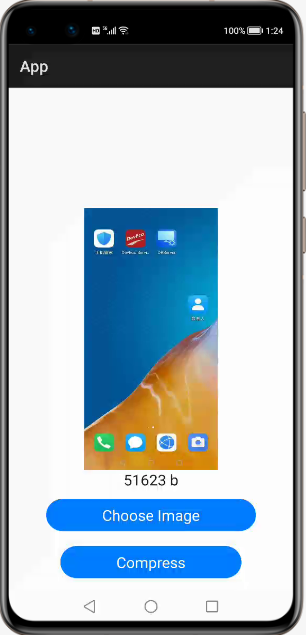
compress是一个轻量级图像压缩库。compress允许将大照片压缩成小尺寸的照片,图像质量损失非常小或可以忽略不计。
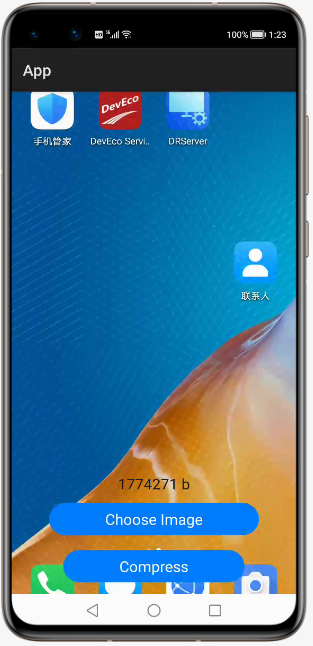
1.2. 手机模拟器上运行效果:
2. 组件compress使用方法
2.1. 添加依赖
将compress-debug.har复制到应用的entry\libs目录下即可(由于build.gradle中已经依赖的libs目录下的*.har,因此不需要再做修改)。
2.2. 设置布局
<DependentLayout

    xmlns:ohos="http://schemas.huawei.com/res/ohos"

    ohos:width="match_parent"

    ohos:height="match_parent"

    ohos:background_element="#FFFFFF">

    <Image

        ohos:id="$+id:image1"

        ohos:height="match_parent"

        ohos:width="match_parent"

        ohos:image_src="$media:dog1.PNG"/>

    <Text

        ohos:id="$+id:text"

        ohos:width="match_content"

        ohos:height="match_content"

        ohos:text=""

        ohos:text_size="19fp"

        ohos:text_color="#1C1C1C"

        ohos:top_padding="8vp"

        ohos:bottom_padding="8vp"

        ohos:right_padding="70vp"

        ohos:left_padding="70vp"

        ohos:center_in_parent="true"

        ohos:align_parent_bottom="true"

        ohos:bottom_margin="120vp"/>

    <Button

        ohos:id="$+id:choose_button"

        ohos:width="match_content"

        ohos:height="match_content"

        ohos:text="Choose Image"

        ohos:text_size="19fp"

        ohos:text_color="#FFFFFF"

        ohos:top_padding="8vp"

        ohos:bottom_padding="8vp"

        ohos:right_padding="70vp"

        ohos:left_padding="70vp"

        ohos:background_element="$graphic:background_button"

        ohos:center_in_parent="true"

        ohos:align_parent_bottom="true"

        ohos:bottom_margin="75vp"/>

    <Button

        ohos:id="$+id:button"

        ohos:width="match_content"

        ohos:height="match_content"

        ohos:text="Compress"

        ohos:text_size="19fp"

        ohos:text_color="#FFFFFF"

        ohos:top_padding="8vp"

        ohos:bottom_padding="8vp"

        ohos:right_padding="70vp"

        ohos:left_padding="70vp"

        ohos:background_element="$graphic:background_button"

        ohos:center_in_parent="true"

        ohos:align_parent_bottom="true"

        ohos:bottom_margin="15vp"/>

</DependentLayout>
2.3. 图像压缩
核心类:Compressor
核心方法:
(1)自定义压缩:
public static File customCompress(Context context, File file, int width, int height, int quality) throws IOException 参数:
context - 应用程序上下文
file - 待压缩图片抽象路径名
width - 压缩后宽度
height - 压缩后高度
quality - 图片压缩质量,范围0~100
结果:
返回压缩后图片抽象路径名。
异常:
发生I/O异常
(2)默认压缩:
public static File defaultCompress(Context context, File file) throws IOException参数:
context - 应用程序上下文
file - 待压缩图片抽象路径名
结果:
返回压缩后图片抽象路径名。
异常:
发生I/O异常
简单示例:
运行示例前需要在模拟器保存一张截图或使用相机功能照一张照片
public void onStart(Intent intent) {

    super.onStart(intent);

    super.setUIContent(ResourceTable.Layout_ability_main);

    // 请求文件的读取权限

    String[] permissions = {"ohos.permission.READ_USER_STORAGE"};

    requestPermissionsFromUser(permissions, 0);

    // 获取压缩按钮并绑定事件

    Button button = (Button) findComponentById(ResourceTable.Id_button);

    if (button != null) {

        // 为按钮设置点击回调

        button.setClickedListener(new Component.ClickedListener() {

            @Override

            public void onClick(Component component) {

                try {

                    File file = new File(System.getProperty("java.io.tmpdir") + File.separator + tmpName);

                    HiLog.error(LOG_LABEL, "old size..." + file.length() +  " ...b");

                    // 默认压缩

                    // File newFile = Compressor.defaultCompress(file);

                    // 自定义压缩

                    File newFile = Compressor.customCompress(getContext(), file, 500, 1000, 60);

                    Text text = (Text) findComponentById(ResourceTable.Id_text);

                    text.setText("size: " + newFile.length() + " b");

                    HiLog.error(LOG_LABEL, "new size..." + newFile.length() +  " ...b");

                    PixelMap newPixelMap = Compressor.decode(newFile);

                    Image image = (Image) findComponentById(ResourceTable.Id_image1);

                    image.setPixelMap(newPixelMap);

                } catch (IOException e) {

                    e.printStackTrace();

                }

            }

        });

    }

    // 获取选择图片按钮并绑定事件

    Button chooseButton = (Button) findComponentById(ResourceTable.Id_choose_button);

    if (chooseButton != null) {

        // 为按钮设置点击回调

        chooseButton.setClickedListener(new Component.ClickedListener() {

            @Override

            public void onClick(Component component) {

                DataAbilityHelper helper = DataAbilityHelper.creator(getContext());

                try {

                    ResultSet resultSet = helper.query(AVStorage.Images.Media.EXTERNAL_DATA_ABILITY_URI, null, null);

                    while (resultSet != null && resultSet.goToNextRow()) {

                        // 互殴媒体库的图片

                        int id = resultSet.getInt(resultSet.getColumnIndexForName(AVStorage.Images.Media.ID));

                        HiLog.error(LOG_LABEL, "id:..." + id +  " ...");

                        Uri uri = Uri.appendEncodedPathToUri(AVStorage.Images.Media.EXTERNAL_DATA_ABILITY_URI, "" + id);

                        // 根据图片的uri打开文件并保存到临时目录中

                        FileDescriptor fileDescriptor = helper.openFile(uri, "r");

                        ImageSource.DecodingOptions decodingOpts = new ImageSource.DecodingOptions();

                        decodingOpts.sampleSize = ImageSource.DecodingOptions.DEFAULT_SAMPLE_SIZE;

                        ImageSource imageSource = ImageSource.create(fileDescriptor, null);

                        PixelMap pixelMap = imageSource.createThumbnailPixelmap(decodingOpts, true);

                        ImagePacker imagePacker = ImagePacker.create();

                        tmpName = UUID.randomUUID().toString();

                        File file = new File(System.getProperty("java.io.tmpdir") + File.separator + tmpName);

                        FileOutputStream outputStream = new FileOutputStream(file);

                        ImagePacker.PackingOptions packingOptions = new ImagePacker.PackingOptions();

                        packingOptions.quality = 100;

                        boolean result = imagePacker.initializePacking(outputStream, packingOptions);

                        result = imagePacker.addImage(pixelMap);

                        long dataSize = imagePacker.finalizePacking();

                        // 显示图片和图片大小

                        Text text = (Text) findComponentById(ResourceTable.Id_text);

                        text.setText("size: " + file.length() + " b");

                        Image image = (Image) findComponentById(ResourceTable.Id_image1);

                        image.setPixelMap(pixelMap);

                    }

                } catch (DataAbilityRemoteException | FileNotFoundException e) {

                    e.printStackTrace();

                }

            }

        });

    }

}
3. 组件compress开发实现
3.1. 拷贝图片制临时目录
传入的图片路径拷贝临时文件到应用的临时目录。
private static File copyToCache(Context context, File imageFile) throws IOException {

    PixelMap pixelMap = decode(imageFile);

    String cachePath = context.getCacheDir() + File.separator + imageFile.getName();

    File cacheFile = new File(cachePath);

    int quality = 100; // 压缩质量

    refreshTmpFile(pixelMap, cacheFile, quality);

    return cacheFile;

}
3.2. 图片解码
对临时目录里的图片进行解码
private static PixelMap decode(File file, int width, int height) {

    ImageSource imageSource = ImageSource.create(file, null);

    mageSource.DecodingOptions decodingOpts = new

ImageSource.DecodingOptions();

    decodingOpts.desiredSize = new Size(width, height);

    return imageSource.createPixelmap(decodingOpts);

}
3.3. 图片编码
按照开发人员设定的规则进行编码,生成新图片
private static void refreshTmpFile(PixelMap pixelMap, File file, int quality)

throws IOException {

    ImagePacker imagePacker = ImagePacker.create();

    ImagePacker.PackingOptions options = new ImagePacker.PackingOptions();

    options.quality = quality;

    imagePacker.initializePacking(new FileOutputStream(file), options);

    imagePacker.addImage(pixelMap);

    imagePacker.finalizePacking();

}
项目源代码地址:https://github.com/isoftstone-dev/Compressor_Harmony
作者:软通田可辉
想了解更多内容,请访问: 51CTO和华为官方战略合作共建的鸿蒙技术社区https://harmonyos.51cto.com
HarmonyOS三方件开发指南(7)——compress组件的更多相关文章
- HarmonyOS三方件开发指南(14)-Glide组件功能介绍
<HarmonyOS三方件开发指南>系列文章合集 引言 在实际应用开发中,会用到大量图片处理,如:网络图片.本地图片.应用资源.二进制流.Uri对象等,虽然官方提供了PixelMap进行图 ...
- HarmonyOS三方件开发指南(19)-BGABadgeView徽章组件
目录: 1.引言 2.功能介绍 3.BGABadgeView 使用指南 4.BGABadgeView 开发指南 5.<HarmonyOS三方件开发指南>系列文章合集 引言 现在很多的APP ...
- HarmonyOS三方件开发指南(12)——cropper图片裁剪
鸿蒙入门指南,小白速来!0基础学习路线分享,高效学习方法,重点答疑解惑--->[课程入口] 目录:1. cropper组件功能介绍2. cropper使用方法3. cropper组件开发实现4. ...
- HarmonyOS三方件开发指南(13)-SwipeLayout侧滑删除
鸿蒙入门指南,小白速来!0基础学习路线分享,高效学习方法,重点答疑解惑--->[课程入口] 目录:1. SwipeLayout组件功能介绍2. SwipeLayout使用方法3. SwipeLa ...
- HarmonyOS三方件开发指南(15)-LoadingView功能介绍
目录: 1. LoadingView组件功能介绍2. Lottie使用方法3. Lottie开发实现4.<HarmonyOS三方件开发指南>系列文章合集 1. LoadingView组件功 ...
- HarmonyOS三方件开发指南(16)-VideoCache 视频缓存
目录: 1.引言 2.功能介绍 3.VideoCache使用指南 4.VideoCache开发指南 5.<HarmonyOS三方件开发指南>系列文章合集 引言 对于视频播放器这个app大家 ...
- HarmonyOS三方件开发指南(17)-BottomNavigationBar
目录: 1.引言 2.功能介绍 3.BottomNavigationBar使用指南 4.BottomNavigationBar开发指南 5.<HarmonyOS三方件开发指南>文章合集 引 ...
- HarmonyOS三方件开发指南(8)——RoundedImage
[小年答谢,新春送礼]免费抽取1000元京东卡+更多新春好礼~查看详情>>> 目录: 1. RoundedImage组件功能介绍 2. RoundedImage使用方法 3. Rou ...
- HarmonyOS三方件开发指南(4)——Logger组件
目录: 1. Logger功能介绍 2. Logger使用方法 3. Logger开发实现 4. 源码上传地址 1. Logger功能介绍1.1. ...
随机推荐
- react状态管理器之mobx
react有几种状态管理器,今天先来整理一下mobx状态管理器,首先了解一下什么是mobx 1.mobx成员: observable action 可以干嘛: MobX 的理念是通过观察者模式对数据做 ...
- 收下这款 Vue 项目模版,它将让你的开发效率在 2021 年提高 50%
这是什么 vue-automation 是一款开箱即用的 Vue 项目模版,它基于 Vue CLI 4 众所周知,虽然 Vue CLI 提供了脚手架的功能,但由于官方的脚手架过于简单,运用在实际项目开 ...
- php中require与include的区别
描述:require, include三者都是引入文件,其中require_once,include_once只引入一次,即之前引入过的就不再引入. include与require的区别: 加载失败的 ...
- Go之获取系统性能指标 - goPsutil
简介 psutil是一个跨平台进程和系统监控的Python库,而gopsutil是其Go语言版本的实现. Go语言部署简单.性能好的特点非常适合做一些诸如采集系统信息和监控的服务,本文介绍的gopsu ...
- LINUX五中IO模型
阻塞IO模型 用户空间调用recvfrom命令 直到数据包到达且被复制到应用进程的缓冲区或发生错误时才返回,这个过程中 进程亦或线程一直处于等待阻塞状态. 2.非阻塞IO模型 用户空间调用内核指令re ...
- Ubuntu和UOS+mips64l龙芯处理器安装编译Openssl
1.下载openssl开发包文件,我这里下载的是openssl-1.1.1f.tar.gz:并放在/data/home/dengchaoqun/openssl1.1.1目录下 2.终端切换到当前目录下 ...
- k8s之API Server认证
集群安全性 在生产环境中,必须保障集群用户的角色以及权限问题,不能给所有用户都赋予管理员权限. 1.集群的安全性必须考虑如下几个目标 (1)保证容器与其所在宿主机的隔离 (2)限制容器给基础设置或其他 ...
- oracle11g数据库安装采坑记录
第一处坑: 解决方案: 原文:https://blog.csdn.net/yhj198927/article/details/49178279 1.打开oracle的"Net Manager ...
- 【SpringBoot1.x】SpringBoot1.x 配置
SpringBoot1.x 配置 文章源码 配置文件 SpringBoot 使用一个全局的配置文件,配置文件名是固定的. application.properties.application.yml都 ...
- maven 报的一堆错
今天初学maven,刚开始下载的是Apache-maven-3.6.2然后配置运行一个servlet,但是在pom.xml中写jar包坐标时一直报错显示红色,本地仓库和官网上的中央仓库都试过了就是依赖 ...