
SpringBoot --- 自定义 Starter
SpringBoot --- 自定义 Starter
创建
1、需要创建一个新的空工程
2、新的工程需要引入两个模块
一个Maven 模块 作为启动器
一个SpringBoot 模块 作为自动配置模块
3、在Starter 模块(即启动器模块)的 pom.xml 引入 自动配置模块
    <!--启动器-->

    <groupId>com.ling.starter</groupId>

    <artifactId>ling-spring-boot-starter</artifactId>

    <version>1.0-SNAPSHOT</version>

    <dependencies>

<!--        引入自动配置模块-->

        <dependency>

            <groupId>com.ling.starter</groupId>

            <artifactId>ling-spring-boot-starter-autoconfigurer</artifactId>

            <version>0.0.1-SNAPSHOT</version>

        </dependency>

    </dependencies>
4、接下来主要的工作是编写自动配置包 ling-spring-boot-starter-autoconfigurer
首先,我们要明确,需要使用者配置的属性有哪些,需要编写一个类并用 @ConfigurationProperties 标注,用 prefix 明确配置的字首部分,约定后,使用者配置。
package com.ling.starter;

import org.springframework.boot.context.properties.ConfigurationProperties;

@ConfigurationProperties(prefix = "ling.hello")

public class HelloProperties {

    private String prefix;

    private String suffix;

    public String getPrefix() {

        return prefix;

    }

    public void setPrefix(String prefix) {

        this.prefix = prefix;

    }

    public String getSuffix() {

        return suffix;

    }

    public void setSuffix(String suffix) {

        this.suffix = suffix;

    }

}
5、接下来是编写Service 类,明确的是,以上的配置,用于哪些处理。
package com.ling.starter;

public class HelloService {

    HelloProperties helloProperties;

    public HelloProperties getHelloProperties() {

        return helloProperties;

    }

    public void setHelloProperties(HelloProperties helloProperties) {

        this.helloProperties = helloProperties;

    }

    public String syaHello(String name){  // 做业务处理

        return helloProperties.getPrefix()+ "---" + name + "---" + helloProperties.getSuffix();

    }

}
编写配置类(类似 xml ),注入Bean。
@Configuration     //表明这是一个配置类

@ConditionalOnWebApplication   //判断是否是web 工程,是则配置

@EnableConfigurationProperties(HelloProperties.class)  //需要注入哪些类到容器中

public class HelloAutoconfiguration {

    @Autowired

    HelloProperties helloProperties;

    @Bean

    public HelloService helloService(){

        HelloService helloService = new HelloService();

        helloService.setHelloProperties(helloProperties);

        return helloService;

    }

}
到这里自定义 starter 已经完成。
测试
1、创建一个web 工程,测试
2、导入自定义的 starter 依赖
<!--        测试 自定义 starter-->

        <dependency>

            <groupId>com.ling.starter</groupId>

            <artifactId>ling-spring-boot-starter</artifactId>

            <version>1.0-SNAPSHOT</version>

        </dependency>
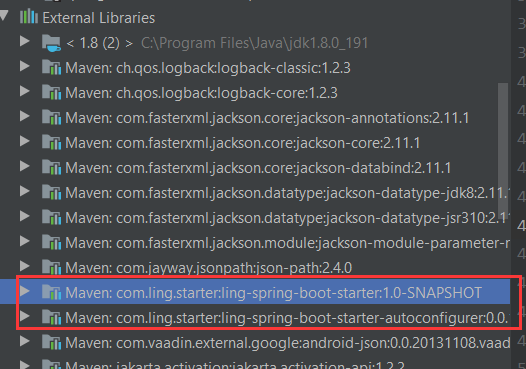
3、导入成功后,可以在依赖库中找到自定义 starter 的包,因为 ling-spring-boot-starter 的 pom 文件已经导入了 ling-spring-boot-starter-autoconfigurer 的依赖。所以会自动导入ling-spring-boot-starter 所依赖的包。
4、创建并配置 properties.yml 文件(配置是没有相关提示属于正常,按照约定好的字首和属性名配置即可)
ling:

  hello:

    prefix: 你好呀

    suffix: 欢迎你。。。
5、编写Contriller 类
@RestController  //非JSON 数据,可用 @RestController

/* @RestController== @ResponseBody +@Controller*/

public class HWcontroller {

    @Autowired

    HelloService helloService;

    @RequestMapping("/hello")

    public String hello(){

        return helloService.syaHello("son");

    }

}
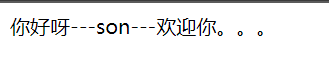
6、启动工程,访问
http://localhost:8080/hello
SpringBoot --- 自定义 Starter的更多相关文章
- SpringBoot自定义starter及自动配置
SpringBoot的核心就是自动配置,而支持自动配置的是一个个starter项目.除了官方已有的starter,用户自己也可以根据规则自定义自己的starter项目. 自定义starter条件 自动 ...
- SpringBoot自定义Starter实现
自定义Starter: Starter会把所有用到的依赖都给包含进来,避免了开发者自己去引入依赖所带来的麻烦.Starter 提供了一种开箱即用的理念,其中核心就是springboot的自动配置原理相 ...
- springboot 自定义starter之AutoConfiguration【原】
八.自定义starter AutoConfiguration: 1.这个场景需要使用到的依赖是什么? 没有特别依赖的配置 2.如何编写自动配置 @Configuration //指定这个类是一个配置类 ...
- SpringBoot自定义starter开发分布式任务调度实践
概述 需求 在前面的博客<Java定时器演进过程和生产级分布式任务调度ElasticJob代码实战>中,我们已经熟悉ElasticJob分布式任务的应用,其核心实现为elasticjob- ...
- SpringBoot系列三:SpringBoot自定义Starter
在前面两章 SpringBoot入门 .SpringBoot自动配置原理 的学习后,我们对如何创建一个 SpringBoot 项目.SpringBoot 的运行原理以及自动配置等都有了一定的了解.如果 ...
- springboot自定义starter
1,创建一个空工程 2,new一个Modules ---------------- maven (启动器) : springboottest-spring-boot-starter 3,new一个M ...
- Springboot自定义starter打印sql及其执行时间
前面写到了通过实现mybatis提供的org.apache.ibatis.plugin.Interceptor接口实现了打印SQL执行时间,并格式化SQL及其参数,如果我们使用的是ssm还得再配置文件 ...
- Spring-Boot自定义Starter实践
此文已由作者王慎为授权网易云社区发布. 欢迎访问网易云社区,了解更多网易技术产品运营经验. disconf-spring-boot-starter 使用方法: 引入maven依赖: <depen ...
- SpringBoot之旅第六篇-启动原理及自定义starter
一.引言 SpringBoot的一大优势就是Starter,由于SpringBoot有很多开箱即用的Starter依赖,使得我们开发变得简单,我们不需要过多的关注框架的配置. 在日常开发中,我们也会自 ...
随机推荐
- pandas之时间数据
1.时间戳Timestamp() 参数可以为各种形式的时间,Timestamp()会将其转换为时间. time1 = pd.Timestamp('2019/7/13') time2 = pd.Time ...
- ✨Shell脚本实现Base64 加密解密
加密算法 # !/bin/bash # 全局变量 str="" base64_encode_string(){ # 源数据 source_string=$1 echo " ...
- 修改git上传代码的作者姓名
本文参考https://www.cnblogs.com/weiaiqi/p/11842515.html 随着IT行业的不断壮大,开源的东西越来越多,使用git来进行代码管理的人自然也越来越多,而且很多 ...
- 使用opencv为没有透明通道的图像加入透明通道
在图像处理中,我们经常需要处理带透明通道的图片,比如为图片或视频添加水印,为图片或视频添加字幕.贴图等.然而,我们的素材图片未必总是带有透明通道.比如,素材的背景本该透明的地方,却是黑色和白色.有时, ...
- 8-Pandas之如何查找存在缺失值的行(any与all详解)
若有一份数据,简略如下: 国家 啤酒消耗量 烈酒消耗量 红酒消耗量 总酒精消耗量 所在大洲 0 Afghanistan 0.0 0.0 0.0 0.0 AS 1 Albania 89.0 132. ...
- PHP array_flip() 函数
------------恢复内容开始------------ 实例 反转数组中的键名和对应关联的键值: <?php$a1=array("a"=>"red&qu ...
- PHP count_chars() 函数
实例 返回一个字符串,包含所有在 "Hello World!" 中使用过的不同字符(模式 3): <?php高佣联盟 www.cgewang.com$str = " ...
- Calibre LVS BOX 详细用法
https://www.cnblogs.com/yeungchie/ LVS BOX的使用对于后端的团队协作起到非常便利的作用. 通过在lvs rules file添加BOX的相关语句可以达到这个目的 ...
- HDU Typewriter 6583 dp SAM 卡常
LINK:Typewriter 好久没写SAM了 什么都给忘了. 写了大概2h.感觉被卡常还看了题解. 考虑dp 然后容易想到维护前面的一个j决策 尽可能小. 然后每次考虑向后加一个字符 不过不行就跳 ...
- 题解 Luogu P1514 【引水入城】
有一种神奇的算法叫做floodfill 就是一个n*m的矩阵,a[i][j]为当前高度,我们可以任选一个点倒水,开始bfs,如果要搜的点没有被搜到过,并且高度小于当前的点,我们就把这个点加入队列中 而 ...