
android 错误解决
转自:https://blog.csdn.net/gbstyle/article/details/82926358
错误1:
com.android.ddmlib.AdbCommandRejectedException: device unauthorized.
This adb server's $ADB_VENDOR_KEYS is not set
Try 'adb kill-server' if that seems wrong.
Otherwise check for a confirmation dialog on your device.
Error while Installing APK
解决方案:
手机-设置-应用程序-开发-usb调试打开再关闭一次
错误2:
关于FrameLayout的介绍是:FrameLayout内的子View会被绘制在一个栈中,最后添加的组件会被添加在最上面。按照这样的说法,应该是ImageView会覆盖在Button上面的。但是实际的效果却是这个样子的:
按钮显示在了FrameLayout的顶部。
原因分析:
按钮在Lollipop以及之后的版本,默认都有一个高度,这个也就是造成为什么在FrameLayout中绘制的时候会被绘制在最上层。
解决方法一:
设置Button的stateListAnimator属性
android:stateListAnimator="@null"
不过这样做的话,按钮的阴影效果也会不见
解决方法二:
设置其他View的elevation属性
<ImageView
android:layout_width="wrap_content"
android:layout_height="wrap_content"
android:src="@mipmap/ic_launcher"
android:elevation="2dp"
错误3:
转自https://blog.csdn.net/crheh/article/details/78358004
android studio 运行出现“The activity must be exported or contain an intent-filter
在studio界面的run下面有一个框
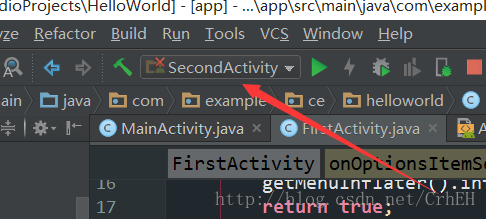
在里面选app文件夹 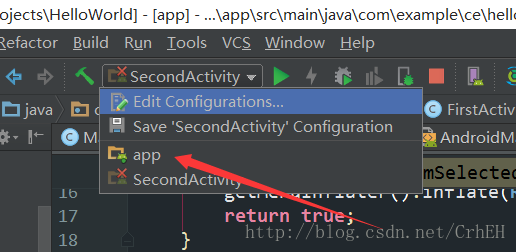
之后再运行就好了
android 错误解决的更多相关文章
- UnityError 打包到Android错误解决
- 创建Android项目及常见错误解决
首先打开eclipse,点击右上角有一个这个小按钮,点击java然后OK 因为切换到这个视图来创建android程序更加方便,然后点击 Next Next 这个地方可以修改android应用程序的图标 ...
- Android ROM开发(二)——ROM架构以及Updater-Script脚本分析,常见的Status错误解决办法
Android ROM开发(二)--ROM架构以及Updater-Script脚本分析,常见的Status错误解决办法 怪自己二了,写好的不小心弄没了,现在只好重新写一些了,上篇简单的配置了一下环境, ...
- android studio 更新 Gradle错误解决方法(Gradle sync failed)
android studio 更新 Gradle错误解决方法 Android Studio每次更新版本都会更新Gradle这个插件,但由于长城的问题每次更新都是失败,又是停止在Refreshing ...
- 安卓安装提示:Android SDK requires Android Developer Toolkit version 21.1.0 or above. (错误解决方法)
安卓安装提示:Android SDK requires Android Developer Toolkit version 21.1.0 or above. (错误解决方法) 主要是因为版本号不正确 ...
- Android Studio Eclipse运行时出现 finished with non-zero exit value 2 错误解决方法
作者:程序员小冰,CSDN博客:http://blog.csdn.net/qq_21376985 QQ986945193 微博:http://weibo.com/mcxiaobing Error:Ex ...
- Android 错误集合
1. Error:java.util.concurrent.ExecutionException: com.android.tools.aapt2.Aapt2Exception: AAPT2 erro ...
- Visual Studio找不到adb.exe错误解决
Visual Studio找不到adb.exe错误解决 错误信息:Cannot find adb.exe in specified SDK path.出现这种情况,是因为没有安装Android SDK ...
- Xamarin提示安装包错误解决办法
Xamarin提示安装包错误解决办法大学霸 Xamarin提示安装包错误,错误信息类似于:Please install package:'Xamarin.Android.Support.v7.Medi ...
随机推荐
- Mac OS 安装 MySQL5.7
在 macOS 上安装 MySQL 5.7 安装 Homebrew $ /usr/bin/ruby -e "$(curl -fsSL https://raw.githubuserconten ...
- axios请求数据完整
<template> <!-- 所有的内容要被根节点包含起来 --> <div id="home"> 首页组件 <button @clic ...
- 反射load,loadfile,LoadFrom区别
反射加载数据用法 Load Assembly assembly = Assembly.Load("Ruanmou.DB.MySql");//dll名称无后缀 从当前目录加载dll ...
- ISO/IEC 9899:2011 条款6.5——表达式
6.5 表达式 1.一个表达式是操作符与操作数的一个序列,这些操作符与操作数指定了一个值的计算,或指派一个对象或一个函数,或是生成副作用,或执行上述操作的组合.对一个操作符的操作数的值计算顺序排在对该 ...
- ISO/IEC 9899:2011 条款6.5.17——逗号操作符
6.5.17 逗号操作符 语法 1.expression: assignment-expression expression , assignment-expression 语义 2.一个 ...
- pytorch怎么使用定义好的模型的一部分
Encoder代码为: .输入图片的通道nc=.ndf=. def __init__(self,isize,nz,nc,ndf,ngpu,n_exter_layers=,add_final_conv= ...
- 全面系统Python3入门+进阶-1-7 课程内容与特点
结束
- String类型字符 常用的方法
例子: String r=“我是谁” System.out.println(r.length())
- 【linux基础-err】 tar命令-stdin: not in gzip format
problem gzip: stdin: not in gzip format tar: Error is not recoverable: exiting now 解决方法 最后发现下载的压缩文件有 ...
- 【Leetcode_easy】1022. Sum of Root To Leaf Binary Numbers
problem 1022. Sum of Root To Leaf Binary Numbers 参考 1. Leetcode_easy_1022. Sum of Root To Leaf Binar ...