
WPF—TreeView无限极绑定集合形成树结构
1.如图所示:绑定树效果图
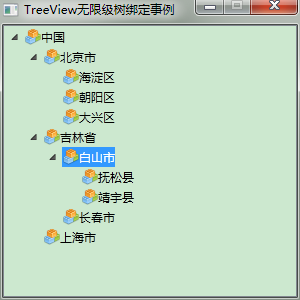
2.前台Xaml代码:
<Window x:Class="WpfTest.MainWindow"

        xmlns="http://schemas.microsoft.com/winfx/2006/xaml/presentation"

        xmlns:x="http://schemas.microsoft.com/winfx/2006/xaml"

        xmlns:mode="clr-namespace:WpfTest"

        Title="TreeView无限级树绑定事例" Height="" Width="" WindowStartupLocation="CenterScreen" ResizeMode="CanMinimize">

    <Grid>

        <Grid.Resources>

            <HierarchicalDataTemplate DataType="{x:Type mode:Node}" ItemsSource="{Binding Nodes}">

                <StackPanel Orientation="Horizontal" Margin="0,2,0,2">

                    <!--<Image Source="pack://application:,,,/WpfTest;Component/Resources/KnowDot.png" Width="" Height="" />-->

                    <!--<Image Source="Resources/KnowDot.png" Width="" Height="" />-->

                    <Image Source="/WpfTest;Component/Resources/KnowDot.png" Width="" Height="" />

                    <TextBlock Text="{Binding Name}" ToolTip="{Binding Name}" Tag="{Binding}"/>

                </StackPanel>

            </HierarchicalDataTemplate>

        </Grid.Resources>

        <TreeView Name="TreeView"/>

    </Grid>

</Window>
2.后台cs代码:采用递归无限极向下查询
using System;

using System.Collections.Generic;

using System.Linq;

using System.Text;

using System.Windows;

using System.Windows.Controls;

using System.Windows.Data;

using System.Windows.Documents;

using System.Windows.Input;

using System.Windows.Media;

using System.Windows.Media.Imaging;

using System.Windows.Navigation;

using System.Windows.Shapes;

using System.Threading;

using System.Diagnostics;

using System.Windows.Markup;

namespace WpfTest

{

    /// <summary>

    /// MainWindow.xaml 的交互逻辑

    /// </summary>

    public partial class MainWindow : Window

    {

        public MainWindow()

        {

            InitializeComponent();

            List<Node> nodes = new List<Node>()

            {

                new Node { ID = , Name = "中国" },

                new Node { ID = , Name = "北京市", ParentID =  },

                new Node { ID = , Name = "吉林省", ParentID =  },

                new Node { ID = , Name = "上海市", ParentID =  },

                new Node { ID = , Name = "海淀区", ParentID =  },

                new Node { ID = , Name = "朝阳区", ParentID =  },

                new Node { ID = , Name = "大兴区", ParentID =  },

                new Node { ID = , Name = "白山市", ParentID =  },

                new Node { ID = , Name = "长春市", ParentID =  },

                new Node { ID = , Name = "抚松县", ParentID =  },

                new Node { ID = , Name = "靖宇县", ParentID =  }

            };

            // 绑定树

            List<Node> outputList = Bind(nodes);

            //(TreeView.SelectedItem as Node).ID

            this.TreeView.ItemsSource = outputList;

            //TreeViewItem item = new TreeViewItem();

            //item.Header = "";

        }

        /// <summary>

        /// 绑定树

        /// </summary>

        List<Node> Bind(List<Node> nodes)

        {

            List<Node> outputList = new List<Node>();

            for (int i = ; i < nodes.Count; i++)

            {

                if (nodes[i].ParentID == -)

                {

                    outputList.Add(nodes[i]);

                }

                else

                {

                    FindDownward(nodes, nodes[i].ParentID).Nodes.Add(nodes[i]);

                }

            }

            return outputList;

        }

        /// <summary>

        /// 递归向下查找

        /// </summary>

        Node FindDownward(List<Node> nodes, int id)

        {

            if (nodes == null) return null;

            for (int i = ; i < nodes.Count; i++)

            {

                if (nodes[i].ID == id)

                {

                    return nodes[i];

                }

                Node node = FindDownward(nodes[i].Nodes, id);

                if (node != null)

                {

                    return node;

                }

            }

            return null;

        }

    }

    public class Node

    {

        public Node()

        {

            this.Nodes = new List<Node>();

            this.ParentID = -;

        }

        public int ID { get; set; }

        public string Name { get; set; }

        public int ParentID { get; set; }

        public List<Node> Nodes { get; set; }

    }

}
WPF—TreeView无限极绑定集合形成树结构的更多相关文章
- [No0000D1]WPF—TreeView无限极绑定集合形成树结构
1.如图所示:绑定树效果图 2.前台Xaml代码: <Window x:Class="WpfTest.MainWindow" xmlns="http://schem ...
- wpf treeview 数据绑定 递归绑定节点
1.先上效果 将所有节点加入ComboBox数据源,在ComboBox中选择时下方Treeview显示该节点下的子节点. 1.xaml文件,将以下代码加入界面合适位置 <StackPanel&g ...
- 转:打造DropDownList,TreeView,ListBox无限极分类目录树
[csharp] view plaincopyprint? #region DropDownList无限递归显示层次关系 /// <summary> /// 创建无限分级下拉列表框 /// ...
- WPF 绑定集合 根据集合个数改变样式 INotifyCollectionChanged
问题:当前ListBox Items 绑定 集合数据源ListA时候:ListA集合数据源中存在另外一个集合ListB,当更改或往ListB集合中添加数据的时候,通知改变? 实体类继承 INotify ...
- WPF Binding学习(四) 绑定各种数据源
转自:http://blog.csdn.net/lisenyang/article/details/18312199 1.集合作为数据源 首先我们先创建一个模型类 public class Stude ...
- WPF TreeView HierarchicalDataTemplate
原文 WPF TreeView HierarchicalDataTemplate HierarchicalDataTemplate 的DataType是本层的绑定,而ItemsSource是绑定下层的 ...
- C#无限极分类树-创建-排序-读取 用Asp.Net Core+EF实现
今天做一个管理后台菜单,想着要用无限极分类,记得园子里还是什么地方见过这种写法,可今天找了半天也没找到,没办法静下心来自己写了: 首先创建节点类(我给它取名:AdminUserTree): /// & ...
- [WPF 基础知识系列] —— 绑定中的数据校验Vaildation
前言: 只要是有表单存在,那么就有可能有对数据的校验需求.如:判断是否为整数.判断电子邮件格式等等. WPF采用一种全新的方式 - Binding,来实现前台显示与后台数据进行交互,当然数据校验方式也 ...
- 【laravel5.4】Baum无限极分类和collect助手函数、transform()中间件(转换数据)方法使用
1.目的,无限极分类 /* * getdepartment:获取[当前登录用户对应公司的所有有效部门] * DB::table ==>返回查询构造器结果,不会返回一个collect实例 * 而 ...
随机推荐
- .NET 集合操作性能
如果单元格的内容是na(not applicatable),就表示这个操作不能应用于这种集合类型.
- [SQL]SQL类似统计功能的sql文
declare @t table(name varchar(),type int) insert into @t union all union all union all union all if ...
- CodeForces 593D【树链剖分】
题意: 给你n个点和n-1条边组成的一棵树,按顺序给出数的每一条边. 询问m次,每次给出一个x求x除以从点a到点b所有边的权值和的乘积,还有修改,给出边的编号,修改某条边的权值. 思路: 树链剖分,用 ...
- [POJ 2443] Set Operation (bitset)
题目链接:http://poj.org/problem?id=2443 题目大意:给你N个集合,每个集合里有若干个数.M个查询,每个查询有a,b两个数.问是否存在一个集合同时包含a,b这两个数.若存在 ...
- (转)Combobox出现System.Data.DataRowView的原因,以及指定ValueMember的时机问题
原文地址 http://blog.csdn.net/lubiaopan/article/details/5915774 当使用Combobox控件时,出现SelectedValue的值为“System ...
- Linux驱动之准备
第一: 开始系统学习Linux驱动,以前断断续续也玩玩了一下,开贴来系统学习Linux驱动. 硬件平台是JZ2440-4.3 ARM9开发板,开发板运行系统版本Linux3.4.2内核(内核移植,下载 ...
- MFC学习 socket
下面未处理异常 tcpserver.cpp #include "WinSock2.h" #include <stdio.h> #pragma comment(lib, ...
- android 数据存储----文件方式 总结
在android中的文件放在不同位置,它们的读取方式也有一些不同. 本文对android中对资源文件的读取.数据区文件的读取.SD卡文件的读取及RandomAccessFile的方式和方法进行了整理. ...
- apache中若干模块的安装
第一次手动安装apache,由于在./configure -prefix=/usr/local/apache2 -enable-module=so这样配置,导致后来不得不手动安装一些模块,遇到了一些坑 ...
- Some regret....
今天是一个败笔,早上10点才起床,下午又不专心看书,晚上把还是不能静下来...... 把所有的时间都花在了那一篇FlowVisor上了,但是却没有任何收获,居然没看懂,等下好好整理一下逻辑. 明天开始 ...