
IT该忍者神龟Instant client required
Apply Navicat Product : Navicat for Oracle, Navicat Premium
Apply Navicat Version No. : All
Instant Client package is required for Basic and TNS connection type. To download Instant Client package (Instant Client Package - Basic), please go to http://www.oracle.com/technetwork/database/features/instant-client/index-097480.html
Note: Navicat version 9 or above, instant client is bundled in Navicat.
Connection Type
- Basic
In Basic mode, Navicat Oracle connects to Oracle through the Oracle Call Interface (OCI). OCI is an application programming interface that allows an application developer to use a third-generation language's native procedure or function calls to access the
Oracle database server and control all phases of SQL statement execution. OCI is a library of standard database access and retrieval functions in the form of a dynamic-link library. - TNS
In TNS mode, Navicat Oracle connects to Oracle server using an alias entry from a tnsnames.ora file.
Windows
Installation Instructions
Note: Navicat version 10 or below, Navicat only support 32-bit instant client.
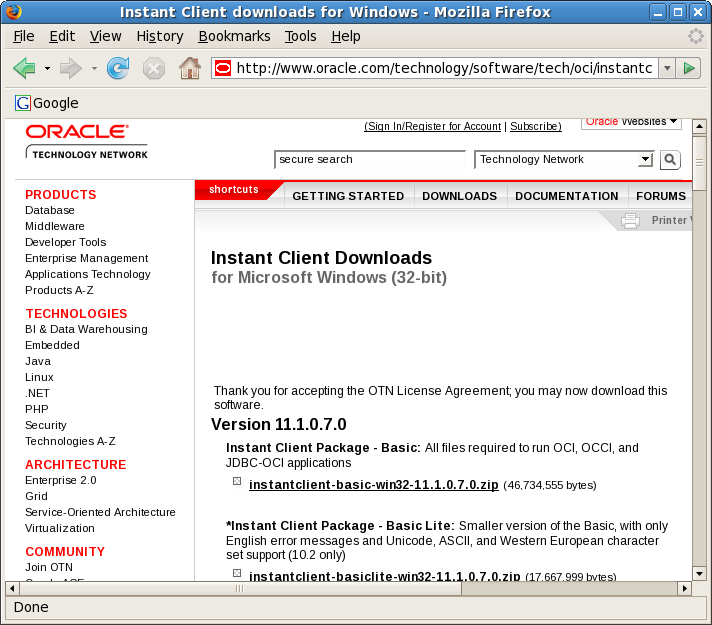
- Download the appropriate Instant Client packages for your platform. All installations REQUIRE the Basic or Basic Lite package.
Note:- For Oracle 9i or above, you need Instant Client 11 or below
- For Oracle 8 and 8i server, you need Instant Client 10 or below
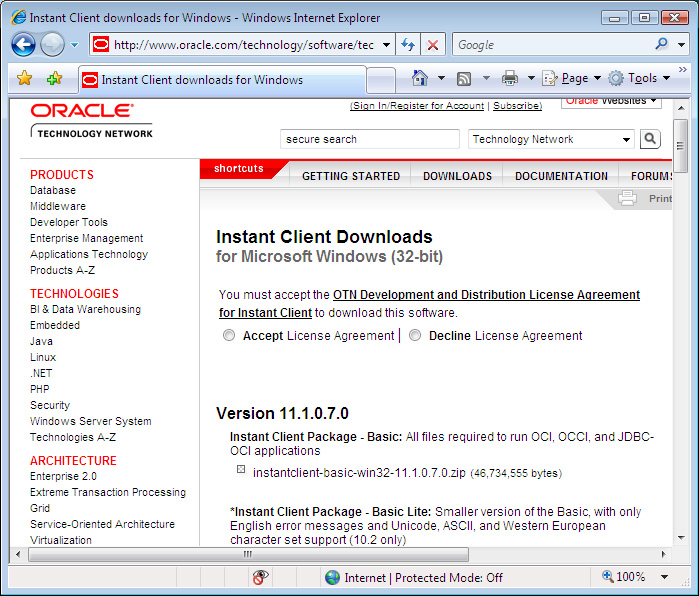
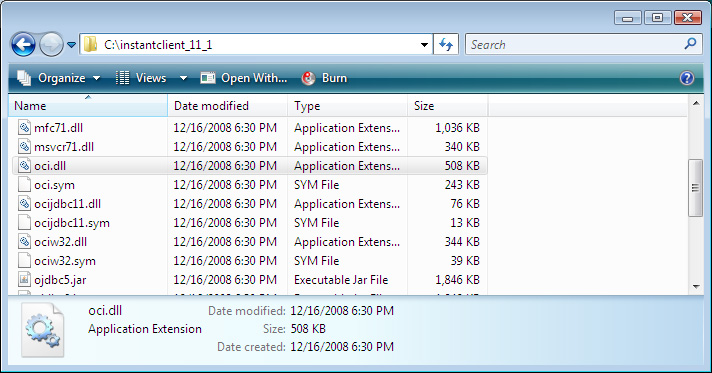
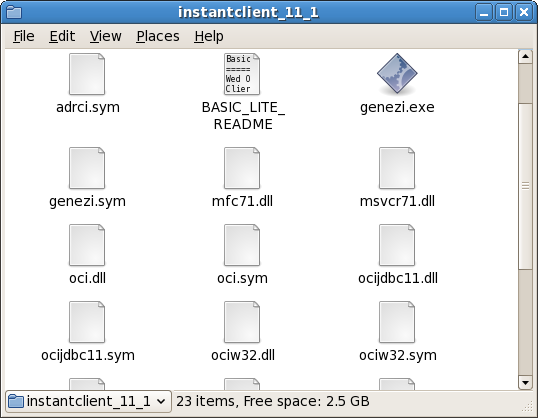
- Unzip the packages into a single directory such as "C:\instantclient_11_1".
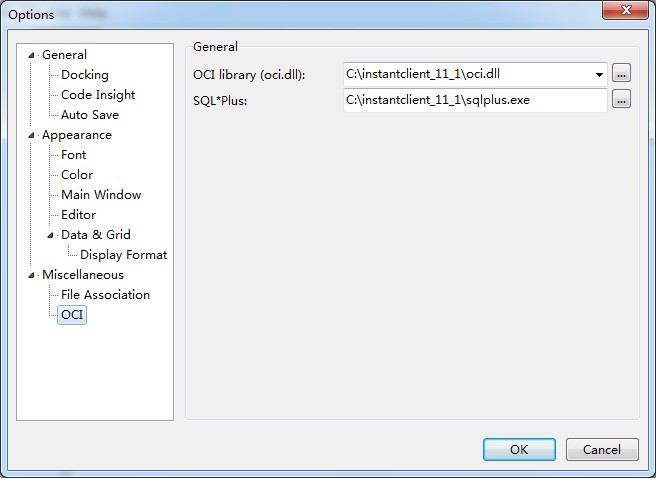
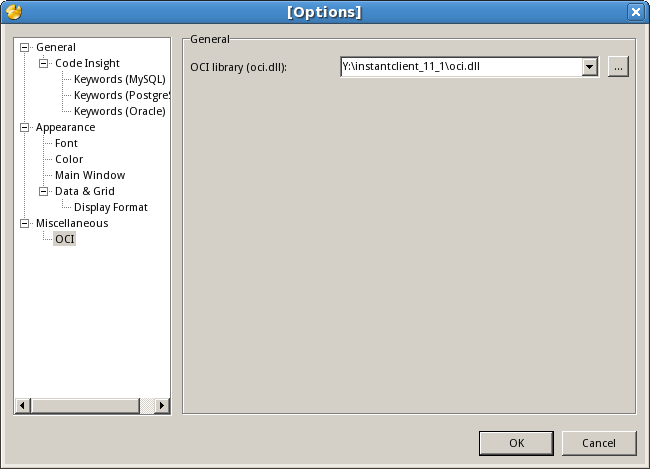
- In Options -> OCI, choose the oci.dll in the directory you defined in Step 2 ("C:\instantclient_11_1\oci.dll").
- Restart Navicat.
Mac
Installation Instructions
Note: Navicat version 10 or below, Navicat only support 32-bit instant client.
- Download the appropriate Instant Client packages for your platform. All installations REQUIRE the Basic or Basic Lite package.
Hint:- MAC OSX any versions running on PPC cpu should use PPC Navicat and PPC Instant Client.
- MAC OSX 10.4 or below running on INTEL cpu should use PPC Navicat and PPC Instant Client.
- MAC OSX 10.5 up running on INTEL cpu should use X86 Navicat and x86 Instant Client.
- Just simply unzip the packages and copy all files under /usr/lib or ~/lib. (Copy all files under /usr/lib for Mac OS X 10.3, otherwise, copy all files under /usr/lib or ~/lib for Mac OS X 10.4 or above.)
Tips: Besides, you can place the instant client in anywhere you like and then specify the path in Preference.
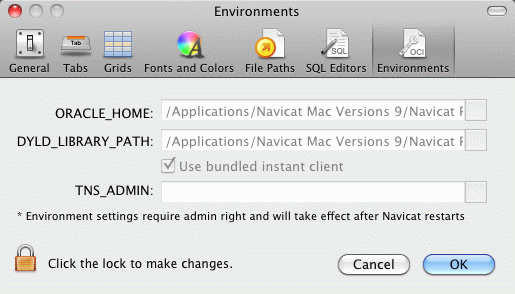
- Restart Navicat.
Linux
Installation Instructions
- Download Instant Client packages for Microsoft Windows (32-bit). All installations REQUIRE the Basic or Basic Lite package.
Note:- For Oracle 9i or above, you need Instant Client 11 or below
- For Oracle 8 and 8i server, you need Instant Client 10 or below
- Unzip the packages into a single directory such as "/home/test/instantclient_11_1".
- In Options -> OCI, choose the oci.dll in the directory you defined in Step 2 ("/home/test/instantclient_11_1").
- Restart Navicat.
ORA-12737: Instant Client Light: unsupported server character set CHS16GBK
Google,解释例如以下:
ORA-12737:
Instant Client Light: unsupported server character set string
Cause: The character set specified is not allowed for this operation or is invalid. Instant Client Light has only minimal character sets.
Action: Do not use Instant Client Light for this character set
2、首先,我们打开“tools”-->"options"菜单,见到例如以下界面。根据OCI library(oci.dll) 路径,导航到 navicat oci 文件夹下,备份里面的文件(通过在该文件夹新建bak文件夹,将“%dir%/Navicat
Lite\instantclient_10_2”路径下的全部dll文件剪切到bak目录)。
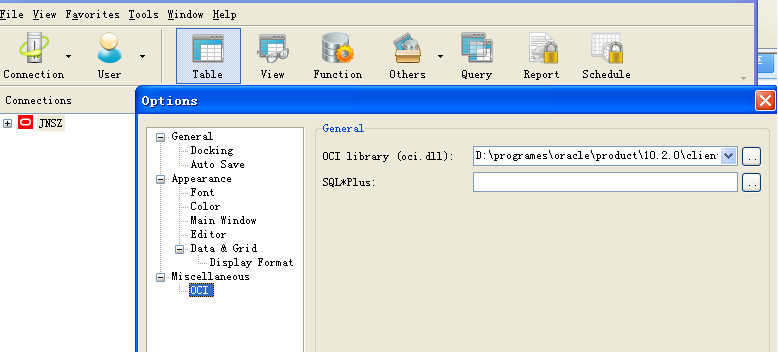
3、在oracle client安装文件夹bin/文件夹下,找到例如以下几个.dll文件
4、将上面所列文件放置到“%dir%/Navicat Lite\instantclient_10_2” 文件夹下,又一次启动navcat就可以。
版权声明:本文博客原创文章,博客,未经同意,不得转载。
IT该忍者神龟Instant client required的更多相关文章
- Oracle Instant Client的安装和使用
转自:https://www.cnblogs.com/chinalantian/archive/2011/09/09/2172145.html 根据自己需求到Oracle网站(http://www.o ...
- win7 PLSQL Developer 10/11/12 连接 Oracle 10/11/12 x64位数据库配置详解(与32位一样,只要注意对应Oracle Instant Client版本) tns 错误和 nls错误
环境win7 x64 PLSQL Developer 10 与 11 Oracle Instant Client 10 与 12 参考http://blog.csdn.net/chen_zw/arti ...
- 如何安装Oracle Instant Client
Oracle Instant Client是Oracle发布的轻量级数据库客户端,下面我们来看看官方的定义: Instant Client allows you to run your applica ...
- ORA-12737: Instant Client Light: unsupported server character set CHS16GBK/ZHS16GBK解决方案
二.Navicat for Oracle的配置 1.启动该工具,出现如下的开始界面,单击“连接”选项,进行连接数据库,如图所示: 6.在“新建连接”对话框中,输入任意的连接名,选择默认的连接类型,输入 ...
- navicat连接oracle报错ORA-12737: Instant Client Light: unsupported server character set CHS16GBK”
原文如下http://blog.163.com/cp7618@yeah/blog/static/7023477720142154449893/?COLLCC=1318255100& 这个工具可 ...
- ORACLE Instant Client 配置
http://www.oracle.com/technetwork/cn/database/features/instant-client/index-092699-zhs.html 在官网下载对应的 ...
- 通过Instant Client包来使用SQL*PLUS
1.首先下载两个程序包: Instant Client Package - Basic(或Instant Client Package - Basic Lite)包 Instant Client Pa ...
- 使用Instant Client配置PL/SQL Developer
之前使用PL/SQL Developer都是直接在本机安装完整版的Oracle Database,一是省事,二是可以在本机做一些demo测试:最近换了台电脑,感觉Instant Client更简单一些 ...
- navicat连接oracle一个错误:ORA-12737 Instant Client Light:unsupported server character set ZHS16GBK
今天使用Navicat连接Oracle数据库.它报告了以下错误:"ORA-12737 Instant Client Light:unsupported server character se ...
随机推荐
- android 构建数据库SQLite
1.首先我们需要一个空白的eclipse android工程 2.然后修改AndroidManifest.xml 在<application></application>标签里 ...
- JAVA GUI学习 - JTable表格组件学习_C ***
/** * JTable高级应用 * @author Wfei * */ public class JTableKnow_C extends JFrame { JTable jTable; MyJMe ...
- 利用Crowbar抓取网页异步加载的内容 [Python俱乐部]
利用Crowbar抓取网页异步加载的内容 [Python俱乐部] 利用Crowbar抓取网页异步加载的内容 在做 Web 信息提取.数据挖掘的过程中,一个关键步骤就是网页源代码的获取.但是出于各种原因 ...
- GLSL中的各种变量总结
1.uint CreateShader(enum type) : 创建空的shader object; type: VERTEX_SHADER, 2.void ShaderSource(uint sh ...
- Android调用系统关机与重启功能
我是在android源码里编译的package/apps/,因为需要调用的关机接口是不对上层开放的,在eclipse里面不能调用. 我主要是介绍调用android的关机功能,因为在调试过程中,关机的一 ...
- c++实现精确计时
//获取比較准确是程序执行时间 #include<iostream> #include<windows.h> using namespace std; int main(voi ...
- mysql待整理
1. MYSQL SQL_NO_CACHE的真正含义 http://www.dewen.org/q/5149/Mysql 是 结果不缓存,但查询还是缓存了. 如果要重新测试,就在查询前先执行一下&qu ...
- 【转】Ubuntu下deb包的安装方法
[转]Ubuntu下deb包的安装方法 deb是debian linus的安装格式,跟red hat的rpm非常相似,最基本的安装命令是:dpkg -i file.deb dpkg 是Debian P ...
- Codeforces 492B B. Vanya and Lanterns
Codeforces 492B B. Vanya and Lanterns 题目链接:http://acm.hust.edu.cn/vjudge/contest/view.action?cid= ...
- tasklet和工作队列
tasklet机制和工作队列 http://blog.chinaunix.net/uid-28236237-id-3450753.html tasklet原理 http://www.kuqin.com ...