
scrapy各种持久化存储的奇淫技巧
理论
磁盘文件:
基于终端指令
1)保证parse方法返回一个可迭代类型的对象(存储解析到的页面内容)
2)使用终端指令完成数据存储到指定磁盘文件中的操作,如:scrapy crawl 爬虫文件名称 -o 磁盘文件.后缀 --nolog
基于管道
items.py:存储解析到的页面数据
pipelines.py:处理持久化存储的相关操作
代码实现流程:
1)将解析到的页面数据存储到item对象
2)使用关键字yield将items提交给管道文件处理
3)在管道文件中编写代码完成数据存储的操作
4)在配置文件中开启管道操作
数据库:
基于mysql存储
基于Redis存储
代码实现流程:
1)将解析到的页面数据存储到item对象
2)使用关键字yield将items提交给管道文件处理
3)在管道文件中编写代码完成数据存储的操作
4)在配置文件中开启管道操作
思考:
如何爬取糗事百科多页面数据和将数据同时存储到磁盘文件、MySQL、Redis中?
问题一的解决方案:请求的手动发送
问题二的解决方案:
1)在管道文件中编写对应平台的管道类
2)在配置文件中对自定义的管道类进行生效操作
练习
需求:爬取糗事百科中作者和内容并基于终端指令存储
qiushi.py
 1 # -*- coding: utf-8 -*-

 2 import scrapy

 3 class QiushiSpider(scrapy.Spider):

 4     name = 'qiushi'

 5     # allowed_domains = ['www.xxx.com']

 6     start_urls = ['https://www.qiushibaike.com/text/']

 7     def parse(self, response):

 8         div_list=response.xpath('//div[@id="content-left"]/div')

 9         data_list=[]

10         for div in div_list:

11             author=div.xpath('.//div[@class="author clearfix"]/a[2]/h2/text()').extract_first()

12             content=div.xpath('.//div[@class="content"]/span/text()').extract_first()

13             dict={

14                 'author':author,

15                 'content':content

16             }

17             data_list.append(dict)

18         return data_list
settings.py
1 USER_AGENT = 'Mozilla/5.0 (Windows NT 10.0; WOW64) AppleWebKit/537.36 (KHTML, like Gecko) Chrome/70.0.3538.25 Safari/537.36 Core/1.70.3704.400 QQBrowser/10.4.3587.400'

2 ROBOTSTXT_OBEY = False
终端操作:

需求:爬取糗事百科中作者和内容并基于管道存储
qiushi.py
 1 # -*- coding: utf-8 -*-

 2 import scrapy

 3 from qiushiProject.items import QiushiprojectItem

 4 class QiushiSpider(scrapy.Spider):

 5     name = 'qiushi'

 6     # allowed_domains = ['www.xxx.com']

 7     start_urls = ['https://www.qiushibaike.com/text/']

 8     def parse(self, response):

 9         div_list=response.xpath('//div[@id="content-left"]/div')

10         for div in div_list:

11             author=div.xpath('.//div[@class="author clearfix"]/a[2]/h2/text()').extract_first()

12             content=div.xpath('.//div[@class="content"]/span/text()').extract_first()

13             #第一步:将解析到的页面数据存储到item对象

14             item=QiushiprojectItem()

15             item['author'] = author

16             item['content'] = content

17             #第二步:使用关键字yield将items提交给管道文件处理

18             yield item
items.py
1 import scrapy

2 class QiushiprojectItem(scrapy.Item):

3     # define the fields for your item here like:

4     author = scrapy.Field() #声明属性

5     content = scrapy.Field()
pipelines.py
 1 class QiushiprojectPipeline(object):

 2     f=None

 3     #该方法只在爬虫开始时调用一次

 4     def open_spider(self,spider):

 5         print('开始爬虫')

 6         self.f=open('./qiushi.txt','w',encoding='utf-8')

 7     #该方法可接受爬虫文件提交过来的item对象,并且对item对象中的数据进行持久化存储

 8     #参数item:接受到的item对象

 9     def process_item(self, item, spider):

10         # 每当爬虫文件向管道提交一次item,则该方法就会被执行一次,故open方法只需打开一次,不然只会写入最后数据

11         print('process_item被调用')

12         #取出item对象中的数据

13         author=item['author']

14         content=item['content']

15         self.f.write(author+":"+content)

16         return item

17     # 该方法只在爬虫结束时调用一次

18     def close_spider(self,spider):

19         print('爬虫结束')

20         self.f.close()
settings.py
1 USER_AGENT = 'Mozilla/5.0 (Windows NT 10.0; WOW64) AppleWebKit/537.36 (KHTML, like Gecko) Chrome/70.0.3538.25 Safari/537.36 Core/1.70.3704.400 QQBrowser/10.4.3587.400'

2 ROBOTSTXT_OBEY = False

3 ITEM_PIPELINES = {

4     'qiushiProject.pipelines.QiushiprojectPipeline': 300,

5  }
终端指令

需求:爬取糗事百科中作者和内容并基于mysql存储
qiushi.py
 1 # -*- coding: utf-8 -*-

 2 import scrapy

 3 from qiushiProject.items import QiushiprojectItem

 4 class QiushiSpider(scrapy.Spider):

 5     name = 'qiushi'

 6     # allowed_domains = ['www.xxx.com']

 7     start_urls = ['https://www.qiushibaike.com/text/']

 8     def parse(self, response):

 9         div_list=response.xpath('//div[@id="content-left"]/div')

10         for div in div_list:

11             author=div.xpath('.//div[@class="author clearfix"]/a[2]/h2/text()').extract_first()

12             content=div.xpath('.//div[@class="content"]/span/text()').extract_first()

13             #第一步:将解析到的页面数据存储到item对象

14             item=QiushiprojectItem()

15             item['author'] = author

16             item['content'] = content

17             #第二步:使用关键字yield将items提交给管道文件处理

18             yield item
items.py
1 import scrapy

2 class QiushiprojectItem(scrapy.Item):

3     # define the fields for your item here like:

4     author = scrapy.Field() #声明属性

5     content = scrapy.Field()
pipelines.py
 1 import pymysql

 2 class QiushiprojectPipeline(object):

 3     conn=None

 4     cursor=None

 5     def open_spider(self,spider):

 6         print('开始爬虫')

 7         self.conn=pymysql.Connect(host='127.0.0.1',port=3306,user='root',password='123456',db='qiushibaike')#链接数据库

 8     def process_item(self, item, spider):

 9         sql='insert into qiushi values("%s","%s")'%(item['author'],item['content'])#插入数据

10         self.cursor=self.conn.cursor()#生成游标对象

11         try:

12             self.cursor.execute(sql)#执行sql语句

13             self.conn.commit()#提交事务

14         except Exception as e:

15             print(e)

16             self.conn.rollback()

17         return item

18     def close_spider(self,spider):

19         print('爬虫结束')

20         self.cursor.close()

21         self.conn.close()
settings.py
1 USER_AGENT = 'Mozilla/5.0 (Windows NT 10.0; WOW64) AppleWebKit/537.36 (KHTML, like Gecko) Chrome/70.0.3538.25 Safari/537.36 Core/1.70.3704.400 QQBrowser/10.4.3587.400'

2 ROBOTSTXT_OBEY = False

3 ITEM_PIPELINES = {

4     'qiushiProject.pipelines.QiushiprojectPipeline': 300,

5  }
启动MySQL数据库,创建数据库qiushibaike和表qiushi
mysql> create database qiushibaike;

mysql> use qiushibaike;

mysql> create table qiushi(author char(20),content char(255));

mysql> desc qiushi;
终端指令

查看数据库
mysql> select * from qiushi;
可视化界面
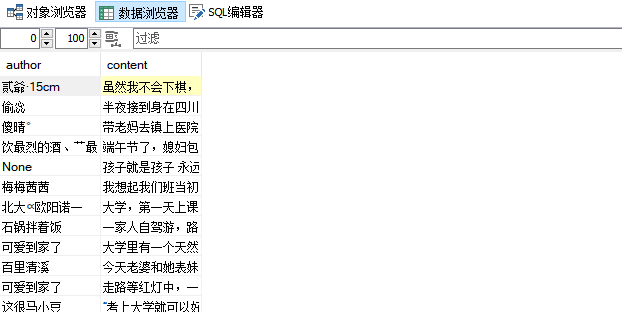
需求:爬取糗事百科中作者和内容并基于Redis存储
qiushi.py
 1 # -*- coding: utf-8 -*-

 2 import scrapy

 3 from qiushiProject.items import QiushiprojectItem

 4 class QiushiSpider(scrapy.Spider):

 5     name = 'qiushi'

 6     # allowed_domains = ['www.xxx.com']

 7     start_urls = ['https://www.qiushibaike.com/text/']

 8     def parse(self, response):

 9         div_list=response.xpath('//div[@id="content-left"]/div')

10         for div in div_list:

11             author=div.xpath('.//div[@class="author clearfix"]/a[2]/h2/text()').extract_first()

12             content=div.xpath('.//div[@class="content"]/span/text()').extract_first()

13             #第一步:将解析到的页面数据存储到item对象

14             item=QiushiprojectItem()

15             item['author'] = author

16             item['content'] = content

17             #第二步:使用关键字yield将items提交给管道文件处理

18             yield item
items.py
1 import scrapy

2 class QiushiprojectItem(scrapy.Item):

3     # define the fields for your item here like:

4     author = scrapy.Field() #声明属性

5     content = scrapy.Field()
pipelines.py
 1 import redis

 2 class QiushiprojectPipeline(object):

 3     conn=None

 4     def open_spider(self,spider):

 5         print('开始爬虫')

 6         self.conn=redis.Redis(host='127.0.0.1',port=6379)#链接数据库

 7     def process_item(self, item, spider):

 8         dict={

 9             'author':item['author'],

10             'content':item['content']

11         }

12         self.conn.lpush('data',str(dict))#data为列表名,前后两者必须为字符串类型

13         return item

14     def close_spider(self,spider):

15         print('爬虫结束')
settings.py
1 USER_AGENT = 'Mozilla/5.0 (Windows NT 10.0; WOW64) AppleWebKit/537.36 (KHTML, like Gecko) Chrome/70.0.3538.25 Safari/537.36 Core/1.70.3704.400 QQBrowser/10.4.3587.400'

2 ROBOTSTXT_OBEY = False

3 ITEM_PIPELINES = {

4     'qiushiProject.pipelines.QiushiprojectPipeline': 300,

5  }
终端指令

启动Redis,并写入数据库
127.0.0.1:6379> lrange data 0 -1
可视化界面

需求:实现爬取糗事百科多页面数据和将数据同时存储到磁盘文件、MySQL、Redis中
qiushi.py
 1 # -*- coding: utf-8 -*-

 2 import scrapy

 3 from qiushiProject.items import QiushiprojectItem

 4 class QiushiSpider(scrapy.Spider):

 5     name = 'qiushi'

 6     # allowed_domains = ['www.xxx.com']

 7     start_urls = ['https://www.qiushibaike.com/text/']

 8     url='https://www.qiushibaike.com/text/page/%s/'

 9     pageNum=1

10     def parse(self, response):

11         div_list=response.xpath('//div[@id="content-left"]/div')

12         for div in div_list:

13             author=div.xpath('.//div[@class="author clearfix"]/a[2]/h2/text()').extract_first()

14             content=div.xpath('.//div[@class="content"]/span/text()').extract_first()

15             item=QiushiprojectItem()

16             item['author'] = author

17             item['content'] = content

18             yield item

19         #13表示最后一页

20         if self.pageNum <= 13:

21             print('第%s页爬取成功并写入文件' % self.pageNum)

22             self.pageNum += 1

23             new_url = 'https://www.qiushibaike.com/text/page/%s/'% self.pageNum

24             yield scrapy.Request(url=new_url,callback=self.parse)
items.py
1 import scrapy

2 class QiushiprojectItem(scrapy.Item):

3     # define the fields for your item here like:

4     author = scrapy.Field() #声明属性

5     content = scrapy.Field()
pipelines.py
 1 import redis

 2 class QiushiprojectPipeline(object):

 3     conn=None

 4     def open_spider(self,spider):

 5         print('开始爬虫')

 6         self.conn=redis.Redis(host='127.0.0.1',port=6379)#链接数据库

 7     def process_item(self, item, spider):

 8         dict={

 9             'author':item['author'],

10             'content':item['content']

11         }

12         self.conn.lpush('data',str(dict))#data为列表名,前后两者必须为字符串类型

13         return item

14     def close_spider(self,spider):

15         print('数据已写入Redis数据库中')

16

17 import pymysql

18 class QiushiprojectByMysql(object):

19     conn=None

20     cursor=None

21     def open_spider(self,spider):

22         print('开始爬虫')

23         self.conn=pymysql.Connect(host='127.0.0.1',port=3306,user='root',password='123456',db='qiushibaike')

24     def process_item(self,item,spider):

25         sql='insert into qiushi values ("%s","%s")'%(item['author'],item['content'])

26         self.cursor=self.conn.cursor()

27         try:

28             self.cursor.execute(sql)

29             self.conn.commit()

30         except Exception as e:

31             print(e)

32             self.conn.rollback()

33         return item

34     def close_spider(self,spider):

35         print('数据已写入MySQL数据库中')

36         self.cursor.close()

37         self.conn.close()

38

39 class QiushiprojectByFiles(object):

40     f = None

41     def open_spider(self, spider):

42         print('开始爬虫')

43         self.f = open('./qiushi.txt', 'w', encoding='utf-8')

44     def process_item(self, item, spider):

45         author = str(item['author'])

46         content = str(item['content'])

47         self.f.write(author + ":" + content)

48         return item

49     def close_spider(self, spider):

50         print('数据已写入到磁盘文件中')

51         self.f.close()
settings.py
1 USER_AGENT = 'Mozilla/5.0 (Windows NT 10.0; WOW64) AppleWebKit/537.36 (KHTML, like Gecko) Chrome/70.0.3538.25 Safari/537.36 Core/1.70.3704.400 QQBrowser/10.4.3587.400'

2 ROBOTSTXT_OBEY = False

3 ITEM_PIPELINES = {

4    'qiushiProject.pipelines.QiushiprojectPipeline': 300,

5    'qiushiProject.pipelines.QiushiprojectByMysql': 400,

6    'qiushiProject.pipelines.QiushiprojectByFiles': 500,

7 }
终端指令

scrapy各种持久化存储的奇淫技巧的更多相关文章
- 优化DP的奇淫技巧
DP是搞OI不可不学的算法.一些丧心病狂的出题人不满足于裸的DP,一定要加上优化才能A掉. 故下面记录一些优化DP的奇淫技巧. OJ 1326 裸的状态方程很好推. f[i]=max(f[j]+sum ...
- 12个实用的 Javascript 奇淫技巧
这里分享12个实用的 Javascript 奇淫技巧.JavaScript自1995年诞生以来已过去了16个年头,如今全世界无数的网页在依靠她完成各种关键任务,JavaScript曾在Tiobe发布的 ...
- NGINX的奇淫技巧 —— 5. NGINX实现金盾防火墙的功能(防CC)
NGINX的奇淫技巧 —— 5. NGINX实现金盾防火墙的功能(防CC) ARGUS 1月13日 发布 推荐 0 推荐 收藏 2 收藏,1.1k 浏览 文章整理中...... 实现思路 当服务器接收 ...
- NGINX的奇淫技巧 —— 3. 不同域名输出不同伺服器标识
NGINX的奇淫技巧 —— 3. 不同域名输出不同伺服器标识 ARGUS 1月13日 发布 推荐 0 推荐 收藏 6 收藏,707 浏览 大家或许会有这种奇葩的需求...要是同一台主机上, 需要针对不 ...
- NGINX的奇淫技巧 —— 6. IF实现数学比较功能 (1)
NGINX的奇淫技巧 —— 6. IF实现数学比较功能 (1) ARGUS 1月13日 发布 推荐 0 推荐 收藏 3 收藏,839 浏览 nginx的if支持=.!= 逻辑比较, 但不支持if中 & ...
- Zepto源码分析(二)奇淫技巧总结
Zepto源码分析(一)核心代码分析 Zepto源码分析(二)奇淫技巧总结 目录 * 前言 * 短路操作符 * 参数重载(参数个数重载) * 参数重载(参数类型重载) * CSS操作 * 获取属性值的 ...
- scrapy之持久化存储
scrapy之持久化存储 scrapy持久化存储一般有三种,分别是基于终端指令保存到磁盘本地,存储到MySQL,以及存储到Redis. 基于终端指令的持久化存储 scrapy crawl xxoo - ...
- javascript之奇淫技巧
最近准备面试,复习一下javascript,整理了一些javascript的奇淫技巧~ //为兼容ie的模拟Object.keys() Object.showkeys = function(obj) ...
- Gradle更小、更快构建APP的奇淫技巧
本文已获得原作者授权同意,翻译以及转载原文链接:Build your Android app Faster and Smaller than ever作者:Jirawatee译文链接:Gradle更小 ...
随机推荐
- Spring IOC容器核心流程源码分析
简单介绍 Spring IOC的核心方法就在于refresh方法,这个方法里面完成了Spring的初始化.准备bean.实例化bean和扩展功能的实现. 这个方法的作用是什么? 它是如何完成这些功能的 ...
- Java程序员的推荐阅读书籍
作为Java程序员来说,最痛苦的事情莫过于可以选择的范围太广,可以读的书太多,往往容易无所适从.我想就我自己读过的技术书籍中挑选出来一些,按照学习的先后顺序,推荐给大家,特别是那些想不断提高自己技术水 ...
- Grid布局如何设置动画效果
CS代码 新增 GridLengthAnimation继承自AnimationTimeline public class GridLengthAnimation : AnimationTimeline ...
- etcd学习(6)-etcd实现raft源码解读
etcd中raft实现源码解读 前言 raft实现 看下etcd中的raftexample newRaftNode startRaft serveChannels 领导者选举 启动并初始化node节点 ...
- SQL 练习15
检索" 01 "课程分数小于 60,按分数降序排列的学生信息 SELECT Student.* ,SC.score from Student,SC WHERE sc.cid = ' ...
- 分享一份【饿了么】Java面试专家岗面试题,欢迎留言交流哦!
前段时间有小伙伴去饿了么面试Java专家岗,记录了一面技术相关的问题,大家可以看看. 基础问题 1.数据库事务的隔离级别? 2.事务的几大特性,并谈一下实现原理 3.如何用redis实现消息的发布订阅 ...
- msp432搭建平衡小车(二)
前言 上一节掌握了使用pwm驱动电机,接下来介绍如何使用msp432读取mpu6050数据 正文 首先我们得知道mpu6050通信方式,由于mpu6050只能用i2c通信,所以学会使用msp432的i ...
- 接口测试--测试工具:rap2 接口文档解析
通过百度 OCR 工具识别 rap2 登录中的验证码,从而实现登录~那我们今天来实战解析 rap2 的接口数据,生成我们所需要的接口数据 实践上手 文档分析 1.我们先通过 F12 看看哪个接口是我们 ...
- 4、二进制安装K8s 之 部署kube-controller-manager
二进制安装K8s 之 部署kube-controller-manager 1.创建配置文件 cat > /data/k8s/config/kube-controller-manager.conf ...
- C#基础知识---装箱与拆箱
一.定义 装箱:将值类型转化为引用类型,装箱一般会在堆上分配一块内存,用于存储要转换的值. 拆箱:将引用类型转化为值类型 注:.NET 2.0 引入的泛型其实在很大的程度上解决了装拆箱产生的类型转换问 ...