
SpringBoot-Web-初见
怎么开发一个网站?
目前后端通过修改基本都是可以实现,主要是前端还存在不少问题,所以还是推荐使用
- 模板,更改别人的,成为自己的
- 使用框架,组件,自己手动拼接
- 前端搞定:页面写出来
- 设计数据库(难点)
- 前端可以独立的自动运行,独立化工程
- 数据接口怎么对接:json,对象all in one
- 前后端联调测试
有一个熟悉的后台模板,前端页面自己可以组合出来一个网站的页面,让它独立运行。
静态资源
SpringMVC中所有静态资源或者页面应该放在web目录下,不能直接访问的会放在web/WEB-INF下
找到静态资源的存放目录
SpringBoot项目的静态资源应该放在哪个目录下?
WebMvcAutoConfiguration
//添加资源处理器

public void addResourceHandlers(ResourceHandlerRegistry registry) {

      //如果静态资源已经被自定义了 那么就自定义的生效

            if (!this.resourceProperties.isAddMappings()) {

                logger.debug("Default resource handling disabled");

            } else {

                Duration cachePeriod = this.resourceProperties.getCache().getPeriod();

                CacheControl cacheControl = this.resourceProperties.getCache().getCachecontrol().toHttpCacheControl();

                //获取静态资源方式一:找到webjars/路径下的静态资源 (此方式了解即可 一般不使用)

                if (!registry.hasMappingForPattern("/webjars/**")) {

                    this.customizeResourceHandlerRegistration(registry.addResourceHandler(new String[]{"/webjars/**"}).addResourceLocations(new String[]{"classpath:/META-INF/resources/webjars/"}).setCachePeriod(this.getSeconds(cachePeriod)).setCacheControl(cacheControl));

                }

                String staticPathPattern = this.mvcProperties.getStaticPathPattern();

                //获取静态资源方式二: 获取当前目录下的静态资源 staticPathPattern

                if (!registry.hasMappingForPattern(staticPathPattern)) {

                    this.customizeResourceHandlerRegistration(registry.addResourceHandler(new String[]{staticPathPattern})

                    .addResourceLocations(WebMvcAutoConfiguration.getResourceLocations(this.resourceProperties.getStaticLocations()))

                    .setCachePeriod(this.getSeconds(cachePeriod)).setCacheControl(cacheControl));

                }

            }

        }
点进staticPathPattern继续查看源码,staticPathPattern代表/**
点进(this.resourceProperties.getStaticLocations())会发现以下路径定义
// 访问 /** 会去这几个目录下寻找静态资源

 private static final String[] CLASSPATH_RESOURCE_LOCATIONS = new String[]

 {"classpath:/META-INF/resources/",

 "classpath:/resources/",

 "classpath:/static/",

 "classpath:/public/"};
优先级
| 目录 | 优先级 |
|---|---|
| resources | 高 |
| static | 中 |
| public | 低 |
扩展自定义路径
从源码的第一行我们可以看出,如果静态资源路径被自定义了,那么就会生效自定义的
# 在application配置文件中 设置如下 覆盖默认路径

spring.mvc.static-path-pattern=/tutony
首页定制
在WebMvcAutoConfiguration有:
     //最后会被注入到bean

        @Bean //欢迎页的处理映射

        public WelcomePageHandlerMapping welcomePageHandlerMapping(ApplicationContext applicationContext, FormattingConversionService mvcConversionService, ResourceUrlProvider mvcResourceUrlProvider) {

            WelcomePageHandlerMapping welcomePageHandlerMapping = new WelcomePageHandlerMapping(new TemplateAvailabilityProviders(applicationContext), applicationContext,

            this.getWelcomePage(),

            //可以寻找自定义欢迎页

            this.mvcProperties.getStaticPathPattern());

            welcomePageHandlerMapping.setInterceptors(this.getInterceptors(mvcConversionService, mvcResourceUrlProvider));

            welcomePageHandlerMapping.setCorsConfigurations(this.getCorsConfigurations());

            return welcomePageHandlerMapping;

        }

       // 在静态目录下寻找

        private Optional<Resource> getWelcomePage() {

            String[] locations = WebMvcAutoConfiguration.getResourceLocations(this.resourceProperties.getStaticLocations());

            return Arrays.stream(locations).map(this::getIndexHtml).filter(this::isReadable).findFirst();

        }

        //返回静态资源目录下一个叫 index.html的文件

        private Resource getIndexHtml(String location) {

            return this.resourceLoader.getResource(location + "index.html");

        }
因此从源码可以看出我们在静态资源目录下定义一个index.html文件
SpringBoot将自动识别为首页(欢迎页)
模板引擎Thymeleaf
前端交给我们的页面,是html页面。
如果是我们以前开发,我们需要把他们转成jsp页面,
SpringBoot这个项目首先是以jar的方式,不是war,像第二,我们用的还是嵌入式的Tomcat,所以呢,他现在默认是不支持jsp的。
那不支持jsp,如果我们直接用纯静态页面的方式,那给我们开发会带来非常大的麻烦,那怎么办呢,SpringBoot推荐你可以来使用模板引擎。
模板引擎有非常多,但再多的模板引擎,他们的思想都是一样的:
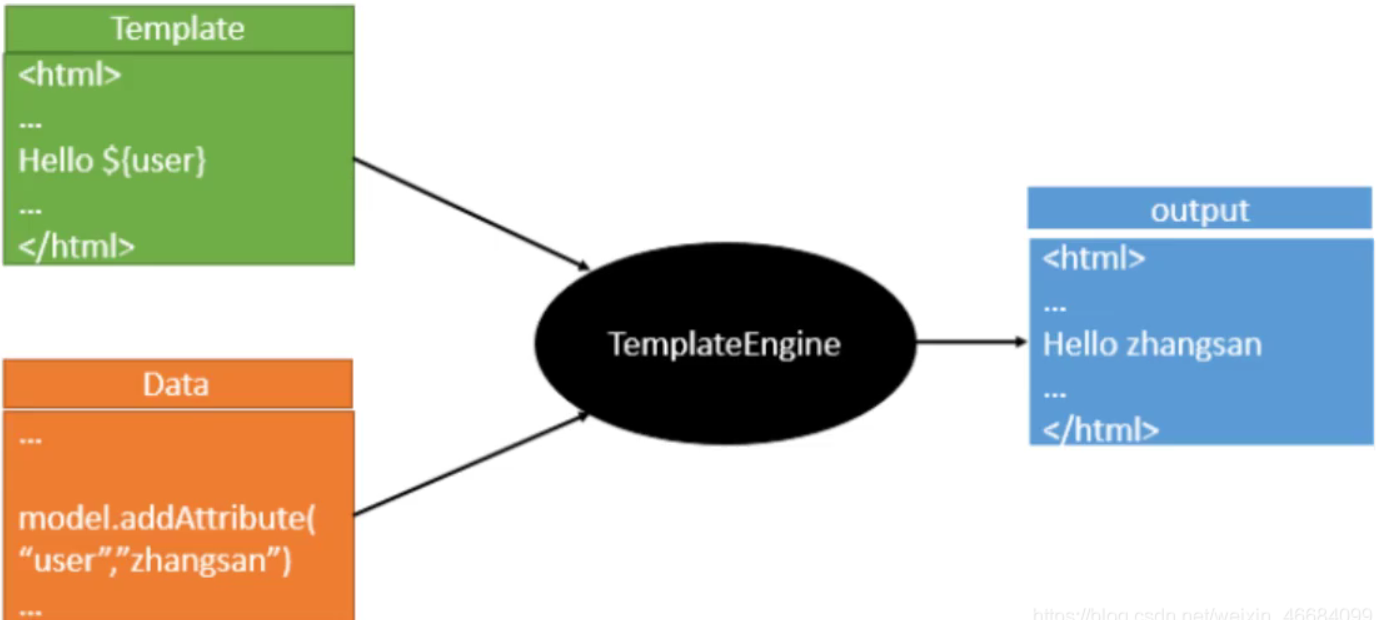
thymeleaf中文文档:https://raledong.gitbooks.io/using-thymeleaf/content/Chapter1/
员工管理系统-初见
员工管理系统-初见 地址:https://gitee.com/zwtgit/spring-boot-web
关于Thymeleaf相关的操作我就不说了,本人不推荐使用。
下面主要说一下SpringBoot的特殊操作。
国际化
什么是页面国际化?
我们在很多网站上看到的中英文切换,这个就叫做国际化
Spring Boot 和 Spring 一脉相承,对于国际化的支持,
默认是通过 AcceptHeaderLocaleResolver 解析器来完成的,
这个解析器,默认是通过请求头的 Accept-Language 字段来判断当前请求所属的环境的,进而给出合适的响应。
国际化实现
1.在resource目录下新建i18n(国际化单词的简写)文件夹
国际化,也叫 i18n,为啥叫这个名字呢?因为国际化英文是 internationalization ,

在 i 和 n 之间有 18 个字母,所以叫 i18n。

我们的应用如果做了国际化就可以在不同的语言环境下,方便的进行切换,

最常见的就是中文和英文之间的切换,国际化这个功能也是相当的常见。
2.创建Login.properties三个配置文件
Login_en_US.properties(英语)

Login.tip=Please sign in

Login.password=Password

Login.remenber=Remember me

Login.username=Username

Login.sign=Sign in

Login_zh_CN.properties(中文)

Login.tip=用户登录

Login.password=密码

Login.remenber=记住我

Login.username=用户名

Login.sign=登录
4.在springboot配置文件application.properties中指定国际化配置文件路径
# 配置国际化文件位置

spring.messages.basename=i18n.Login
5.在Thymeleaf中国际化的配置需要使用#{}包裹
编写国际化配置类
/**

 * 国际化配置类

 * 需要实现LocaleResolver

 */

public class MyLocaleResolover implements LocaleResolver {

    //解析请求

    @Override

    public Locale resolveLocale(HttpServletRequest httpServletRequest) {

        //获取请求中的语言参数

        String languge = httpServletRequest.getParameter("l");

        Locale locale = Locale.getDefault();//如果没有泽使用默认的

        //如果请求的链接携带了国际化参数

        if(!StringUtils.isEmpty(languge)){

            //zh_CN

            String[] s = languge.split("_");

            //国际 地区

            locale = new Locale(s[0], s[1]);

        }

        return locale;

    }

    @Override

    public void setLocale(HttpServletRequest httpServletRequest, HttpServletResponse httpServletResponse, Locale locale) {

    }

}
将国际化配置类放入spring容器
/**

 * 扩展MVC

 */

@Configuration

public class MyMvcConfig implements WebMvcConfigurer {

    /**

     * 视图跳转

     * 添加首页控制

     * url:localhost:8080/ 跳转到首页

     * url:localhost:8080/index.html 跳转到首页

     * @param registry

     */

    @Override

    public void addViewControllers(ViewControllerRegistry registry) {

        registry.addViewController("/").setViewName("index");

        registry.addViewController("/index.html").setViewName("index");

    }

    /**

     * 讲国际化配置放到spring容器管理

     * @return 自定义的国际化配置

     */

    @Bean

    public LocaleResolver localeResolver(){

        return new MyLocaleResolover();

    }

}
页面国际化∶
- 我们需要配置
i18n文件 - 我们如果需要在项目中进行按钮自动切换,我们需要自定义一个组件
LocaleResolver - 记得将自己写的组件配置到spring容器
@Bean - 国际化使用:#{}
登陆功能
编写index.html设置请求路径
编写html
编写LoginController
/**

 * 登录功能实现

 */

@Controller

public class LoginController {

    //登录功能 伪造假数据

    @RequestMapping("/user/login")

    public String login(@RequestParam("username") String username, @RequestParam("password")String password, Model model){

        if (!StringUtils.isEmpty(username.trim()) && password.trim().equals("123456")){

            model.addAttribute("msg","登录成功");

            return "redirect: /main.html"; //重定向

        }

        model.addAttribute("msg","账号或密码错误");

        return "index";

    }

}
编写MVC自定义配置
   /**

     * 视图跳转

     * 添加首页控制

     * url:localhost:8080/ 跳转到首页

     * url:localhost:8080/index.html 跳转到首页

     * @param registry

     */

    @Override

    public void addViewControllers(ViewControllerRegistry registry) {

        registry.addViewController("/").setViewName("index");

        registry.addViewController("/index.html").setViewName("index");

        //登录重定向

        registry.addViewController("/main.html").setViewName("dashboard");

    }
拦截器
修改LoginController
修改LoginController代码,登录成功以后将用户信息放在session中:
   //登录功能 伪造假数据

    @RequestMapping("/user/login")

    public String login(@RequestParam("username") String username, @RequestParam("password")String password, Model model, HttpSession httpSession){

        if (!StringUtils.isEmpty(username.trim()) && password.trim().equals("123456")){

            model.addAttribute("msg","登录成功");

            httpSession.setAttribute("userLoginInfo",username);//登录成功以后将用户信息放置在Session中

            return "redirect:/main.html"; //重定向

        }

        model.addAttribute("msg","账号或密码错误");

        return "index";

    }
编写拦截器
/**

 * 自定义拦截器

 * 拦截未登录的用户

 */

public class MyInterceptor implements HandlerInterceptor {

    //判断用户是否登录 从session中判断

    @Override

    public boolean preHandle(HttpServletRequest request, HttpServletResponse response, Object handler) throws Exception {

        //获取Session

        HttpSession session = request.getSession();

        //判断是否在登录页面

        if(request.getRequestURI().contains("index")){

            return true;

        }

        //判断是否登录过了

        if(session.getAttribute("userLogin")!=null){

            return true;

        }

        // 用户没有登陆跳转到登陆页面

        request.setAttribute("msg","没有登录请先登录!");

        request.getRequestDispatcher("/").forward(request, response);

        return false;

    }

}
在MVC自定义配置类中设置
 //配置拦截器

    @Override

    public void addInterceptors(InterceptorRegistry registry) {

        registry.addInterceptor(new MyInterceptor())

                //拦截哪些请求

                .addPathPatterns("/**")

                //不拦截哪些请求 首页 登录请求 静态资源

                .excludePathPatterns("/","/index.html","/user/login","/css/**","/js/**","/img/**");

    }
SpringBoot-Web-初见的更多相关文章
- springboot+web文件上传和下载
一.首先安装mysql数据库,开启web服务器. 二.pom.xml文件依赖包配置如下: <?xml version="1.0" encoding="UTF-8&q ...
- 如何在spring-boot web项目中启用swagger
swagger的三个项目及其作用 我们打开swagger的官网,会发现有三个swagger相关的项目,它们分别是 swagger-editor 作用是通过写代码,生成文档描述(一个json文件或其他格 ...
- SpringBoot Web开发(5) 开发页面国际化+登录拦截
SpringBoot Web开发(5) 开发页面国际化+登录拦截 一.页面国际化 页面国际化目的:根据浏览器语言设置的信息对页面信息进行切换,或者用户点击链接自行对页面语言信息进行切换. **效果演示 ...
- SpringBoot Web开发(4) Thymeleaf模板与freemaker
SpringBoot Web开发(4) Thymeleaf模板与freemaker 一.模板引擎 常用得模板引擎有JSP.Velocity.Freemarker.Thymeleaf SpringBoo ...
- SpringBoot Web项目中中如何使用Junit
Junit这种老技术,现在又拿出来说,不为别的,某种程度上来说,更是为了要说明它在项目中的重要性. 凭本人的感觉和经验来说,在项目中完全按标准都写Junit用例覆盖大部分业务代码的,应该不会超过一半. ...
- SpringBoot Web篇(二)
摘要 继上一篇 SpringBoot Web篇(一) 文件上传 当我们服务器需要接收用户上传的文件时,就需要使用MultipartFile作为参数接收文件.如下: @PostMapping(" ...
- SpringBoot web获取请求数据【转】
SpringBoot web获取请求数据 一个网站最基本的功能就是匹配请求,获取请求数据,处理请求(业务处理),请求响应,我们今天来看SpringBoot中怎么获取请求数据. 文章包含的内容如下: 获 ...
- springboot web项目创建及自动配置分析(thymeleaf+flyway)
@ 目录 源码分析 webjars thymeleaf thymeleaf语法 springmvc 启动配置原理 集成flyway插件 springboot 创建web项目只需要引入对应的web-st ...
- SpringBoot Web 学习
SpringBoot Web 开发 静态资源 打开WebMvcAutoConfiguration类里面的静态类WebMvcAutoConfigurationAdapter里面的addResourceH ...
- SpringBoot Web学习笔记
一.资源的访问: 情形一.所有的 /webjars/** 都会去 classpath:/META_INFO/resource/webjars/ 下找资源: webjars:以jar包的方式引入静态 ...
随机推荐
- 从小白角度探索Android事件分发机制
今早来上班时看到郭神这边文章超赞,剧情很好引人入胜,特此备份! https://mp.weixin.qq.com/s?__biz=MzA5MzI3NjE2MA==&mid=2650244386 ...
- linux中的防火墙netfilter iptables
目录 一.Linux防火墙基础 1.1 ptables的表.链结构 1.2 数据包控制的匹配流程 二.编写防火墙规则 1.iptables的安装 2.1 基本语法.控制类型 一般在生产环境中设置网络型 ...
- Oracle中使用虚拟表DUAL或XMLTABLE返回顺序数列
在Oracle中使用虚拟表DUAL或XMLTABLE返回顺序数列 使用DUAL表和CONNECT BY LEVEL的特殊用法,返回一个1-10的顺序数列,示例代码如下: SELECT LEVEL FR ...
- Cancer Cell | 肿瘤微环境渐进式调控AML治疗抵抗的分子机制
急性髓系白血病 ( acute myeloid leukemia, AML ) 是成年人常见的血液系统恶性肿瘤之一,主要表现为髓系原始细胞克隆性恶性增殖及正常造血细胞功能抑制.在AML基因突变图谱中, ...
- 端口,InetSocketAddress类的使用
端口 端口表示计算机上的一个程序的进程: 不同的进程有不同的端口号!用来区分软件 被规定:0~65535 TCP,UDP:65535*2 单个协议下,端口号不能冲突 端口分类: 公有端口:0~1023 ...
- 在Ant脚本中使用时间戳
时间戳在项目自动构建中广泛使用,例如在jar文件的manifest文件中,以及最后zip包的文件名里等,时间戳对应的Ant命令是,这个标签既可以用在一个内部,也可以放在外部用作"全局&quo ...
- HttpClient执行post请求
public class Httpclient_post { private ResourceBundle bundle; private String url; private BasicCooki ...
- Java协程编程之Loom项目尝鲜
前提 之前很长一段时间关注JDK协程库的开发进度,但是前一段时间比较忙很少去查看OpenJDK官网的内容.Java协程项目Loom(因为项目还在开发阶段,OpenJDK给出的官网https://ope ...
- Linux 并发服务器编程(多进程)
文章目录 说明 注意事项 server.c client.c 运行截图 说明 在Linux中通过流式套接字编程(TCP),实现一个并发服务器的访问回显,适合刚学完Linux套接字编程的朋友进行巩固训练 ...
- SpringBoot 整合 SpringSecurity 梳理
文档 Spring Security Reference SpringBoot+SpringSecurity+jwt整合及初体验 JSON Web Token 入门教程 - 阮一峰 JWT 官网 Sp ...