
spring boot集成mybatis框架
概述
- 中文官网:http://www.mybatis.cn
- 参考教程:https://www.w3cschool.cn/mybatis
- MyBatis Plus:http://mp.baomidou.com/#/quick-start
- 主要步骤:添加配置、生成MyBatis模板、编写服务接口、配置打包资源、编译运行测试
<!-- mybatis -->

        <dependency>

            <groupId>org.mybatis.spring.boot</groupId>

            <artifactId>mybatis-spring-boot-starter</artifactId>

            <version>2.1.2</version>

        </dependency>

        <!-- mysql -->

        <dependency>

            <groupId>mysql</groupId>

            <artifactId>mysql-connector-java</artifactId>

        </dependency>
数据源配置
适用于Mysql5.7及以下版本,mysql8.0要使用另外的配置
spring:

  datasource:

    driverClassName: com.mysql.jdbc.Driver

    url: jdbc:mysql://192.168.177.67:3316/dbmng?useUnicode=true&zeroDateTimeBehavior=convertToNull&autoReconnect=true&characterEncoding=utf-8

    username: automng

    password: Automng_123
mysql8.0连接配置,不使用SSL,同时指定时区
server:
  port: 9100
spring:
  datasource:
    #com.mysql.jdbc.Driver
    driverClassName: com.mysql.cj.jdbc.Driver
    url: jdbc:mysql://127.0.0.1:3306/dbmng?useUnicode=true&characterEncoding=utf-8&autoReconnect=true&useSSL=false&zeroDateTimeBehavior=convertToNull&serverTimezone=Asia/Shanghai
    username: automng
    password: Automng_123
mybatis架构
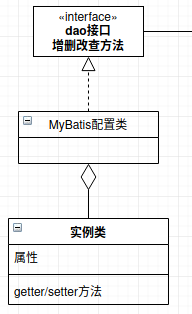
定义interface,xml映射关系,然后通过配置类建立他们之间的实现。
mybatis在项目中的位置,提供JDBC底层服务,业务调用mybatis方法,然后对外提供服务
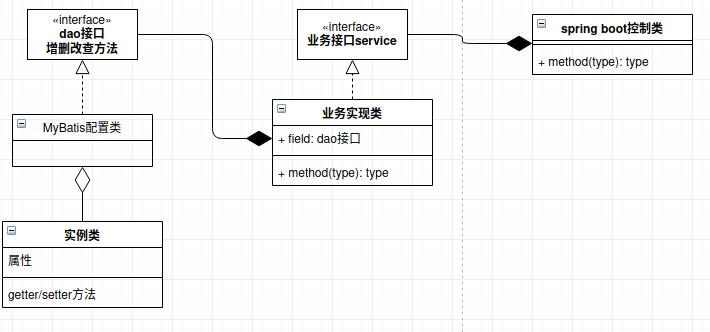
创建一个Java实体类
创建创建一个XML配置文件,通过XML配置文件关联实体类属性与数据库字段
定义一个实体类对应的接口
配置mybatis,将实体类接口转化为实现类
配置一套业务接口与实现类,通过spring注解注入mybatis实现类
定义一套控制类,通过spring注解注入业务接口,对外提供服务
MapperScan注解将对应的接口转化为实现类
package cn.itoracle.dbmng.config;

import javax.sql.DataSource;

import org.apache.ibatis.session.SqlSessionFactory;

import org.mybatis.spring.SqlSessionFactoryBean;

import org.mybatis.spring.annotation.MapperScan;

import org.springframework.beans.factory.annotation.Autowired;

import org.springframework.context.annotation.Bean;

import org.springframework.context.annotation.Configuration;

import org.springframework.core.io.support.PathMatchingResourcePatternResolver;

/**

 * MyBais配置类

 * @author tan

 * @version May 2, 2020 6:11:22 PM

 */

@Configuration

@MapperScan("cn.itoracle.dbmng.**.dao")    // 扫描DAO

public class MyBatisConfig {

    @Autowired

    private DataSource dataSource;

    @Bean

    public SqlSessionFactory sqlSessionFactory() throws Exception {

    SqlSessionFactoryBean sessionFactory = new SqlSessionFactoryBean();

    sessionFactory.setDataSource(dataSource);

    sessionFactory.setTypeAliasesPackage("cn.itoracle.dbmng.**.model");    // 扫描Model

    PathMatchingResourcePatternResolver resolver = new PathMatchingResourcePatternResolver();

    sessionFactory.setMapperLocations(resolver.getResources("classpath*:**/sqlmap/*.xml"));    // 扫描映射文件

    return sessionFactory.getObject();

    }

}
package cn.itoracle.dbmng.dao;

import java.util.List;

import cn.itoracle.dbmng.model.SysUser;

public interface SysUserMapper {

    int deleteByPrimaryKey(Long id);

    int insert(SysUser record);

    int insertSelective(SysUser record);

    SysUser selectByPrimaryKey(Long id);

    int updateByPrimaryKeySelective(SysUser record);

    int updateByPrimaryKey(SysUser record);

    /**

     * 查询全部

     * @return

     */

    List<SysUser> findAll();

}
model类
package cn.itoracle.dbmng.model;

import java.util.Date;

public class SysUser {

    private Long id;

    private String name;

    private String nickName;

    private String avatar;

    private String password;

    private String salt;

    private String email;

    private String mobile;

    private Byte status;

    private Long deptId;

    private String createBy;

    private Date createTime;

    private String lastUpdateBy;

    private Date lastUpdateTime;

    private Byte delFlag;

    public Long getId() {

        return id;

    }

    public void setId(Long id) {

        this.id = id;

    }

    public String getName() {

        return name;

    }

    public void setName(String name) {

        this.name = name == null ? null : name.trim();

    }

    public String getNickName() {

        return nickName;

    }

    public void setNickName(String nickName) {

        this.nickName = nickName == null ? null : nickName.trim();

    }

    public String getAvatar() {

        return avatar;

    }

    public void setAvatar(String avatar) {

        this.avatar = avatar == null ? null : avatar.trim();

    }

    public String getPassword() {

        return password;

    }

    public void setPassword(String password) {

        this.password = password == null ? null : password.trim();

    }

    public String getSalt() {

        return salt;

    }

    public void setSalt(String salt) {

        this.salt = salt == null ? null : salt.trim();

    }

    public String getEmail() {

        return email;

    }

    public void setEmail(String email) {

        this.email = email == null ? null : email.trim();

    }

    public String getMobile() {

        return mobile;

    }

    public void setMobile(String mobile) {

        this.mobile = mobile == null ? null : mobile.trim();

    }

    public Byte getStatus() {

        return status;

    }

    public void setStatus(Byte status) {

        this.status = status;

    }

    public Long getDeptId() {

        return deptId;

    }

    public void setDeptId(Long deptId) {

        this.deptId = deptId;

    }

    public String getCreateBy() {

        return createBy;

    }

    public void setCreateBy(String createBy) {

        this.createBy = createBy == null ? null : createBy.trim();

    }

    public Date getCreateTime() {

        return createTime;

    }

    public void setCreateTime(Date createTime) {

        this.createTime = createTime;

    }

    public String getLastUpdateBy() {

        return lastUpdateBy;

    }

    public void setLastUpdateBy(String lastUpdateBy) {

        this.lastUpdateBy = lastUpdateBy == null ? null : lastUpdateBy.trim();

    }

    public Date getLastUpdateTime() {

        return lastUpdateTime;

    }

    public void setLastUpdateTime(Date lastUpdateTime) {

        this.lastUpdateTime = lastUpdateTime;

    }

    public Byte getDelFlag() {

        return delFlag;

    }

    public void setDelFlag(Byte delFlag) {

        this.delFlag = delFlag;

    }

}
mapper映射文件
<?xml version="1.0" encoding="UTF-8"?>

<!DOCTYPE mapper PUBLIC "-//mybatis.org//DTD Mapper 3.0//EN" "http://www.mybatis.org/dtd/mybatis-3-mapper.dtd">

<mapper namespace="cn.itoracle.dbmng.dao.SysUserMapper">

  <resultMap id="BaseResultMap" type="cn.itoracle.dbmng.model.SysUser">

    <id column="id" jdbcType="BIGINT" property="id" />

    <result column="name" jdbcType="VARCHAR" property="name" />

    <result column="nick_name" jdbcType="VARCHAR" property="nickName" />

    <result column="avatar" jdbcType="VARCHAR" property="avatar" />

    <result column="password" jdbcType="VARCHAR" property="password" />

    <result column="salt" jdbcType="VARCHAR" property="salt" />

    <result column="email" jdbcType="VARCHAR" property="email" />

    <result column="mobile" jdbcType="VARCHAR" property="mobile" />

    <result column="status" jdbcType="TINYINT" property="status" />

    <result column="dept_id" jdbcType="BIGINT" property="deptId" />

    <result column="create_by" jdbcType="VARCHAR" property="createBy" />

    <result column="create_time" jdbcType="TIMESTAMP" property="createTime" />

    <result column="last_update_by" jdbcType="VARCHAR" property="lastUpdateBy" />

    <result column="last_update_time" jdbcType="TIMESTAMP" property="lastUpdateTime" />

    <result column="del_flag" jdbcType="TINYINT" property="delFlag" />

  </resultMap>

  <sql id="Base_Column_List">

    id, name, nick_name, avatar, password, salt, email, mobile, status, dept_id, create_by,

    create_time, last_update_by, last_update_time, del_flag

  </sql>

  <select id="selectByPrimaryKey" parameterType="java.lang.Long" resultMap="BaseResultMap">

    select

    <include refid="Base_Column_List" />

    from sys_user

    where id = #{id,jdbcType=BIGINT}

  </select>

  <delete id="deleteByPrimaryKey" parameterType="java.lang.Long">

    delete from sys_user

    where id = #{id,jdbcType=BIGINT}

  </delete>

  <insert id="insert" parameterType="cn.itoracle.dbmng.model.SysUser">

    insert into sys_user (id, name, nick_name,

      avatar, password, salt,

      email, mobile, status,

      dept_id, create_by, create_time,

      last_update_by, last_update_time, del_flag

      )

    values (#{id,jdbcType=BIGINT}, #{name,jdbcType=VARCHAR}, #{nickName,jdbcType=VARCHAR},

      #{avatar,jdbcType=VARCHAR}, #{password,jdbcType=VARCHAR}, #{salt,jdbcType=VARCHAR},

      #{email,jdbcType=VARCHAR}, #{mobile,jdbcType=VARCHAR}, #{status,jdbcType=TINYINT},

      #{deptId,jdbcType=BIGINT}, #{createBy,jdbcType=VARCHAR}, #{createTime,jdbcType=TIMESTAMP},

      #{lastUpdateBy,jdbcType=VARCHAR}, #{lastUpdateTime,jdbcType=TIMESTAMP}, #{delFlag,jdbcType=TINYINT}

      )

  </insert>

  <insert id="insertSelective" parameterType="cn.itoracle.dbmng.model.SysUser">

    insert into sys_user

    <trim prefix="(" suffix=")" suffixOverrides=",">

      <if test="id != null">

        id,

      </if>

      <if test="name != null">

        name,

      </if>

      <if test="nickName != null">

        nick_name,

      </if>

      <if test="avatar != null">

        avatar,

      </if>

      <if test="password != null">

        password,

      </if>

      <if test="salt != null">

        salt,

      </if>

      <if test="email != null">

        email,

      </if>

      <if test="mobile != null">

        mobile,

      </if>

      <if test="status != null">

        status,

      </if>

      <if test="deptId != null">

        dept_id,

      </if>

      <if test="createBy != null">

        create_by,

      </if>

      <if test="createTime != null">

        create_time,

      </if>

      <if test="lastUpdateBy != null">

        last_update_by,

      </if>

      <if test="lastUpdateTime != null">

        last_update_time,

      </if>

      <if test="delFlag != null">

        del_flag,

      </if>

    </trim>

    <trim prefix="values (" suffix=")" suffixOverrides=",">

      <if test="id != null">

        #{id,jdbcType=BIGINT},

      </if>

      <if test="name != null">

        #{name,jdbcType=VARCHAR},

      </if>

      <if test="nickName != null">

        #{nickName,jdbcType=VARCHAR},

      </if>

      <if test="avatar != null">

        #{avatar,jdbcType=VARCHAR},

      </if>

      <if test="password != null">

        #{password,jdbcType=VARCHAR},

      </if>

      <if test="salt != null">

        #{salt,jdbcType=VARCHAR},

      </if>

      <if test="email != null">

        #{email,jdbcType=VARCHAR},

      </if>

      <if test="mobile != null">

        #{mobile,jdbcType=VARCHAR},

      </if>

      <if test="status != null">

        #{status,jdbcType=TINYINT},

      </if>

      <if test="deptId != null">

        #{deptId,jdbcType=BIGINT},

      </if>

      <if test="createBy != null">

        #{createBy,jdbcType=VARCHAR},

      </if>

      <if test="createTime != null">

        #{createTime,jdbcType=TIMESTAMP},

      </if>

      <if test="lastUpdateBy != null">

        #{lastUpdateBy,jdbcType=VARCHAR},

      </if>

      <if test="lastUpdateTime != null">

        #{lastUpdateTime,jdbcType=TIMESTAMP},

      </if>

      <if test="delFlag != null">

        #{delFlag,jdbcType=TINYINT},

      </if>

    </trim>

  </insert>

  <update id="updateByPrimaryKeySelective" parameterType="cn.itoracle.dbmng.model.SysUser">

    update sys_user

    <set>

      <if test="name != null">

        name = #{name,jdbcType=VARCHAR},

      </if>

      <if test="nickName != null">

        nick_name = #{nickName,jdbcType=VARCHAR},

      </if>

      <if test="avatar != null">

        avatar = #{avatar,jdbcType=VARCHAR},

      </if>

      <if test="password != null">

        password = #{password,jdbcType=VARCHAR},

      </if>

      <if test="salt != null">

        salt = #{salt,jdbcType=VARCHAR},

      </if>

      <if test="email != null">

        email = #{email,jdbcType=VARCHAR},

      </if>

      <if test="mobile != null">

        mobile = #{mobile,jdbcType=VARCHAR},

      </if>

      <if test="status != null">

        status = #{status,jdbcType=TINYINT},

      </if>

      <if test="deptId != null">

        dept_id = #{deptId,jdbcType=BIGINT},

      </if>

      <if test="createBy != null">

        create_by = #{createBy,jdbcType=VARCHAR},

      </if>

      <if test="createTime != null">

        create_time = #{createTime,jdbcType=TIMESTAMP},

      </if>

      <if test="lastUpdateBy != null">

        last_update_by = #{lastUpdateBy,jdbcType=VARCHAR},

      </if>

      <if test="lastUpdateTime != null">

        last_update_time = #{lastUpdateTime,jdbcType=TIMESTAMP},

      </if>

      <if test="delFlag != null">

        del_flag = #{delFlag,jdbcType=TINYINT},

      </if>

    </set>

    where id = #{id,jdbcType=BIGINT}

  </update>

  <update id="updateByPrimaryKey" parameterType="cn.itoracle.dbmng.model.SysUser">

    update sys_user

    set name = #{name,jdbcType=VARCHAR},

      nick_name = #{nickName,jdbcType=VARCHAR},

      avatar = #{avatar,jdbcType=VARCHAR},

      password = #{password,jdbcType=VARCHAR},

      salt = #{salt,jdbcType=VARCHAR},

      email = #{email,jdbcType=VARCHAR},

      mobile = #{mobile,jdbcType=VARCHAR},

      status = #{status,jdbcType=TINYINT},

      dept_id = #{deptId,jdbcType=BIGINT},

      create_by = #{createBy,jdbcType=VARCHAR},

      create_time = #{createTime,jdbcType=TIMESTAMP},

      last_update_by = #{lastUpdateBy,jdbcType=VARCHAR},

      last_update_time = #{lastUpdateTime,jdbcType=TIMESTAMP},

      del_flag = #{delFlag,jdbcType=TINYINT}

    where id = #{id,jdbcType=BIGINT}

  </update>

  <select id="findAll" resultMap="BaseResultMap">

    select

    <include refid="Base_Column_List" />

    from sys_user

  </select>

</mapper>
<build>

        <plugins>

            <plugin>

                <groupId>org.springframework.boot</groupId>

                <artifactId>spring-boot-maven-plugin</artifactId>

            </plugin>

        </plugins>

        <!-- 打包时拷贝MyBatis的映射文件 -->

        <resources>

            <resource>

                <directory>src/main/java</directory>

                <includes>

                    <include>**/sqlmap/*.xml</include>

                </includes>

                <filtering>false</filtering>

            </resource>

            <resource>

                <directory>src/main/resources</directory>

                    <includes>

                        <include>**/*.*</include>

                    </includes>

                    <filtering>true</filtering>

            </resource>

        </resources>

    </build>
遇到问题
spring boot集成mybatis框架的更多相关文章
- Spring Boot集成MyBatis开发Web项目
1.Maven构建Spring Boot 创建Maven Web工程,引入spring-boot-starter-parent依赖 <project xmlns="http://mav ...
- 详解Spring Boot集成MyBatis的开发流程
MyBatis是支持定制化SQL.存储过程以及高级映射的优秀的持久层框架,避免了几乎所有的JDBC代码和手动设置参数以及获取结果集. spring Boot是能支持快速创建Spring应用的Java框 ...
- spring boot集成mybatis(1)
Spring Boot 集成教程 Spring Boot 介绍 Spring Boot 开发环境搭建(Eclipse) Spring Boot Hello World (restful接口)例子 sp ...
- spring boot集成MyBatis 通用Mapper 使用总结
spring boot集成MyBatis 通用Mapper 使用总结 2019年 参考资料: Spring boot集成 MyBatis 通用Mapper SpringBoot框架之通用mapper插 ...
- spring boot集成mybatis只剩两个sql 并提示 Cannot obtain primary key information from the database, generated objects may be incomplete
前言 spring boot集成mybatis时只生成两个sql, 搞了一个早上,终于找到原因了 找了很多办法都没有解决, 最后注意到生成sql的时候打印了一句话: Cannot obtain pri ...
- 【spring boot】14.spring boot集成mybatis,注解方式OR映射文件方式AND pagehelper分页插件【Mybatis】pagehelper分页插件分页查询无效解决方法
spring boot集成mybatis,集成使用mybatis拖沓了好久,今天终于可以补起来了. 本篇源码中,同时使用了Spring data JPA 和 Mybatis两种方式. 在使用的过程中一 ...
- spring boot集成mybatis(2) - 使用pagehelper实现分页
Spring Boot 集成教程 Spring Boot 介绍 Spring Boot 开发环境搭建(Eclipse) Spring Boot Hello World (restful接口)例子 sp ...
- spring boot集成mybatis(3) - mybatis generator 配置
Spring Boot 集成教程 Spring Boot 介绍 Spring Boot 开发环境搭建(Eclipse) Spring Boot Hello World (restful接口)例子 sp ...
- spring boot 集成 Mybatis,JPA
相对应MyBatis, JPA可能大家会比较陌生,它并不是一个框架,而是一组规范,其使用跟Hibernate 差不多,原理层面的东西就不多讲了,主要的是应用. Mybatis就不多说了,SSM这三个框 ...
随机推荐
- CentOS服务器的网络配置与部署
1.系统安装与软件安装 1.1选择CentOs7.9release版本用作所研发系统部署服务器,官网以及所选择镜像为地址为:http://ftp.sjtu.edu.cn/centos/7.9.2009 ...
- electron获取不到remote
electron获取不到remote 问题 // 渲染进程 let remote = require('electron').remote console.log(remote) // undefin ...
- 学习JS的第一天--初识JS
1.初识JS a.我的第一个JS程序: document.write("Hello JS")://这段代码是输出到body中就是直接打开就可以看到: console.log(&qu ...
- Spring Cache 带你飞(二)
接着上一篇讲了 Spring Cache 如何被 Spring Aop 代理加载对应的代码,以及何如注入相关界面逻辑. Spring Cache 带你飞(一) 本篇我们围绕两个要点展开: 一个数据是如 ...
- Hi3516开发笔记(二):Hi3516虚拟机基础环境搭建之串口调试、网络连接以及sftp文件传输
前言 搭建Hi3516的基础虚拟机,为交叉编译环境搭建前期工作.后续会编译一个基本的C语言程序Demo,在HI3516上跑. 虚拟机 开发本对虚拟机做了一些基本要求,如下图: 其实重 ...
- myeclipse与tomcat,运行jsp程序
一.myeclipse中配置JRE 步骤: 1.选择window->preferences->Java->Installed JREs 2.点击窗口右边的"add" ...
- [loj6500]操作
差分,令$b_{i}=a_{i-1}\oplus a_{i}$,对于一个区间$[l,r]$,相当于令$a_{l-1}=a_{r+1}=0$之后求出$b_{l..r+1}$,对区间$[i-k,i)$异或 ...
- [nowcoder5669E]Eliminate++
枚举$a_{i}$并判断是否可行,有以下结论:若$a_{i}$可以留下来,一定存在一种合法方案使得$a_{i}$仅参与最后若干次合并,且第一次参与合并前左右都不超过2个数 证明:将大于$a_{i}$的 ...
- 未能加载文件或程序集“Microsoft.CodeDom.Providers.DotNetCompilerPlatform
"/"应用程序中的服务器错误. 未能加载文件或程序集"Microsoft.CodeDom.Providers.DotNetCompilerPlatform, Versio ...
- BehaviorTree.CPP行为树BT的入门(二)
节点与树 用户必须创建自己的ActionNodes和ConditionNodes(LeafNodes):该库可帮助您轻松地将它们组成树. 将LeafNodes视为组成复杂系统所需的构建块. 根据定义, ...