
wpf 中 theme 的使用 和 listview 模板的使用.
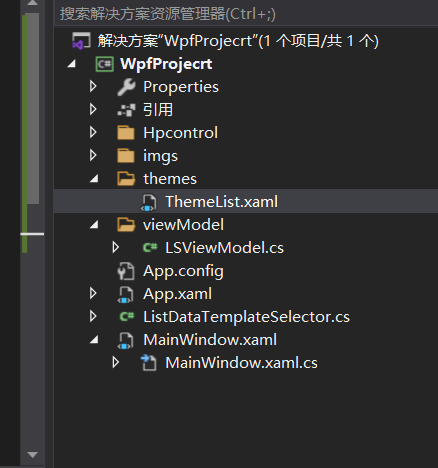
theme 文件
<ResourceDictionary xmlns="http://schemas.microsoft.com/winfx/2006/xaml/presentation"
xmlns:x="http://schemas.microsoft.com/winfx/2006/xaml"
xmlns:local="clr-namespace:WpfProjecrt.Hpcontrol">
<DataTemplate x:Key="HumanMessageDataTemplate">
<TextBlock Text="hello world"
Margin="0,0,0,0"
HorizontalAlignment="Right"
Foreground="#4d4d4d"
TextWrapping="Wrap"
FontSize="16"
FontFamily="楷体"/>
</DataTemplate>
<DataTemplate x:Key="DriverMessageDataTemplate">
<Grid HorizontalAlignment="Left">
<Grid Background="#ffffff">
<local:TestControl></local:TestControl>
</Grid>
</Grid>
</DataTemplate>
</ResourceDictionary>
2, 将theme 文件添加到App.xaml文件
<Application x:Class="WpfProjecrt.App"
xmlns="http://schemas.microsoft.com/winfx/2006/xaml/presentation"
xmlns:x="http://schemas.microsoft.com/winfx/2006/xaml"
xmlns:local="clr-namespace:WpfProjecrt"
StartupUri="MainWindow.xaml">
<Application.Resources>
<ResourceDictionary>
<ResourceDictionary.MergedDictionaries>
<ResourceDictionary Source="/themes/ThemeList.xaml"/>
</ResourceDictionary.MergedDictionaries>
</ResourceDictionary>
</Application.Resources>
</Application>
3, 添加listview 的选择器 ListDataTemplateSelector
public class ListDataTemplateSelector : DataTemplateSelector
{
public override DataTemplate SelectTemplate(object item, DependencyObject container)
{
DataTemplate dt= App.Current.Resources["DriverMessageDataTemplate"] as DataTemplate;
return dt;
// return App.Current.Resources["DriverMessageDataTemplate"] as DataTemplate;
}
}
4, 使用 现实的xml文件
<Window x:Class="WpfProjecrt.MainWindow"
xmlns="http://schemas.microsoft.com/winfx/2006/xaml/presentation"
xmlns:x="http://schemas.microsoft.com/winfx/2006/xaml"
xmlns:d="http://schemas.microsoft.com/expression/blend/2008"
xmlns:mc="http://schemas.openxmlformats.org/markup-compatibility/2006"
xmlns:local="clr-namespace:WpfProjecrt"
xmlns:local2="clr-namespace:WpfProjecrt.Hpcontrol"
mc:Ignorable="d"
Title="MainWindow" Height="450" Width="800">
<Grid>
<Grid>
<Grid.RowDefinitions>
<RowDefinition Height="auto"></RowDefinition>
<RowDefinition></RowDefinition>
</Grid.RowDefinitions>
<StackPanel Grid.Row="0">
<Image x:Name="mg" Height="100" Width="100"></Image>
<TextBlock Name="tb" >open web page</TextBlock>
<ComboBox x:Name="cb" DisplayMemberPath="name" ItemsSource="{Binding mm}"></ComboBox>
</StackPanel>
<ListView ItemsSource="{Binding mm}" ItemTemplateSelector="{Binding lss}" Grid.Row="1" x:Name="lw" Padding="0,16,0,0">
</ListView>
</Grid>
</Grid>
</Window>
对应后面的cs 文件
public class Meal
{
public string name
{
set;
get;
}
}
public partial class MainWindow : Window
{
public MainWindow()
{
InitializeComponent();
this.Loaded += MainWindow_Loaded;
this.DataContext = this;
// cb.ItemsSource = mcollection;
//lw.ItemsSource = mcollection;
//lw.ItemTemplateSelector = ListViewDataTemplateSelector;
}
private void MainWindow_Loaded(object sender, RoutedEventArgs e)
{
var link = new Hyperlink()
{
NavigateUri = new Uri("https://www.baidu.com"),
Inlines = { new Run() { Text = "baidu" } }
};
link.Click += Link_Click;
tb.Inlines.Add( link );
for(int i=0; i<100; i++)
{
Meal m = new Meal();
m.name = i.ToString();
mcollection.Add(m);
}
// mg.Source=new ImageSource()
BitmapImage image = new BitmapImage(new Uri("./imgs/123.jpg", UriKind.Relative));
mg.Source = image;
}
private ObservableCollection<Meal> mcollection = new ObservableCollection<Meal>();
public ObservableCollection<Meal> mm
{
get
{
return mcollection;
}
}
public ListDataTemplateSelector lss
{
get
{
return ls;
}
}
private ListDataTemplateSelector ls = new ListDataTemplateSelector();
private void Link_Click(object sender, RoutedEventArgs e)
{
System.Diagnostics.Process.Start(((Hyperlink)sender).NavigateUri.ToString());
}
}
总结, xml 文件绑定属性最好用CLR的包装器包装一下,
否则可能包装不上。
wpf 中 theme 的使用 和 listview 模板的使用.的更多相关文章
- 在WPF中自定义控件(3) CustomControl (上)
原文:在WPF中自定义控件(3) CustomControl (上) 在WPF中自定义控件(3) CustomControl (上) 周银辉 ...
- WPF 显示文件列表中使用 ListBox 变到ListView 最后使用DataGrid
WPF 显示文件列表中使用 ListBox 变到ListView 最后使用DataGrid 故事背景: 需要检索某目录下文件,并列出来,提供选择和其他功能. 第一版需求: 列出文件供选择即可,代码如下 ...
- WPF 中获取DataGrid 模板列中控件的对像
WPF 中获取DataGrid 模板列中控件的对像 #region 当前选定行的TextBox获得焦点 /// <summary> /// 当前选定行的TextBox获得焦点 /// &l ...
- WPF中的数据模板(DataTemplate)(转)
原文地址 http://www.cnblogs.com/zhouyinhui/archive/2007/03/30/694388.html WPF中的数据模板(DataTemplate) ...
- WPF中的ControlTemplate(控件模板)(转)
原文地址 http://www.cnblogs.com/zhouyinhui/archive/2007/03/28/690993.html WPF中的ControlTemplate(控件模板) ...
- WPF中通过代码定义模板
WPF中可以再XAML中定义模板,也可以通过C#代码定义模板,通过代码可能更清楚的看清其逻辑,而且代码的好处就是可以随时动态的去操作,而在XAML中定义的一般都是静态的. //控件呈现的显示内容1(这 ...
- wpf中的数据模板
wpf中的模板分为数据模板和控件模板,我们可以通过我们自己定制的数据模板来制定自己想要的数据表现形式.例如:时间的显示可以通过图片,也可以通过简单数字表现出来. 例如: (1)先在Demo这个命名空间 ...
- WPF中ListBox /ListView如何改变选中条背景颜色
适用ListBox /ListView WPF中LISTVIEW如何改变选中条背景颜色 https://www.cnblogs.com/sjqq/p/7828119.html
- WPF中的数据模板(DataTemplate)
原文:WPF中的数据模板(DataTemplate) WPF中的数据模板(DataTemplate) ...
随机推荐
- celery task异步任务
业务端后台:通过python manage运行 运行用例时,用python manage运行时会卡,影响效率 celery task 本身自己也是个服务,异步处理case 异步:小明去给我买个东西,我 ...
- [刘阳Java]_CSS图片画廊
图片画廊也是一种比较经典的案例.本节文章主要简单给大家介绍了CSS2实现图片画廊,采取的实现思路 ul放置图片 li标签里面嵌套a标签 a标签里面嵌套两个图片的标签 通过简单的伪类来实现图片预览效果 ...
- 基于IDEA的JAVA开发[第一集]:在Linux上安装IDEA
1,因为买了荣耀的magicbook pro 锐龙版,系统是Linux,以后打算直接在Linux上开发.本来熟悉Myeclipse,下载了Myeclipse2017 for Linux,但是安装中出现 ...
- cisco 交换机 IOS命令
1 显示交换机的MAC地址表 user mode : show mac-address-table
- python -- 结构数据类型(列表、元组、集合、字典)
一.列表 列表表示一组有序的元素,这些元素可以是数字.字符串,也可以是另一个列表. # ----------------------------------------# 列表(list):一组有序的 ...
- Java的标准日志
虽然开源社区有很多优秀的日志框架,但我们学习标准的java日志框架是为了更好的理解其他框架啊(近期项目要用ELK) 看自己以前写的Log4J简直不忍直视啊啊啊啊,那时还感觉自我良好 1. 为什么要使用 ...
- Maven工程 报 Diamond types are not supported at language level '5'
Maven工程 报 Diamond types are not supported at language level '5' 出现这种信息,一般表示的是你的language level(IDEA下J ...
- Nacos 2.0源码分析-拦截器机制
温馨提示: 本文内容基于个人学习Nacos 2.0.1版本代码总结而来,因个人理解差异,不保证完全正确.如有理解错误之处欢迎各位拍砖指正,相互学习:转载请注明出处. Nacos服务端在处理健康检查和心 ...
- windows下搭建vue开发环境实践
Vue.js是一套构建用户界面的 "渐进式框架".与其他重量级框架不同的是,Vue 采用自底向上增量开发的设计.Vue 的核心库只关注视图层,并且非常容易学习,非常容易与其它库或已 ...
- Windows环境安装kafka
前言 注意事项: 需要有jdk,jdk8以上.配置好环境变量. 参看链接:https://blog.csdn.net/weixin_38004638/article/details/91893910 ...