
压缩校验合并js之grunt搭建
1.在说grunt先认识几个grunt配置中的几个单词,concat(合并文件),uglify(压缩文件),jshint(检测代码规范),watch(实时监听修改的文件)
2.grunt是基于nodejs,安装之前需要安装nodejs。
3.开始,进行项目的路径下,cmd——>npm init生成package.json,暂时没有这么多内容的,但是大致就是这样的
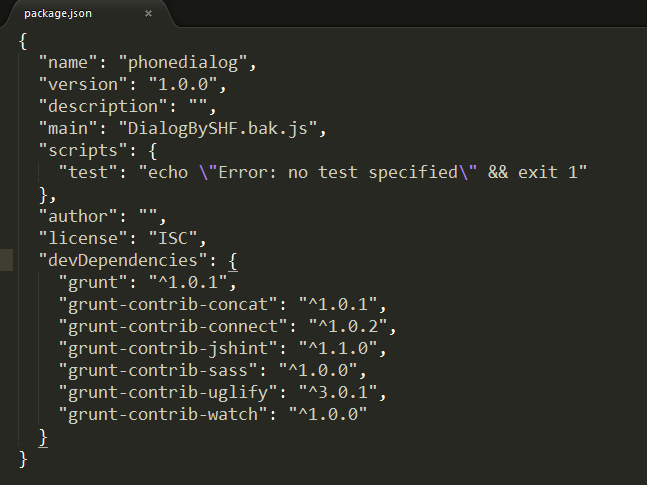
4.然后安装grunt : npm install grunt --save-dev --save-dev这个命令使得package.json文件中出现 “grunt”:“^1.0.1”。
5.安装grunt中的各路插件了:
npm install --save-dev grunt-contrib-concat grunt-contrib-jshint grunt-contrib-sass grunt-contrib-uglify grunt-contrib-watch grunt-contrib-connect
6.建立Gruntfile.js文件开始配置:
module.exports = function(grunt) {

  grunt.initConfig({

      pkg: grunt.file.readJSON('package.json'),

      concat: {

      //合并一下两个文件,合并后的文件名字为global.js

        dist: {

          src: ['slide.js', 'dialog.js'],

          dest: 'global.js',

        },

      },

      uglify: {

      //压缩合并后的文件

        compressjs: {

          files: {

            'global.min.js': ['global.js']

          }

        }

      },

      jshint: {

      //检查校验合并后的文件

        all: ['global.js']

      },

      watch: {

      //监听文件的改动并变化

        scripts: {

          files: ['slide.js','dialog.js'],

          tasks: ['concat','jshint','uglify']

        }

      },

  });

  grunt.loadNpmTasks('grunt-contrib-concat');

  grunt.loadNpmTasks('grunt-contrib-jshint');

  grunt.loadNpmTasks('grunt-contrib-uglify');

  grunt.loadNpmTasks('grunt-contrib-watch');

  grunt.registerTask('concatjs',['concat']);

  grunt.registerTask('compressjs',['concat','jshint','uglify']);

  grunt.registerTask('watchit',['concat','jshint','uglify','watch']);

  grunt.registerTask('default');

};

执行grunt watchit,便可以了。
压缩校验合并js之grunt搭建的更多相关文章
- Gulpfile.js——编译、压缩、合并js和css文件
gulp 一个入门教程:http://www.ydcss.com/gulp API文档地址:http://www.gulpjs.com.cn/docs/api/ 我的一个Low版的gulpfile v ...
- maven 压缩、合并 js, css
转载自:http://blog.csdn.net/fangxing80/article/details/17639607 我们知道在 Web 应用开发中为了提高客户端响应速度,需要将页面使用的资源最小 ...
- 转:利用node压缩、合并js,css,图片
1.安装nodejs http://nodejs.org/ 2.安装各自的node package js我用的是UglifyJS github地址:https://github.com/mishoo/ ...
- Maven插件wro4j-maven-plugin压缩、合并js、css详解
1. 在pom.xml文件中,引入wro4j-maven-plugin插件 <plugin> <groupId>ro.isdc.wro4j</groupId> ...
- MVC4新功能...压缩和合并js文件和样式文件
1.在App_Start文件夹中BundleConfig.cs类中添加相应的文件 1.1bundles.Add(new ScriptBundle("~/bundles/adminJs&quo ...
- MVC4中压缩和合并js文件和样式文件
1.在App_Start文件夹中BundleConfig.cs类中添加相应的文件 1.1bundles.Add(new ScriptBundle("~/bundles/adminJs&quo ...
- grunt自定义任务——合并压缩css和js
npm文档:www.npmjs.com grunt基础教程:http://www.gruntjs.net/docs/getting-started/ http://www.w3cplus.com/to ...
- 引用:使用grunt 压缩 合并js、css文件
引用:https://www.jianshu.com/p/08c7babdec65 压缩 js 文件 1.创建一个目录 名为grunt 目录.png 2.在grunt目录下创建一个 src目录,存 ...
- Grunt的配置及使用(压缩合并js/css)
Grunt的配置及使用(压缩合并js/css) 安装 前提是你已经安装了nodejs和npm. 你能够在 nodejs.org 下载安装包安装.也能够通过包管理器(比方在 Mac 上用 homebre ...
随机推荐
- [转]Aroon Indicator
Aroon Indicator Trend Oscillator Description The Aroon indicator, developed by Tushar Chande, indica ...
- MyBatis Generator 生成的example 如何使用 and or 简单混合查询
简单介绍: Criteria,包含一个Cretiron的集合,每一个Criteria对象内包含的Cretiron之间是由AND连接的,是逻辑与的关系. oredCriteria,Example内有一个 ...
- PHP代码实现2 [从变量和数据的角度] 1
PHP代码实现2 [从变量和数据的角度] 1 数据类型 1.静态类型语言,比如:C/Java等,在静态语言类型中,类型的检查是在<编译>(compile-time)确定的, 也就是说在运行 ...
- WCF 基础连接已经关闭: 服务器关闭了本应保持活动状态的连接。
详细错误信息: System.ServiceModel.CommunicationException: 接收对 http://localhost:48655/XXXXXX.svc 的 HTTP 响应时 ...
- Qt深入浅出(十五)QTableView
转载:吓人的猿 TableView 表格视图控件QTableView,需要和QStandardItemModel, 配套使用,这套框架是基于MVC设计模式设计的,M(Model)是QStandardI ...
- gulp学习总结
一.gulp使用-博客推荐: http://www.sheyilin.com/2016/02/gulp_introduce/ 二.gulp的作用 gulp是一个前端构建工具,它是一个工具框架,可以通过 ...
- [转][PowerShell]ps执行重启IIS
来自:https://www.aliyun.com/jiaocheng/871477.html write-output 'Restarting IIS servers ............... ...
- php的语法
常量:不变的量: php 设置常量的方法:define()方法: define("常量名","常量的值",true) 参数三:大小写是否敏感: php中的常量, ...
- 如何优雅地等待所有的goroutine退出
转自:https://www.cnblogs.com/cobbliu/p/4461866.html goroutine和channel是Go语言非常棒的特色,它们提供了一种非常轻便易用的并发能力.但是 ...
- kappa系数
kappa计算结果为-1~1,通常kappa是落在 0~1 间,可分为五组来表示不同级别的一致性: 0.0~0.20 极低的一致性(slight) 0.21~0.40 一般的一致性(fair) 0.4 ...