
uni-app实现文件上传(h5方式)
1.嵌入H5页面,需要采用web-view标签,如下:
<web-view src="/hybrid/html/index.html" @message="handleMessage"></web-view>
注意:
- h5页面必须在项目目录:/hybrid/html/下面,因为这样uni-app才不会进行编译
- @message事件是h5页面向应用发送数据的回调

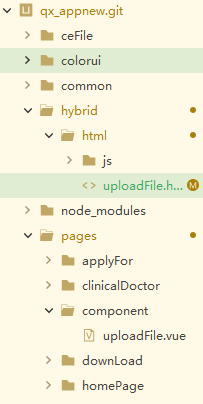
2.h5页面代码:
<!DOCTYPE html>
<html lang="zh">
<head>
<meta charset="UTF-8">
<meta name="viewport" content="width=device-width, initial-scale=1.0">
<meta http-equiv="X-UA-Compatible" content="ie=edge">
<title>上传文件</title>
<style>
*{
margin: 0;
padding: 0;
}
.head-btn{
text-align: center;
margin-top: 50px;
}
.file {
position: relative;
display: inline-block;
background: #D0EEFF;
border: 1px solid #99D3F5;
border-radius: 10px;
padding: 24px 50px;
overflow: hidden;
color: #1E88C7;
text-decoration: none;
text-indent: 0;
line-height: 20px;
font-size: 40px;
}
.file input {
position: absolute;
font-size: 200px;
right: 0;
top: 0;
opacity: 0;}
.file:hover {
background: #AADFFD;
border-color: #78C3F3;
color: #004974;
text-decoration: none;
}
.determine{
color: #FFFFFF;
background-color: #007AFF;
display: inline-block;
font-size: 20px;
border-radius: 5px;
padding: 8px 24px;
}
.showFileName{
display: inline-block;
height: 30px;
min-width: 300px;
}
.btn {
display: block;
margin: 20px auto;
padding: 5px;
background-color: #007aff;
border: 0;
color: #ffffff;
height: 40px;
width: 200px;
border-radius: 5px;
}
.btn1 {
display: block;
margin: 20px auto;
padding: 5px;
background-color: #007aff;
border: 0;
color: #ffffff;
height: 40px;
width: 200px;
border-radius: 5px;
}.btn-red {
background-color: #dd524d;
}.btn-yellow {
background-color: #f0ad4e;
}.desc {
padding: 10px;
color: #999999;
}
.text{
background-color: #007AFF;
text-align: center;
font-size: 18px;
color: white;
height: 45px;
}
.text-in{
padding-top: 10px;
}
.body{
background-image: url(../../static/timg.jpg);
}</style>
</head>
<body class="body">
<div class="text">
<div class="text-in">
文件上传
</div>
</div>
<div class="head-btn">
<form action="" method="post">
<a href="javascript:;" class="file">选择文件
<input type="file" name="uploadFile" id="uploadFile" >
</a>
</form>
<p class="showFileName"></p></div>
<div>
<button class="btn" type="button" data-action="redirectTo">确定</button>
<button class="btn1" type="button" data-action="navigateBack">取消上传</button>
</div><script src="./js/jQuery1_10_2.js"></script>
<script type="text/javascript" src="https://js.cdn.aliyun.dcloud.net.cn/dev/uni-app/uni.webview.1.5.2.js"></script>
<script>
console.log("转检编号:"+getQuery('id')); //转检编号
//取url中的参数值
function getQuery(id) {
// 正则:[找寻'&' + 'url参数名字' = '值' + '&']('&'可以不存在)
let reg = new RegExp("(^|&)"+ id +"=([^&]*)(&|$)");
let r = window.location.search.substr(1).match(reg);
//console.log("r="+r);
if(r != null) {
// 对参数值进行解码
return decodeURIComponent(r[2]);
}
return null;
}$(".file").on("change", "input[type='file']", function() {
let filePath = $(this).val();
// console.log(filePath);
localStorage.setItem("fileAddress", filePath);
let lastname = localStorage.getItem("fileAddress");
if (lastname != "") {
$(".showFileName").html(lastname);
} else {
$(".showFileName").html("");
}
});
$('.btn').click(function(evt) {
var fileUrl;
var formdata = new FormData(); // 创建一个form类型的数据
formdata.append("files",$("#uploadFile")[0].files[0]); // 获取上传文件的数据
formdata.append("operate","UpLoadFile"); // 操作码
formdata.append("name","name");
//console.log("files:"+formdata.get("files") + ",name:" + formdata.get("name"))
console.log("begin")
$.ajax({
url: 'http://47.97.163.146:8080/Controler.ashx',
type: "POST",
async:false, //同步请求,否则内部嵌套的ajax不会运行
processData: false,
contentType: false,
data:formdata,
dataType:"json",
success: function(data) {
//更新数据库添入附件的url
console.log("data:" + JSON.stringify(data))
fileUrl = data.url;
// var formdata1 = new FormData(); // 创建一个form类型的数据
// formdata1.append("operate","UploadFileZJ"); // 操作码
// formdata1.append("ID",getQuery('id'));
// formdata1.append("url",fileUrl);
console.log("url地址:"+fileUrl);
console.log("转检编号:"+getQuery('id'));
//console.log("url:"+formdata1.get("url") + ",ID:" + formdata1.get("ID")) //查看url和转检id
$.ajax({
url: 'http://47.97.163.146:8080/Controler.ashx',
type: "POST",
data:{operate:"UploadFileZJ",ID:getQuery('id'),url:fileUrl},
dataType:"json",
success: function(data){
console.log("更新成功")
},
error: function(err) {
console.log(555)
console.log("更新失败的");
}
})
console.log("这是请求成功的");
},
error: function(err) {console.log("这是请求失败的");
}
});
console.log("end")var target = evt.target;
if (target.tagName === 'BUTTON') {
var action = target.getAttribute('data-action');
if (action == 'redirectTo') {
uni.redirectTo({
url: '/pages/index/index',
success:function (d) {
console.log("跳转成功");
},
fail:function(e){
console.log(e);
},
});
}
}
});//取消文件上传
$('.btn1').click(function(evt) {
var target = evt.target;
if (target.tagName === 'BUTTON') {
var action = target.getAttribute('data-action');
if (action == 'navigateBack') {
uni.navigateBack({
delta: 1
});
}
}
});</script>
</body>
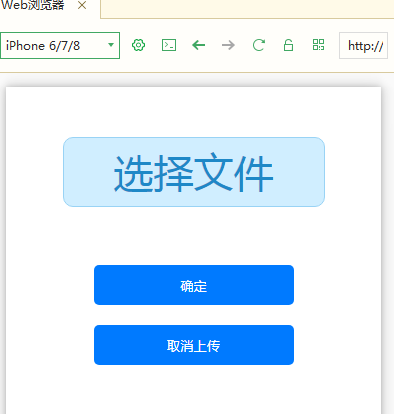
</html>样式图:
uni-app实现文件上传(h5方式)的更多相关文章
- python_way day21 Django文件上传Form方式提交,原生Ajax提交字符处啊,Django文件上传之原生Ajax方式、jQuery Ajax方式、iframe方式,Django验证码,抽屉示例,
python_way day21 1.Django文件上传至Form方式 2.原生Ajax文件上传提交表单 使用原生Ajax好处:不依赖jquery,在发送一个很小的文件或者字符串的时候就可以用原生A ...
- 表单文件上传编码方式(enctype 属性)
enctype 属性规定在发送到服务器之前应该如何对表单数据进行编码. 如下: <form action="upload.php" method="post&quo ...
- JavaWeb 文件上传 commons_fileupload方式
import org.apache.commons.fileupload.FileItem; import org.apache.commons.fileupload.FileUploadExcept ...
- type=file文件上传H5新特性
1.语法 <input name="myFile" type="file"> 2.属性(以下三个仅HTML5支持,因此存在兼容性问题) (1)mul ...
- springMVC两种方式实现多文件上传及效率比较
springMVC实现 多文件上传的方式有两种,一种是我们经常使用的以字节流的方式进行文件上传,另外一种是使用springMVC包装好的解析器进行上传.这两种方式对于实 现多文件上传效率上却有着很大的 ...
- Java实现文件上传
最近自己在做一个小系统玩的时候涉及到了文件的上传,于是在网上找到Java上传文件的方案,最后确定使用common-fileupload实现上传操作. 需求说明 用户添加页面有一个“上传”按钮,点击按钮 ...
- java常见3种文件上传速度对比和文件上传方法详细代码
在java里面文件上传的方式很多,最简单的依然是FileInputStream.FileOutputStream了,在这里我列举3种常见的文件上传方法代码,并比较他们的上传速度(由于代码是在本地测试, ...
- servlet3.0文件上传与下载
描述:文件上传与下载是在JavaEE中常见的功能,实现文件上传与下载的方式有多种,其中文件上传的方式有: (1)commons-fileupload: (2)Servlet 3.0 实现文件上传 (3 ...
- Selenium2学习-039-WebUI自动化实战实例-文件上传下载
通常在 WebUI 自动化测试过程中必然会涉及到文件上传的自动化测试需求,而开发在进行相应的技术实现是不同的,粗略可划分为两类:input标签类(类型为file)和非input标签类(例如:div.a ...
随机推荐
- 记一个 Base64 有关的 Bug
本文原计划写两部分内容,第一是记录最近遇到的与 Base64 有关的 Bug,第二是 Base64 编码的原理详解.结果写了一半发现,诶?不复杂的一个事儿怎么也要讲这么长?不利于阅读和理解啊(其实是今 ...
- 硬件小白学习之路(1)稳压芯片LM431
图稳压芯片LM431简介 偶然的机会接触到LM431这个芯片,周末晚上打发无聊的时光,查资料进行剖析. LM431的Symbol Diagram和Functional Diagram如图1所示,下面分 ...
- 何用Java8 Stream API进行数据抽取与收集
上一篇中我们通过一个实例看到了Java8 Stream API 相较于传统的的Java 集合操作的简洁与优势,本篇我们依然借助于一个实际的例子来看看Java8 Stream API 如何抽取及收集数据 ...
- MySQL学习之路 一 : MySQL 5.7.19 源码安装
MySQL 5.7.19 源码安装 查看系统: # cat /etc/redhat-release CentOS Linux release 7.3.1611 (Core) 安装依赖包 # yum - ...
- 「前端」rem 缩放方案 flexible-js 兼容 375px 方案的思路
本文来自尚妆前端团队南洋 发表于尚妆github博客,欢迎订阅. 移动端H5页面rem缩放方案flexible.js兼容375px方案的思路 参考: 移动端高清.多屏适配方案 viewport-and ...
- CSS的常用单位 %和 vw vh 和 box-sizing:border-box; 和flex简介
一.% 理解: %号是CSS中的常用单位,它是相对于父容器而言的.如:一个父容器的宽是100px,给它的子元素一个10%,那么子元素的宽就是100px的10% 10px. 效果图: (利用%设置了li ...
- Layabox enabled 脚本禁用 坑
从unity入坑到Layabox,真的是一路踩坑啊,今天这个坑叫做 脚本禁用 enabled 问题一: 首先看官方文档 https://ldc2.layabox.com/doc/?nav=zh-ts- ...
- iOS中使用block进行网络请求回调
iOS中使用block进行网络请求回调 HttpRequest.h // // HttpRequest.h // UseBlockCallBack // // Created by Michael o ...
- 微信小程序之登录连接django,以及用户的信息授权认证
小结: 1 如何自定义组件 - 组件和页面一样,也是由四个文件组成,所以我们自定义组件的时候,模拟pages文件夹,把所有的所有的组件都放在一个文件夹中,每个组件又由一个文件夹包裹,方便管理,在对应目 ...
- 一文深入了解史上最强的Java堆内缓存框架Caffeine
它提供了一个近乎最佳的命中率.从性能上秒杀其他一堆进程内缓存框架,Spring5更是为了它放弃了使用多年的GuavaCache 缓存,在我们的日常开发中用的非常多,是我们应对各种性能问题支持高并发的一 ...