
搭建harbor企业级私有registry
主机环境要求
硬件Hardware
|
Resource |
Capacity |
Description |
|
CPU |
minimal 2 CPU |
4 CPU is prefered |
|
Mem |
minimal 4GB |
8GB is prefered |
|
Disk |
minimal 40GB |
160GB is prefered |
软件Software
|
Software |
Version |
Description |
|
Python |
version 2.7 or higher |
Note that you may have to install Python on Linux distributions (Gentoo, Arch) that do not come with a Python interpreter installed by default |
|
Docker engine |
version 1.10 or higher |
For installation instructions, please refer to: https://docs.docker.com/engine/installation/ |
|
Docker Compose |
version 1.6.0 or higher |
For installation instructions, please refer to: https://docs.docker.com/compose/install/ |
|
Openssl |
latest is prefered |
Generate certificate and keys for Harbor |
网络端口Network ports
|
Port |
Protocol |
Description |
|
443 |
HTTPS |
Harbor UI and API will accept requests on this port for https protocol |
|
4443 |
HTTS |
Connections to the Docker Content Trust service for Harbor, only needed when Notary is enabled |
|
80 |
HTTP |
Harbor UI and API will accept requests on this port for http protocol |
安装harbor
安装docker
安装docker-compose
curl -L https://github.com/docker/compose/releases/download/1.18.0/docker-compose-`uname -s`-`uname -m` -o /usr/local/bin/docker-compose

chmod +x /usr/local/bin/docker-compose

docker-compose version

#------------------------------------------------------------

docker-compose version 1.18., build 8dd22a9

docker-py version: 2.6.

CPython version: 2.7.

OpenSSL version: OpenSSL 1.0.1t   May

#------------------------------------------------------------
下载harbor离线包
wget http://harbor.orientsoft.cn/harbor-v1.3.0/harbor-offline-installer-v1.3.0.tgz

tar xvf harbor-offline-installer-v1.3.0.tgz
配置HTTPS所需证书
mkdir /data

mkdir /root/data

cd /root/data

# 创建自已的CA证书

openssl req -newkey rsa: -nodes -sha256 -keyout ca.key -x509 -days  -out ca.crt

#------------------------------------------------------------

Country Name ( letter code) [AU]:CN

State or Province Name (full name) [Some-State]:Harbin

Locality Name (eg, city) []:Harbin

Organization Name (eg, company) [Internet Widgits Pty Ltd]:ydgw

Organizational Unit Name (eg, section) []:ydgw

Common Name (e.g. server FQDN or YOUR name) []:10.240.4.159

Email Address []:liuyajun@ydgw.cn

#------------------------------------------------------------

# 生成一个证书签名请求

openssl req  -newkey rsa: -nodes -sha256 -keyout 10.240.4.159.key -out 10.240.4.159.csr

#------------------------------------------------------------

Country Name ( letter code) [AU]:CN

State or Province Name (full name) [Some-State]:Harbin

Locality Name (eg, city) []:Harbin

Organization Name (eg, company) [Internet Widgits Pty Ltd]:ydgw

Organizational Unit Name (eg, section) []:ydgw

Common Name (e.g. server FQDN or YOUR name) []:10.240.4.159

Email Address []:liuyajun@ydgw.cn

Please enter the following 'extra' attributes

to be sent with your certificate request

A challenge password []:   #密码留空即可

An optional company name []:

#------------------------------------------------------------

# 创建文件夹和辅助内容

mkdir demoCA

cd demoCA

touch index.txt

echo '' > serial

cd ..

ll

#------------------------------------------------------------

total

drwxr-xr-x  root root  Jan  : ./

drwx------  root root  Jan  : ../

-rw-r--r--  root root  Jan  : 10.240.4.159.csr

-rw-r--r--  root root  Jan  : 10.240.4.159.key

-rw-r--r--  root root  Jan  : ca.crt

-rw-r--r--  root root  Jan  : ca.key

drwxr-xr-x  root root  Jan  : demoCA/

#------------------------------------------------------------

# 签名证书

echo subjectAltName = IP:10.240.4.159 > extfile.cnf

openssl ca -in 10.240.4.159.csr -out 10.240.4.159.crt -cert ca.crt -keyfile ca.key -extfile extfile.cnf -days  -outdir .

#------------------------------------------------------------

Using configuration from /usr/lib/ssl/openssl.cnf

Check that the request matches the signature

Signature ok

Certificate Details:

        Serial Number:  (0x1)

        Validity

            Not Before: Jan  ::  GMT

            Not After : Jan  ::  GMT

        Subject:

            countryName               = CN

            stateOrProvinceName       = Harbin

            organizationName          = ydgw

            organizationalUnitName    = ydgw

            commonName                = 10.240.4.159

            emailAddress              = liuyajun@ydgw.cn

        X509v3 extensions:

            X509v3 Subject Alternative Name:

                IP Address:10.240.4.159

Certificate is to be certified until Jan  ::  GMT ( days)

Sign the certificate? [y/n]:y

 out of  certificate requests certified, commit? [y/n]y

Write out database with  new entries

Data Base Updated

#------------------------------------------------------------

ll

#------------------------------------------------------------

total

drwxr-xr-x  root root  Jan  : ./

drwx------  root root  Jan  : ../

-rw-r--r--  root root  Jan  : .pem

-rw-r--r--  root root  Jan  : 10.240.4.159.crt

-rw-r--r--  root root  Jan  : 10.240.4.159.csr

-rw-r--r--  root root  Jan  : 10.240.4.159.key

-rw-r--r--  root root  Jan  : ca.crt

-rw-r--r--  root root  Jan  : ca.key

drwxr-xr-x  root root  Jan  : demoCA/

-rw-r--r--  root root    Jan  : extfile.cnf

#------------------------------------------------------------

# 证书加入本机信任

cp 10.240.4.159.crt /usr/local/share/ca-certificates/

update-ca-certificates

# 重启docker使证书生效

systemctl daemon-reload

systemctl restart docker
上述安装使用的IP地址曾用域名配置,但启动harbor后,docker login总会报类似以下错误信息,调了两天也没有找到解决办法,最后只好放弃
docker login reg.ydgw.cn
Username: admin
Password:
Error response from daemon: Get https://reg.ydgw.cn/v2/: x509: certificate is not valid for any names, but wanted to match reg.ydgw.cn
配置安装启动harbor
# 进入harbor的触压后的目录

cd harbor

#------------------------------------------------------------

ll

total

drwxr-xr-x  root root       Jan  : ./

drwx------  root root       Jan  : ../

drwxr-xr-x  root root       Jan  : common/

-rw-r--r--  root root       Jan   : docker-compose.clair.yml

-rw-r--r--  root root       Jan   : docker-compose.notary.yml

-rw-r--r--  root root       Jan   : docker-compose.yml

-rw-r--r--  root root       Jan   : harbor_1_1_0_template

-rw-r--r--  root root       Jan   : harbor.cfg

-rw-r--r--  root root  Jan   : harbor.v1.3.0.tar.gz

-rwxr-xr-x  root root       Jan   : install.sh*

-rw-r--r--  root root    Jan   : LICENSE

-rw-r--r--  root root        Jan   : NOTICE

-rwxr-xr-x  root root      Jan   : prepare*

-rwxr-xr-x  root root       Jan   : upgrade*

#------------------------------------------------------------

vi harbor.cfg

# 更改以下几项内容

#------------------------------------------------------------

hostname = reg.ydgw.cn

ui_url_protocol = https

ssl_cert = /root/data/10.240.4.159.crt

ssl_cert_key = /root/data/10.240.4.159.key

db_password = xxxxxxx    # MYSQL数据库密码,可以改复杂些的

harbor_admin_password = xxxxxxxx  # harbor admin用户密码,后在WEB界面也能改

#------------------------------------------------------------

# 生成配置文件

./prepare

# 启动harbor(第一次启动,需要pull一些镜像)

docker-compose up -d
持久性的数据和日志文件
默认情况下,注册表数据将保留在主机的/data目录中。即使拆除和或重建Harbor的集装箱,这些数据也保持不变。
ll /data

#------------------------------------------------------------

total

drwxr-xr-x   root  root   Jan  : ./

drwxr-xr-x  root  root   Jan  : ../

drwxr-xr-x      Jan  : ca_download/

drwxr-xr-x      Jan  : config/

drwxr-xr-x      Jan  : database/

drwxr-xr-x      Jan  : job_logs/

drwxr-xr-x      Jan  : psc/

drwxr-xr-x      Jan  : registry/

-rw-------        Jan  : secretkey

#------------------------------------------------------------
Harbor的使用
web登陆
使用浏览器打开:https://10.240.4.159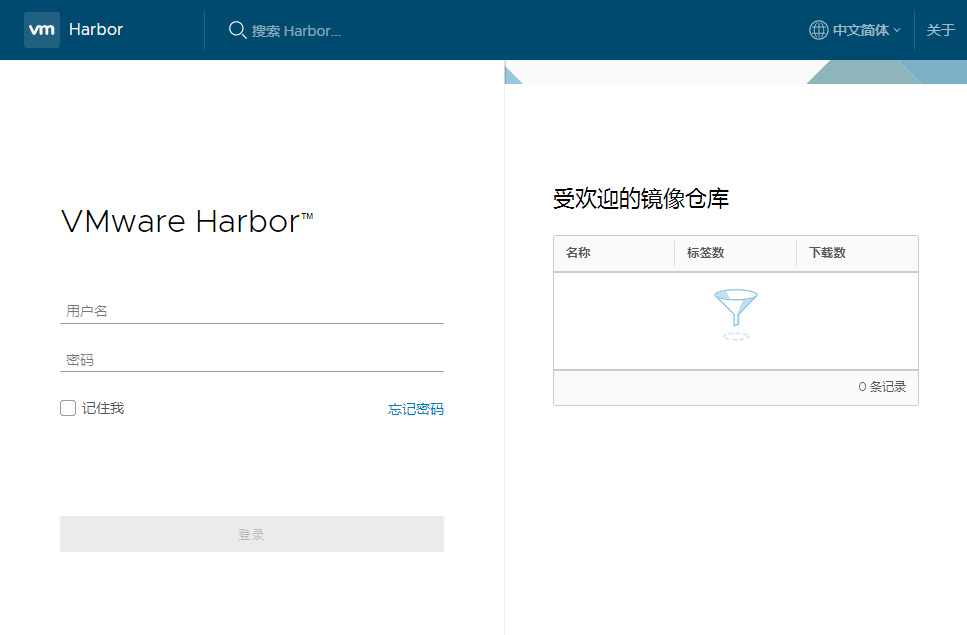
输入用户名和密码登陆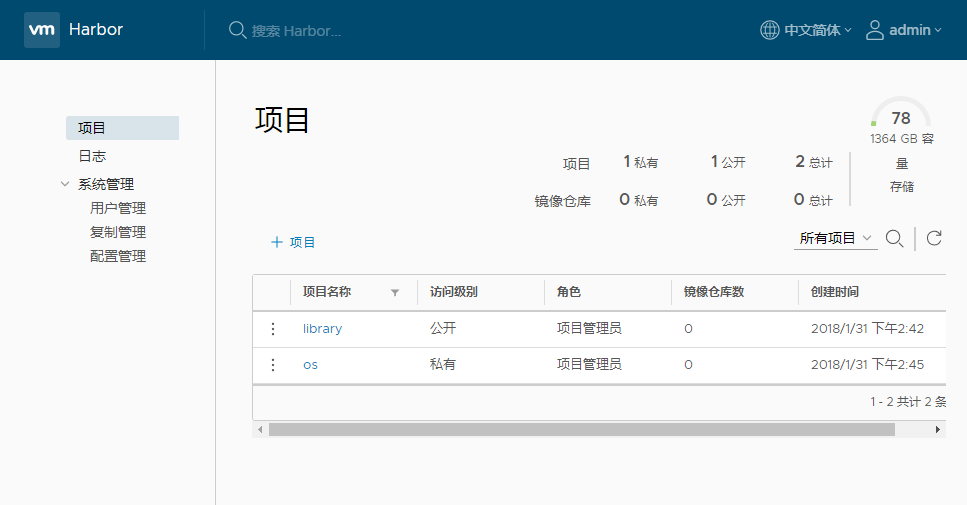
客户端docker login
# 客户端不安装证书直接登陆会报以下错误

docker login 10.240.4.159

Username: admin

Password:

Error response from daemon: Get https://10.240.4.159/v2/: x509: certificate signed by unknown authority

# 将证书拷贝到如10.240.4.160客户机上并信任

scp 10.240.4.159.crt 10.240.4.160:/usr/local/share/ca-certificates/

# 在10.240.4.160客户机上执行

update-ca-certificates

# 重启docker使证书生效

systemctl daemon-reload

systemctl restart docker

# 之后就可以正常登陆了

docker login 10.240.4.159

Username: admin

Password:

Login Succeeded
上传镜像到harbor
在harbor中新建一个os的项目,访问级别设置为公开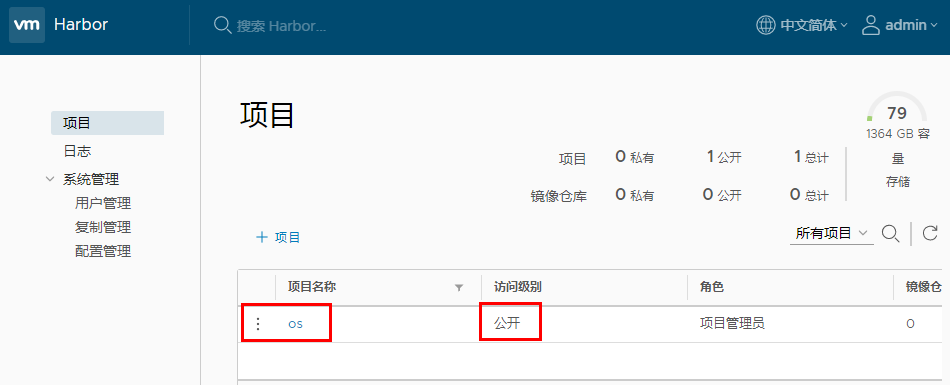
点击os项目,推送镜像可以看到命令提示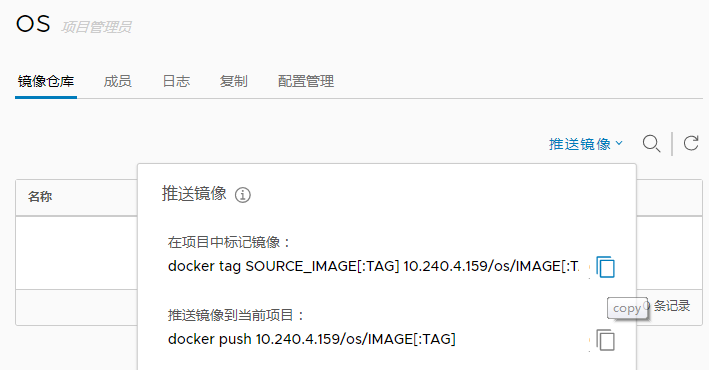
# 先下载官方的centos镜像

docker pull centos:7.4.

# 修改TAG标签

docker tag centos:7.4. 10.240.4.159/os/centos:7.4.

docker images | grep centos

10.240.4.159/os/centos           7.4.            3afd47092a0e         months ago        197MB

centos                           7.4.            3afd47092a0e         months ago        197MB

# 推送镜像(需要login)

docker push 10.240.4.159/os/centos:7.4.
重新刷新后,harbor中已经能看到推送的镜像了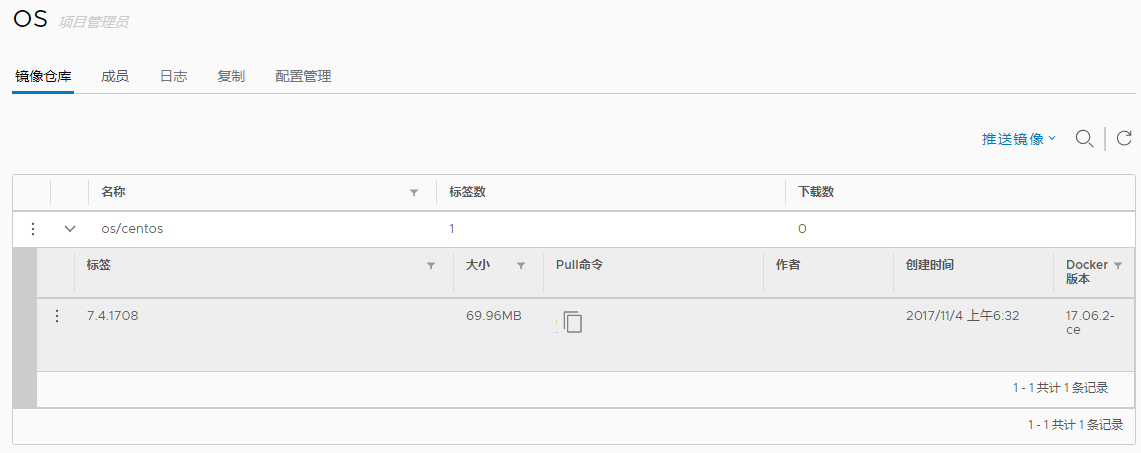
Harbor的生命周期
cd harbor

# 停止和启动

docker-compose stop

docker-compose start

# 要更改Harbor的配置,请首先停止现有的Harbor实例并进行更新harbor.cfg。然后运行prepare脚本来填充配置。最后重新创建并启动Harbor的实例:

docker-compose down -v   # 删除Harbor 的容器,同时保留图像数据和Harbor的数据库文件在文件系统上

vi harbor.cfg

./prepare

docker-compose up -d
Harbor故障排除
docker-compose ps

#----------------------------------------------------------------------------------------------------------------------------

       Name                     Command               State                                Ports

------------------------------------------------------------------------------------------------------------------------------

harbor-adminserver   /harbor/start.sh                 Up

harbor-db            /usr/local/bin/docker-entr ...   Up      /tcp

harbor-jobservice    /harbor/start.sh                 Up

harbor-log           /bin/sh -c /usr/local/bin/ ...   Up      127.0.0.1:->/tcp

harbor-ui            /harbor/start.sh                 Up

nginx                nginx -g daemon off;             Up      0.0.0.0:->/tcp, 0.0.0.0:->/tcp, 0.0.0.0:->/tcp

registry             /entrypoint.sh serve /etc/ ...   Up      /tcp

#----------------------------------------------------------------------------------------------------------------------------

# 如果容器未处于UP状态,请检查目录中该容器的日志文件/var/log/harbor。例如,如果容器harbor-ui没有运行,则应该查看日志文件ui.log

netstat -tnulp

Active Internet connections (only servers)

Proto Recv-Q Send-Q Local Address           Foreign Address         State       PID/Program name

tcp               0.0.0.0:           0.0.0.0:*               LISTEN      /rpc.statd

tcp               127.0.0.1:          0.0.0.0:*               LISTEN      /docker-proxy

tcp               0.0.0.0:             0.0.0.0:*               LISTEN      /rpcbind

tcp               0.0.0.0:              0.0.0.0:*               LISTEN      /sshd

tcp6              :::                  :::*                    LISTEN      /rpcbind

tcp6              :::                   :::*                    LISTEN      /docker-proxy   #

tcp6              :::                :::*                    LISTEN      /rpc.statd

tcp6              :::                   :::*                    LISTEN      /sshd

tcp6              :::                  :::*                    LISTEN      /docker-proxy

tcp6              :::                 :::*                    LISTEN      /docker-proxy

udp               0.0.0.0:             0.0.0.0:*                           /rpcbind

udp               0.0.0.0:           0.0.0.0:*                           /rpc.statd

udp               0.0.0.0:             0.0.0.0:*                           /rpcbind

udp               127.0.0.1:           0.0.0.0:*                           /rpc.statd

udp6              :::                  :::*                                /rpcbind

udp6              :::                  :::*                                /rpcbind

udp6              :::                :::*                                /rpc.statd
参考文档:
搭建harbor企业级私有registry的更多相关文章
- 搭建Harbor企业级docker仓库
搭建Harbor企业级docker仓库 一.Harbor简介 1.Harbor介绍 Harbor是一个用于存储和分发Docker镜像的企业级Registry服务器,通过添加一些企业必需的功能特性,例如 ...
- Harbor 企业级私有仓库 Ubuntu16.04 搭建及使用
一.Harbor简介 1.1.什么是Harbor 几个VMware中国的人搞了一个容器镜像仓库.Harbor是一个用于存储和分发Docker镜像的企业级Registry服务器. 1.2.Harbor架 ...
- Harbor 企业级 Docker Registry
HarBor项目:https://github.com/vmware/harbor 下载:https://github.com/vmware/harbor/releases 安装文档:https:// ...
- Kubernetes集群搭建之企业级环境中基于Harbor搭建自己的私有仓库
搭建背景 企业环境中使用Docker环境,一般出于安全考虑,业务使用的镜像一般不会从第三方公共仓库下载.那么就要引出今天的主题 企业级环境中基于Harbor搭建自己的安全认证仓库 介绍 名称:Harb ...
- docker 系列 - 企业级私有镜像仓库Harbor部署(转载)
本文转载自 搜云库 的文章 https://www.jianshu.com/p/7d76850de03f , 感谢作者 3.png 上一篇文章搭建了一个具有基础功能,权限认证.TLS 的私有仓库, ...
- 搭建harbor私有仓库
2-1.项目说明 Harbor是一个用于存储和分发Docker镜像的企业级Registry服务器,由VMware开源,其通过添加一些企业必需的功能特性,例如安全.标识和管理等,扩展了开源 Docke ...
- docker搭建私有registry
搭建docker的私有registry 1. registry简介 Docker在2015年推出了distribution项目,即Docker Registry 2.相比于old registry ...
- Harbor企业级私服Docker镜像仓库搭建及应用
一.简介 Docker Hub作为Docker默认官方公共镜像,如果想要自己搭建私有镜像,Harbor是企业级镜像库非常好的选择. 所谓私有仓库,也就是在本地(局域网)搭建的一个类似公共仓库的东西,搭 ...
- Docker镜像仓库的搭建--> Harbor篇
简介 Harbor是VMware公司开源的一个企业级Docker Registry项目,项目地址:https://github.com/goharbor/harbor Harbor作为一个企业级私有R ...
随机推荐
- jQuery下锚点的平滑跳转
对于锚点的平滑跳转,我觉得要谨慎使用,在个人站点或是这个效果含有功能提示可以用一用,在一般的商业性质的网站上,权衡来讲,不用更好,当然,这只是我的个人意见.jQuery库已经为我们做了很多的工作了,所 ...
- 计蒜客 置换的玩笑(DFS)
传送门 题目大意: 小蒜头又调皮了.这一次,姐姐的实验报告惨遭毒手. 姐姐的实验报告上原本记录着从 1 到 n 的序列,任意两个数字间用空格间隔.但是“坑姐”的蒜头居然把数字间的空格都给删掉了,整个数 ...
- spring学习之spring入门
一 spring的基础 1:什么是spring spring是由Rod Johnson组织和开发的一个分层 的Java SE/EE 一站式轻量级开源框架,它以Ioc(控制反转)和 AOP(面向切面编程 ...
- 吴裕雄--天生自然TensorFlow高层封装:Estimator-DNNClassifier
# 1. 模型定义. import numpy as np import tensorflow as tf from tensorflow.examples.tutorials.mnist impor ...
- mybatis 在自动生成时设置不生成Example类
只需要在配置要生成的table表中添加几个配置属性就行了. 在generatorConfig.xml文件中修改 <!--指定数据库表--> <table tableName=&quo ...
- PHP实现冒泡排序算法相关案例
<?php /** * 冒泡排序,先找出一个最大的浮上去,然后再依次找最大的浮上去 */ function mpsort($a = []){ $nCount = count($a); if($n ...
- Django专题-Cookie
Cookie Cookie的由来 大家都知道HTTP协议是无状态的. 无状态的意思是每次请求都是独立的,它的执行情况和结果与前面的请求和之后的请求都无直接关系,它不会受前面的请求响应情况直接影响, ...
- LeetCode——542. 01 矩阵
给定一个由 0 和 1 组成的矩阵,找出每个元素到最近的 0 的距离. 两个相邻元素间的距离为 1 . 示例 1: 输入: 0 0 0 0 1 0 0 0 0 输出: 0 0 0 0 1 0 0 0 ...
- 阿里云 asp.net core nginx 单机部署
1. dotnet core 安装 https://www.microsoft.com/net/download#core 安装之前要安装依赖:yum install libunwind libicu ...
- LeetCode No.148,149,150
No.148 SortList 排序链表 题目 在 O(n log n) 时间复杂度和常数级空间复杂度下,对链表进行排序. 示例 输入: 4->2->1->3 输出: 1->2 ...