
在ubuntu上安装subline
Sublime Text is a most popular, lightweight and smart cross-platform text and source code editor with a Python API, that available for Linux, Windows and Mac OS X. It is really an awesome application for programming and offers a wide range of file types to manage has it supports syntax highlighting for C, C++, C#, CSS, HTML, Java, JavaScript, PHP, Groovy, LaTeX and the list goes on. The user interface is much similar to most famous editor called “vim“.
By default there is no official repository available for Sublime Text 2 and there is no any magical way to install using “yum” or “apt-get” command as you use these command frequently to install packages on your Linux systems.
But due to high volume of users requests, the WebUpd8team created a up-to-date PPA forSublime Text 2 for Ubuntu users. So, here in this article we will show you two methods to install Sublime Text.
At the time of writing this article, Sublime Text 3 beta is available to registered Sublime Text users only at a license costs USD $70. However, now it’s available to all users.
The first method is using source tarball on RHEL, CentOS, Fedora, Debian, Ubuntu andLinux Mint.
The Second method is using PPA on Debian, Ubuntu and Linux Mint.
Method 1: Installing from Source Tarball
The latest stable version can be downloaded from Sublime Text website or you can use the following “wget” command to download the tar-file that suits you better and extract it as shown below.
On 32-Bit Systems
# cd ~
# wget http://c758482.r82.cf2.rackcdn.com/Sublime\ Text\ 2.0.2.tar.bz2
# tar vxjf Sublime\ Text\ 2.0.2.tar.bz2
On 64-Bit Systems
# cd ~
# wget http://c758482.r82.cf2.rackcdn.com/Sublime\ Text\ 2.0.2\ x64.tar.bz2
# tar vxjf Sublime\ Text\ 2.0.2\ x64.tar.bz2
Once unpacked, you will get a directory called “Sublime Text 2″, inside this directory you will see a list files that required by Sublime Text to run. For security reason, we move this folder under “/opt” location.
# sudo mv Sublime\ Text\ 2 /opt/
Next create a symbolic link to call “Sublime Text” from the command line as “sublime”. To do, create a symbolic link under “/usr/bin” as shown below.
# sudo ln -s /opt/Sublime\ Text\ 2/sublime_text /usr/bin/sublime
For Ubuntu Unity Lancher
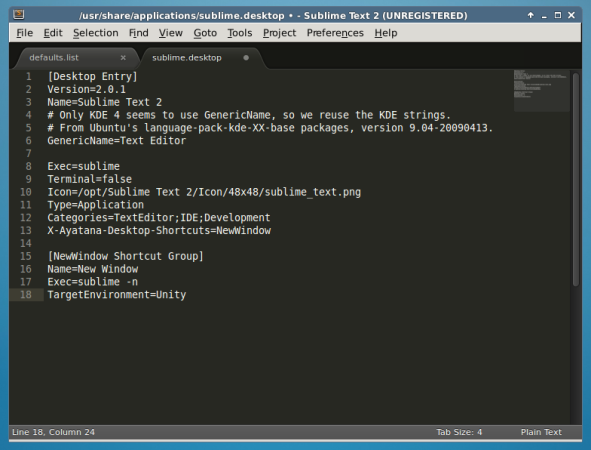
If you are using Unity and want to add “Sublime Text” to the Unity launcher. Create a “sublime.desktop” file under “/usr/share/applications”.
# sudo sublime /usr/share/applications/sublime.desktop
Then Copy and Paste the following content into it. Save and close.
[Desktop Entry]
Version=2.0.1
Name=Sublime Text 2
# Only KDE 4 seems to use GenericName, so we reuse the KDE strings.
# From Ubuntu's language-pack-kde-XX-base packages, version 9.04-20090413.
GenericName=Text Editor
Exec=sublime
Terminal=false
Icon=/opt/Sublime Text 2/Icon/48x48/sublime_text.png
Type=Application
Categories=TextEditor;IDE;Development
X-Ayatana-Desktop-Shortcuts=NewWindow
[NewWindow Shortcut Group]
Name=New Window
Exec=sublime -n
TargetEnvironment=Unity
Install Sublime Text in Ubuntu
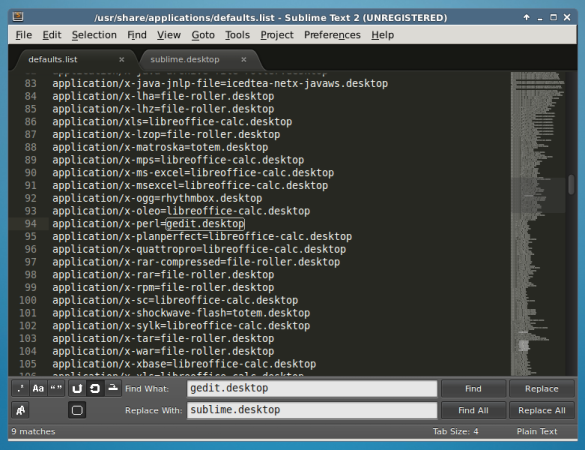
If you would like to open all your text files with “Sublime Text“. Open a “defaults.list” file and replace all occurrences of “gedit.desktop” with “sublime.desktop” as shown.
# sudo sublime /usr/share/applications/defaults.list
Method 2: Installing Sublime Text Using PPA
Add WebUpd8team PPA to your Synaptic Manager to install Sublime Text using following steps.
# sudo add-apt-repository ppa:webupd8team/sublime-text-2
# sudo apt-get update
# sudo apt-get install sublime-text
NOTE: As I said the Sublime Text 3 Beta is released, if you would like to install Sublime Text 3, use this following command.
# sudo apt-get install sublime-text-installer
Start Sublime Text
To Launch Sublime Text from command line, call the “sublime” as shown.
# sublime
Install Sublime Text in Debian
That’s It! If you are using any other editor, please do tell us via comment section.
在ubuntu上安装subline的更多相关文章
- [异常解决] ubuntu上安装JLink驱动遇到的坑及给后来者的建议
一.前言 最近将整个电脑格式化,改成了linux操作系统 希望这样能让自己在一个新的世界探索技术.提升自己吧- win上的工具用多了,就不想变化了- 继上一篇<ubuntu上安装虚拟机遇到的问题 ...
- Ubuntu上安装Robomongo及添加到启动器
到目前为止,Robomongo仍是MongoDB最好的客户端管理工具,如需在Ubuntu上安装Robomongo,可直接从官网下载.tar.gz压缩包进行解压,然后直接运行bin目录下的robomon ...
- 在 Ubuntu 上安装 Android Studio
在 Ubuntu 上安装 Android Studio http://www.linuxidc.com/Linux/2013-05/84812.htm 打开terminal,输入以下命令 sudo a ...
- Ubuntu上安装Karma失败对策
在Ubuntu上安装Karma遇到超时 timeout 错误.Google了一下,国外的码农给了一个快捷的解决方案,实测可行,贴在这里: sudo apt-get install npm nodejs ...
- 在Ubuntu上安装LAMP服务器
1.安装Ubuntu上安装LAMP apt-get install lamp-server^ 2.安装过程中设置MySql密码 3.测试 创建index.php var/www/html/index. ...
- [译]How to Setup Sync Gateway on Ubuntu如何在ubuntu上安装sync-gateway
参考文章https://hidekiitakura.com/2015/03/21/how-to-setup-sync-gateway-on-ubuntudigitalocean/ 在此对作者表示感谢 ...
- 在Ubuntu上安装JDK、Ant、Jmeter和Jenkins
一.前期准备 1. 在win7下载VMware.Ubuntu(用迅雷下比较快) 2. 安装完VMware后新建虚拟机,选择iso: 3. 具体配置参考如下,至此Ubantu安装完成 二.在Ubuntu ...
- Ubuntu上安装MongoDB(译)
add by zhj:直接从第四步开始就可以了,而且安装好MongoDB后会自动启动的,不必自己去执行启动命令 原文:https://docs.mongodb.com/manual/tutorial/ ...
- Ubuntu上安装ns2-2.34
Ubuntu上安装ns2-2.34 步骤1 下载ns-allinone-2.34 $ tar zxf ns-allinone-2.34.tar.gz 步骤2 sudo apt-get install ...
随机推荐
- Spring课程 Spring入门篇 2-2 Spring注入方式
课程链接: 本节主要讲了以下两块内容: 1 xml两种注入方式 2 注入方式代码实现 3 特别注意 1 xml两种注入方式 构造注入和set注入 2 注入方式代码实现 2.1 set注入方式的实现 实 ...
- 学习路线 roadmap
我的学习路线为HTML > CSS > Javsscript:Javascript是前端一切学习的基础.HTML和css一起学习. JavaScript基础: Js基础教程.js内置对象常 ...
- 笨办法学Python(十五)
习题 15: 读取文件 你已经学过了 raw_input 和 argv,这些是你开始学习读取文件的必备基础.你可能需要多多实验才能明白它的工作原理,所以你要细心做练习,并且仔细检查结果.处理文件需要非 ...
- MySQL数据库实验三:连接查询
实验三 连接查询 实验名称:连接查询(2课时) 一.实验目的 理解JOIN语句的操作和基本使用方法,掌握内连接.外连接.自身连接的概念和使用. 二.实验环境 是MS SQL SERVER 200 ...
- Java解析html页面,获取想要的元素
背景:通过接口访问数据,获取的内容是个标准的html格式,使用jsoup的方式获取页面元素值 先推荐比较好的博客:http://www.open-open.com/jsoup/. 单个案例比较不错 h ...
- 2017.9.14 HTML学习总结---超链接标签图片标签
2.4 超链接标签 定义:它是指从一个对象指向另一个对象的指针,它可以是网页中的一段文字 也可以是一张图片,以实现从一个页面到另一个页面的跳转. 格式:<a href="url&qu ...
- 如何在spring中运行多个schedulers quartz 实例
http://wzping.iteye.com/blog/468263 1.定义一个JOB <!-- 使用pojo来做job,指定pojo和method --> <bean ...
- 矩阵——特征向量(Eigenvector)
原文链接 矩阵的基础内容以前已经提到,今天我们来看看矩阵的重要特性——特征向量. 矩阵是个非常抽象的数学概念,很多人到了这里往往望而生畏.比如矩阵的乘法为什么有这样奇怪的定义?实际上是由工程实际需要定 ...
- java设计模式——享元模式
一. 定义与类型 定义:提供了减少对象数量从而改善应用所需的对象结构的方式,运用共享技术有效地支持大量细粒度的对象 类型:结构性 二. 使用场景 (1) 常常应用于系统底层的开发,以便解决系统的性能 ...
- data-ng-init 指令
1.data-ng-init指令为AngularJS应用程序定义了一个初始值. 2.通常情况下,data-ng-init指令并不常用,将会使用控制器或模块来代替它.