
vue-router路由嵌套的使用
vue-router路由嵌套的使用,以及子路由中设置默认路由:
项目结构:
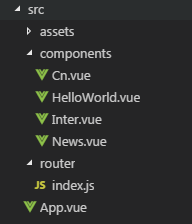
在/src/App.vue文件中:
<template>

  <div id="app">

    <router-link to="/">首页</router-link>

    <router-link to="/news">新闻</router-link>

    <router-view/>

  </div>

</template>

<script>

export default {

  name: 'App'

}

</script>

<style>

</style>
在HellowWorld.vue文件中:
<template>

  <div class="hello">

    hello

  </div>

</template>

<script>

export default {

  beforeRouteEnter (to, from, next) {

    console.log('/ beforeRouteEnter');

    next();

  },

  beforeRouteLeave (to, from, next) {

    console.log('/ beforeRouteLeave');

    next();

  },

  name: 'HelloWorld',

  data () {

    return {

      msg: 'Welcome to Your Vue.js App'

    }

  }

}

</script>

<!-- Add "scoped" attribute to limit CSS to this component only -->

<style scoped>

</style>
在News.vue文件中:
<template>

    <div class="news">

        <router-link to="/news/cn">国内新闻</router-link>

        <router-link to="/news/inter">国际新闻</router-link>

        <router-view></router-view>

    </div>

</template>

<script>

export default {

}

</script>

<style>

   .news{

       margin:30px auto;

       width:300px;

   }

</style>
在Cn.vue文件中:
<template>

    <div class="cn">

        国内新闻

    </div>

</template>

<script>

export default {

}

</script>

<style>

</style>
在Inter.vue文件中:
<template>

    <div class="inter">

        inter国际

    </div>

</template>

<script>

export default {

}

</script>

<style>

</style>
在/router/index.js文件中,使用路由嵌套:
import Vue from 'vue'

import Router from 'vue-router'

Vue.use(Router)

export default new Router({

  routes: [

    {

      path: '/',

      name: 'HelloWorld',

      component: ()=>import(/* webpackChunkName 'home' */'@/components/HelloWorld'),

      beforeRouteEnter (to, from, next) {

        console.log('router / beforeRouteEnter');

        next();

      },

      beforeRouteLeave (to, from, next) {

        console.log('router / beforeRouteLeave');

        next();

      },

      beforeEnter: (to, from, next) => {

        console.log('router / beforeEnter');

        next();

      }

    },

    {

      path: '/news',

      name: 'News',

      component: ()=>import(/* webpackChunkName 'News' */'@/components/News'),

      children:[

        {

          path:'cn',

          name: 'cn',

          component: ()=>import(/* webpackChunkName 'cn' */'@/components/Cn'),

        },

        {

          path:'inter',

          name: 'inter',

          component: ()=>import(/* webpackChunkName 'inter' */'@/components/Inter'),

        },

        {path: '/news', redirect: 'cn'},

      ]

    },

  ]

})
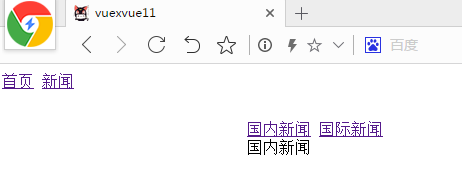
效果如下:
vue-router路由嵌套的使用的更多相关文章
- 前端MVC Vue2学习总结(八)——Vue Router路由、Vuex状态管理、Element-UI
一.Vue Router路由 二.Vuex状态管理 三.Element-UI Element-UI是饿了么前端团队推出的一款基于Vue.js 2.0 的桌面端UI框架,手机端有对应框架是 Mint U ...
- vue学习路由嵌套
1. 路由嵌套和参数传递 传参的两种形式: a.查询字符串:login?name=tom&pwd=123 {{$route.query}} ------ <li><route ...
- Vue系列:Vue Router 路由梳理
Vue Router 是 Vue.js 官方的路由管理器.它和 Vue.js 的核心深度集成,让构建单页面应用变得易如反掌.包含的功能有: 嵌套的路由/视图表 模块化的.基于组件的路由配置 路由参数. ...
- 04 Vue Router路由管理器
路由的基本概念与原理 Vue Router Vue Router (官网: https://router.vuejs.org/zh/)是Vue.js 官方的路由管理器. 它和vue.js的核心深度集成 ...
- Vue Router路由管理器介绍
参考博客:https://www.cnblogs.com/avon/p/5943008.html 安装介绍:Vue Router 版本说明 对于 TypeScript 用户来说,vue-router@ ...
- vue.js路由嵌套
<!DOCTYPE html> <html> <head> <title></title> <meta charset="u ...
- Vue Router 路由守卫:完整的导航解析流程
完整的导航解析流程 1 导航被触发. 2 在失活的组件里调用离开守卫. 3 调用全局的 beforeEach 守卫. 4 在重用的组件里调用 beforeRouteUpdate 守卫 (2.2+). ...
- Vue Router路由守卫妙用:异步获取数据成功后再进行路由跳转并传递数据,失败则不进行跳转
问题引入 试想这样一个业务场景: 在用户输入数据,点击提交按钮后,这时发起了ajax请求,如果请求成功, 则跳转到详情页面并展示详情数据,失败则不跳转到详情页面,只是在当前页面给出错误消息. 难点所在 ...
- vue 多级路由嵌套后打开页面是空白
在多层路由嵌套时,一级子目录必须有一个页面并且添加一具<router-view>,否则路由跳转页面为空,没有任何显示 来自为知笔记(Wiz)
- Vue Router 路由实现原理
一.概念 通过改变 URL,在不重新请求页面的情况下,更新页面视图. 二.实现方式 更新视图但不重新请求页面,是前端路由原理的核心之一,目前在浏览器环境中这一功能的实现主要有2种方式: 1.Hash ...
随机推荐
- Solr6.5查询参数说明
q - 查询字符串,这个是必须的.如果查询所有*:* ,根据指定字段查询(Name:张三 AND Address:北京) fq - (filter query)过虑查询,作用:在q查询符合结果中同时是 ...
- lua(简单的传参)
#include <iostream> #include <string.h> extern "C" { /*头文件lua.h定义了Lua提供的基础函数,包 ...
- amoeba安装与简单使用(一)
1.我的环境Amoeba 2.0.1 -- CentOS release 6.8 (Final) -- 10.20.49.254Mysql 5.1.73 -- CentOS release 6.4 ( ...
- NSTheard 详解
一.什么是NSThread NSThread是基于线程使用,轻量级的多线程编程方法(相对GCD和NSOperation),一个NSThread对象代表一个线程, 需要手动管理线程的生命周期,处理线程同 ...
- linux 字符驱动
1 结构体说明: struct cdev { struct kobject kobj; // 每一个 cdev 都是一个 kobject st ...
- python cookbook第三版学习笔记十七:委托属性
我们想在访问实例的属性时能够将其委托到一个内部持有的对象上,这经常用到代理机制上 class A: def spam(self,x): print("class_A: ...
- oracle decode 用法
含义解释: decode(条件,值1,返回值1,值2,返回值2,...值n,返回值n,缺省值) 该函数的含义如下:IF 条件=值1 THEN RETURN(翻译值1)ELSIF 条件=值2 THEN ...
- 常见数据挖掘算法的Map-Reduce策略(1)
大数据这个名词是被炒得越来越火了,各种大数据技术层出不穷,做数据挖掘的也跟着火了一把,呵呵,现今机器学习算法常见的并行实现方式:MPI,Map-Reduce计算框架,GPU方面,grap ...
- 项目中对模板和js,css文件进行压缩的处理类
我们知道,在html的页面中,所有空格和换行符其实都会占据一定的空间,即使使用了gzip压缩,在传输过程中依然会浪费用户的流量和我们自己服务器的带宽,此脚本就是为了解决这个问题而诞生的. 请自行下载G ...
- 基本jquery
<!DOCTYPE HTML> <html lang="en-US"> <head> <meta charset="UTF-8& ...