
web02--jsp数据传递
1.创建一个login.jsp登陆界面
<%@ page language="java" import="java.util.*" pageEncoding="UTF-8"%>

<%

String path = request.getContextPath();

String basePath = request.getScheme()+"://"+request.getServerName()+":"+request.getServerPort()+path+"/";

%>

<!DOCTYPE HTML PUBLIC "-//W3C//DTD HTML 4.01 Transitional//EN">

<html>

  <head>

    <base href="<%=basePath%>">

    <title>login.jsp</title>

    <meta http-equiv="pragma" content="no-cache">

    <meta http-equiv="cache-control" content="no-cache">

    <meta http-equiv="expires" content="0">

    <meta http-equiv="keywords" content="keyword1,keyword2,keyword3">

    <meta http-equiv="description" content="This is my page">

    <!--

    <link rel="stylesheet" type="text/css" href="styles.css">

    -->

  </head>

  <body>

     <%-- action:我们需要提交的地址  method:请求的方式 --%>

    <form action="doMain.jsp" method="get">

      <table>

        <tr>

           <td>用户名:</td>

           <td><input  type="text" name="userName"></td>

        </tr>

        <tr>

           <td>密码:</td>

           <td><input  type="password" name="password"></td>

        </tr>

        <tr>

           <td><input  type="submit" value="登录"></td>

        </tr>

      </table>

    </form>

  </body>

</html>
2.创建对应的处理界面doMain.jsp
<%@ page language="java" import="java.util.*" pageEncoding="UTF-8"

contentType="text/html; charset=ISO-8859-1"

%>

<%

String path = request.getContextPath();

String basePath = request.getScheme()+"://"+request.getServerName()+":"+request.getServerPort()+path+"/";

%>

<!DOCTYPE HTML PUBLIC "-//W3C//DTD HTML 4.01 Transitional//EN">

<html>

  <head>

    <base href="<%=basePath%>">

    <title>doMain.jsp</title>

    <meta http-equiv="pragma" content="no-cache">

    <meta http-equiv="cache-control" content="no-cache">

    <meta http-equiv="expires" content="0">

    <meta http-equiv="keywords" content="keyword1,keyword2,keyword3">

    <meta http-equiv="description" content="This is my page">

    <!--

    <link rel="stylesheet" type="text/css" href="styles.css">

    -->

  </head>

  <body>

   <h1>登录成功</h1>

<%-- login.jsp中的form表单 get方式请求乱码

    01.治标不治本    不推荐使用

    String  userName=new String(name.getBytes("iso-8859-1"),"utf-8");

    02.治本

    在服务器中的conf文件夹中找到server.xml文件中的Connector节点中  新增属性

   URIEncoding="UTF-8"

 --%>

    <%

      //根据login.jsp页面 name的属性值  获取 value

      //post乱码 解决   是不是每个页面都需要设置 请求编码格式??? 后面 我们会用Filter

      request.setCharacterEncoding("utf-8");  //请求的编码

      response.setCharacterEncoding("utf-8"); //响应的编码

      String  name=request.getParameter("userName");  //获取用户名

      String  pwd=request.getParameter("password");  //获取密码

    %>

   <%-- 就是想把login页面的值 传递给last.jsp   --%>

    <%

    out.print("用户名:"+name);

    out.print("密码:"+pwd);

    //把从login页面拿到的值 存储到了 request作用域中了

    request.setAttribute("userName", name);

    request.setAttribute("password", pwd);

     //转发到了last.jsp  携带了数据     last页面能取得数据

    //request.getRequestDispatcher("last.jsp").forward(request, response);

     //重定向last.jsp   数据都会丢失!   last页面不能取得数据

     response.sendRedirect("last.jsp");

    %>

     <%-- get请求  --%>

    <a  href="last.jsp?userName=小黑黑2&password=123456">跳转到最后一个界面</a>

  </body>

</html>
3.创建last.jsp看能不能获取login.jsp的值?
<%@ page language="java" import="java.util.*" pageEncoding="UTF-8"%>

<%

String path = request.getContextPath();

String basePath = request.getScheme()+"://"+request.getServerName()+":"+request.getServerPort()+path+"/";

%>

<!DOCTYPE HTML PUBLIC "-//W3C//DTD HTML 4.01 Transitional//EN">

<html>

  <head>

    <base href="<%=basePath%>">

    <title>last.jsp</title>

    <meta http-equiv="pragma" content="no-cache">

    <meta http-equiv="cache-control" content="no-cache">

    <meta http-equiv="expires" content="0">

    <meta http-equiv="keywords" content="keyword1,keyword2,keyword3">

    <meta http-equiv="description" content="This is my page">

    <!--

    <link rel="stylesheet" type="text/css" href="styles.css">

    -->

  </head>

  <body>

  <h1>last.jsp</h1>

  <%

  //在doMain中使用了转发后   能直接获取  login页面的值

  String  name=request.getParameter("userName");  //获取用户名

  String  pwd=request.getParameter("password");  //获取密码

  out.print("用户名:"+name);

  out.print("密码:"+pwd);

  %>

   <%

   //从request.getAttribute()取值

    request.setCharacterEncoding("utf-8");  //请求的编码

    String  name1=(String)request.getAttribute("userName");//获取用户名

    String  pwd2=(String)request.getAttribute("password");  //获取密码

    out.print("用户名:"+name1);

    out.print("密码:"+pwd2);

    %>

  </body>

</html>
4.通过request获取界面的多个值
01.创建request1.jsp
  <form action="request2.jsp" method="post">

      <input type="checkbox"  name="box" value="别玩手机">别玩手机"

      <input type="checkbox"  name="box" value="就玩手机">就玩手机"

      <input type="checkbox"  name="box" value="还玩手机">还玩手机"

      <input type="checkbox"  name="box" value="真玩手机">真玩手机"

      <input type="checkbox"  name="box" value="玩手机">玩手机">

      <button type="submit">提交</button>

  </form>
02.创建request2.jsp
 <body>

  <%

  request.setCharacterEncoding("utf-8");

  //获取选中复选框的值

 String [] boxs=request.getParameterValues("box");

  //首先进行判断  必须先判断非空

  if(boxs!=null&&boxs.length!=0){

      for(String box:boxs){

          out.print(box+"<br/>");

      }

  }else{

      //重定向到request1界面

      response.sendRedirect("request1.jsp");

  }

  %>

      <h1>request对象常用的方法</h1>

     获取http请求中使用的方法名称 <%=request.getMethod() %><br/>

     获取http请求中调用servlet的url部分 <%=request.getServletPath() %><br/>

     获取http请求中MIME类型 <%=request.getContentType() %><br/>

     获取请求中服务器主机名称 <%=request.getServerName() %><br/>

     获取请求中服务器的端口号名称 <%=request.getServerPort() %><br/>

     获取请求中服务器的ip地址 <%=request.getRemoteAddr()%><br/>

     获取请求中服务器的ip地址 <%=request.getRemoteHost()%><br/>

     获取请求中使用的协议 <%=request.getScheme() %><br/>

  </body>
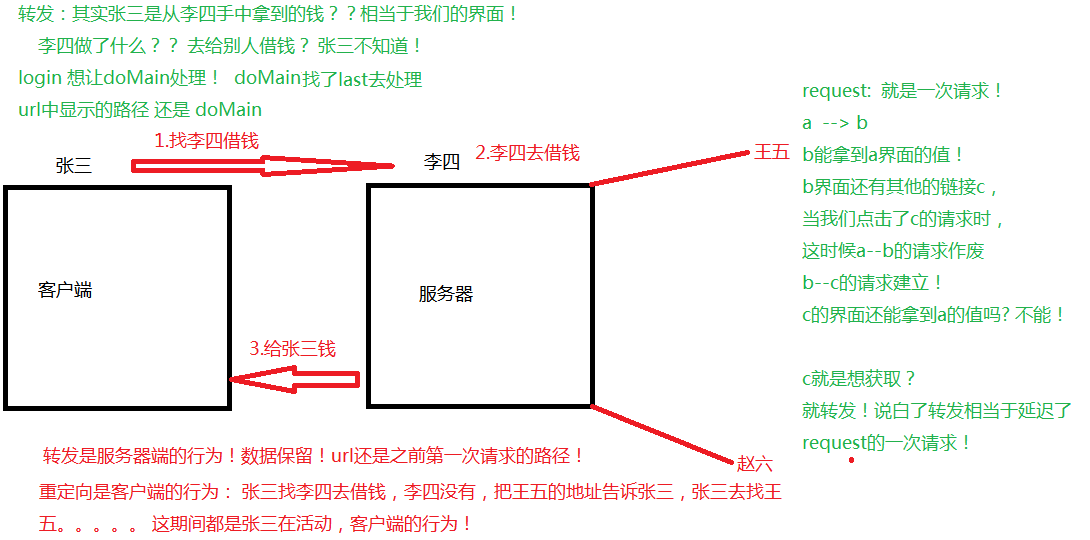
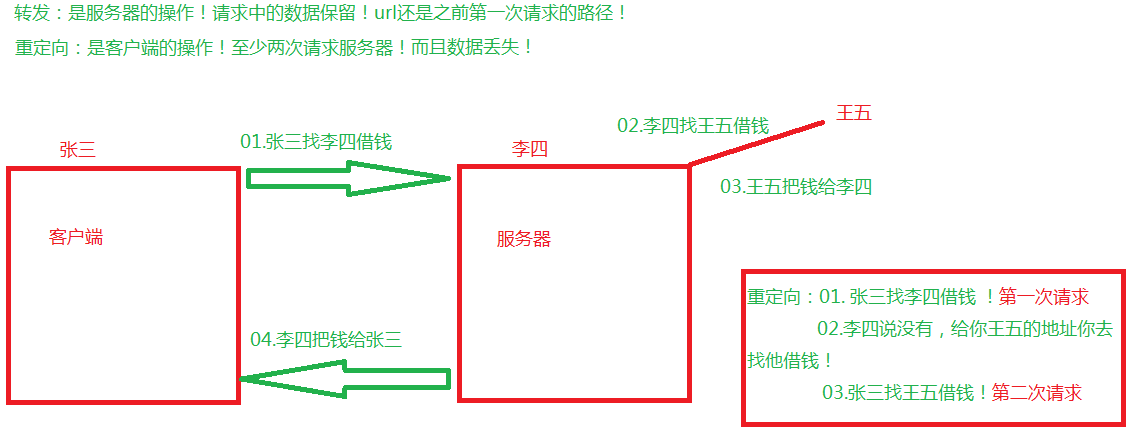
转发和重定向
web02--jsp数据传递的更多相关文章
- JSP Servlet SQL 三者之间数据传递
前言: 最近一直在做WEB开发,现总结一下这一段时间的体会和感触. 切记,web开发重点在于前台数据交互,页面美化而不要太沉溺于底层数据. 浏览器时代来到,向我们召唤出更炫.更简洁.更方便.更大气的网 ...
- springMVC:将controller中数据传递到jsp页面
1> 将方法的返回值该为ModelAndView在返回时,将数据存储在ModelAndView对象中如: newModelAndView("/WEBINF/jsp/showData.j ...
- JSP、servlet、SQL三者之间的数据传递
JSP.servlet.SQL三者之间的数据传递 博客分类: web开发 JSPservletSQL数据库连接池web开发 前言: 最近一直在做WEB开发,现总结一下这一段时间的体会和感触. 切记, ...
- struts2之Action与JSP相互数据传递
package com.loaderman.crm.action; import com.loaderman.crm.entity.User; import com.loaderman.crm.ser ...
- 《Java从入门到放弃》入门篇:springMVC数据传递
springMVC中的数据传递方式与JSP和Struts2相比,更加的简单.具体有什么样的区别呢?我们通过下面这张图来对比就知道了. 随手画的,有些错别字,不用太在意..... 接下来,进入正题,sp ...
- #学习笔记#JSP数据交互
#学习笔记#JSP数据交互 数据库的使用方式: 当用户在第一个页面的查询框输入查询语句点提交的时候我们是用什么样的方式完成这个查询的? 答:我们通过在第一个页面提交表单的形式,真正的数据库查询时在 ...
- SpringMVC -- 梗概--源码--壹--数据传递
附:实体类 Class : User package com.c61.entity; import java.text.SimpleDateFormat; import java.util.Date; ...
- 22SpringMvc_jsp页面上的数据传递到控制器的说明
假设有这个一个业务:在jsp页面上写入数据,然后把这个数据传递到后台. 效果如下:
- JSP/Servlet开发——第二章 JSP数据交互(一)
1. JSP内置对象:JSP内置对象是 Web 容器创建的一组对象: ●JSP常用的内置对象:out.request.application.session.response等: ●内置对象不需要 ...
- Java WEB中的HttpServletResponse数据传递
1.什么是HttpServletResponse 2.使用HttpServletResponse向浏览器发送数据及相关实例. 实例1:实现文件下载功能 实例2:实现验证码注册 实例3:实现页面3秒后跳 ...
随机推荐
- 【USACO 1.2.1】挤牛奶
[问题描述] 三个农民每天清晨5点起床,然后去牛棚给3头牛挤奶.第一个农民在300时刻(从5点开始计时,秒为单位)给他的牛挤奶,一直到1000时刻.第二个农民在700时刻开始,在 1200时刻结束.第 ...
- 绘图时,根据size()和自定义rect编程的区别
在绘图的时候,很多时候编写的代码需要根据当前窗口自身的size来进行绘制,这个时候可以添加一个额外的中间rect来做过度,这样以后的绘图机制不会 随着size的变化而不断变化.你的处理逻辑可以保持不变 ...
- 动态加载下拉框列表并添加onclick事件
1. js动态加载元素并设置属性 摘自(http://www.liangshunet.com/ca/201408/336848696.htm) <div id="parent&quo ...
- 初涉JavaScript模式 (9) : 函数 【常用方式】
回调模式 上一篇,对JavaScript函数进行了大体的介绍,这一篇对一些在工作中经常遇到的情况进行扩展. 在工作中,我们经常遇到很多需求,比如现在有一个需求: 一栋10层的大楼,当我们在坐电梯时,电 ...
- PhotoShop 移动工具详解
自动选择工具 勾选后 可以随意移动任意图层 不勾选 只适用于移动当前所选图层 Ctrl+Z 还原移动Ctrl+Alt+Z 后退一步 复制图像 Alt键+拖动 Shift+Alt+拖动 ...
- Cmakelist.txt
在LINUX下面编程需要注意的是,需要自己配置链接库,比如 TARGET_LINK_LIBRARIES(),需要把自己要加的库加进去
- 省队集训day6 A
code: #include<cstdio> #include<iostream> #include<cmath> #include<cstring> ...
- 新建PCH文件以及常用宏定义
$(SRCROOT)/项目名/pch文件名.pch //0-255的随机数 #define randint arc4random() % 256 //随机色 #define randColor [UI ...
- 仿微博——MJExtension之字典转模型
1.模型类中定义好属性 2.用AFN请求下来的数据保存到字典中 3.从字典中取出微博字典数组 //微博字典数组 NSArray *restrictArray = responseObject[@&qu ...
- OSPF+LVS ,qugga,vconfig,...感觉这些很有想法啊
将以前铁板一块的硬件拿来无限细分,路由器,交换机可灵活实现,SDN,NVF.硬盘可以分区,分区可以分布式块存储,操作系统可虚拟化,KVM OR LXC,网络可自由随时按需求定制更改配置. 操作系统支持 ...