
Selenium3+python自动化011-unittest生成测试报告(HTMLTestRunner)
批量执行完用例后,生成的测试报告是文本形式的,不够直观,为了更好的展示测试报告,最好是生成HTML格式的。
unittest里面是不能生成html格式报告的,需要导入一个第三方的模块:HTMLTestRunner
一、导入HTMLTestRunner
1.这个模块下载不能通过pip安装了,只能下载后手动导入,下载地址:http://tungwaiyip.info/software/HTMLTestRunner.html
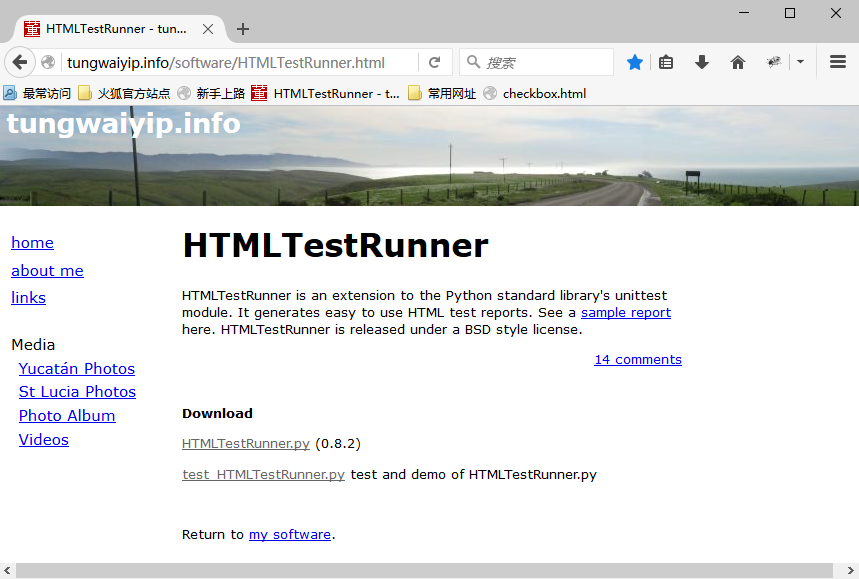
2.Download下HTMLTestRunner.py文件就是我们需要下载的包。
3.下载后手动拖到python安装文件的Lib目录下
4.验证安装成功 执行 import HTMLTestRunner 没有报错证明配置成功。

报告路径
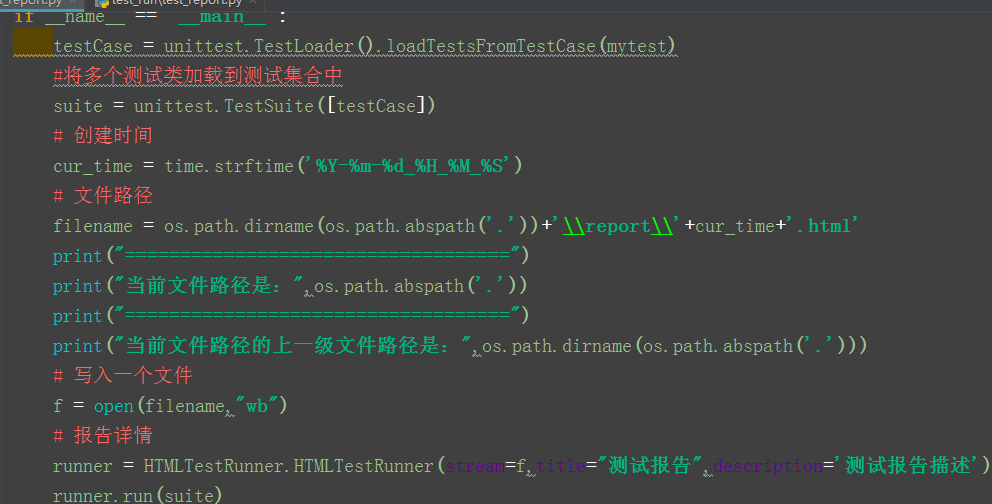
 # encoding = utf - 8

 import unittest

 import sys

 import HTMLTestRunner

 import time

 import os

 #被测试类

 class myclass(object):

     """classmethod 修饰符对应的函数不需要实例化,

     不需要 self 参数,但第一个参数需要是表示自身

     类的 cls 参数,可以来调用类的属性,类的方法,

     实例化对象等。"""

     @classmethod

     def sum(cls,a,b):

         return a + b   #将两个传入参数进行相加操作

     @classmethod

     def sub(cls, a, b):

         return a - b   #将两个传入参数进行相减操作

 class mytest(unittest.TestCase):

     # @classmethod

     # def setUpClass(cls):

     #     """初始化类固件"""

     #     print("-----setUpClass")

     # @classmethod

     # def tearDownClass(cls):

     #     """重构类固件"""

     #     print("--tearDownClas")

     #初始化工作

     def setUp(self):

         self.a = 3

         self.b = 1

         print("--setUp")

     #退出清理工作

     def tearDown(self):

         print("--tearDown")

     #具体的测试用例,一定要以test开头

     def test1sum(self):

         # res=3/0 抛出异常,执行结果为F

         #断言两数之和的结果是否是4

         res=myclass.sum(self.a,self.b)

         self.assertEqual(res,4,'test sum fail')

         print('testsum方法')

     def testsub(self):

         #断言两数之差的结果是否是2

         self.assertEqual(myclass.sub(self.a,self.b),2,'test sub fail')

         print('testsub方法')

 class aa(unittest.TestCase):

     # num=2

     # @unittest.skip('skipping')

     # @unittest.skipIf(num>1,'num已经大于1')

     @unittest.skipUnless(sys.platform == "linux", "requires linux")

     def testaa(self):

         print('testaa')

 if __name__ == '__main__':

     testCase = unittest.TestLoader().loadTestsFromTestCase(mytest)

     #将多个测试类加载到测试集合中

     suite = unittest.TestSuite([testCase])

     # 创建时间

     cur_time = time.strftime('%Y-%m-%d_%H_%M_%S')

     # 文件路径

     filename = os.path.dirname(os.path.abspath('.'))+'\\report\\'+cur_time+'.html'

     print("===================================")

     print("当前文件路径是:",os.path.abspath('.'))

     print("===================================")

     print("当前文件路径的上一级文件路径是:",os.path.dirname(os.path.abspath('.')))

     # 写入一个文件

     f = open(filename,"wb")

     # 报告详情

     runner = HTMLTestRunner.HTMLTestRunner(stream=f,title="测试报告",description='测试报告描述')

     runner.run(suite)

     # 原始版本

     # f = open("./report.html","wb")

     # runner = HTMLTestRunner.HTMLTestRunner(stream=f,title="测试报告",description="测试报告描述")

     # runner.run(suite)
<?xml version="1.0" encoding="UTF-8"?>
<!DOCTYPE html PUBLIC "-//W3C//DTD XHTML 1.0 Strict//EN" "http://www.w3.org/TR/xhtml1/DTD/xhtml1-strict.dtd">
<html xmlns="http://www.w3.org/1999/xhtml">
<head>
<title>测试报告</title>
<meta name="generator" content="HTMLTestRunner 0.8.2"/>
<meta http-equiv="Content-Type" content="text/html; charset=UTF-8"/> <style type="text/css" media="screen">
body { font-family: verdana, arial, helvetica, sans-serif; font-size: 80%; }
table { font-size: 100%; }
pre { } /* -- heading ---------------------------------------------------------------------- */
h1 {
font-size: 16pt;
color: gray;
}
.heading {
margin-top: 0ex;
margin-bottom: 1ex;
} .heading .attribute {
margin-top: 1ex;
margin-bottom: 0;
} .heading .description {
margin-top: 4ex;
margin-bottom: 6ex;
} /* -- css div popup ------------------------------------------------------------------------ */
a.popup_link {
} a.popup_link:hover {
color: red;
} .popup_window {
display: none;
position: relative;
left: 0px;
top: 0px;
/*border: solid #627173 1px; */
padding: 10px;
background-color: #E6E6D6;
font-family: "Lucida Console", "Courier New", Courier, monospace;
text-align: left;
font-size: 8pt;
width: 500px;
} }
/* -- report ------------------------------------------------------------------------ */
#show_detail_line {
margin-top: 3ex;
margin-bottom: 1ex;
}
#result_table {
width: 80%;
border-collapse: collapse;
border: 1px solid #777;
}
#header_row {
font-weight: bold;
color: white;
background-color: #777;
}
#result_table td {
border: 1px solid #777;
padding: 2px;
}
#total_row { font-weight: bold; }
.passClass { background-color: #6c6; }
.failClass { background-color: #c60; }
.errorClass { background-color: #c00; }
.passCase { color: #6c6; }
.failCase { color: #c60; font-weight: bold; }
.errorCase { color: #c00; font-weight: bold; }
.hiddenRow { display: none; }
.testcase { margin-left: 2em; } /* -- ending ---------------------------------------------------------------------- */
#ending {
} </style> </head>
<body>
<script language="javascript" type="text/javascript"><!--
output_list = Array(); /* level - 0:Summary; 1:Failed; 2:All */
function showCase(level) {
trs = document.getElementsByTagName("tr");
for (var i = 0; i < trs.length; i++) {
tr = trs[i];
id = tr.id;
if (id.substr(0,2) == 'ft') {
if (level < 1) {
tr.className = 'hiddenRow';
}
else {
tr.className = '';
}
}
if (id.substr(0,2) == 'pt') {
if (level > 1) {
tr.className = '';
}
else {
tr.className = 'hiddenRow';
}
}
}
} function showClassDetail(cid, count) {
var id_list = Array(count);
var toHide = 1;
for (var i = 0; i < count; i++) {
tid0 = 't' + cid.substr(1) + '.' + (i+1);
tid = 'f' + tid0;
tr = document.getElementById(tid);
if (!tr) {
tid = 'p' + tid0;
tr = document.getElementById(tid);
}
id_list[i] = tid;
if (tr.className) {
toHide = 0;
}
}
for (var i = 0; i < count; i++) {
tid = id_list[i];
if (toHide) {
document.getElementById('div_'+tid).style.display = 'none'
document.getElementById(tid).className = 'hiddenRow';
}
else {
document.getElementById(tid).className = '';
}
}
} function showTestDetail(div_id){
var details_div = document.getElementById(div_id)
var displayState = details_div.style.display
// alert(displayState)
if (displayState != 'block' ) {
displayState = 'block'
details_div.style.display = 'block'
}
else {
details_div.style.display = 'none'
}
} function html_escape(s) {
s = s.replace(/&/g,'&');
s = s.replace(/</g,'<');
s = s.replace(/>/g,'>');
return s;
} /* obsoleted by detail in <div>
function showOutput(id, name) {
var w = window.open("", //url
name,
"resizable,scrollbars,status,width=800,height=450");
d = w.document;
d.write("<pre>");
d.write(html_escape(output_list[id]));
d.write("\n");
d.write("<a href='javascript:window.close()'>close</a>\n");
d.write("</pre>\n");
d.close();
}
*/
--></script> <div class='heading'>
<h1>测试报告</h1>
<p class='attribute'><strong>Start Time:</strong> 2019-07-01 23:11:41</p>
<p class='attribute'><strong>Duration:</strong> 0:00:00.001000</p>
<p class='attribute'><strong>Status:</strong> Pass 2</p> <p class='description'>测试报告描述</p>
</div> <p id='show_detail_line'>Show
<a href='javascript:showCase(0)'>Summary</a>
<a href='javascript:showCase(1)'>Failed</a>
<a href='javascript:showCase(2)'>All</a>
</p>
<table id='result_table'>
<colgroup>
<col align='left' />
<col align='right' />
<col align='right' />
<col align='right' />
<col align='right' />
<col align='right' />
</colgroup>
<tr id='header_row'>
<td>Test Group/Test case</td>
<td>Count</td>
<td>Pass</td>
<td>Fail</td>
<td>Error</td>
<td>View</td>
</tr> <tr class='passClass'>
<td>mytest</td>
<td>2</td>
<td>2</td>
<td>0</td>
<td>0</td>
<td><a href="javascript:showClassDetail('c1',2)">Detail</a></td>
</tr> <tr id='pt1.1' class='hiddenRow'>
<td class='none'><div class='testcase'>test1sum</div></td>
<td colspan='5' align='center'> <!--css div popup start-->
<a class="popup_link" onfocus='this.blur();' href="javascript:showTestDetail('div_pt1.1')" >
pass</a> <div id='div_pt1.1' class="popup_window">
<div style='text-align: right; color:red;cursor:pointer'>
<a onfocus='this.blur();' onclick="document.getElementById('div_pt1.1').style.display = 'none' " >
[x]</a>
</div>
<pre> pt1.1: </pre>
</div>
<!--css div popup end--> </td>
</tr> <tr id='pt1.2' class='hiddenRow'>
<td class='none'><div class='testcase'>testsub</div></td>
<td colspan='5' align='center'> <!--css div popup start-->
<a class="popup_link" onfocus='this.blur();' href="javascript:showTestDetail('div_pt1.2')" >
pass</a> <div id='div_pt1.2' class="popup_window">
<div style='text-align: right; color:red;cursor:pointer'>
<a onfocus='this.blur();' onclick="document.getElementById('div_pt1.2').style.display = 'none' " >
[x]</a>
</div>
<pre> pt1.2: </pre>
</div>
<!--css div popup end--> </td>
</tr> <tr id='total_row'>
<td>Total</td>
<td>2</td>
<td>2</td>
<td>0</td>
<td>0</td>
<td> </td>
</tr>
</table> <div id='ending'> </div> </body>
</html>
测试报告

Selenium3+python自动化011-unittest生成测试报告(HTMLTestRunner)的更多相关文章
- 3.5 unittest生成测试报告HTMLTestRunner
3.5 unittest生成测试报告HTMLTestRunner 前言批量执行完用例后,生成的测试报告是文本形式的,不够直观,为了更好的展示测试报告,最好是生成HTML格式的.unittest里面是不 ...
- python自动化之(自动生成测试报告)
前言: 用python执行测试脚本, 测试报告是记录我们测试过程的问题, 方便我们对整个测试过程的把控. 这里引用的是别人写好的模板, 我们拿过来用就OK, 能力强者可自行编写模板 测试报告图模板: ...
- Python自动化 unittest生成测试报告(HTMLTestRunner)03
批量执行完用例后,生成的测试报告是文本形式的,不够直观,为了更好的展示测试报告,最好是生成HTML格式的. unittest里面是不能生成html格式报告的,需要导入一个第三方的模块:HTMLTest ...
- python接口自动化测试(七)unittest 生成测试报告
用例的管理问题解决了后,接下来要考虑的就是报告我问题了,这里生成测试报告主要用到 HTMLTestRunner.py 这个模块,下面简单介绍一下如何使用: 一.下载HTMLTestRunner下载: ...
- 自动化测试基础篇--Selenium unittest生成测试报告(HTMLTestRunner)
如何生成HTMLTestRunner测试报告.接上篇文章,对于unittest框架,运行后,测试结果不便于查看,同时多个case存在的时候,可能会导致case result记录不正确的情况. 为此,引 ...
- python之单元测试_生成测试报告
(1)HTMLTestRunner.py的下载路径:https://pan.baidu.com/s/1Yk2E8d8bIo5_rmpussOE9Q 提取码:0jae (2)HTMLTestRunner ...
- Selenium2+python自动化(unittest)
# coding:utf-8from selenium import webdriverimport unittestimport timeclass Bolg(unittest.TestCase): ...
- selenium3+python自动化50-环境搭建(firefox)
前言 有不少小伙伴在安装selenium环境后启动firefox报错,因为现在selenium升级到3.0了,跟2.0的版本还有有一点区别的. 安装环境过程中主要会遇到三个坑: 1.'geckodri ...
- selenium3+python自动化50-环境搭建(firefox)【转载】
前言 有不少小伙伴在安装selenium环境后启动firefox报错,因为现在selenium升级到3.0了,跟2.0的版本还有有一点区别的. 安装环境过程中主要会遇到三个坑: 1.'geckodri ...
- Selenium3+python自动化006+自动化测试概述
自动化测试概述 1.自动化分类: (1)单元测试自动化: 单元测试(Unit):模拟各种异常场景,外部依赖较少,且可以做测试单元到最小的一种测试方法. Java单元测试框架Junit.TestNG; ...
随机推荐
- nodejs下载网页所有图片
前言 昨天一番发了一篇批量下载手机壁纸的文章,分享了抓取到的美图给小伙伴,然后一番就美美的去碎觉了. 早上起来看到有小伙伴在日更群里说有没有狗哥的?憨憨的一番以为就是狗的图片,于是就发了几张昨天抓取的 ...
- python——面向对象(4),单继承
"""class 类名(object<父类>)继承:子类继承父类.单继承:""" class A(object): " ...
- Spark学习之路 (十七)Spark分区[转]
分区的概念 分区是RDD内部并行计算的一个计算单元,RDD的数据集在逻辑上被划分为多个分片,每一个分片称为分区,分区的格式决定了并行计算的粒度,而每个分区的数值计算都是在一个任务中进行的,因此任务的个 ...
- 【python基础语法】字符串常用方法 、列表(第3天课堂笔记)
""" 字符串的方法 join 字符串拼接,将列表转换为字符串 find 查找元素位置 count 查找元素个数 replace 替换字符 split 字符串分割,将字符 ...
- Beego 输出数据格式JSON、XML、JSONP
JSON.XML.JSONP beego 当初设计的时候就考虑了 API 功能的设计,而我们在设计 API 的时候经常是输出 JSON 或者 XML 数据,那么 beego 提供了这样的方式直接输出: ...
- springBoot 与 springMVC的区别
springMVC 1.是基于Servlet的一个MVC框架(DispatcherServlet.ModelAndView.ViewResolver),解决web开发问题 缺点是 :配置复杂 要简化使 ...
- Linux内核镜像文件格式与生成过程(转)
<Linux内核镜像格式> Linux内核有多种格式的镜像,包括vmlinux.Image.zImage.bzImage.uImage.xipImage.bootpImage等. ➤k ...
- PHP0005:PHP基础--函数
- Easyui-Tree和Combotree使用注意事项-sunziren
版权声明:本文为sunziren原创文章,博客园首发,转载务必注明出处以及作者名称. Easyui-Tree和Combotree所使用的数据结构是类似的,在我的上一篇文章<Easyui-Tree ...
- Hadoop学习之路(7)MapReduce自定义排序
本文测试文本: tom 20 8000 nancy 22 8000 ketty 22 9000 stone 19 10000 green 19 11000 white 39 29000 socrate ...