
Wireless-MCS
MCS是modulation and coding scheme的缩写,可以翻译为调制和编码格式,我们可以选择配置该参数,来选择AP和Client之间传输的MCS rate,这些数据速率是使用short guard interval为20MHz信道宽度计算得出的: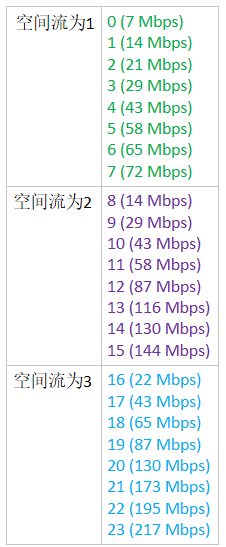
配置MCS:
Step 1
Choose Wireless > 802.11a/n/ac or 802.11b/g/n > High Throughput to open the (5 GHz or 2.4 GHz) High Throughput page.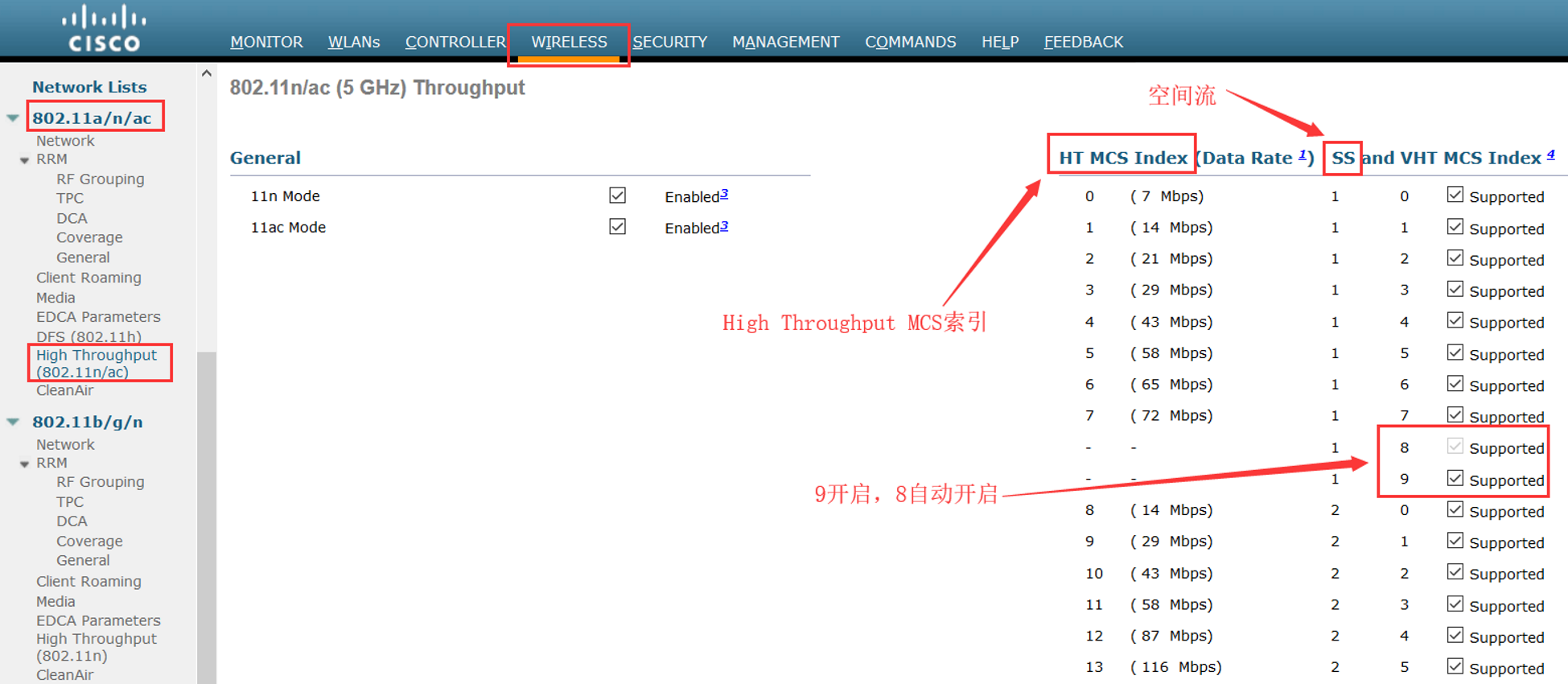
Step 2
Select the 11n Mode check box to enable 802.11n support on the network. The default value is enabled.
If you want to disable 802.11n mode when both 802.11n and 802.11ac modes are enabled, you must disable the 802.11ac mode first.
如果802.11n和11ac都开启的,你需要先关闭802.11ac才能关闭802.11n
Step 3
Select the check boxes of the desired rates to specify the modulation and coding scheme (MCS) rates at which data can be transmitted between the access point and the client. These data rates, which are calculated for a 20-MHz channel width using a short guard interval, are available:
选择你希望在AP和Client之间的MCS rate
• 0 (7 Mbps)
• 1 (14 Mbps)
• 2 (21 Mbps)
• 3 (29 Mbps)
• 4 (43 Mbps)
• 5 (58 Mbps)
• 6 (65 Mbps)
• 7 (72 Mbps)
• 8 (14 Mbps)
• 9 (29 Mbps)
• 10 (43 Mbps)
• 11 (58 Mbps)
• 12 (87 Mbps)
• 13 (116 Mbps)
• 14 (130 Mbps)
• 15 (144 Mbps)
Any associated clients that support the selected rates may communicate with the access point using those rates. However, the clients are not required to be able to use this rate in order to associate. The MCS settings determine the number of spatial streams(SS), the modulation, the coding rate, and the data rate values that are used.
任何支持选中速率的Client将会使用这些rate来和AP通信,然而,Client不需要使用这个rate去关联。MCS设置决定了被使用的空间流的数量,调制方式,编码速率和数据速率
Step 4
Click Apply.
Step 5
Use the 802.11n data rates that you configured by enabling WMM (Wi-Fi Multi-Media,WiFi多媒体) on the WLAN as follows:
通过开启WLAN的WMM使用你配置的802.11n数据速率。
a. Choose WLANs to open the WLANs page.
b. Click the ID number of the WLAN for which you want to configure WMM mode.
c. When the WLANs > Edit page appears, choose the QoS tab to open the WLANs > Edit (Qos) page.
d. From the WMM Policy drop-down list, choose Required or Allowed to require or allow client devices to use WMM. Devices that do not support WMM cannot join the WLAN. 选择“Required”或“Allowed”去要求或允许Client使用WMM,Client不支持WMM的就不能加入WLAN
e. If you choose Allowed, devices that cannot support WMM can join the WLAN but will not benefit from the 802.11n rates.
f. Click Apply.如果选择的是“Allowed”,不支持WMM的Client可以加入WLAN,但是不能受益于802.11n速率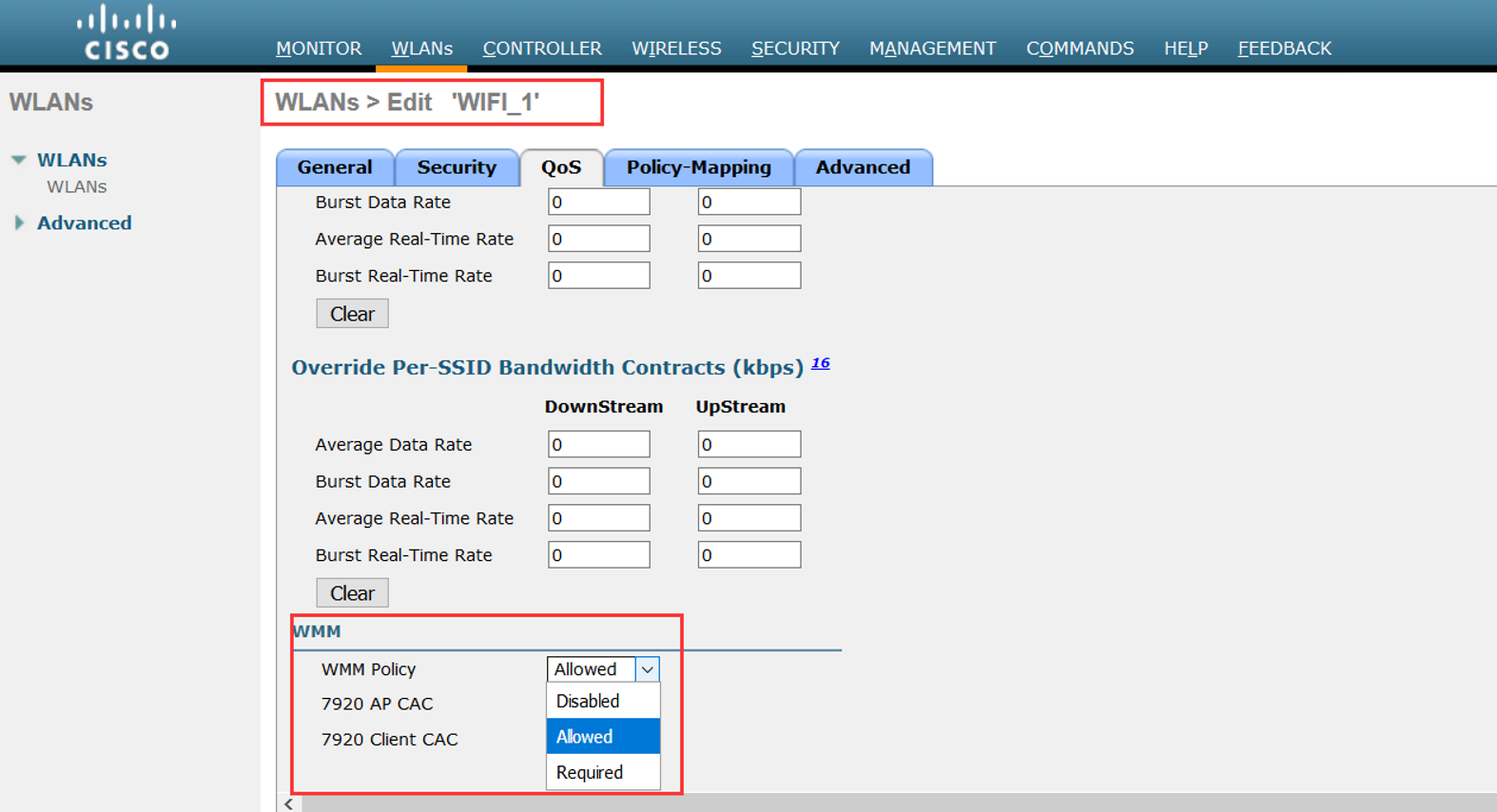
Step 6
Click Save Configuration.
Note To determine if an access point supports 802.11n, look at the 11n Supported text box on either the 802.11a/n/ac (or 802.11b/g/n) Cisco APs > Configure page or the 802.11a/n/ac (or 802.11b/g/n) AP Interfaces > Details page.
CLI命令配置:
• Enable 802.11n support on the network by entering this command:
config {802.11a | 802.11b} 11nsupport {enable | disable}
• Specify the modulation and coding scheme (MCS) rates at which data can be transmitted between the access point and the client by entering this command:
config {802.11a | 802.11b} 11nsupport mcs tx {0-15} {enable | disable}
• Use the 802.11n data rates that you configured by enabling WMM on the WLAN as follows:
config wlan wmm {allow | disable | require} wlan_id
The require parameter requires client devices to use WMM. Devices that do not support WMM cannot join the WLAN.
If set to allow, devices that cannot support WMM can join the WLAN but do not benefit from 802.11n rates.
• Specify the aggregation method used for 802.11n packets as follows:
1. Disable the network by entering this command:
config {802.11a | 802.11b} disable network
2. Specify the aggregation method entering this command:
config {802.11a | 802.11b} 11nsupport {a-mpdu | a-msdu} tx priority {0-7 | all} {enable | disable}
Aggregation is the process of grouping packet data frames together rather than transmitting them separately. Two aggregation methods are available: Aggregated MAC Protocol Data Unit (A-MPDU) and Aggregated MAC Service Data Unit (A-MSDU). A-MSDU is performed in hardware and therefore is the default method.
聚合是将分组数据帧分组在一起而不是单独发送它们的过程。 两种聚合方法可用:聚合MAC协议数据单元(A-MPDU)和聚合MAC服务数据单元(A-MSDU)。 A-MSDU在硬件中执行,因此是默认方法。
注意:For 802.11ac, all packets are A-MPDU. The A-MSDU option does not apply for 802.11ac.
You can specify the aggregation method for various types of traffic from the access point to the clients. This table defines the priority levels (0-7) assigned per traffic type
你可以指定从AP到Client各种流量的聚合方式。下面这个表定义了优先级级别0-7,对应的每种流量类型: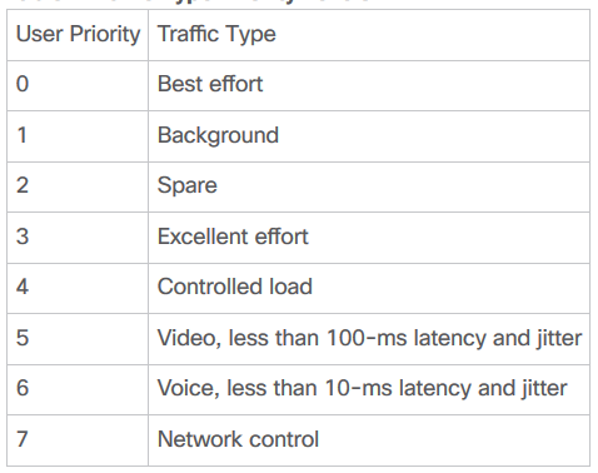
You can configure each priority level independently, or you can use the all parameter to configure all of the priority levels at once. When you use the enable command, the traffic associated with that priority level uses A-MPDU transmission. When you use the disable command, the traffic associated with that priority level uses A-MSDU transmission. Configure the priority levels to match the aggregation method used by the clients. By default, A-MPDU is enabled for priority level 0, 4 and 5 and the rest are disabled. By default, A-MSDU is enabled for all priorities except 6 and 7.
3. Reenable the network by entering this command:
config {802.11a | 802.11b} enable network
• Configure the 802.11n-5 GHz A-MPDU transmit aggregation scheduler by entering this command:
config 802.11{a | b} 11nsupport a-mpdu tx scheduler {enable | disable | timeout rt timeout-value}
The timeout value is in milliseconds. The valid range is between 1 millisecond to 1000 milliseconds.
• Configure the guard interval for the network by entering this command: config 802.11{a | b} 11nsupport guard_interval {any | long}
• Configure the Reduced Interframe Space (RIFS) for the network by entering this command:
config 802.11{a | b} 11nsupport rifs rx {enable | disable}
• Save your changes by entering this command: save config
• View the configuration settings for the 802.11 networks by entering this command:
show {802.11a | 802.11b}
Wireless-MCS的更多相关文章
- IEEE 802.11p (WAVE,Wireless Access in the Vehicular Environment)
IEEE 802.11p(又称WAVE,Wireless Access in the Vehicular Environment)是一个由IEEE 802.11标准扩充的通讯协定.这个通讯协定主要用在 ...
- [并查集] POJ 2236 Wireless Network
Wireless Network Time Limit: 10000MS Memory Limit: 65536K Total Submissions: 25022 Accepted: 103 ...
- 可重入锁 公平锁 读写锁、CLH队列、CLH队列锁、自旋锁、排队自旋锁、MCS锁、CLH锁
1.可重入锁 如果锁具备可重入性,则称作为可重入锁. ========================================== (转)可重入和不可重入 2011-10-04 21:38 这 ...
- POJ 2236 Wireless Network(并查集)
传送门 Wireless Network Time Limit: 10000MS Memory Limit: 65536K Total Submissions: 24513 Accepted ...
- Overview and Evaluation of Bluetooth Low Energy: An Emerging Low-Power Wireless Technology
转自:http://www.mdpi.com/1424-8220/12/9/11734/htm Sensors 2012, 12(9), 11734-11753; doi:10.3390/s12091 ...
- poj 2236:Wireless Network(并查集,提高题)
Wireless Network Time Limit: 10000MS Memory Limit: 65536K Total Submissions: 16065 Accepted: 677 ...
- wireless tool 移植
在linux上调试wifi, 需要移植wireless tool进行验证,本文记录移植方法. 参考链接 http://www.cnblogs.com/zengjfgit/p/5601473.html ...
- 无线电源传输 Wireless Power Consortium (WPC) Communication
Universally Compatible Wireless Power Using the Qi Protocol Wireless charging of portable electronic ...
- CLH锁 、MCS锁
一.引文 1.1 SMP(Symmetric Multi-Processor) 对称多处理器结构,指服务器中多个CPU对称工作,每个CPU访问内存地址所需时间相同.其主要特征是共享,包含对CPU,内存 ...
- Top 10 Free Wireless Network hacking/monitoring tools for ethical hackers and businesses
There are lots of free tools available online to get easy access to the WiFi networks intended to he ...
随机推荐
- Sliding Window POJ - 2823 单调队列模板题
Sliding Window POJ - 2823 单调队列模板题 题意 给出一个数列 并且给出一个数m 问每个连续的m中的最小\最大值是多少,并输出 思路 使用单调队列来写,拿最小值来举例 要求区间 ...
- 初识Docker:BusyBox容器后台运行失败
1.问题描述:我在进行Docker网络实验时,使用docker run -d busybox命令时,busybox无法保持后台长期运行. ============================ ...
- 【原】AMFObject数据格式详解
AMF AMF是Action Message Format(动作消息格式)的简写,它是一种二进制的数据格式.它的设计是为了把actionscript里面的数据(包括Object, Array, Boo ...
- 求int型正整数在内存中存储时1的个数 && int型的数到底最大是多少?
输入一个int型的正整数(十位数之内!嘞!),计算出该int型数据在内存中存储时1的个数. #include<bits/stdc++.h> using namespace std; int ...
- Oracle的表空间、用户和模式
Oracle 的 表空间(Tablespace).用户(User).模式(Schema) 前面有整理了一篇 Oracle 数据库(database) 与 实例(instance) 的概念及关系整理 ...
- codeforces div2 603 E. Editor(线段树)
题目链接:https://codeforces.com/contest/1263/problem/E 题意:一个编译器,每次输入一些字符,R表示光标右移,L表示光标左移,然后有一些左括号( 和 右括 ...
- 【visio】故障树分析图
率属于 商务 故障树是从一个可能的事故开始,自上而下.一层层的寻找顶事件的直接原因和间接原因事件,直到基本原因事件,并用逻辑图把这些事件之间的逻辑关系表达出来. 主要的应用场景:分析复杂问题原因,一个 ...
- 506,display有哪些值?说明他们的作用
block:转换成块状元素 inline:装换成行内元素 none:设置元素不可见 inline-block:想行内元素那样显示,但是其内容像块类型元素一样显示 list-item:想块类型元素一样显 ...
- C语言实例-大小写字母间的转换
初学C语言都会遇到要求写大小写转换的题目 这类题目主要通过ASCII(美国信息交换标准代码)码差值实现,A对应ASCII码十进制数字是65,a对应ASCII码十进制数字是97,即大小写字母之间ASCI ...
- py2
函数相关的 # 生成器相关的# 例1 ll = sum(i for i in range(100000000)) #生成器占资源少 # 例2 def demo(): for i in range(4) ...