
14.翻译系列:从已经存在的数据库中生成上下文类和实体类【EF 6 Code-First系列】
原文链接:https://www.entityframeworktutorial.net/code-first/code-first-from-existing-database.aspx
EF 6 Code-First系列文章目录:
- 1 翻译系列:什么是Code First(EF 6 Code First 系列)
- 2.翻译系列:为EF Code-First设置开发环境(EF 6 Code-First系列)
- 3.翻译系列:EF Code-First 示例(EF 6 Code-First系列)
- 4.翻译系列:EF 6 Code-First默认约定(EF 6 Code-First系列)
- 5.翻译系列:EF 6中数据库的初始化(EF 6 Code-First 系列)
- 6.翻译系列:EF 6 Code-First中数据库初始化策略(EF 6 Code-First系列
- 7.翻译系列:EF 6中的继承策略(EF 6 Code-First 系列)
- 8.翻译系列: EF 6中配置领域类(EF 6 Code-First 系列)
- 9.翻译系列:EF 6以及EF Core中的数据注解特性(EF 6 Code-First系列)
- 9.1 翻译系列:数据注解特性之----Table【EF 6 Code-First 系列】
- 9.2 翻译系列:数据注解特性之---Column【EF 6 Code First系列】
- 9.3 翻译系列:数据注解特性之Key【EF 6 Code-First 系列】
- 9.4 翻译系列:EF 6以及 EF Core中的NotMapped特性(EF 6 Code-First系列)
- 9.5 翻译系列:数据注解之ForeignKey特性【EF 6 Code-First系列】
- 9.6 翻译系列:数据注解之Index特性【EF 6 Code-First系列】
- 9.7 翻译系列:EF数据注解特性之--InverseProperty【EF 6 Code-First系列】
- 9.8 翻译系列:数据注解特性之--Required 【EF 6 Code-First系列】
- 9.9 翻译系列:数据注解特性之--MaxLength 【EF 6 Code-First系列】
- 9.10 翻译系列:EF数据注解特性之StringLength【EF 6 Code-First系列】
- 9.11 翻译系列:数据注解特性之--Timestamp【EF 6 Code-First系列】
- 9.12 翻译系列:数据注解特性之ConcurrencyCheck【EF 6 Code-First系列】
- 10.翻译系列:EF 6中的Fluent API配置【EF 6 Code-First系列】
- 10.1.翻译系列:EF 6中的实体映射【EF 6 Code-First系列】
- 10.2.翻译系列:使用Fluent API进行属性映射【EF 6 Code-First】
- 11.翻译系列:在EF 6中配置一对零或者一对一的关系【EF 6 Code-First系列】
- 12.翻译系列:EF 6 中配置一对多的关系【EF 6 Code-First系列】
- 13.翻译系列:Code-First方式配置多对多关系【EF 6 Code-First系列】
- 14.翻译系列:从已经存在的数据库中生成上下文类和实体类【EF 6 Code-First系列】
- 15.翻译系列:EF 6中的级联删除【EF 6 Code-First 系列】
- 16.翻译系列:EF 6 Code -First中使用存储过程【EF 6 Code-First系列】
- 17.翻译系列:将Fluent API的配置迁移到单独的类中【EF 6 Code-First系列】
- 18.翻译系列:EF 6 Code-First 中的Seed Data(种子数据或原始测试数据)【EF 6 Code-First系列】
- 19.翻译系列:EF 6中定义自定义的约定【EF 6 Code-First约定】
- 20.翻译系列:Code-First中的数据库迁移技术【EF 6 Code-First系列】
- 20.1翻译系列:EF 6中自动数据迁移技术【EF 6 Code-First系列】
- 20.2.翻译系列:EF 6中基于代码的数据库迁移技术【EF 6 Code-First系列】
- 21.翻译系列:Entity Framework 6 Power Tools【EF 6 Code-First系列】
这里你将会学习使用Code-First方式,从一个已经存在的数据库中生成上下文类和实体类。
对于已经存在的数据库,EF提供了一种简单的方式来使用Code-First方式。它将会根据你的数据库表,生成所有的实体类,然后使用Fluent API和数据注解来配置这些生成的类。
我们创建一个控制台应用程序EFCodeFirstFromExisingDB:

添加一个ADO.NET实体数据模型:后面就按图操作了。。


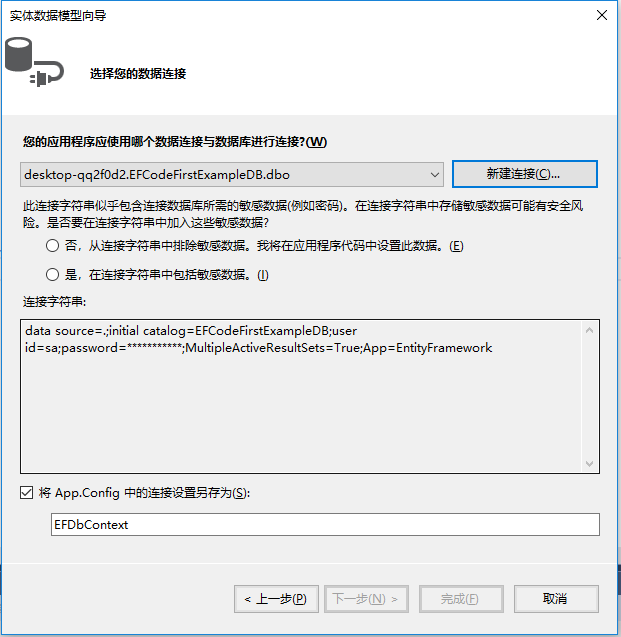

点击完成之后,就生成了类:

我们分别看看:
生成的上下文类:

生成的Grade类:

生成的Students类:

14.翻译系列:从已经存在的数据库中生成上下文类和实体类【EF 6 Code-First系列】的更多相关文章
- idea 从数据库快速生成Spring Data JPA实体类
第一步,调出 Persistence 窗口. File—>Project Structure—>model—> + —>JPA 第二步:打开 Persistence窗口 配置 ...
- 9.2 翻译系列:数据注解特性之---Column【EF 6 Code First系列】
原文链接:http://www.entityframeworktutorial.net/code-first/column-dataannotations-attribute-in-code-firs ...
- 1 翻译系列:什么是Code First(EF 6 Code First 系列)
原文链接:http://www.entityframeworktutorial.net/code-first/what-is-code-first.aspx EF 6 Code-First系列文章目录 ...
- 自定义tt文本模板实现MySql指数据库中生成实体类
自定义tt文本模板实现MySql指数据库中生成实体类 1.在项目中依次点击“添加”/“新建项”,选择“文本模板”,输入名称后点击添加. 2.在Base.tt中添加如下代码. <#@ templa ...
- 解决SpringDataJpa实体类中属性顺序与数据库中生成字段顺序不一致的问题
一.在application.yml配置中添加数据库根据实体类自动创建数据库表的配置(这里数据库采用MySQL数据库) jpa: database: MYSQL show-sql: true #Hib ...
- insert 一条数据 然后拿出这条数据在数据库中生成的ID
[insert 一条数据 然后拿出这条数据在数据库中生成的ID] <insert id="insert" parameterType="management&quo ...
- java高并发系列 - 第16天:JUC中等待多线程完成的工具类CountDownLatch,必备技能
这是java高并发系列第16篇文章. 本篇内容 介绍CountDownLatch及使用场景 提供几个示例介绍CountDownLatch的使用 手写一个并行处理任务的工具类 假如有这样一个需求,当我们 ...
- Intellij IDEA 通过数据库表逆向生成带注释的实体类文件超级详细步骤,附详细解决方案
参考:https://blog.csdn.net/qq_34371461/article/details/80571281 https://blog.csdn.net/mqchenrong/arti ...
- Oracle数据库使用mybatis的时候,实体类日期为Date类型,mybatis里面定义的是Date类型,插入的时候,时分秒全部是12:00:00问题
实体类中日期定义的是Date类型的,没毛病: 我在mybatis里面定义的是Date类型的,进行测试的时候发现,数据库插入的日期的时分秒全部都是一样的,都是12:00:00,很郁闷: 后来把mybat ...
随机推荐
- Django视图层、虚拟环境
一.虚拟环境安装 目的:为了解决版本共存问题 ''' 1.通过pip3安装虚拟环境: -- pip3 install virtualenv 2.前往目标文件夹: -- cd 目标文件夹 (C:\Vir ...
- ppt标签打开文件 word标签打开文件 窗口打开文件 粘贴默认方式
ppt标签打开文件 word标签打开文件 word窗口打开文件 ppt粘贴默认方式 word粘贴默认方式 ppt粘贴默认方式 只保留文本 == 通过 视图 切换窗口. == 层叠 样式 如下. == ...
- android 职业 转行
不知道多少人和我一样.学安卓安卓工作.成了一件很烦躁的事情.甚至迷茫. 起初学安卓,是因为安卓流行,所以有兴趣,想要学.那个时候想做一个应用,想对安卓手机有个了解,比如获取手机短信.没有太在意工 ...
- 用java连接RabbitMQ
pom.xml <dependencies> <dependency> <groupId>junit</groupId> <artifactId& ...
- 潭州课堂25班:Ph201805201 django 项目 第十课 自定义错误码,完成图片验证码,用户是否被注册功能 (课堂笔记)
把 视图传到前台的 JsonResponse(data=data) 先进行处理,之后再传到前台, 处理:引用自定义错误代码,把错误代码返回给前台,前台根据错误代码中文提示 class Code: O ...
- python 有参装饰器与迭代器
1.有参装饰器 模板: def auth(x): def deco(func): def timmer(*args,**kwargs ): res = func(*args,**kwargs ) re ...
- 生成缓存文件cache file
生成缓存文件cache file class Test{ public function index(){ $arrConfig = Array( 'name' => 'daicr', 'age ...
- webView加载url,加载指定字符串
//加载url-(void)addWebView{ UIWebView * webView = [[UIWebView alloc] initWithFrame:CGRectMake(, , zScr ...
- Groovy 反射字符串常量方法
Keywords: Groovy, Reflection, 反射 The Reflection of Groovy String constant style method. Groovy支持以下的方 ...
- css冲刺
CSS知识点及面试题 1.一般与文本相关的属性都可以继承text-/font-/line- 2.background属性1)background-repeat:repeat/repeat-x/repe ...