
ios开发——实用技术OC篇&地图与定位
地图与定位
11.1 iOS定位服务
11.2 iOS地图
11.3 Web地图
1 iOS定位服务
iOS中有三个定位服务组件:
Wifi定位,通过查询一个Wifi路由器的地理位置的信息。比较省电,iPod touch和iPad也可以采用。
蜂窝基站定位,通过移动运用商基站定位。也适合有3G版本的iPod touch和iPad。
GPS卫星定位,通过3-4颗GPS定位位置定位,最为准确,但是耗电量大,不能遮挡。
Core Location
Core Location是iPhone、iPad等开发定位服务应用程序的框架。我们要在Xcode中添加“CoreLocation.framework”存在的框架。
主要使用的类是:CLLocationManager,通过CLLocationManager实现定位服务。
CoreLocation.framework
定位服务实例
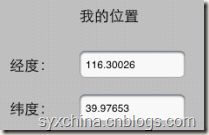
项目WhereAmI:
WhereAmIViewController.h

#import <UIKit/UIKit.h>
#import <CoreLocation/CoreLocation.h>

@interface ViewController : UIViewController<CLLocationManagerDelegate> {
    CLLocationManager* locationManager;
}

@property (strong, nonatomic)    CLLocationManager* locationManager;
@property (retain, nonatomic) IBOutlet UILabel *longitudeText;
@property (retain, nonatomic) IBOutlet UILabel *latituduText;
@property (retain, nonatomic) IBOutlet UIActivityIndicatorView *activity;
- (IBAction)findMe:(id)sender;
- (IBAction)webMap:(id)sender;

@end
CLLocationManagerDelegate是定位服务的委托,常用的位置变化回调方法是:
locationManager:didUpdateToLocation:fromLocation: locationManager:didFailWithError:
CLLocationManager 是定位服务管理类,通过它可以设置定位服务的参数、获取经纬度等。
m中加载方法
- (IBAction)findMe:(id)sender {
    self.locationManager = [[[CLLocationManager alloc] init] autorelease];
    self.locationManager.delegate = self;
    self.locationManager.desiredAccuracy = kCLLocationAccuracyBest;
    self.locationManager.distanceFilter = 1000.0f;
    [self.locationManager startUpdatingLocation];
    [activity startAnimating];
    NSLog(@"start gps");
}
CLLocationManager 是的startUpdatingLocation方法启动所有定位硬件,对应的方法是stopUpdatingLocation,通过调用该方法关闭定位服务器更新,为了省电必须在不用的时候调用该方法关闭定位服务。
此外,我们还可以在这里设定定位服务的参数,包括:distanceFilter和desiredAccuracy。
distanceFilter,这个属性用来控制定位服务更新频率。单位是“米”。 desiredAccuracy,这个属性用来控制定位精度,精度
越高耗电量越大。
定位精度
desiredAccuracy精度参数可以iOS SDK通过常量实现:
kCLLocationAccuracyNearestTenMeters,10米
kCLLocationAccuracyHundredMeters ,100米
kCLLocationAccuracyKilometer ,1000米
kCLLocationAccuracyThreeKilometers,3000米
kCLLocationAccuracyBest ,最好的精度
kCLLocationAccuracyBestForNavigation,导航情况下最好精度,iOS 4 SDK新增加。一般要有外接电源时候才能使用。
委托方法用于实现位置的更新
-(void)locationManager:(CLLocationManager *)manager didUpdateToLocation:(CLLocation *)newLocation fromLocation:(CLLocation *)oldLocation {
    latituduText.text = [NSString stringWithFormat:@"%3.5f",newLocation.coordinate.latitude];
    longitudeText.text = [NSString stringWithFormat:@"%3.5f",newLocation.coordinate.longitude];
    [activity stopAnimating];
    [locationManager stopUpdatingLocation];
    NSLog(@"location ok");
}
该委托方法不仅可以获得当前位置(newLocation),还可以获得上次的位置(oldLocation ),CLLocation 对象coordinate.latitude属性获得经度,coordinate.longitude属性获得纬度。
[NSString stringWithFormat:@"%3.5f”, newLocation.coordinate.latitude] 中的%3.5f是输出整数部分是3位,小数部分是5位的浮点数。
2 iOS地图
iOS应用程序中使用Map Kit API开发地图应用程序。
其核心是MKMapView类使用。
多数情况下地图会与定位服务结合使用。
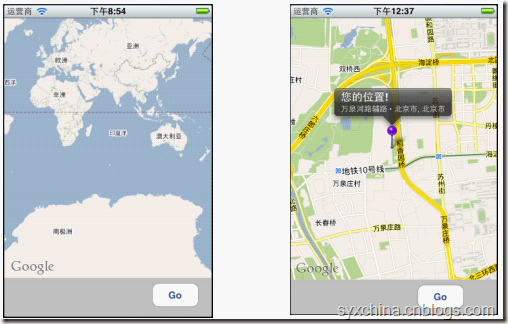
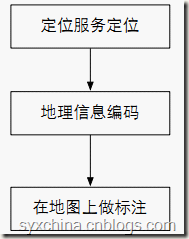
地图开发一般过程

添加MapKit类库
MapKit.framework
MapMeViewController.h
#import <UIKit/UIKit.h>
#import <MapKit/MapKit.h>
#import <CoreLocation/CoreLocation.h>
#import "MapLocation.h"

@interface ViewController : UIViewController<CLLocationManagerDelegate, MKReverseGeocoderDelegate, MKMapViewDelegate> {

}

@property (retain, nonatomic) IBOutlet MKMapView *mapView;
@property (retain, nonatomic) IBOutlet UIActivityIndicatorView *activity;
- (IBAction)findMe:(id)sender;
@end
CLLocationManagerDelegate是定位服务委托。
MKMapViewDelegate是地图视图委托,主要方法:
-mapView:viewForAnnotation:
-mapViewDidFailLoadingMap:withError:
MKReverseGeocoderDelegate是给地理坐标获得标志点信息的委托,用于地理信息编码(即:从坐标获得地点获得信息),主要委托方法:
– reverseGeocoder:didFindPlacemark:
– reverseGeocoder:didFailWithError:
m文件中的视图加载和卸载
- (void)viewDidLoad {
    [super viewDidLoad];
    mapView.mapType = MKMapTypeStandard;
    //mapView.mapType = MKMapTypeSatellite;
    //mapView.mapType = MKMapTypeHybrid;
    mapView.delegate = self;
}
mapView.mapType = MKMapTypeStandard;是指定地图的类型,iOS提供了三种风格的地图:
MKMapTypeStandard标准地图模式
MKMapTypeSatellite卫星地图模式
MKMapTypeHybrid具有街道等信息的卫星地图模式
mapView.delegate = self;是将委托对象指定为自身。
按钮事件
- (IBAction)findMe:(id)sender {
    CLLocationManager *lm = [[CLLocationManager alloc] init];
    lm.delegate = self;
    lm.desiredAccuracy = kCLLocationAccuracyBest;
    [lm startUpdatingLocation];

    activity.hidden = NO;
    [activity startAnimating];
}
点击按钮时候通过定位服务获取当前位置信息。
通过lm.delegate = self;是将委托对象指定为自身。
因此,点击事件发生时候将会回调CLLocationManagerDelegate委托的
-locationManager:didUpdateToLocation:fromLocation:方法。
回调位置更新方法
#pragma mark CLLocationManagerDelegate Methods
- (void)locationManager:(CLLocationManager *)manager
    didUpdateToLocation:(CLLocation *)newLocation
           fromLocation:(CLLocation *)oldLocation {

    MKCoordinateRegion viewRegion = MKCoordinateRegionMakeWithDistance(newLocation.coordinate, 2000, 2000);
    //[mapView setRegion:viewRegion animated:YES];
    MKCoordinateRegion adjustedRegion = [mapView regionThatFits:viewRegion];
    [mapView setRegion:adjustedRegion animated:YES];

    manager.delegate = nil;
    [manager stopUpdatingLocation];

    MKReverseGeocoder *geocoder = [[MKReverseGeocoder alloc] initWithCoordinate:newLocation.coordinate];
    geocoder.delegate = self;
    [geocoder start];
}
MKCoordinateRegionMakeWithDistance(newLocation.coordinate, 2000, 2000); 该函数能够创建一个MKCoordinateRegion结构体,第一个参数是一个CLLocationCoordinate2D结构指定了目标区域的中 心点,第二个是目标区域南北的跨度单位是米,第三个是目标区域东西的跨度单位是米。后两个参数的调整会影响地图缩放。
[[MKReverseGeocoder alloc] initWithCoordinate:newLocation.coordinate]; 创建地理编码对象geocoder,通过该对象可以把坐标转换成为地理信息的描述。
geocoder.delegate = self;指定编码的处理是自身对象。
[geocoder start];开始编码处理。
MKReverseGeocoderDelegate
是地理编码委托对象,该委托的方法:
成功时候调用-reverseGeocoder:didFindPlacemark:
失败时候调用-reverseGeocoder:didFailWithError:
成功编码回调方法
- (void)reverseGeocoder:(MKReverseGeocoder *)geocoder didFindPlacemark:(MKPlacemark *)placemark {

    MapLocation *annotation = [[MapLocation alloc] init];
    annotation.streetAddress = placemark.thoroughfare;
    annotation.city = placemark.locality;
    annotation.state = placemark.administrativeArea;
    annotation.zip = placemark.postalCode;
    annotation.coordinate = geocoder.coordinate;
    [mapView addAnnotation:annotation];

    [annotation release];
    geocoder.delegate = nil;
    [geocoder autorelease];

    [activity stopAnimating];
    activity.hidden = YES;
}
成功编码后需要在该方法中创建标注对象(MapLocation)。MapLocation 是我们自定义的实现MKAnnotation协议标注对象。 该方法的placemark是MKPlacemark获得很多地理信息,详细见下表。
[mapView addAnnotation:annotation]; 为地图添加标注,该方法将会触发mapView:viewForAnnotation:方法回调。
MKPlacemark类属性
addressDictionary 地址信息的dictionary
thoroughfare 指定街道级别信息
subThoroughfare 指定街道级别的附加信息
locality 指定城市信息
subLocality 指定城市信息附加信息
administrativeArea 行政区域
subAdministrativeArea 行政区域附加信息
country 国家信息
countryCode 国家代号
postalCode 邮政编码
失败编码回调方法
- (void)reverseGeocoder:(MKReverseGeocoder *)geocoder didFailWithError:(NSError *)error {
    UIAlertView *alert = [[UIAlertView alloc]
                          initWithTitle:@"地理解码错误息"
                          message:@"地理代码不能识别"
                          delegate:nil
                          cancelButtonTitle:@"Ok"
                          otherButtonTitles:nil];
    [alert show];
    [alert release];

    geocoder.delegate = nil;
    [geocoder autorelease];

    [activity stopAnimating];
}
MKMapViewDelegate
是地图视图委托对象,本例子我们使用的方法:
- mapView:viewForAnnotation:为地图设置标注时候回调方法。
-mapViewDidFailLoadingMap:withError:地图加载错误时候回调方法。
地图标注回调方法
#pragma mark Map View Delegate Methods
- (MKAnnotationView *) mapView:(MKMapView *)theMapView viewForAnnotation:(id <MKAnnotation>) annotation {

    MKPinAnnotationView *annotationView = (MKPinAnnotationView *)[mapView dequeueReusableAnnotationViewWithIdentifier:@"PIN_ANNOTATION"];
    if(annotationView == nil) {
        annotationView = [[[MKPinAnnotationView alloc] initWithAnnotation:annotation
                                                          reuseIdentifier:@"PIN_ANNOTATION"] autorelease];
    }
    annotationView.canShowCallout = YES;
    annotationView.pinColor = MKPinAnnotationColorRed;
    annotationView.animatesDrop = YES;
    annotationView.highlighted = YES;
    annotationView.draggable = YES;
    return annotationView;
}
与表格视图单元格处理类似,地图标注对象由于会很多,因此需要重复利用,通过
dequeueReusableAnnotationViewWithIdentifier方法可以查找可重复利用的标注对象,以达到节省内存的目的。
annotationView.canShowCallout = YES;指定标注上的插图,点击图钉有气泡显示。
annotationView.pinColor 设置图钉的颜色。
annotationView.animatesDrop动画效果。
地图加载失败回调方法
- (void)mapViewDidFailLoadingMap:(MKMapView *)theMapView withError:(NSError *)error {
    UIAlertView *alert = [[UIAlertView alloc]
                          initWithTitle:@"地图加载错误"
                          message:[error localizedDescription]
                          delegate:nil
                          cancelButtonTitle:@"Ok"
                          otherButtonTitles:nil];
    [alert show];
    [alert release];
}
自定义地图标注对象
#import <Foundation/Foundation.h>
#import <MapKit/MapKit.h>

@interface MapLocation : NSObject <MKAnnotation, NSCoding> {
    NSString *streetAddress;
    NSString *city;
    NSString *state;
    NSString *zip;

    CLLocationCoordinate2D coordinate;
}
@property (nonatomic, copy) NSString *streetAddress;
@property (nonatomic, copy) NSString *city;
@property (nonatomic, copy) NSString *state;
@property (nonatomic, copy) NSString *zip;
@property (nonatomic, readwrite) CLLocationCoordinate2D coordinate;
@end
作为地图标注对象实现MKAnnotation协议是必须的,只有实现该协议才能使该类成为标注类。实现NSCoding协议是可选的,实现该协议可以使标注对象能够复制。 里面的属性有哪些要看你自己的需要。
MapLocation.m
- (NSString *)title {
    return @"您的位置!";
}
- (NSString *)subtitle {

    NSMutableString *ret = [NSMutableString string];
    if (streetAddress)
        [ret appendString:streetAddress];
    if (streetAddress && (city || state || zip))
        [ret appendString:@" • "];
    if (city)
        [ret appendString:city];
    if (city && state)
        [ret appendString:@", "];
    if (state)
        [ret appendString:state];
    if (zip)
        [ret appendFormat:@", %@", zip];

    return ret;
}
title 和subtitle 是MKAnnotation协议要求实现的方法。
MapLocation.m
#pragma mark -
- (void)dealloc {
    [streetAddress release];
    [city release];
    [state release];
    [zip release];
    [super dealloc];
}
#pragma mark -
#pragma mark NSCoding Methods
- (void) encodeWithCoder: (NSCoder *)encoder {
    [encoder encodeObject: [self streetAddress] forKey: @"streetAddress"];
    [encoder encodeObject: [self city] forKey: @"city"];
    [encoder encodeObject: [self state] forKey: @"state"];
    [encoder encodeObject: [self zip] forKey: @"zip"];
}
- (id) initWithCoder: (NSCoder *)decoder  {
    if (self = [super init]) {
        [self setStreetAddress: [decoder decodeObjectForKey: @"streetAddress"]];
        [self setCity: [decoder decodeObjectForKey: @"city"]];
        [self setState: [decoder decodeObjectForKey: @"state"]];
        [self setZip: [decoder decodeObjectForKey: @"zip"]];
    }
    return self;
}
encodeWithCoder:和initWithCoder:是NSCoding协议要求实现方法。
3 Web地图
在iOS中我们还可以使用Web地图。

- (IBAction)webMap:(id)sender {
    CLLocation *lastLocation = [locationManager location];
    if(!lastLocation)
    {
        UIAlertView *alert;
        alert = [[UIAlertView alloc]
                 initWithTitle:@"系统错误"
                 message:@"还没有接收到数据!"
                 delegate:nil cancelButtonTitle:nil
                 otherButtonTitles:@"OK", nil];

        [alert show];
        [alert release];
        return;
    }

    NSString *urlString = [NSString stringWithFormat:
                           @"http://maps.google.com/maps?q=Here+I+Am!@%f,%f",
                           lastLocation.coordinate.latitude,
                           lastLocation.coordinate.longitude];
    NSURL *url = [NSURL URLWithString:urlString];

    [[UIApplication sharedApplication] openURL:url];
}
http://maps.google.com/maps?q=Here+I+Am!@%f,%f是请求Web地图的网站,q后面上参数。
[[UIApplication sharedApplication] openURL:url];打开iOS内置的浏览器,即在内置浏览器中打开地图。
ios开发——实用技术OC篇&地图与定位的更多相关文章
- iOS开发——实用技术OC篇&单例模式的实实现(ACR&MRC)
单例模式的实实现(ACR&MRC) 在iOS开发中单例模式是一种非常常见的模式,虽然我们自己实现的比较少,但是,系统却提供了不少的到来模式给我们用,比如最常见的UIApplication,No ...
- iOS开发——实用技术OC篇&简单抽屉效果的实现
简单抽屉效果的实现 就目前大部分App来说基本上都有关于抽屉效果的实现,比如QQ/微信等.所以,今天我们就来简单的实现一下.当然如果你想你的效果更好或者是封装成一个到哪里都能用的工具类,那就还需要下一 ...
- iOS开发——实用技术OC篇&8行代码教你搞定导航控制器全屏滑动返回效果
8行代码教你搞定导航控制器全屏滑动返回效果 前言 如果自定了导航控制器的自控制器的leftBarButtonItem,可能会引发边缘滑动pop效果的失灵,是由于 self.interactivePop ...
- iOS开发——实用技术OC篇&事件处理详解
事件处理详解 一:事件处理 事件处理常见属性: 事件类型 @property(nonatomic,readonly) UIEventType type; @property(nonatomic ...
- ios开发——实用技术OC篇》倒计时实现的两种方法
倒计时实现的两种方法 timeFireMethod函数,timeFireMethod进行倒计时的一些操作,完成时把timer给invalidate掉就ok了,代码如下: secondsCountDow ...
- iOS开发——实战OC篇&环境搭建之Xib(玩转UINavigationController与UITabBarController)
iOS开发——实战OC篇&环境搭建之Xib(玩转UINavigationController与UITabBarController) 前面我们介绍了StoryBoard这个新技术,和纯技术 ...
- iOS开发——实战OC篇&环境搭建之纯代码(玩转UINavigationController与UITabBarController)
iOS开发——实战OC篇&环境搭建之纯代码(玩转UINavigationController与UITabBarController) 这里我们就直接上实例: 一:新建一个项目singleV ...
- ios开发——实用技术OC-Swift篇&触摸与手势识别
iOS开发学习之触摸事件和手势识别 iOS的输入事件 触摸事件 手势识别 手机摇晃 一.iOS的输入事件 触摸事件(滑动.点击) 运动事件(摇一摇.手机倾斜.行走),不需要人为参与的 远程控制 ...
- iOS开发——实战OC篇&环境搭建之StoryBoard(玩转UINavigationController与UITabBarController)
环境搭建之StoryBoard(玩转UINavigationController与UITabBarController) 研究了这么就IOS开发,都没有所处一个像样或者自己忙一点的项目.最近自 ...
随机推荐
- BZOJ3053: The Closest M Points
题解: 我们可以事先在堆里放入插入m个inf然后不断的比较当前值与堆首元素的大小,如果小于的话进入. 估计函数也可以随便写写... query的时候貌似不用保留dir... return 0写在 wh ...
- [ahu 1248] NBA Finals
NBA Finals Time Limit: 1000 ms Case Time Limit: 1000 ms Memory Limit: 64 MBTotal Submission: 251 ...
- sockaddr和sockaddr_in的区别(转载)
原文链接:http://kenby.iteye.com/blog/1149001 struct sockaddr和struct sockaddr_in这两个结构体用来处理网络通信的地址. 在各种系统调 ...
- 【转】AngularJS路由和模板
1. AngularJS路由介绍 AngularJS路由功能是一个纯前端的解决方案,与我们熟悉的后台路由不太一样.后台路由,通过不同的URL会路由到不同的控制器上(controller),再渲染(re ...
- jQuery 属性操作 - val() 方法
val() 方法返回或设置被选元素的值. 元素的值是通过 value 属性设置的.该方法大多用于 input 元素. 如果该方法未设置参数,则返回被选元素的当前值. <html> < ...
- Swift的字符串String是值类型
根据<The Swift Programming Language>中文版基于Xcode6.1的文章描述: Swift的 String 类型是值类型.如果创建了新的字符串,那么当其进行常量 ...
- Android ViewTreeObserver简介
Android ViewTreeObserver简介 一.结构 public final class ViewTreeObserver extends Object java.lang.Objec ...
- POJ1177 Picture 线段树+离散化+扫描线
求最终的覆盖图形周长,写这种代码应该短而精确,差的比较远 /* Problem: 1177 User: 96655 Memory: 348K Time: 32MS Language: C++ Resu ...
- 《Python基础教程(第二版)》学习笔记 -> 第二章 列表和元组
本章将引入一个新的概念:数据结构. 数据结构是通过某种方式阻止在一起的数据元素的集合,这些数据元素可以是数字或者字符,设置可以是其他数据结构. Python中,最基本的数据结构是序列(Sequence ...
- HDU 1540 Tunnel Warfare 线段树区间合并
Tunnel Warfare 题意:D代表破坏村庄,R代表修复最后被破坏的那个村庄,Q代表询问包括x在内的最大连续区间是多少 思路:一个节点的最大连续区间由(左儿子的最大的连续区间,右儿子的最大连续区 ...