
自欺欺人的使用 NSTimer 销毁
自欺欺人的使用 NSTimer 销毁
1.NSTimer是要加到runloop中才会起作用。
常见的创建timer方式
// 第一种方式

@property (nonatomic , strong) NSTimer *timer;

// 默认加入当前runloop的NSDefaultRunLoopMode

self.timer = [NSTimer scheduledTimerWithTimeInterval:1.0 target:self selector:@selector(timerAction:) userInfo:nil repeats:NO];
// 第二种方式

self.timer = [NSTimer timerWithTimeInterval:1.0 target:self selector:@selector(timerAction:) userInfo:nil repeats:YES];
第一种缺陷如果当前线程就是主线程,也就是UI线程时,某些UI事件,比如UIScrollView的拖动操作,会将Run Loop切换成
NSEventTrackingRunLoopMode模式,在这个过程中,默认的NSDefaultRunLoopMode模式中注册的事件是不会被执行的。也就是说,此时使用scheduledTimerWithTimeInterval添加到Run Loop中的Timer就不会执行第二种方式需要使用NSRunLoop的addTimer:forMode:方法来把Timer按照指定模式加入到Run Loop中。这里使用的模式是:
NSRunLoopCommonModes,这个模式等效于NSDefaultRunLoopMode和NSEventTrackingRunLoopMode的结合
[[NSRunLoop mainRunLoop] addTimer:self.timer forMode:NSRunLoopCommonModes];
- 以上两种方式都是在主线程上创建的,如果在子线程创建的timer,加入到runloop则需要手动开启runloop
[[NSRunLoop currentRunLoop] run];,同时也必须在子线程销毁。
2.NSTimer会强引用它的target对象。
[self.timer invalidate]是唯一的方法将定时器从循环池中移除
- (void)dealloc

{

    // 自欺欺人的写法,永远都不会执行到,除非你在外部手动invalidate这个timer

    [self.timer invalidate];

}
当我们在控制器中创建timer且tager设为self时。
会发生 timer 添加到 Runloop 的时候,且会被 Runloop 强引用,
- Note in particular that run loops maintain strong references to their timers, so you don’t have to maintain your own strong reference to a timer after you have added it to a run loop.
然后 Timer 又会有一个对 Target 的强引用(也就是 self )
- Target is the object to which to send the message specified by aSelector when the timer fires. The timer maintains a strong reference to target until it (the timer) is invalidated.
也就是说 NSTimer 强引用了 self ,self的全局变量 NSTimer 又使 self 强引用了 NSTimer,导致 self 一直不能被释放掉,所以也就走不到 self 的 dealloc 里。
此时我们就会想把 Target 设置为 weakSelf ,运行后也不起作用. 是由于我们的 self 和 weakSelf 都是指针指向控制器,控制器的dealloc需要timer的销毁才调用。同样造成相互强引用。
	__weak typeof(self) weakSelf = self;

self.timer = [NSTimer scheduledTimerWithTimeInterval:1.0 target:weakSelf selector:@selector(timerAction:) userInfo:nil repeats:NO];
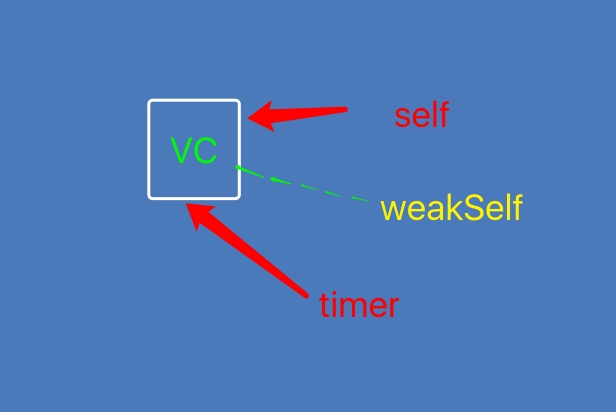
- 此时我们又想到下面那种把timer设为weak,此时是直接运行造成坏内存访问,因为timer创建就销毁
@property (nonatomic , strong) NSTimer *timer;
self.timer = [NSTimer timerWithTimeInterval:1.0 target:self selector:@selector(timerAction:) userInfo:nil repeats:YES];
[[NSRunLoop currentRunLoop] addTimer:self.timer forMode:NSRunLoopCommonModes];
- 另一种当我们在创建完timer后 置为nil,NSTimer还会不会起作用,答案是会起作用。因为Runloop对NSTimer 有了强引用,指向NSTimer那块内存。
self.timer = [NSTimer scheduledTimerWithTimeInterval:1.0 target:self selector:@selector(timerAction) userInfo:nil repeats:YES];
self.timer = nil;
### 3.解决runloop循环引用

- iOS 10.0 以后增加两个创建方法
(NSTimer *)timerWithTimeInterval:(NSTimeInterval)interval repeats:(BOOL)repeats block:(void (^)(NSTimer *timer))block API_AVAILABLE(macosx(10.12), ios(10.0), watchos(3.0), tvos(10.0));
(NSTimer *)scheduledTimerWithTimeInterval:(NSTimeInterval)interval repeats:(BOOL)repeats block:(void (^)(NSTimer *timer))block API_AVAILABLE(macosx(10.12), ios(10.0), watchos(3.0), tvos(10.0));
##### 自定义分类创建NSTimer,适用于iOS 10以前

- 原理等同于以上方法,把 target 转换为 NSTimer 自身然后把控制器的定时器方法在block方法中保存执行。
(instancetype)syl_timerWithTimeInterval:(NSTimeInterval)time repeats:(BOOL)repeats block:(void (^)(NSTimer *timer))block
{
// 此时的 target 为 NSTimer
return [NSTimer timerWithTimeInterval:time target:self selector:@selector(timeAction:) userInfo:block repeats:repeats];
}(void)timeAction:(NSTimer *)timer {
void (^block)(NSTimer *) = [timer userInfo];
!block?:block(timer);
}
### 4.使用 GCD 定时器
// GCD 定时器
- (void)timerNine {
__weak typeof(self) weakSelf = self;
dispatch_queue_t queue = dispatch_queue_create("SYLingGCDTimer", DISPATCH_QUEUE_CONCURRENT);
dispatch_source_t timer = dispatch_source_create(DISPATCH_SOURCE_TYPE_TIMER, 0, 0, queue);
// leewayInSeconds 精准度
dispatch_source_set_timer(timer, DISPATCH_TIME_NOW, 1.0 * NSEC_PER_SEC, 0 * NSEC_PER_SEC);
dispatch_source_set_event_handler(timer, ^{
// code to be executed when timer fires
timer;
[weakSelf timerAction];
});
dispatch_resume(timer);
}
[Demo地址](https://github.com/SYLing/SYLTimer)

我的博客即将搬运同步至腾讯云+社区,邀请大家一同入驻:https://cloud.tencent.com/developer/support-plan?invite_code=1ritpp1xqps9u
自欺欺人的使用 NSTimer 销毁的更多相关文章
- NSTimer 销毁问题 和 iOS中控制器的释放问题
俗话说的好,前人栽树后人乘凉,最近看了很多博文,不少博文提到了NSTimer的销毁问题, 之前我都没怎么注意,现在对照着文章一一实践发现坑还真不少.下面是我读到的几篇博文分享给大家 @啸笑天的NSTi ...
- iOS之 NSTimer(一)
以前没怎么了解过这个NSTimer,其实还是有挺多坑的,今天来总结一下: 首先我们一起来看这个: 我在A -> (push) -> B控制器,然后再B控制器中开启了一个NSTimer.然 ...
- 控制器pop时没有被销毁(没有走dealloc方法)错误原因
ARC环境下,不需要我们进行过多的内存的管理我们需要做的就是在dealloc方法中进行内存管理,但是错误的代码也会造成内存管理方法dealloc不执行,错误的原因无非以下三种,其中第二种和第三种最容易 ...
- iOS,视图控制器相关(UIViewController)
1.视图控制器各个方法调用时机 2.选项卡(Tab Bar)和导航栏(Navigation Bar) 3.有无控制器的页面跳转 4.页面跳转隐藏底部选项卡 5.获取导航栏和状态栏高度,隐藏导航栏返回按 ...
- iOS中控制器的释放问题
iOS中控制器的释放问题 ARC工程是可以重写dealloc方法并被系统调用的,但不需要手动调用父类的dealloc,手写[super dealloc]方法会报错,事实上系统会自动帮你调用父类的dea ...
- 一览Swift中的常用关键字
要学习Swift这门语言,就必须先了解Swift的关键字及对应的解释.这里就列一下在Swift中常用到的关键字. 关键字是类似于标识符的保留字符序列,除非用重音符号(`)将其括起来,否则不能用作标识符 ...
- Objective-C三种定时器CADisplayLink / NSTimer / GCD的使用
OC中的三种定时器:CADisplayLink.NSTimer.GCD 我们先来看看CADiskplayLink, 点进头文件里面看看, 用注释来说明下 @interface CADisplayLin ...
- ios - NSTimer中target的self是强引用问题
当控制器ViewController跳转进入控制器OneViewController中的时候开启定时器,让定时器每隔一段时间打印一次,当OneViewController dismiss的时候,控制器 ...
- ios基础篇(二十三)—— 定时器NSTimer与图片的自动切换
一.NSTimer NSTimer是一个能在从现在开始到后面的某一个时刻或者周期性的执行我们指定的方法的对象.可以按照一定的时间间隔,将制定的信息发送给目标对象.并更新某个对象的行为.你可以选择在未来 ...
随机推荐
- Swagger测试工具
http://www.360doc.com/content/16/0509/08/1355383_557462195.shtml
- 在Service里调用AlertDialog
用常规的方法在AlertDialog的时候,会报错,大意是「can not add window in this view」. 原因是Service是没有界面的,只有Activity才能添加界面. 解 ...
- 状态空间搜索好题UVA10603
题目 分析:注意这里求的是最少流量, 二不是最少步数!!!所以我们用优先队列去维护一个最小流量,然后进行bfs即可,解释一下一个重要的数组ans[i],表示的是杯子中的水为i时的最小流量 #inclu ...
- JS 之正则表达式
字符 含意 \ 做为转意,即通常在"\"后面的字符不按原来意义解释,如/b/匹配字符"b",当b前面加了反斜杆后/\b/,转意为匹配一个单词的边界. -或- 对 ...
- UI:一个IOS工程的标准框架
来自cocachina 的写法 参考 声明:本文来自互联网,非本人原创,仅供参考学习使用. 我的iOS工程结构 接下来,我就简单介绍下我做iOS项目时使用的工程结构.首先要说的是,这只是我的工程结构, ...
- eclipse整合tomcat
首先确保jdk已经安装好 步骤1 获得服务器运行环境配置,Window/Preferences/Server/Runtime Environmen l步骤2 添加服务器 步骤3 选择服务器在硬盘的地址 ...
- mysql连接过多-报错
有两种方法: 1,错误连接参数 max_connect_errors,在配置文件中调整增大. 比如:修改mysql配置文件,在[mysqld]字段下面添加 max_connect_errors=102 ...
- hdoj1166【线段树】
单点更新+区间求和 不多说,直接上渣code--- #include<cstdio> #include<iostream> #include<string.h> # ...
- Managed C++ wtypes.h DATE 转化为 .net的 DateTime
http://stackoverflow.com/questions/570224/how-do-i-convert-from-mfcs-coledatetime-to-c-sharp-datetim ...
- python中用代码实现99乘法表
第一种:使用for遍历循环嵌套 ,): ,x+): print("%s*%s=%s" % (y,x,x*y),end=" ") print("&quo ...