
Jquery下拉框左右选择
1、说明
本文demo实现下拉框左右选择,本文地址:http://www.cnblogs.com/lengzhan/p/6423023.html
2、代码
<!DOCTYPE html PUBLIC "-//W3C//DTD XHTML 1.0 Transitional//EN" "http://www.w3.org/TR/xhtml1/DTD/xhtml1-transitional.dtd">

<html xmlns="http://www.w3.org/1999/xhtml">

<head>

    <meta http-equiv="Content-Type" content="text/html; charset=utf-8" />

    <title></title>

    <style type="text/css">

        .centent

        {

            width: 260px;

        }

        .cententl

        {

            float: left;

        }

        .btnAdd

        {

            float: left;

            padding:30px 5px;

        }

    </style>

    <script src="scripts/jquery.js" type="text/javascript"></script>

    <script type="text/javascript">

        $(function () {

            //移到右边

            $('#btnAdd').click(function () {

                //获取选中的选项,删除自己并追加给对方

                $('#select1 option:selected').appendTo('#select2');

            });

            //移到左边

            $('#btnDel').click(function () {

                //获取选中的选项,删除自己并追加给对方

                $('#select2 option:selected').appendTo('#select1');

            });

            //全部移到右边

            $('#btnAdds').click(function () {

                //获取全部的选项,删除自己并追加给对方

                $('#select1 option').appendTo('#select2');

            });

            //全部移到左边

            $('#btnDels').click(function () {

                //获取全部的选项,删除自己并追加给对方

                $('#select2 option').appendTo('#select1');

            });

            //双击选项

            $('#select1').dblclick(function () {

                //获取双击的选项,删除自己并追加给对方

                $("option:selected", this).appendTo('#select2');

            });

            //双击选项

            $('#select2').dblclick(function () {

                //获取双击的选项,删除自己并追加给对方

                $("option:selected", this).appendTo('#select1');

            });

        });

    </script>

</head>

<body>

    <div class="centent">

        <div class="cententl">

            <select multiple="multiple" id="select1" style="width: 100px; height: 160px;">

                <option value="1">课程1</option>

                <option value="2">课程2</option>

                <option value="3">课程3</option>

                <option value="4">课程4</option>

                <option value="5">课程5</option>

                <option value="6">课程6</option>

                <option value="7">课程7</option>

                <option value="8">课程8</option>

            </select>

        </div>

        <div class="btnAdd">

            <input type="button" id="btnAdd" value=" > " /><br />

            <input type="button" id="btnDel" value=" < " /><br />

            <input type="button" id="btnAdds" value=">>" /><br />

            <input type="button" id="btnDels" value="<<" />

        </div>

        <div>

            <select multiple="multiple" id="select2" style="width: 100px; height: 160px;">

            </select>

        </div>

    </div>

</body>

</html>
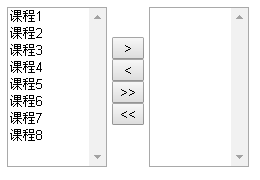
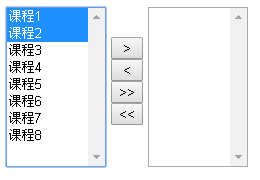

3、Demo
Jquery下拉框左右选择的更多相关文章
- jquery 下拉框左右选择
html <!DOCTYPE html> <html> <head> <meta charset="utf-8" /> <ti ...
- jquery 下拉框 收藏
jquery 下拉框 Query获取Select选择的Text和Value: 语法解释: 1. $("#select_id").change(function(){//code. ...
- 带搜索框的jQuery下拉框插件
由于下拉框的条数有几十个,于是打算找一个可以搜索查找功能的下拉框,刚开始在网上看了几个,都是有浏览器兼容性问题,后来看到这个“带搜索框的jQuery下拉框美化插件 searchable”,看演示代码简 ...
- Ajax jQuery下拉框联动案例
需求: 使用ajax和jQuery实现下拉框联动. 注意:需要加入jquery-2.1.1.min.js 前台 <!DOCTYPE html> <html> <head& ...
- JS年月日三级联动下拉框日期选择代码
<!DOCTYPE html PUBLIC "-//W3C//DTD XHTML 1.0 Transitional//EN" "http://www.w3.org/ ...
- jQuery下拉框操作系列$("option:selected",this) &&(锋利的jQuery)
jQuery下拉框操作系列$("option:selected",this) &&(锋利的jQuery) <!DOCTYPE html> <ht ...
- selenium 显示等待wait.until 常用封装 及下拉框的选择操作等
from selenium.webdriver.common.by import Byfrom selenium.webdriver.support.ui import WebDriverWait a ...
- 使用 JavaScript 中的 document 对象的属性,根据下拉框中选择的属性,更改页面中的字体颜色和背景颜色
查看本章节 查看作业目录 需求说明: 使用 JavaScript 中的 document 对象的属性,根据下拉框中选择的属性,更改页面中的字体颜色和背景颜色 实现思路: 在页面的 <body&g ...
- jQuery插件实现select下拉框左右选择_交换内容(multiselect2side)
效果图: 使用jQuery插件---multiselect2side做法: <!DOCTYPE html PUBLIC "-//W3C//DTD XHTML 1.0 Transitio ...
随机推荐
- C#3.0之神奇的Lambda表达式和Lambda语句
“Lambda 表达式”是一个匿名函数,它可以包含表达式和语句,并且可用于创建委托或表达式目录树类型.所有 Lambda 表达式都使用 Lambda 运算符 =>,该运算符读为“goes to” ...
- Intel Developer Forum
http://en.wikipedia.org/wiki/Intel_Developer_Forum Intel Developer Forum From Wikipedia, the free en ...
- Android自己定义组件系列【11】——实现3D立体旋转效果
今天在网上看到一篇文章写关于Android实现3D旋转(ca=drs-">http://www.ibm.com/developerworks/cn/opensource/os-cn-a ...
- ViewPagerIndicator 取代TabHost,实现滑动tab,引导页等效果
https://github.com/eltld/ViewPagerIndicator 取代TabHost,实现滑动tab,引导页等效果
- Django-配置celery
首先需要安装的包 pip install cellerypip install django-cellery pip install django-cellery-results pip instal ...
- ArcGIS 10.3 for Server新特性介绍
ArcGIS10.3的正式版立即在美国Esri全球用户大会推出.中国的正式发行时间预计在Esri中国的用户大会.以下就将用户比較关心的ArcGIS 10.3 for Server的新特性给大家进行简单 ...
- Arcgis Engine(ae)接口详解(8):临时元素(element)
//主地图的地图(map)对象 IMap map = null; IActiveView activeView = null; //IGraphicsContainer用于操作临时元素,可以通过map ...
- Arcgis Engine(ae)接口详解(5):IGeometry几何高级操作
IPoint point = new PointClass(); point.PutCoords(, ); //ITopologicalOperator接口用于几何对象的几何操作 ITopologic ...
- Tomcat安全配置规范
第1章 账号管理.认证授权 1.1 账号 1.1.1 共享帐号管理 安全基线项目名称 Tomcat共享帐号管理安全基线要求项 安全基线编号 SBL-Tomcat-01-01-01 安全基线项说明 ...
- Do not use the <section> element as a generic container; this is what <div> is for, especially when the sectioning is only for styling purposes.
Do not use the <section> element as a generic container; this is what <div> is for, espe ...