
EditPlus 好看的monaco主题
版本: editplus 4.3
效果图:
--------
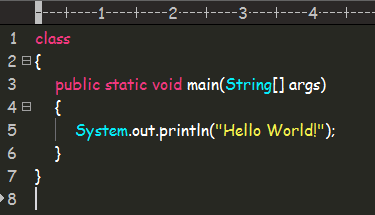
在editplus配置目录下,找到editplus_u.ini,替换为以下代码:
--------------------------------------------------------
[Options]

Placement=2C0000000200000003000000ABACFFFFABACFFFFFFFFFFFFFFFFFFFFBA0200000B000000A0050000A1030000FF

Window List=00000000000000000000000000000000FF

Marker List=00000000000000000000000000000000FF

Function List=00000000000000000000000000000000FF

Open Remote=00000000000000000000000000000000FF

Expand=00000000000000000000000000000000FF

Project Pos=00000000000000000000000000000000FF

Workspace Path=C:\Users\Jun\Desktop\鼠标移动到图片上图片等比例放大效果

Cliptext Window=145

Cliptext Window 2=559

Output=90

Output 2=169

Folding=1

FindX=663

FindY=289

Find=list_21

Tab Index=1

Cliptext=2

Custom colors=6D6D7200FFFFFF00FFFFFF00FFFFFF00FFFFFF00FFFFFF00FFFFFF00FFFFFF0031282700FFFFFF00FFFFFF00FFFFFF00FFFFFF00FFFFFF00FFFFFF00FFFFFF00FF

Matching Brace=1

Indent guide=1

Cliptext Edit=00000000000000000000000000000000FF

ReplaceX=439

ReplaceY=349

[Files]

Encoding=65001

Backup=0

Backup Remote=0

[Fonts]

Edit Window=F0FFFFFF00000000000000000000000090010000000000000302014243006F006D00690063002000530061006E00730020004D0053000000000000000000000000000000000000000000000000000000000000000000000000000000FF

Printer=F4FFFFFF00000000000000000000000090010000000000000000003143006F007500720069006500720020004E0065007700000000000000000000000000000000000000000000000000000000000000000000000000000000000000FF

Output Window=F4FFFFFF00000000000000000000000090010000000000000000003143006F007500720069006500720020004E0065007700000000000000000000000000000000000000000000000000000000000000000000000000000000000000FF

Hex Viewer=F4FFFFFF00000000000000000000000090010000000000010000003143006F007500720069006500720020004E0065007700000000000000000000000000000000000000000000000000000000000000000000000000000000000000FF

Custom 1=F4FFFFFF00000000000000000000000090010000000000000000002241007200690061006C000000720020004E0065007700000000000000000000000000000000000000000000000000000000000000000000000000000000000000FF

Custom 4=F5FFFFFF0000000000000000000000009001000000000000000000224D0053002000530061006E0073002000530065007200690066000000000000000000000000000000000000000000000000000000000000000000000000000000FF

[Tool Option]

Top Selector=1

[Colors\Text]

Background=2238503

Default=0

Foreground=16777215

[Colors\Keyword 1]

Foreground=8272368

Default=0

[Colors\Embedded script]

Foreground=16777215

Default=0

[Colors\Keyword 3]

Foreground=16777215

Default=0

[Colors\Keyword 6]

Foreground=8716287

Default=0

[Colors\Keyword 7]

Foreground=8716287

Default=0

[Colors\Keyword 8]

Foreground=8716287

Default=0

[Colors\Keyword 9]

Foreground=8454143

Default=0

[Colors\Keyword 10]

Foreground=8716287

Default=0

[Colors\Quotation]

Foreground=8454143

Default=0

[Colors\Quotation 2]

Foreground=5107956

Default=0

[Colors\Line comment]

Foreground=10789024

Default=0

[Colors\Line number]

Foreground=12632256

Background=2238503

Default=0

[Colors\Folding mark -]

Background=2238503

Default=0

[Colors\Matching words]

Default=0

Background=718314

[Colors\Keyword 2]

Foreground=16379142

Default=0

[Colors\Folding mark +]

Background=2238503

Default=0

[Colors\Text selection]

Background=7039851

Default=0

[Colors\Number]

Foreground=16524240

Default=0

[Colors\Block comment]

Foreground=8421504

Default=0

[Colors\Keyword 5]

Foreground=15574913

Default=0

[Colors\Ruler]

Foreground=12632256

Default=0

Background=2566187

[Colors\Cursor indicator]

Background=16777215

Default=0

[Colors\Indent Guide]

Foreground=7499117

Default=0
转载自: https://blog.csdn.net/encircles/article/details/68962192?locationNum=10&fps=1
EditPlus 好看的monaco主题的更多相关文章
- 为eclipse设置好看的代码主题
eclipse的默认代码背景是白色,上个文章简单说了字体设置,这边主要介绍代码高亮的主题设置,打造更酷的编程界面.网上有文章说可以在设置里面逐一设置,但是比较麻烦,可以去网上下载现成的主题包,网址为: ...
- 推荐一款好看的Hexo主题Ayer
介绍 Ayer 是一个干净且优雅的Hexo主题,自带响应式,加载速度很快,该有的功能都有,可配置项也很多,非常适合作为你的博客主题,主题内还附送了6张精美的高清壁纸.欢迎使用和Star支持,如果你在使 ...
- Hexo 官方主题 landscape-plus 优化
博主喜欢简洁大方的Hexo主题,看了不下100个主题之后,最终选择了 landscape-plus 主题(针对中国大陆地区,对Hexo官方主题landscape进行优化后的版本).更多Hexo主题资源 ...
- 【Hexo】Hexo+Github构建个人博客 (三):添加皮肤主题
一.选择主题 选择你自己喜欢的主题 参考: 1.Hexo官网主题 2.知乎:有哪些好看的 Hexo 主题? 二.配置主题 1.我选择了hexo-theme-yilia这个主题,简洁大方,功能齐全: 这 ...
- 【翻译】如何创建Ext JS暗黑主题之一
原文:How to Create a Dark Ext JS Theme– Part 1 概述 我是不是都要演示我的Spotifinder Ext JS应用程序.它是一个很酷的应用程序,可连接到Las ...
- Ubuntu 14.04安装Cinnamon桌面环境
2014年05月26日 薄荷开源网,mintos,网如其名,自然最关注的还是 Linux Mint 这个 DistroWatch 排名第一的 Linux 发行版.奈何此前的 Linux Mint 17 ...
- Set up Github Pages with Hexo, migrating from Jekyll
Set up Github Pages with Hexo, migrating from Jekyll. 本文介绍用Hexo建立github pages, 其中包含了从Jekyll迁移过来的过程. ...
- (转)EClipse插件推荐
http://www.importnew.com/4707.html 来自非营利性Eclipse基金会的Eclipse IDE以其插件生态系统著称.Eclipse市场拥有海量插件可供下载,你可以通过插 ...
- 使用hexo+github搭建免费个人博客详细教程
[TOC] 本文目录(注意无法点击): 前言 体验更加排版请访问原文链接:http://blog.liuxianan.com/build-blog-website-by-hexo-github.htm ...
随机推荐
- MYSQL中NULL陷阱
1.NULL值不能做比较,跟任何值比较,NULL值都不会被筛选出来 2.NULL值做数学运算后依旧为NULL,比如 SELECT 5 + NULL 结果为NULL,但是SELECT 5+ '' 结果为 ...
- HTML5 localStorage setItem getItem removeItem
HTML5 WEB存储中提供了两种客户端的数据存储方法:localStorage 还有sessionStorage localStorage: localStorage 方法存储的数据没有时间限制.第 ...
- 第七周课程总结&实验报告五
实验四 类的继承 实验目的 理解抽象类与接口的使用: 了解包的作用,掌握包的设计方法. 实验要求 掌握使用抽象类的方法. 掌握使用系统接口的技术和创建自定义接口的方法. 了解 Java 系统包的结构. ...
- Quartz.Net任务调度总结
Quartz.Net使用经验总结: 学习参考的例子不错,分享一下: (1)https://www.cnblogs.com/jys509/p/4628926.html,该博文介绍比较全面 (2)http ...
- Linux高级调试与优化——内存管理
1.物理地址和虚拟地址 Linux采用页表机制管理内存,32位系统中页大小一般为4KB,物理内存被划分为连续的页,每一个页都有一个唯一的页号. 为了程序的的可移植性,进程往往需要运行在flat mem ...
- electron之API学习
学习一个新框架或者技术,最深入最全面的方法就是通过官方API,例如我们学习electron: 例如我们需要学习electron的BrowserWindow对象的使用,以及在创建她时我们可以配置的参数: ...
- weka数据导入
每一行代表一条数据,用逗号分开属性,最后一列为分类标签 将后缀名改为csv,用excel打开,为每一列加上属性名称,直接导入weka即可
- pandas分组运算(groupby)
1. groupby() import pandas as pd df = pd.DataFrame([[1, 1, 2], [1, 2, 3], [2, 3, 4]], columns=[" ...
- JS对象基础 闭包等
一.我们知道js的基本数据类型包括:number,boolen,string,null及undefined; 看下面的一段代码: var abcobject = { firstname:" ...
- MySQL各种函数/语法
@limit pos,len select * from table limit 5,10 只显示查出结果的6-15行 ---------------------------------------- ...