
FlowPortal-BPM——创建新模块
一、设置webconfig
(1)数据源设置 添加所有所用到数据库

(2)修改企业信息
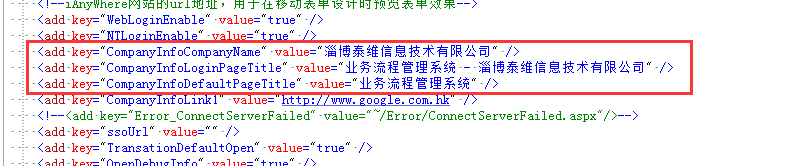
二、Main.ashx——添加新的功能选项卡
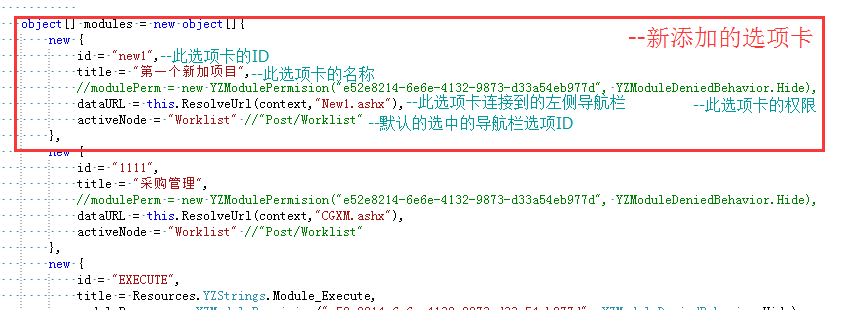
new {

    id = "EXECUTE",

    title = Resources.YZStrings.Module_Execute,

    modulePerm = new YZModulePermision("e52e8214-6e6e-4132-9873-d33a54eb977d", YZModuleDeniedBehavior.Hide),

    dataURL = this.ResolveUrl(context,"EXECUTE.ashx"),

    activeNode = "Worklist" //"Post/Worklist"

},
新建模块选项卡区域代码
三、New1.ashx——设置左侧导航栏
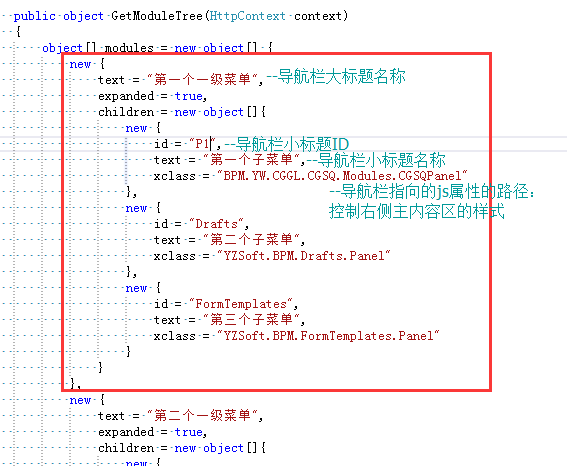
<%@ WebHandler Language="C#" Class="BPMApp.New1ModuleTree" %>   //类名

using System;

using System.Web;

using System.Text;

using Newtonsoft.Json.Linq;

namespace BPMApp

{

    public class New1ModuleTree : YZServiceHandler  //类名

    {

        public object GetModuleTree(HttpContext context)

        {

            object[] modules = new object[] {

                new {

                    text = "第一个一级菜单",

                    expanded = true,

                    children = new object[]{

                        new {

                            id = "P1",//二级菜单的ID

                            text = "第一个子菜单",//二级菜单的名称

                            xclass = "BPM.YW.CGGL.CGSQ.Modules.CGSQPanel"//二级菜单指向的JS文件路径,控制主内容区域的样式

                        },

                        new {

                            id = "Drafts",

                            text = "第二个子菜单",

                            xclass = "YZSoft.BPM.Drafts.Panel"

                        },

                        new {

                            id = "FormTemplates",

                            text = "第三个子菜单",

                            xclass = "YZSoft.BPM.FormTemplates.Panel"

                        }

                    }

                },

                new {

                    text = "第二个一级菜单",

                    expanded = true,

                    children = new object[]{

                        new {

                            id = "Worklist",

                            text = "第四个子菜单",

                            xclass = "BPM.YW.CGGL.CGSQ.Modules.CGSQPanel"

                        },

                        new {

                            id = "ShareTask",

                            text = "第五个子菜单",

                            xclass = "YZSoft.BPM.ShareTask.Panel"

                        }

                    }

                },

            };

            return YZSecurityManager.ApplayPermision(modules);

        }

    }

}
左侧导航栏区域ashx代码
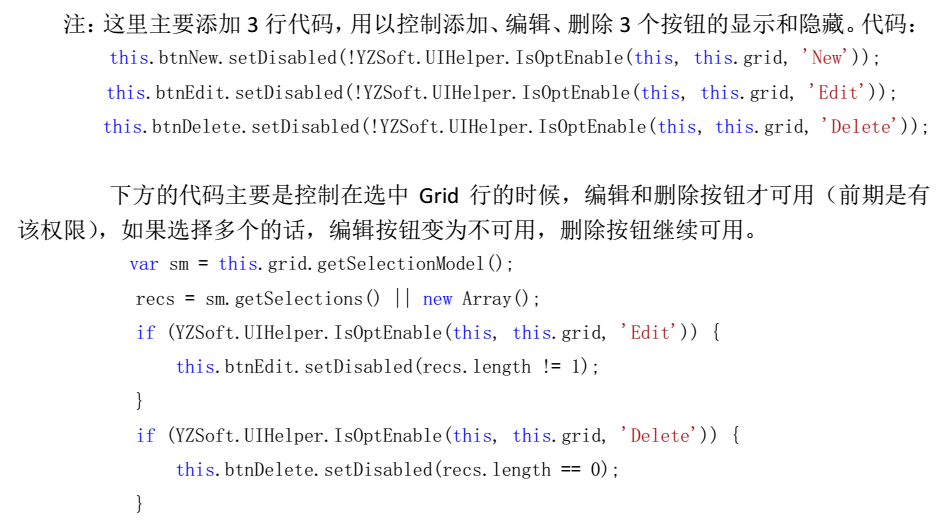
四、主内容区设置
JS文件设置:
Ext.define('BPM.YW.CGGL.CGSQ.Modules.CGSQPanel', { //此JS文件的绝对路径
extend: 'Ext.panel.Panel',
requires: [
'YZSoft.BPM.src.ux.FormManager'
],
dlgCfg: {
dlgModel: 'Dialog', //展示样式:Tab,Window,Dialog
width: ,
height:
},
constructor: function (config) {
var me = this;
//查询所有要展示的数据
me.store = Ext.create('Ext.data.JsonStore', {
remoteSort: true,
pageSize: YZSoft.EnvSetting.PageSize.defaultSize,
model: 'Ext.data.Model',
sorters: { property: 'TaskID', direction: 'desc' }, //数据排序:字段名、升降序
proxy: {
type: 'ajax',
url: YZSoft.$url(me, '../StoreDataService/CGSQListData.ashx'), //对应的一般处理程序的路径
extraParams: {
method: 'GetDataNoRecordPerm' //一般处理程序的查询方法
},
reader: {
rootProperty: 'children'
}
}
});
//展示数据表的表头设置
me.grid = Ext.create('Ext.grid.Panel', {
store: me.store,
border: false,
selModel: { mode: 'MULTI' },
columns: {
defaults: {},
items: [
{ xtype: 'rownumberer' },
//header-表头名称 dataIndex-需要绑定的字段名 sortable-显示(或隐藏)
{ header: '姓名', dataIndex: 'Name', width: , align: 'left', sortable: true },
{ header: '年龄', dataIndex: 'Age', width: , align: 'left', sortable: true, hidden: true },
{ header: '级别', dataIndex: 'Level', width: , align: 'left', sortable: true },
{ header: '电话', dataIndex: 'Tell', width: , align: 'left', sortable: true },
{ header: '物料名称', dataIndex: 'WName', width: , align: 'left', sortable: true },
{ header: '物料单价', dataIndex: 'WPrice', width: , align: 'left', sortable: true },
{ header: '物料数量', dataIndex: 'WShu', width: , align: 'left', sortable: true }
]
},
//状态栏
bbar: Ext.create('Ext.toolbar.Paging', {
store: me.store,
displayInfo: true
}),
//监听
listeners: {
scope: me,
rowdblclick: function (grid, record, tr, rowIndex, e, eOpts) {
me.read(record);
}
}
});
//【添加】按钮
me.btnNew = Ext.create('Ext.button.Button', {
iconCls: 'yz-btn-add',
text: '添加',
//访问权限的控制
//updateStatus: function () {
// this.setDisabled(!YZSoft.UIHelper.IsOptEnable(null, me.grid, '', 1, 1));
// //this.setDisabled(!config.perm['New']);
//},
handler: function () {
me.addNew();
}
});
//【编辑】按钮
me.btnEdit = Ext.create('YZSoft.src.button.Button', {
iconCls: 'yz-btn-edit',
text: '编辑',
sm: me.grid.getSelectionModel(),
//权限
//updateStatus: function () {
// this.setDisabled(!YZSoft.UIHelper.IsOptEnable(null, me.grid, '', 1, 1));
// //this.setDisabled(!config.perm['Edit']);
//},
handler: function () {
var sm = me.grid.getSelectionModel(),
recs = sm.getSelection() || [];
if (recs.length != )
return;
me.edit(recs[]);
}
});
//【删除】按钮
me.btnDelete = Ext.create('YZSoft.src.button.Button', {
iconCls: 'yz-btn-delete',
text: '删除',
sm: me.grid.getSelectionModel(),
//updateStatus: function () {
// this.setDisabled(!YZSoft.UIHelper.IsOptEnable(null, me.grid, '', 1, 1));
// //this.setDisabled(!config.perm['Delete']);
//},
handler: function () {
me.deleteSelection();
}
});
//【打开】按钮
me.btnOpen = Ext.create('YZSoft.src.button.Button', {
iconCls: 'yz-btn-public',
text: '打开',
sm: me.grid.getSelectionModel(),
updateStatus: function () {
this.setDisabled(!YZSoft.UIHelper.IsOptEnable(null, me.grid, '', , -));
},
handler: function () {
me.openSelection();
}
});
//【关闭】按钮
me.btnClose = Ext.create('YZSoft.src.button.Button', {
iconCls: 'yz-btn-power',
text: '关闭',
sm: me.grid.getSelectionModel(),
updateStatus: function () {
this.setDisabled(!YZSoft.UIHelper.IsOptEnable(null, me.grid, '', , -));
},
handler: function () {
me.closeSelection();
}
});
//【高级查询——加号】按钮
me.btnAdt = Ext.create('YZSoft.src.button.Button', {
cls: 'yz-form-advsearch-trigger',
scope: this,
listeners: {
scope: this,
click: function () {
me.ShowAdvancedSearchdDlg(me.store,
{
title: '高级查询',
scope: this,
fn: function (owner) {
//完成查询后自动刷新列表
me.store.reload({ params: { start: me.store.cursor} });
}
}
);
}
}
});
//【导出】按钮
me.btnExcelExport = Ext.create('YZSoft.src.button.ExcelExportButton', {
grid: me.grid,
templateExcel: null, //YZSoft.$url(me, '采购申请.xls'), //导出模板,不设置则按缺省方式导出
params: {},
fileName: '采购申请',//▲导出文件名▲
allowExportAll: true, //可选项,缺省使用YZSoft.EnvSetting.Excel.AllowExportAll中的设置,默认值false
//maxExportPages: 10, //可选项,缺省使用YZSoft.EnvSetting.Excel.MaxExportPages中的设置,默认值100
listeners: {
beforeload: function (params) {
params.ReportDate = new Date();
}
}
});
//按钮布局
var cfg = {
title: '采购申请',//▲标题▲
layout: 'fit',
border: false,
items: [me.grid],
tbar: [me.btnNew, me.btnEdit, me.btnDelete, me.btnOpen, me.btnClose, '|', me.btnExcelExport, '->', {
xtype: 'button',
text: '清除搜索条件',
handler: function () {
var params = me.store.getProxy().getExtraParams();
params.searchType = '';
me.store.loadPage();
}
}, ' ', {
xclass: 'YZSoft.src.form.field.Search',
store: me.store,
width:
}
, me.btnAdt
]
};
Ext.apply(cfg, config);
me.callParent([cfg]);
},
//======================================================================================
//高级查询方法▲按需求修改▲
ShowAdvancedSearchdDlg: function (store, cfg) {
var showform = function () {
var add_winForm = Ext.create('Ext.form.Panel', {
frame: true,
width: '100%',
bodyPadding: ,
fieldDefaults: {
labelAlign: 'left',
anchor: '100%'
},
//弹窗显示的查询条件
items: [{
fieldLabel: '申请人', //申请人
xtype: 'textfield', id: "idName"
}, {
fieldLabel: '申请部门', //申请部门
xtype: 'textfield', id: "idDept"
}, {
fieldLabel: '审批状态', //申请人 YZSoft.src.form.field.User
xtype: 'textfield', id: "idState"
}, {
fieldLabel: '申请时间', //申请时间
xclass: 'YZSoft.src.form.field.PeriodPicker', id: "idAddDate"
}]
});
var syswin = Ext.create('Ext.window.Window', {
title: "高级查询",
width: ,
resizable: false,
closable: true,
// 弹出模态窗体
modal: 'true',
buttonAlign: "center",
bodyStyle: "padding:0 0 0 0",
items: [add_winForm],
buttons: [{
text: RS.$('YZStrings.All_OK'), //确定
id: "idSubmit",
scope: this,
handler: function () {
//点击确定传参,以下为需要修改的传递给一般处理程序的参数
var appName = Ext.getCmp("idName").getValue(); //人员名称
var appDeptName = Ext.getCmp("idDept").getValue(); //部门名称
var state = Ext.getCmp("idState").getValue(); //审批状态
var period = Ext.getCmp("idAddDate").getPeriod(); //日期区间
store.reload({
params:
{
start: store.cursor,
searchType: "AdvancedSearch",
cUserName: appName,
cState: state,
cDepName: appDeptName,
PeriodType: period.PeriodType,
StartDate: period.Date1,
EndDate: period.Date2
}
});
var params = store.getProxy().getExtraParams();
params.searchType = "AdvancedSearch";
params.cUserName = appName;
params.cState = state;
params.cDepName = appDeptName;
params.PeriodType = period.PeriodType;
params.StartDate = period.Date1;
params.EndDate = period.Date2;
store.loadPage();
add_winForm.close();
syswin.close();
}
}, {
text: RS.$('YZStrings.All_Close'), //取消
scope: this,
handler: function () {
add_winForm.close();
syswin.close();
}
}]
});
syswin.show(); //显示window
};
showform(); //显示form
},
//数据更新时自动刷新页面
onActivate: function (times) {
if (times == )
this.store.load({
loadMask: {
msg: RS.$('All_Loading'),
delay: true
}
});
else
this.store.reload({ loadMask: false });
this.updateStatus();
},
//控制按钮权限
updateStatus: function () {
var sm = this.grid.getSelectionModel();
recs = sm.getSelection() || new Array();
//if (!YZSoft.UIHelper.IsOptEnable(this, this.grid, 'Edit')) {
// this.btnEdit.hide();
//} else {
// this.btnEdit.setDisabled(recs.length != 1); //选中一行或者多行是否可用
//}
//if (!YZSoft.UIHelper.IsOptEnable(this, this.grid, 'Delete')) {
// this.btnDelete.hide();
//} else {
// this.btnDelete.setDisabled(recs.length == 0);
//}
},
//【添加】方法▲按照需求修改▲
addNew: function () {
var me = this;
YZSoft.BPM.src.ux.FormManager.openPostWindow('物料申请流程', Ext.apply({ //选择要使用的流程名称
sender: me,
title: '物料申请', //选项卡名称
listeners: {
itemclick: function (view, record, item, index, e, eOpts) {
e.stopEvent();
me.store.load({
params: {
path: record.isRoot() ? '' : record.data.path,
start:
}
});
}
},
tools: [{
type: 'refresh',
tooltip: RS.$('All_Refresh_Tip'),
handler: function (event, toolEl, panel) {
me.treestore.load();
}
}]
}, ''));
},
//【编辑】方法▲按照需求修改▲
edit: function (rec) {
var me = this;
YZSoft.BPM.src.ux.FormManager.openFormApplication('业务管理/采购管理/采购申请', rec.data.TaskID, 'Edit', Ext.apply({
sender: me,
title: "采购申请",
listeners: {
submit: function (action, data) {
me.store.reload({
loadMask: {
msg: '保存已成功',
delay: 'x'
}
});
}
}
}, ''));
},
//【删除】方法
deleteSelection: function () {
var me = this,
recs = me.grid.getSelectionModel().getSelection(),
ids = [];
if (recs.length == )
return;
Ext.each(recs, function (rec) {
ids.push(rec.data.TaskID);
});
Ext.Msg.show({
title: '删除确认',
msg: '您确定要删除选中项吗?',
buttons: Ext.Msg.OKCANCEL,
defaultFocus: 'cancel',
icon: Ext.MessageBox.INFO,
fn: function (btn, text) {
if (btn != 'ok')
return;
YZSoft.Ajax.request({
url: YZSoft.$url(me, '../StoreDataService/CGSQListData.ashx'),
method: 'POST',
params: {
method: 'Delete'
},
jsonData: ids,
waitMsg: { msg: '正在删除...', target: me.grid },
success: function (action) {
me.store.reload({
loadMask: {
msg: Ext.String.format('{0}个对象已删除!', recs.length),
delay: 'x'
}
});
},
failure: function (action) {
var mbox = Ext.Msg.show({
title: '错误提示',
msg: YZSoft.HttpUtility.htmlEncode(action.result.errorMessage, true),
buttons: Ext.Msg.OK,
icon: Ext.MessageBox.WARNING
});
me.store.reload({ mbox: mbox });
}
});
}
});
},
//【双击查看】功能
read: function (rec) {
YZSoft.BPM.src.ux.FormManager.openFormApplication('业务管理/采购管理/采购申请', rec.data.TaskID, 'Read', Ext.apply({
sender: this,
params: { tid: rec.data.TaskID },
title: "采购申请"
}, ''));
},
//【打开】功能
openSelection: function () {
var me = this,
recs = me.grid.getSelectionModel().getSelection(),
ids = [];
if (recs.length == )
return;
Ext.each(recs, function (rec) {
ids.push(rec.data.TaskID);
});
Ext.Msg.show({
title: '打开确认',
msg: '您确定要打开选中项吗?',
buttons: Ext.Msg.OKCANCEL,
defaultFocus: 'cancel',
icon: Ext.MessageBox.INFO,
fn: function (btn, text) {
if (btn != 'ok')
return;
YZSoft.Ajax.request({
url: YZSoft.$url(me, '../StoreDataService/CGSQListData.ashx'),
method: 'POST',
params: {
method: 'Open'
},
jsonData: ids,
waitMsg: { msg: '正在打开...', target: me.grid },
success: function (action) {
me.store.reload({
loadMask: {
msg: Ext.String.format('{0}个对象已打开!', recs.length),
delay: 'x'
}
});
},
failure: function (action) {
var mbox = Ext.Msg.show({
title: '错误提示',
msg: YZSoft.HttpUtility.htmlEncode(action.result.errorMessage, true),
buttons: Ext.Msg.OK,
icon: Ext.MessageBox.WARNING
});
me.store.reload({ mbox: mbox });
}
});
}
});
},
//【关闭】功能
closeSelection: function () {
var me = this,
recs = me.grid.getSelectionModel().getSelection(),
ids = [];
if (recs.length == )
return;
Ext.each(recs, function (rec) {
ids.push(rec.data.TaskID);
});
Ext.Msg.show({
title: '关闭确认',
msg: '您确定要关闭选中项吗?',
buttons: Ext.Msg.OKCANCEL,
defaultFocus: 'cancel',
icon: Ext.MessageBox.INFO,
fn: function (btn, text) {
if (btn != 'ok')
return;
YZSoft.Ajax.request({
url: YZSoft.$url(me, '../StoreDataService/CGSQListData.ashx'),
method: 'POST',
params: {
method: 'Close'
},
jsonData: ids,
waitMsg: { msg: '正在关闭...', target: me.grid },
success: function (action) {
me.store.reload({
loadMask: {
msg: Ext.String.format('{0}个对象已关闭!', recs.length),
delay: 'x'
}
});
},
failure: function (action) {
var mbox = Ext.Msg.show({
title: '错误提示',
msg: YZSoft.HttpUtility.htmlEncode(action.result.errorMessage, true),
buttons: Ext.Msg.OK,
icon: Ext.MessageBox.WARNING
});
me.store.reload({ mbox: mbox });
}
});
}
});
}
});
JS代码根据实际情况进行更改
一般处理程序设置 :(注意相对或绝对路径、数据类型)
<%@ WebHandler Language="C#" Class="ListData" %>

using System;

using System.Web;

using System.Text;

using System.Data;

using System.Data.SqlClient;

using System.Collections;

using System.Collections.Generic;

using BPM;

using BPM.Client;

using YZSoft.Web.DAL;

using Newtonsoft.Json.Linq;

public class ListData : YZServiceHandler

{

    //【删除】功能▲按需求修改

    public void Delete(HttpContext context)

    {

        YZRequest request = new YZRequest(context);

        JArray jPost = request.GetPostData<JArray>();

        List<int> ids = jPost.ToObject<List<int>>();

        using (SqlConnection cn = new SqlConnection(System.Web.Configuration.WebConfigurationManager.ConnectionStrings["BPMDBDataTest"].ConnectionString))

        {

            cn.Open();

            foreach (int id in ids)

            {

                SqlCommand cmd = new SqlCommand();

                cmd.Connection = cn;

                cmd.CommandText = "DELETE FROM CG_PurchaseApp_M WHERE TaskID=@TaskID;DELETE FROM CG_PurchaseApp_T WHERE TaskID=@TaskID";

                cmd.Parameters.Add("@TaskID", SqlDbType.Int).Value = id;

                cmd.ExecuteNonQuery();

            }

        }

    }

    public void Open(HttpContext context)

    {

        YZRequest request = new YZRequest(context);

        JArray jPost = request.GetPostData<JArray>();

        List<int> ids = jPost.ToObject<List<int>>();

        using (SqlConnection cn = new SqlConnection(System.Web.Configuration.WebConfigurationManager.ConnectionStrings["BPMDATA"].ConnectionString))

        {

            cn.Open();

            foreach (int id in ids)

            {

                SqlCommand cmd = new SqlCommand();

                cmd.Connection = cn;

                cmd.CommandText = "update CG_PurchaseApp_M set IsOpenClose ='1' where TaskID =@TaskID";

                cmd.Parameters.Add("@TaskID", SqlDbType.Int).Value = id;

                cmd.ExecuteNonQuery();

            }

        }

    }

    public void Close(HttpContext context)

    {

        YZRequest request = new YZRequest(context);

        JArray jPost = request.GetPostData<JArray>();

        List<int> ids = jPost.ToObject<List<int>>();

        using (SqlConnection cn = new SqlConnection(System.Web.Configuration.WebConfigurationManager.ConnectionStrings["BPMDATA"].ConnectionString))

        {

            cn.Open();

            foreach (int id in ids)

            {

                SqlCommand cmd = new SqlCommand();

                cmd.Connection = cn;

                cmd.CommandText = "update CG_PurchaseApp_M set IsOpenClose ='0' where TaskID =@TaskID";

                cmd.Parameters.Add("@TaskID", SqlDbType.Int).Value = id;

                cmd.ExecuteNonQuery();

            }

        }

    }

    //在Panel.js中的显示的方法名称

    public JObject GetDataNoRecordPerm(HttpContext context)

    {

        YZRequest request = new YZRequest(context);

        SqlServerProvider queryProvider = new SqlServerProvider();

        string searchType = request.GetString("searchType", null);

        string keyword = request.GetString("Keyword", null);

        //获得查询条件

        string filter = null;

        if (searchType == "QuickSearch")

        {

            //应用关键字过滤

            if (!string.IsNullOrEmpty(keyword))

                filter = queryProvider.CombinCond(filter, String.Format(" and cApp LIKE N'%{0}%' OR cMarkerDepName LIKE N'%{0}%' OR cInvName LIKE N'%{0}%'", queryProvider.EncodeText(keyword)));

        }

        //获取查询类型

        //if (searchType == "AdvancedSearch")

        //{

        //    string Name = request.GetString("cUserName", null);

        //    string State = request.GetString("cState", null);

        //    string Dept = request.GetString("cDepName", null);

        //    //添加日期(高级搜索)

        //    string PeriodType = context.Request.Params["PeriodType"].ToString();

        //    string StartDate = "";

        //    string EndDate = "";

        //    if (PeriodType == "all")

        //    {

        //        //日期为全部时进来无意义

        //        StartDate = request.GetString("StartDate".Replace("T", " "), null);//yyyy-MM-ddThh:mm:ss,T没转换成空

        //        EndDate = request.GetString("EndDate".Replace("T", " "), null);

        //    }

        //    else

        //    {

        //        StartDate = Convert.ToDateTime(request.GetString("StartDate", null)).ToString("yyyy-MM-dd");

        //        EndDate = Convert.ToDateTime(request.GetString("EndDate", null).Replace("T", "").Substring(0, 10)).AddDays(-1).ToString("yyyy-MM-dd");

        //    }

        //    if (!string.IsNullOrEmpty(Name))

        //    {

        //        filter = filter + string.Format(" and cApp like '%{0}%'", Name);

        //    }

        //    if (!string.IsNullOrEmpty(Dept))

        //    {

        //        filter = filter + string.Format(" and cMarkerDepName like '%{0}%'", Dept);

        //    }

        //    if (!string.IsNullOrEmpty(State))

        //    {

        //        filter = filter + string.Format(" and cState like '%{0}%'", State);

        //    }

        //    //添加日期(高级搜索)。 查询 数据库中 填写的日期的字段  例如: and convert(nvarchar(50),BaoxiaoDate,120) like '%{0}%'

        //    if (!string.IsNullOrEmpty(PeriodType) && PeriodType.ToLower() != "all")

        //    {

        //        if (PeriodType.ToLower() == "day")

        //        {

        //            filter = filter + string.Format(" and convert(nvarchar(50),dDate,120) like '%{0}%'", StartDate);

        //        }

        //        else

        //        {

        //            filter = filter + string.Format(" and dDate Between '{0}' and '{1}'", StartDate, EndDate);

        //        }

        //    }

        //}

        if (!String.IsNullOrEmpty(filter))

            filter = " WHERE 1=1 " + filter;

        //获得排序子句

        string order = request.GetSortString("TaskID");

        //获得Query

        string query = @"

            WITH X AS(

                SELECT ROW_NUMBER() OVER(ORDER BY {0}) AS RowNum,* FROM v_iDemoDevice {1}

            ),

            Y AS(

                SELECT count(*) AS TotalRows FROM X

            ),

            Z AS(

                SELECT Y.TotalRows,X.* FROM Y,X

            )

            SELECT * FROM Z WHERE RowNum BETWEEN {2} AND {3}

        ";

        query = String.Format(query, order, filter, request.RowNumStart, request.RowNumEnd);

        //执行查询

        JObject rv = new JObject();

        using (SqlConnection cn = new SqlConnection())

        {

            cn.ConnectionString = System.Web.Configuration.WebConfigurationManager.ConnectionStrings["BPMDBDataTest"].ConnectionString;

            cn.Open();

            using (SqlCommand cmd = new SqlCommand())

            {

                cmd.Connection = cn;

                cmd.CommandText = query;

                using (YZReader reader = new YZReader(cmd.ExecuteReader()))

                {

                    //将数据转化为Json集合

                    JArray children = new JArray();

                    rv["children"] = children;

                    int totalRows = ;

                    while (reader.Read())

                    {

                        JObject item = new JObject();

                        children.Add(item);

                        if (totalRows == )

                            totalRows = reader.ReadInt32("TotalRows");

                        item["id"] = reader.ReadInt32("id");

                        item["RowNum"] = reader.ReadInt32("RowNum");

                        item["Type"] = reader.ReadString("Type");

                        item["StationName"] = reader.ReadString("StationName");

                        item["Name"] = reader.ReadString("Name");

                        item["Number"] = reader.ReadString("Number");

                        item["Model"] = reader.ReadString("Model");

                        item["Standard"] = reader.ReadString("Standard");

                        item["Price"] = reader.IsDBNull("Price") ? "-" : reader.ReadDecimal("Price").ToString("F2");

                        item["Power"] = reader.ReadDecimal("Power");

                        item["Manufacture"] = reader.ReadString("Manufacture");

                        item["Provider"] = reader.ReadString("Provider");

                        item["DateOfManufacture"] = YZStringHelper.DateToString(reader.ReadDateTime("DateOfManufacture"));

                        item["SystemName"] = reader.ReadString("SystemName");

                        item["IntendAge"] = reader.IsDBNull("IntendAge") ? "-" : reader.ReadDecimal("IntendAge").ToString();

                        item["StartDate"] = YZStringHelper.DateToString(reader.ReadDateTime("StartDate"));

                        item["Location"] = reader.ReadString("Location");

                        item["Picture"] = reader.ReadString("Picture");

                        item["Status"] = reader.ReadString("Status");

                    }

                    rv[YZJsonProperty.total] = totalRows;

                }

            }

        }

        return rv;

    }

    //获取打开、关闭

    public static string getIsOpenClose(string IsOpenClos)

    {

        if (IsOpenClos == "")

        {

            IsOpenClos = "打开";

        }

        else if (IsOpenClos == "")

        {

            IsOpenClos = "关闭";

        }

        return IsOpenClos;

    }

    public bool IsReusable

    {

        get

        {

            return false;

        }

    }

}
一般处理程序代码
FlowPortal-BPM——创建新模块的更多相关文章
- Magento 2开发教程 - 创建新模块
视频在youtube网站国内访问不了,可以使用FQ软件查看. 视频地址:www.youtube.com/embed/682p52tFcmY@autoplay=1 下面是视频文字介绍: Magento ...
- idea首次创建新模块的详细操作
依赖网址:https://mvnrepository.com/artifact/javax.servlet/javax.servlet-api/3.1.0 https://mvnrepository. ...
- Drupal8开发教程:模块开发——创建新页面
之前我们已经通过<Drupal8开发教程:认识.info.yml文件>对模块的YAML文件有了了解,今天我们来看如何通过模块开发的方式添加一个新的页面. 在 Drupal 7 中,通过模块 ...
- 利用OpenCms9提供的模块创建新站点
OpenCms 9中提供b一个Demo,Demo使用了alkacon的bootstrap模板.如果已经安装了OpenCms 9,可以登陆http://localhost:8080/opencms/op ...
- 1.2、Android Studio为新设备创建一个模块
模块为你的应用的源码.资源文件和app level设置(比如AndroidManifest.xml)提供了一个容器.每个模块可以独立的构建.测试和调试. 通过使用模块,Android Studio可以 ...
- vtiger7新模块的创建和配置
vtiger出7.0了,以前的那些配置方法已经不管用了 下面是新的 模块创建及一些页面及功能配置的方法 下面介绍三个点 1.新建一个模块 2.实现单图片上传的功能 3.实现页面summary显示的功能 ...
- TestCase--网站创建新用户管理模块
对于web测试,用户权限管理模块是必测的一个点,所以今天就来总结一下创建新用户管理模块的测试用例 参考图如下: 测试用例设计如下: 一.功能测试 1. 什么都不输入,单击“立即提交”,页面是否有提示 ...
- 用Kotlin开发Android应用(II):创建新项目
这是关于Kotlin的第二篇.各位高手发现问题,请继续“拍砖”. 原文标题:Kotlin for Android(II): Create a new project 原文链接:http://anton ...
- win32 htmlayout点击按钮创建新窗口,以及按钮图片样式
最近在做一个C++ win32的桌面图形程序,我不是C++程序员,做这个只是因为最近没什么java的活. windows api,之前接触的时候,还是大学,那时用这个开发打飞机游戏纯粹是娱乐.现在基本 ...
随机推荐
- Python打包工具
打包Python应用,使用工具: 1.Linux和Windows下,使用pyinstaller pyinstaller -F -w XXX.py 在当前文件夹下生成两个文件夹:build .dist ...
- 配置yum源方法,以及失效时的处理
正常方法如下: step1: 备份原CentOS-Base.repo 文件 mv /etc/yum.repos.d/CentOS-Base.repo /etc/yum.repos.d/CentOS-B ...
- 文件读取草稿(excel,csv)
using NPOI.XSSF.UserModel; using System; using System.Collections.Generic; using System.Data; using ...
- java集成支付宝移动快捷支付时报错java.security.spec.InvalidKeySpecException: java.security.InvalidKeyException: IOException : algid parse error, not a sequence
出错原因是代码中的私钥设置错误,不是填原始的私钥,而是转换为PKCS8格式的私钥(Java格式的) ,改成后就会报创建交易异常了
- CentOS 最新版的下载地址 + 版本选择详解
CentOS 最新版的下载地址 + 版本选择详解 发现越来越多的机关单位.事业单位开始使用 Linux 作为主要服务器,毕竟,Linux的稳定性和高效性是众所周知的,所以我也打算把自己这一块技术加强一 ...
- EM 最大似然概率估计
转载请注明出处 Leavingseason http://www.cnblogs.com/sylvanas2012/p/5053798.html EM框架是一种求解最大似然概率估计的方法.往往用在存在 ...
- break,continue以及pass的使用
1.break是提前结束循环 for i in range(1,100): if i%2 == 0: print("wrong") break#直接结束循环,并且不打印下面的pri ...
- C# Http请求接口数据的两种方式Get and Post
面向接口编程是一种设计思想,无论用什么语言都少不了面向接口开发思想,在软件开发过程中,常常要调用接口,接下来就是介绍C#调用其它开发商提供的接口进行获取数据,http接口方式获取接口数据. Get请求 ...
- (转)【经验之谈】Git使用之Windows环境下配置
原文地址:http://www.cnblogs.com/xishuai/p/3590434.html 前言 安装 配置 关于git使用的几个问题 后记 关于代码托管,以前用过vss和svn,看博客或论 ...
- Google Tango service outdated谷歌Tango的服务过时了
If you device showed "tango service outdated." It means that your Tango Core need to be up ...