
.NET Core微服务之基于Steeltoe使用Spring Cloud Config统一管理配置
Tip: 此篇已加入.NET Core微服务基础系列文章索引
=> Steeltoe目录快速导航:
1. 基于Steeltoe使用Spring Cloud Eureka
2. 基于Steeltoe使用Spring Cloud Zuul
3. 基于Steeltoe使用Spring Cloud Hystrix
4. 基于Steeltoe使用Spring Cloud Config
一、关于Spring Cloud Config
在分布式系统中,每一个功能模块都能拆分成一个独立的服务,一次请求的完成,可能会调用很多个服务协调来完成,为了方便服务配置文件统一管理,更易于部署、维护,所以就需要分布式配置中心组件了,在Spring Cloud中,就有这么一个分布式配置中心组件 — Spring Cloud Config。
Spring Cloud Config 为分布式系统中的外部配置提供服务器和客户端支持。使用Config Server,我们可以为所有环境中的应用程序管理其外部属性。它非常适合spring应用,也可以使用在其他语言的应用上。随着应用程序通过从开发到测试和生产的部署流程,我们可以管理这些环境之间的配置,并确定应用程序具有迁移时需要运行的一切。服务器存储后端的默认实现使用git,因此它轻松支持标签版本的配置环境,以及可以访问用于管理内容的各种工具。
Spring Cloud Config的原理图大致如下图(此图来自mazen1991)所示:
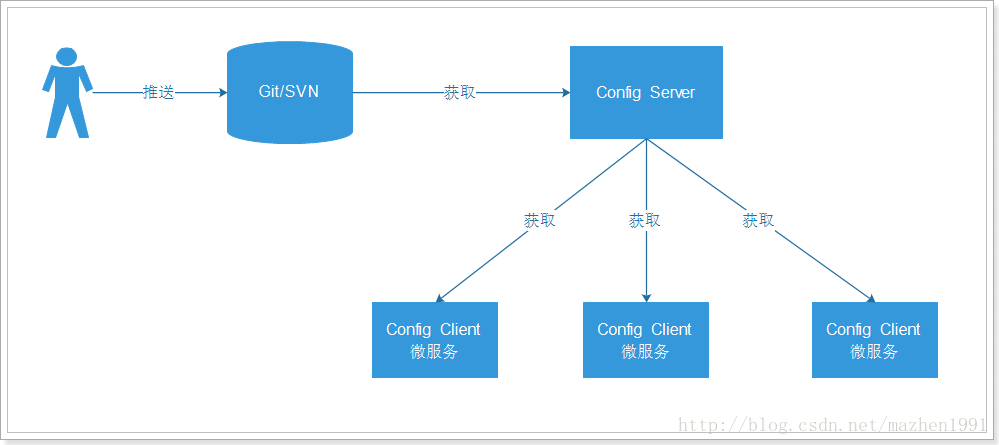
我们将配置文件放入git或者svn等服务中,通过一个Config Server服务来获取git中的配置数据,而我们需要使用的到配置文件的Config Client系统可以通过Config Server来获取对应的配置。
二、快速构建Config Server
示例版本:Spring Boot 1.5.15.RELEASE,Spring Cloud Edgware.SR3
(1)添加Spring Cloud Config相关依赖包
    <dependencies>

        <dependency>

            <groupId>org.springframework.boot</groupId>

            <artifactId>spring-boot-starter</artifactId>

        </dependency>

        <!-- 热启动,热部署依赖包,为了调试方便,加入此包 -->

        <dependency>

            <groupId>org.springframework.boot</groupId>

            <artifactId>spring-boot-devtools</artifactId>

            <optional>true</optional>

        </dependency>

        <!-- spring cloud config -->

        <dependency>

            <groupId>org.springframework.cloud</groupId>

            <artifactId>spring-cloud-config-server</artifactId>

        </dependency>

    </dependencies>

    <!-- spring cloud dependencies -->

    <dependencyManagement>

        <dependencies>

            <dependency>

                <groupId>org.springframework.cloud</groupId>

                <artifactId>spring-cloud-dependencies</artifactId>

                <version>Edgware.SR3</version>

                <type>pom</type>

                <scope>import</scope>

            </dependency>

        </dependencies>

    </dependencyManagement>
(2)启动类添加注解
@SpringBootApplication

@EnableConfigServer

public class ConfigServiceApplication {

    public static void main(String[] args) {

        SpringApplication.run(ConfigServiceApplication.class, args);

    }

}
(3)Config相关配置项
server:

  port: 8888

spring:

  application:

    name: config-server

  cloud:

    config:

      server:

        git:

          # 配置Git仓库地址

          uri: https://github.com/EdisonChou/Microservice.PoC.Steeltoe

          # 配置搜索目录

          search-paths: config

          # Git仓库账号(如果需要认证)

          username:

          # Git仓库密码(如果需要认证)

          password:
这里我在GitHub中(https://github.com/EdisonChou/Microservice.PoC.Steeltoe/config目录中)放了一个sample-service-foo.properties的配置文件,里面只有两行内容:
info.profile=default-1.0

info.remarks=this is a remarks of default profile
此外,对于Spring Cloud Config,端点与配置文件的映射规则如下:
/{application}/{profile}[/{label}]
/{application}-{profile}.yml
/{label}/{application}-{profile}.yml
/{application}-{profile}.properties
/{label}/{application}-{profile}.properties
其中,application: 表示微服务的虚拟主机名,即配置的spring.application.name
profile: 表示当前的环境,dev, test or production?
label: 表示git仓库分支,master or relase or others repository name? 默认是master
三、ASP.NET Core中集成Config Server
(1)快速准备一个ASP.NET Core WebAPI项目(示例版本:2.1),这里以上一篇示例代码中的AgentService为例
(2)通过NuGet安装Config相关包:
PM>Install-Package Steeltoe.Extensions.Configuration.ConfigServerCore
(3)改写Program类
    public class Program

    {

        public static void Main(string[] args)

        {

            CreateWebHostBuilder(args).Build().Run();

        }

        public static IWebHostBuilder CreateWebHostBuilder(string[] args) =>

            WebHost.CreateDefaultBuilder(args)

                .AddConfigServer()  // Add config server via steeltoe

                .UseUrls("http://*:8010")

                .UseStartup<Startup>();

    }
(3)改写Starup类
   public class Startup

    {

        public Startup(IConfiguration configuration)

        {

            Configuration = configuration;

        }

        public IConfiguration Configuration { get; }

        // This method gets called by the runtime. Use this method to add services to the container.

        public void ConfigureServices(IServiceCollection services)

        {

            services.AddOptions();

            // Add Steeltoe Discovery Client service client

            services.AddDiscoveryClient(Configuration);

            // Add Steeltoe Config Client service container

            services.AddConfiguration(Configuration);

            services.AddMvc().SetCompatibilityVersion(CompatibilityVersion.Version_2_1);

            // Add Configuration POCO

            services.Configure<ConfigServerData>(Configuration);

        }

        // This method gets called by the runtime. Use this method to configure the HTTP request pipeline.

        public void Configure(IApplicationBuilder app, IHostingEnvironment env)

        {

            if (env.IsDevelopment())

            {

                app.UseDeveloperExceptionPage();

            }

            app.UseMvc();

            // Add Steeltoe Discovery Client service

            app.UseDiscoveryClient();

        }

    }
(4)为自定义配置内容封装一个类
    public class ConfigServerData

    {

        public Info Info { get; set; }

    }

    public class Info

    {

        public string Profile { get; set; }

        public string Remarks { get; set; }

    }
对应:info.profile 以及 info.remarks
(5)改写Controller,通过依赖注入获取Config内容
    [Route("api/[controller]")]

    [ApiController]

    public class ValuesController : ControllerBase

    {

        private IOptionsSnapshot<ConfigServerData> IConfigServerData { get; set; }

        private IConfigurationRoot Config { get; set; }

        public ValuesController(IConfigurationRoot config, IOptionsSnapshot<ConfigServerData> configServerData)

        {

            if (configServerData != null)

            {

                IConfigServerData = configServerData;

            }

            Config = config;

        }

        [HttpGet]

        [Route("/refresh")]

        public IActionResult Refresh()

        {

            if (Config != null)

            {

                Config.Reload();

            }

            return Ok("Refresh Config Successfully!");

        }

        // GET api/values

        [HttpGet]

        public ActionResult<IEnumerable<string>> Get()

        {

            var config = IConfigServerData.Value;

            return new string[] { $"Profile : {config.Info.Profile}",

                $"Remarks : {config.Info.Remarks}" };

        }

    }
这里提供了一个刷新Config的方法Refresh,由于在没有借助消息总线的情况下,Config Server的Config刷新之后不会推送到各个Config Client,因此需要各个Config Client手动Refresh一下,如下图所示:

这里也提一下Spring Cloud Config推荐的刷新配置的方式,即集成Spring Cloud Bus,如下图所示:

从上图中我们可以看出,它将Config Server加入消息总线之中,并使用Config Server的/bus/refersh端点来实现配置的刷新(一个观察者模式的典型应用)。这样,各个微服务只需要关注自身的业务逻辑,而无需再自己手动刷新配置。但是,遗憾的是,Pivotal目前在Steeltoe中还没有为.NET应用程序提供Spring Cloud Bus的集成,不过可以研究其机制,通过消息队列的客户端如RabbitMQ.Client去自己定制响应事件。
四、快速验证
(1)从Config Server中获取sampleservice-foo.properties配置文件

(2)启动AgentService,验证是否能从ConfigServer获取到正确的配置内容

(3)修改配置文件的属性值:info.profile改为default-1.1,然后提交到github仓库

(4)验证Config Server是否已经获取到最新的info.profile

(5)手动刷新AgentService的Config对象

(6)验证是否能够获取最新的info.profile

五、小结
本文极简地介绍了一下Spring Cloud Config,并快速构建了一个用于演示的Config Server,然后通过Steeltoe OSS提供的Config客户端将ASP.NET Core与Spring Cloud Config进行集成,最后进行了验证能够正常地从Config Server中获取最新的配置内容。当然,关于Spring Cloud Config的内容还有许多,如果要真正使用Spring Cloud Config还需要考虑如何实现自动刷新的问题。从Spring Cloud Config与Apollo的使用体验上来说,本人是更加喜欢Apollo的,无论是功能的全面性和使用的体验来说,Apollo更胜一筹,而且国内的落地案例也更多。因此,如果项目中需要使用或集成统一配置中心,Apollo会是首选。
示例代码
Click => https://github.com/EdisonChou/Microservice.PoC.Steeltoe/tree/master/src/Chapter3-ConfigServer
参考资料
Steeltoe官方文档:《Steeltoe Doc》
Steeltoe官方示例:https://github.com/SteeltoeOSS/Samples
蟋蟀,《.NET Core 微服务架构 Steeltoe的使用》
周立,《Spring Cloud与Docker 微服务架构实战》
mazhen1991,《使用Spring Cloud Config来统一管理配置文件》
冰与火IAF,《Spring Cloud:分布式配置中心 Config》
.NET Core微服务之基于Steeltoe使用Spring Cloud Config统一管理配置的更多相关文章
- .NET Core微服务之基于Steeltoe使用Eureka实现服务注册与发现
Tip: 此篇已加入.NET Core微服务基础系列文章索引 => Steeltoe目录快速导航: 1. 基于Steeltoe使用Spring Cloud Eureka 2. 基于Steelt ...
- .NET Core微服务之基于Steeltoe集成Zuul实现统一API网关
Tip: 此篇已加入.NET Core微服务基础系列文章索引,本篇接上一篇<基于Steeltoe使用Eureka实现服务注册与发现>,所演示的示例也是基于上一篇的基础上而扩展的. => ...
- .NET Core微服务之基于Steeltoe使用Hystrix熔断保护与监控
Tip: 此篇已加入.NET Core微服务基础系列文章索引 => Steeltoe目录快速导航: 1. 基于Steeltoe使用Spring Cloud Eureka 2. 基于Steelt ...
- .NET Core微服务之基于Steeltoe使用Zipkin实现分布式追踪
Tip: 此篇已加入.NET Core微服务基础系列文章索引 => Steeltoe目录快速导航: 1. 基于Steeltoe使用Spring Cloud Eureka 2. 基于Steelt ...
- 9.Spring Cloud Config统一管理微服务配置
Spring Cloud Config统一管理微服务配置 9.1. 为什么要统一管理微服务配置 9.2. Spring Cloud Config简介 Spring Cloud Config为分布式系统 ...
- .NET Core微服务之基于App.Metrics+InfluxDB+Grafana实现统一性能监控
Tip: 此篇已加入.NET Core微服务基础系列文章索引 一.关于App.Metrics+InfluxDB+Grafana 1.1 App.Metrics App.Metrics是一款开源的支持. ...
- 【SpringCloud构建微服务系列】使用Spring Cloud Config统一管理服务配置
一.为什么要统一管理微服务配置 对于传统的单体应用而言,常使用配置文件来管理所有配置,比如SpringBoot的application.yml文件,但是在微服务架构中全部手动修改的话很麻烦而且不易维护 ...
- .NET Core微服务之基于Ocelot实现API网关服务
Tip: 此篇已加入.NET Core微服务基础系列文章索引 一.啥是API网关? API 网关一般放到微服务的最前端,并且要让API 网关变成由应用所发起的每个请求的入口.这样就可以明显的简化客户端 ...
- .NET Core微服务之基于Ocelot实现API网关服务(续)
Tip: 此篇已加入.NET Core微服务基础系列文章索引 一.负载均衡与请求缓存 1.1 负载均衡 为了验证负载均衡,这里我们配置了两个Consul Client节点,其中ClientServic ...
随机推荐
- 远程连接MySQL(MariaDB)数据库
网络环境: MySQL(MariaDB)服务器的操作系统为 CentOS 7 MySQL(MariaDB)服务器IP:172.16.230.15 客户端操作系统为 Windows 2008 R2 客户 ...
- CentOS6.5 安装Python2.7后, yum出现“No module named yum”错误
安装如下方法安装python2.7: yum install –y python27 python27-devel python-docutils cd /usr/bin/ rm -rf python ...
- bzoj 2510 弱题 矩阵乘
看题就像矩阵乘 但是1000的数据无从下手 打表发现每一行的数都是一样的,只不过是错位的,好像叫什么循环矩阵 于是都可以转化为一行的,O(n3)->O(n2)*logk #include< ...
- BZOJ_4867_[Ynoi2017]舌尖上的由乃_分块+dfs序
BZOJ_4867_[Ynoi2017]舌尖上的由乃_分块+dfs序 Description 由乃为了吃到最传统最纯净的美食,决定亲自开垦一片菜园.现有一片空地,由乃已经规划n个地点准备种上蔬菜.最新 ...
- 【爆料】-《澳大利亚联邦大学毕业证书》FedUni一模一样原件
☞澳大利亚联邦大学毕业证书[微/Q:2544033233◆WeChat:CC6669834]UC毕业证书/联系人Alice[查看点击百度快照查看][留信网学历认证&博士&硕士& ...
- 用js制作数码时钟
实现效果 实现效果 图片素材 图片素材 原理分析 用setInterval(fn, 1000)来循环刷新图片. 用date对象的getHours().getMinutes().getSeconds() ...
- 循环神经(LSTM)网络学习总结
摘要: 1.算法概述 2.算法要点与推导 3.算法特性及优缺点 4.注意事项 5.实现和具体例子 6.适用场合 内容: 1.算法概述 长短期记忆网络(Long Short Term Memory ne ...
- 浅谈.Net异步编程的前世今生----APM篇
前言 在.Net程序开发过程中,我们经常会遇到如下场景: 编写WinForm程序客户端,需要查询数据库获取数据,于是我们根据需求写好了代码后,点击查询,发现界面卡死,无法响应.经过调试,发现查询数据库 ...
- MIP 脚本域名地址变更公告
尊敬的 MIP 开发者: MIP 团队为了解决 MIP-Cache 页面下 cookie 相互覆盖问题,增强站点品牌露出,在 2017 年 8 月将 MIP 的脚本域名和 MIP-Cache 页面域名 ...
- MIP 内容声明
从搜索结果页点出的 MIP 页面,其页面上的任何内容(包括但不限于广告.在线咨询.统计等组件)均视为在原站点上的投放和使用. MIP (Mobile Instant Pages - 移动网页加速器), ...