
Zabbix3.4部署
Zabbix简介
zabbix(音同 zæbix)是一个基于WEB界面的提供分布式系统监视以及网络监视功能的企业级的开源解决方案。
zabbix能监视各种网络参数,保证服务器系统的安全运营;并提供灵活的通知机制以让系统管理员快速定位/解决存在的各种问题。
zabbix由2部分构成,zabbix server与可选组件zabbix agent。
zabbix server可以通过SNMP,zabbix agent,ping,端口监视等方法提供对远程服务器/网络状态的监视,数据收集等功能,它可以运行在Linux,Solaris,HP-UX,AIX,Free BSD,Open BSD,OS X等平台上。
官方中文文档:https://www.zabbix.com/documentation/3.4/zh/manual
Zabbix 通过 C/S 模式采集数据,通过 B/S 模式在 web 端展示和配置。
被监控端:主机通过安装 agent 方式采集数据,网络设备通过 SNMP 方式采集数据
Server 端:通过收集 SNMP 和 agent 发送的数据,写入数据库(MySQL,ORACLE 等) ,
再通过 php+apache 在 web 前端展示。
Zabbix 运行条件:
Server:Zabbix Server 需运行在 LAMP(Linux+Apache+Mysql+PHP)环境下(或者
LNMP),对硬件要求低
Agent:目前已有的 agent 基本支持市面常见的 OS,包含 Linux、HPUX、Solaris、Sun 、
windows
SNMP:支持各类常见的网络设备
zabbix优劣势
优点:
开源,无软件成本投入;
Server 对设备性能要求低;
支持设备多,自带多种监控模板;
支持分布式集中管理,有自动发现功能,可以实现自动化监控;
开放式接口,扩展性强,插件编写容易;
当监控的 item 比较多服务器队列比较大时可以采用被动状态,被监控客户端主动从server 端去下载需要监控的 item 然后取数据上传到 server 端。这种方式对服务器的负载比较小。Api 的支持,方便与其他系统结合;
缺点:
需在被监控主机上安装 agent,所有数据都存在数据库里,产生的数据据很大,瓶颈主要在数据库;
Zabbix安装部署
系统环境
|
IP |
主机名 |
功能 |
系统 |
|
192.168.128.165 |
compute |
Zabbix_server |
CentOS 7.4.17 |
|
192.168.128.166 |
controller |
Zabbix_agent |
CentOS 7.4.17 |
1、  先把ip和主机名写入/hosts文件(两台都要)

[root@compute ~]# echo "192.168.128.166   controller" >>/etc/hosts

[root@compute ~]# echo "192.168.128.165   compute" >>/etc/hosts

2、修改yum源(两台都要)

[root@compute~]#wget -O /etc/yum.repos.d/CentOS-Base.repo http://mirrors.aliyun.com/repo/Centos-7.repo

[root@compute ~]# yum clean all && yum makecache

[root@compute ~]# wget -O /etc/yum.repos.d/epel.repo http://mirrors.aliyun.com/repo/epel-7.repo

3、关闭iptables和selinux
时间同步
[root@compute ~]# yum install -y ntp

[root@compute ~]# systemctl start ntpd

加入定时任务中:

* * * * * /usr/sbin/ntpdate time.asia.apple.com && hwclock -w >/dev/null 2>&1
Server端部署
 rpm -i http://repo.zabbix.com/zabbix/3.4/rhel/7/x86_64/zabbix-release-3.4-2.el7.noarch.rpm

 yum install zabbix-server-mysql zabbix-web-mysql zabbix-agent -y

 yum install -y mariadb-server

[root@compute ~]# systemctl start mariadb

[root@compute ~]# systemctl enable mariadb

[root@compute ~]# mysql

Welcome to the MariaDB monitor.  Commands end with ; or \g.

Your MariaDB connection id is 375

Server version: 10.1.20-MariaDB MariaDB Server

Copyright (c) 2000, 2016, Oracle, MariaDB Corporation Ab and others.

Type 'help;' or '\h' for help. Type '\c' to clear the current input statement.

MariaDB [(none)]> create database zabbix character set utf8 collate utf8_bin;

MariaDB [(none)]> grant all privileges on zabbix.* to zabbix@localhost identified by 'zabbix';

MariaDB [(none)]> quit;

#导入数据库

[root@compute ~]# zcat /usr/share/doc/zabbix-server-mysql*/create.sql.gz | mysql -uzabbix -p zabbix

#修改zabbix_server.config添加DBHost、DBPassword

[root@compute ~]# grep ^[a-Z] /etc/zabbix/zabbix_server.conf

LogFile=/var/log/zabbix/zabbix_server.log

LogFileSize=0

PidFile=/var/run/zabbix/zabbix_server.pid

SocketDir=/var/run/zabbix

DBName=zabbix

DBUser=zabbix

SNMPTrapperFile=/var/log/snmptrap/snmptrap.log

Timeout=4

AlertScriptsPath=/usr/lib/zabbix/alertscripts

ExternalScripts=/usr/lib/zabbix/externalscripts

LogSlowQueries=3000

DBHost=localhost

DBPassword=zabbix

#启动zabbix_servera服务

[root@compute ~]# systemctl start zabbix-server

[root@compute ~]# systemctl enable zabbix-server

#修改httpd中的zabbix.conf

[root@compute ~]# vim /etc/httpd/conf.d/zabbix.conf 设置php.ini正确的时区

        php_value max_execution_time 300

        php_value memory_limit 128M

        php_value post_max_size 16M

        php_value upload_max_filesize 2M

        php_value max_input_time 300

        php_value always_populate_raw_post_data -1

        php_value date.timezone Asia/Shanghai

#启动httpd服务

[root@compute ~]# systemctl enable httpd

[root@compute ~]# systemctl start httpd
客户端zabbix_Agent部署
rpm -i http://repo.zabbix.com/zabbix/3.4/rhel/7/x86_64/zabbix-release-3.4-2.el7.noarch.rpm

yum install -y zabbix-agent

#修改/etc/zabbix/zabbix_agentd.conf

#Server=127.0.0.1

Server=192.168.128.165

#ServerActive=127.0.0.1

ServerActive=192.168.128.165           //server端ip

HostName=controller                    //主机名唯一的

HostMetadataItem=system.uname          //设置默认模板,server端自动发现

#启动agent服务

systemctl start zabbix-agent

systemctl enable zabbix-agent
配置zabbix_web
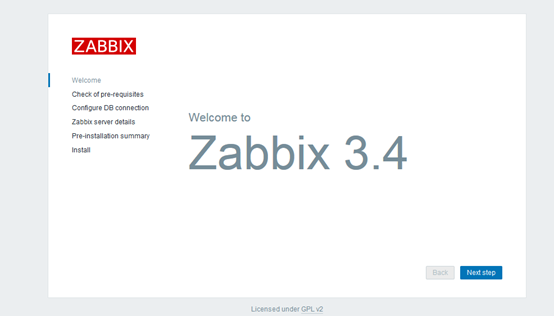
1.浏览器打开http://192.168.128.165/zabbix进入界面
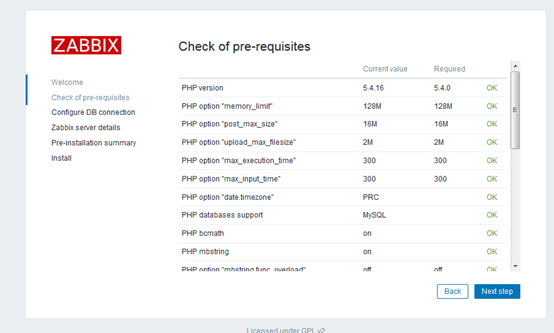
2.环境检测
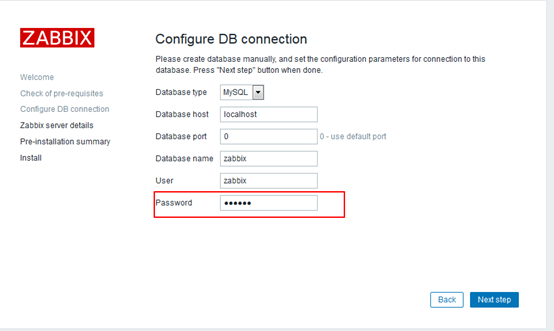
3.初始化数据库,密码为zabbix数据库密码
4.详细信息如默认,Name任意取

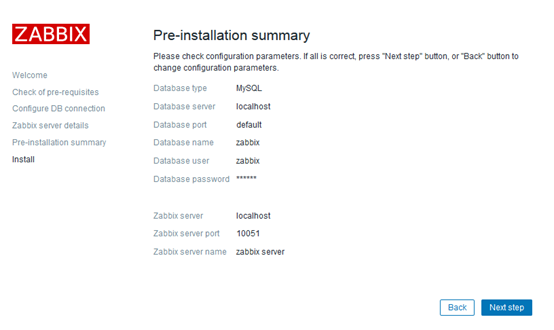
5.全部配置概要
6.安装
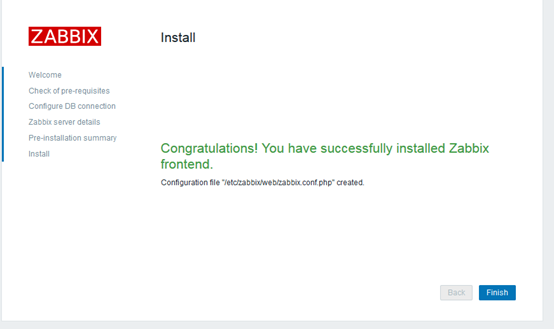
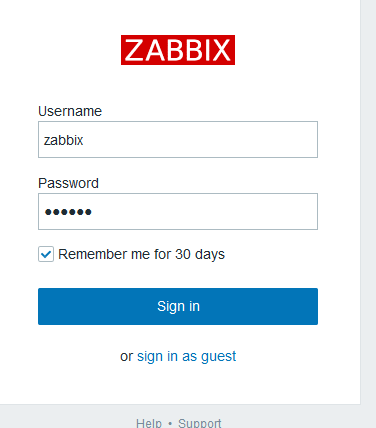
7.登录zabbix,默认账号/密码:Admin/zabbix
Zabbix3.4部署的更多相关文章
- Zabbix3.0部署实践
Zabbix3.0部署实践 Zabbix3整个web界面做了一个全新的设计. 1.1Zabbix环境准备 [root@linux-node1 ~]# cat /etc/redhat-release ...
- 【zabbix】zabbix3.0部署手册
1.环境准备 Centos 6.X 2.数据库准备 默认centos yum源中mysql包的版本号为5.1,为了能使zabbix 3.0能达到最好的性能效果,安装最新版的mysql数据库. yum ...
- zabbix3.0部署(LAMP)
0.1 初始化 #!/bin/sh yum clean all systemctl stop firewalld.service systemctl disable firewalld.service ...
- Zabbix3.0部署最佳实践
Zabbix3整个web界面做了一个全新的设计. 更多新特性请点击当前字幕查看 笔者QQ:572891887 Linux架构交流群:471443208 1.1Zabbix环境准备 [root@li ...
- Zabbix系列之一——zabbix3.4部署
Zabbix简介 zabbix(音同 zæbix)是一个基于WEB界面的提供分布式系统监视以及网络监视功能的企业级的开源解决方案. zabbix能监视各种网络参数,保证服务器系统的安全运营:并提供灵活 ...
- zabbix3.2部署
原地址 http://blog.csdn.net/zk673820543/article/details/50680333 CentOS6.7zabbix3.0.0 1.基础软件包安装,采用yum ...
- 基于LNMP的Zabbbix之Zabbix Server源码详细安装,但不给图
Zabbix Server安装 看到那里有错或者有什么问题的话,求指点 邮箱:losbyday@163.com 上一篇PHP源码安装参见基于LNMP的Zabbbix之PHP源码安装:https://i ...
- zabbix3.0安装部署文档
zabbix v3.0安装部署 摘要: 本文的安装过程摘自http://www.ttlsa.com/以及http://b.lifec-inc.com ,和站长凉白开的<ZABBIX从入门到精通v ...
- CentOS6.8下部署Zabbix3.0
Centos6.8下部署安装zabbix3.0: 环境要求 PHP >= 5.4 (CentOS6默认为5.3.3,需要更新) curl >= 7.20 (如需支持SMTP认证,需更新) ...
随机推荐
- [转]解析多级json数据为list中嵌套一级字典的形式
#!/usr/bin/env python # encoding: utf-8 import json def read(obj,key): collect = list() for k in obj ...
- 同时安装python2和python3
Windows 10 上已经安装了Anaconda2 和 python2.7 [工作需要] 想安装Anaconda3 和 python3 [学习需要] 以 Anaconda2 为主,3为辅. 要点: ...
- mwValidate.js验证插件
这段时间在公司一直做项目的同时,也学了下js,感觉有必要做一些什么东西出来.思来想去就做了最简单的一个验证插件.我很清楚这个东西市面上已经很多了,但我的目的也很清楚,检验我的学习成果.所以也就无所谓了 ...
- flask-session组件
简介 flask-session是flask框架的session组件,由于原来flask内置session使用签名cookie保存,该组件则将支持session保存到多个地方,如: redis mem ...
- linux数据库环境搭建
linux数据库源码下载地址:http://www3.sqlite.org/download.html 下载完成之后,把源码放到linux下的目录,我们一步一步来搭建环境: 1.使用命令解压源码包 u ...
- 我的第六个网页制作:table标签
<!doctype html> <html> <head> <meta charset="utf-8"> <title> ...
- hdu_1576A/B(扩展欧几里得求逆元)
题目链接:http://acm.hdu.edu.cn/showproblem.php?pid=1576 A/B Time Limit: 1000/1000 MS (Java/Others) Me ...
- HDU--1213并查集
题目传送门:HDU--1213 //题意:ignatius过生日,客人来到,他想知道他需要准备多少张桌子.然而一张桌子上面只能坐上相互熟悉的人, //其中熟悉可定义成为A与B认识,B与C认识,我们就说 ...
- 【LeetCode】476. Number Complement (java实现)
原题链接 https://leetcode.com/problems/number-complement/ 原题 Given a positive integer, output its comple ...
- ubuntu 下 apt /apt-get command not found 命令找不到
简介:apt 命令在ubuntu下找不到.(针对云平台,等可联网的ubuntu 如果是虚拟机,请确认能否联网 (如是虚拟机且不能联网请参考其他文章,大致方向是先挂载系统镜像再安装)) (ps:一般的 ...