
在react中实现打印功能
最近项目中,前端采用react+antd+dva的组合,已经完成了后头管理类系统产品的更新迭代工作。
今天有一个新需求,需要在后台管理系统中实现点击打印完成指定页面的打印功能。
之前也没接触过,只知道浏览器带有打印功能的实现,window.print()。
问题来了,在react中是没有dom节点的,不过我们也是可以转为dom节点的。
常规js文件打印:https://blog.csdn.net/u014267869/article/details/52539341
在react中,其实同样也是可以获取到节点信息的,在你需要打印的内容部分节点添加一个ID
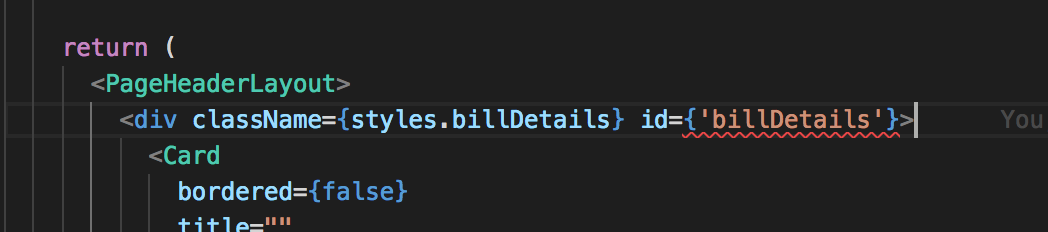
打印按钮点击事件
print = () => {

    window.document.body.innerHTML = window.document.getElementById('billDetails').innerHTML;

    window.print();

    window.location.reload();

}
这样打印出来的内容是没有带样式的,因为一般css文件并不会写到行内去,所以在生成html的文件字符串时,里面没有样式信息,在打印时就会布局混乱。
要想打印出来的效果与网页上显示的效果一致,就需要在生成html的文件字符串时,带上样式信息。
方法1:把样式信息写在行内
在文件信息不复杂时,可以写在行内
方法2:使用react-inline-css
使用这个npm包,可以在配置后把样式自动添加到行内
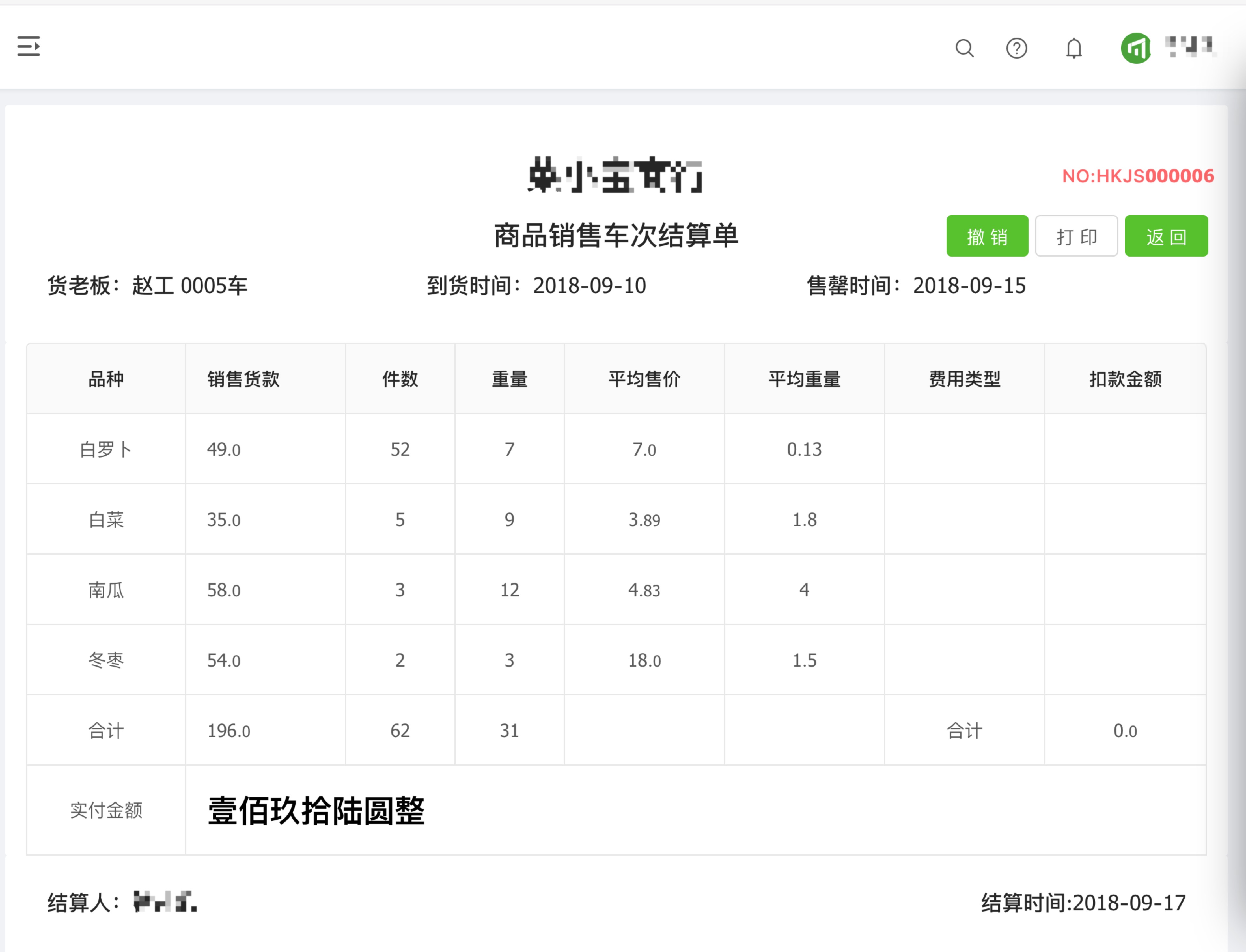
网页效果图:
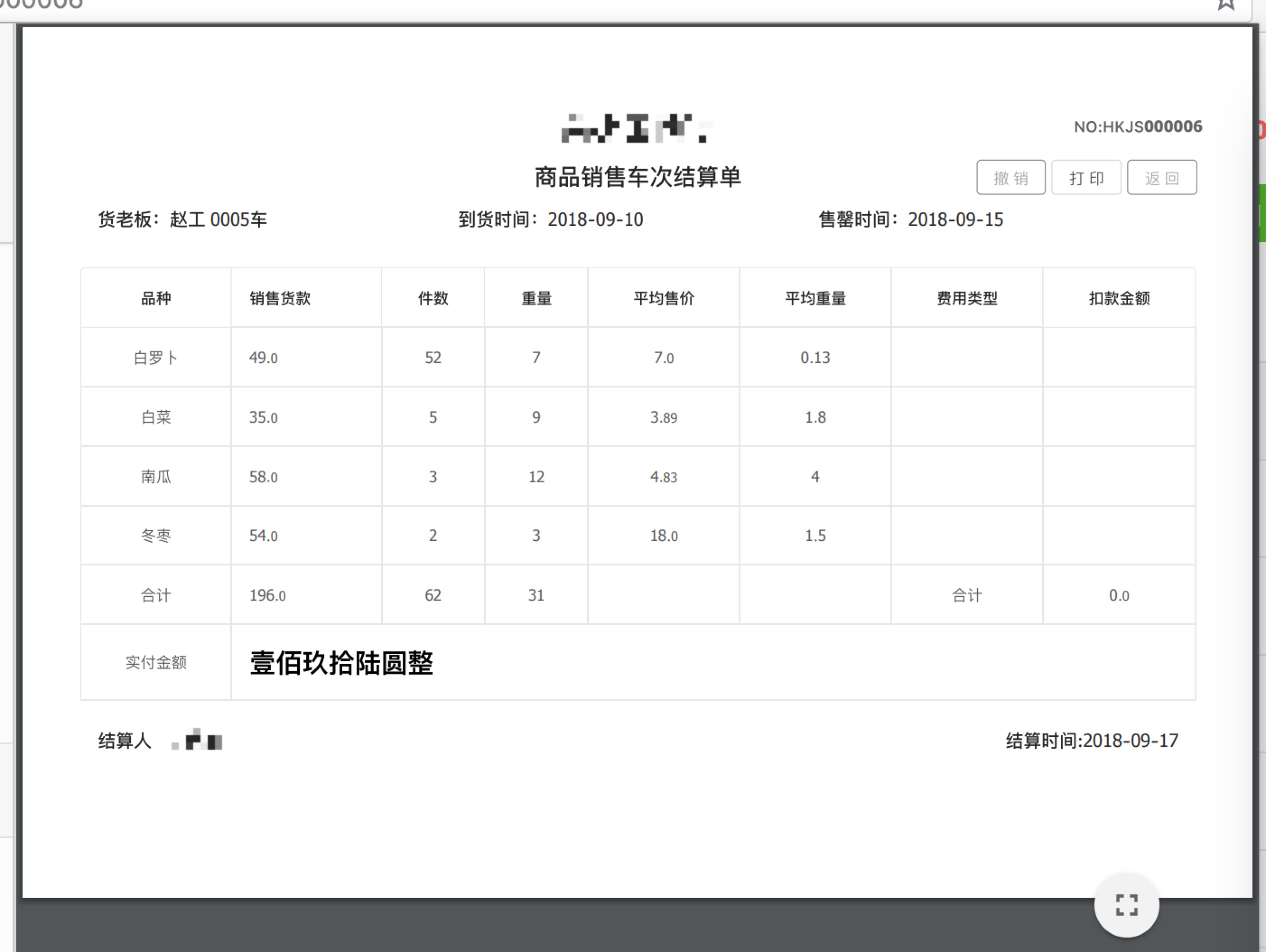
打印预览竖版效果图:

横版效果图:
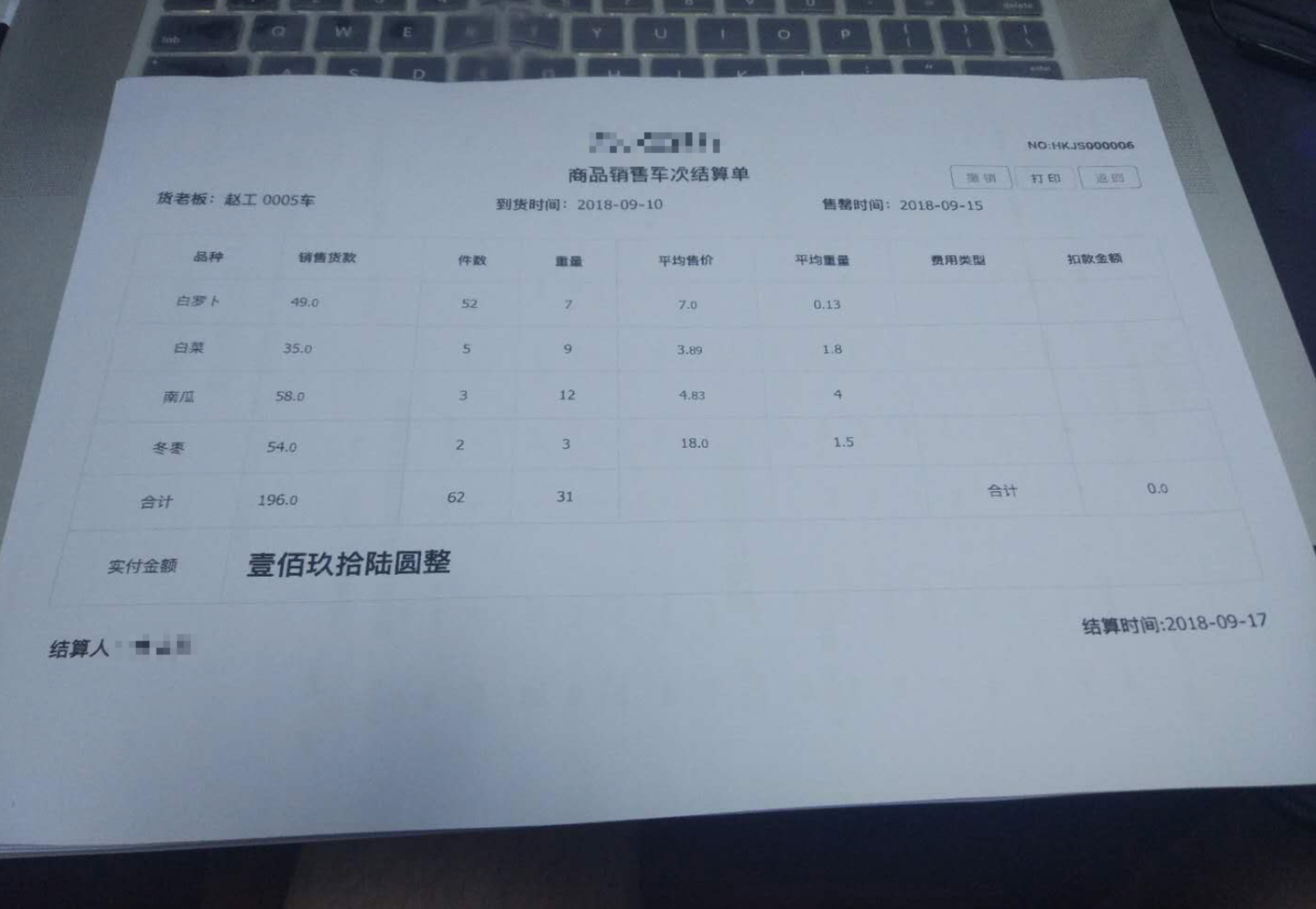
打印效果图:

完整代码:
import React, { PureComponent } from 'react';

import moment from 'moment';

import { connect } from 'dva';

import {

  Card,

  Button,

  Form,

  Table,

  message,

 } from 'antd';

import PageHeaderLayout from '../../layouts/PageHeaderLayout';

import { fixedZeroTo4Bit } from '../../utils/utils';

import styles from './Funds.less';

import { isEmptyObject } from '../../utils/reg';

import { Yuan } from '../../utils/math';

import watermark from '../../assets/icon/revocation.png';

@connect(({ finance, loading }) => ({

  finance,

  loading: loading.models.list,

}))

@Form.create()

export default class LoanSettleMent extends PureComponent {

  constructor(props) {

    super(props);

    this.state = {

      loading: true,

    };

  }

  componentDidMount() {

    const code = !isEmptyObject(this.props.match) ? this.props.match.params.id : 0;

    this.statisticalInfo({ receiptsCode: code });

  }

  // 结算单列表详情

  statisticalInfo(params) {

    this.props.dispatch({

      type: 'finance/statisticalInfo',

      payload: params,

    }).then(() => {

      this.setState({

        loading: false,

      })

    });

  }

  // 撤销操作

  fetchRevocation(params) {

    this.props

      .dispatch({

        type: 'finance/fetchRevocation',

        payload: params,

      })

      .then(() => {

        const { finance: { revocationData } } = this.props;

        const { code } = revocationData;

        if (code === 200) {

          message.info('撤销货款单成功!').then(() => {

            window.location.href = '/funds/loansettlement';

          });

        } else {

          message.info('撤销货款单失败!');

        }

      });

  }

  // 撤销

  cancer = () => {

    const code = !isEmptyObject(this.props.match) ? this.props.match.params.id : 0;

    this.fetchRevocation({

      receiptsCode: code,

    });

  };

  // 返回

  back = () => {

    window.history.back();

  };

  // 打印

  print(){

    window.document.body.innerHTML = window.document.getElementById('billDetails').innerHTML;

    window.print();

    window.location.reload();

  }

  render() {

    const { finance: { statisticalInfo }, loading } = this.props;

    let data = [],

        createName,

        createTime;

    if (statisticalInfo && !Array.isArray(statisticalInfo)) {

      data = statisticalInfo;

      createName = statisticalInfo.createName;

      createTime = statisticalInfo.createTime;

    }

    if (statisticalInfo != undefined) {

      data = statisticalInfo.goodsVos;

    }

    let _data = [],

        receiptsCode;

    if (statisticalInfo && !Array.isArray(statisticalInfo)) {

      _data = statisticalInfo;

      receiptsCode = statisticalInfo.receiptsCode;

    }

    const { supplierName, carNo, stallName, startTime, endTime, enable } = _data;

    const len = data.length;

    const columns = [

      {

        title: '品种',

        dataIndex: 'attrName',

        align: 'center',

      },

      {

        title: '销售货款',

        dataIndex: 'goodsAmount',

        align: 'left',

        render: (text, record, index) => {

          const { goodsAmount, goodsPaymentStr } = record;

          const type = goodsPaymentStr !== null ? goodsPaymentStr.split('负').length : -1;

          if (index < len - 1) {

            return <span>{goodsAmount ? Yuan(goodsAmount, 2) : ''}</span>;

          }

          return {

            children:

              type == 2 ? (

                <span className={styles.neg}>{goodsPaymentStr}</span>

              ) : (

                <span className={styles.bold}>{goodsPaymentStr}</span>

              ),

            props: {

              colSpan: 7,

            },

          };

        },

      },

      {

        title: '件数',

        dataIndex: 'number',

        align: 'center',

        render: (text, record, index) => {

          const { number } = record;

          if (index < len - 1) {

            return <span>{number ? number : ''}</span>;

          }

          return {

            children: '',

            props: {

              colSpan: 0,

            },

          };

        },

      },

      {

        title: '重量',

        dataIndex: 'weight',

        align: 'center',

        render: (text, record, index) => {

          const { weight } = record;

          if (index < len - 1) {

            return <span>{weight ? weight : ''}</span>;

          }

          return {

            children: '',

            props: {

              colSpan: 0,

            },

          };

        },

      },

      {

        title: '平均售价',

        dataIndex: 'averageAmount',

        align: 'center',

        render: (text, record, index) => {

          const { averageAmount } = record;

          if (index < len - 1) {

            return <span>{averageAmount ? Yuan(averageAmount, 2) : ''}</span>;

          }

          return {

            children: '',

            props: {

              colSpan: 0,

            },

          };

        },

      },

      {

        title: '平均重量',

        dataIndex: 'averageWeight',

        align: 'center',

        render: (text, record, index) => {

          const { averageWeight } = record;

          if (index < len - 1) {

            return <span>{averageWeight ? averageWeight : ''}</span>;

          }

          return {

            children: '',

            props: {

              colSpan: 0,

            },

          };

        },

      },

      {

        title: '费用类型',

        dataIndex: 'type',

        align: 'center',

        render: (text, record, index) => {

          const { type } = record;

          if (index < len - 1) {

            return <span>{type}</span>;

          }

          return {

            children: '',

            props: {

              colSpan: 0,

            },

          };

        },

      },

      {

        title: '扣款金额',

        dataIndex: 'amount',

        align: 'center',

        render: (text, record, index) => {

          const { amount } = record;

          if (index < len - 1) {

            return <span>{amount !== null ? Yuan(amount, 2) : ''}</span>;

          }

          return {

            children: '',

            props: {

              colSpan: 0,

            },

          };

        },

      },

    ];

    return (

      <PageHeaderLayout>

        <div className={styles.billDetails} id={'billDetails'}>

          <Card

            bordered={false}

            title=""

          >

            <div className={styles.paymentbill}>

              <div style={{display: 'flex', height: '60px', lineHeight: '60px'}}>

                <h1 style={{flex: 1, textAlign: 'center'}}>{stallName}</h1>

                <span style={{position: 'absolute', right: '10px', color: '#FF6666', fontWeight: '600'}}>{`NO:${receiptsCode !== undefined ? receiptsCode : ''}`}</span>

              </div>

              <div style={{display: 'flex'}}>

                <h2 style={{flex: 1, textAlign: 'center'}}>商品销售车次结算单</h2>

                <div style={{position: 'absolute', right: '10px'}}>

                  <Button type="primary" onClick={this.cancer} disabled={!enable} style={{marginRight: '5px'}}>

                    撤销

                  </Button>

                  <Button onClick={this.print.bind(this)} style={{marginRight: '5px'}}>打印</Button>

                  <Button type="primary" onClick={this.back} style={{marginRight: '5px'}}>

                    返回

                  </Button>

                </div>

              </div>

              <div style={{display: 'flex'}}>

                <h3 style={{flex: 1, textAlign: 'left'}}>{`货老板:${supplierName !== undefined ? supplierName : ''} ${

                  carNo !== undefined ? fixedZeroTo4Bit(carNo, 4) : 0

                }车`}

                </h3>

                <h3 style={{flex: 1}}>{`到货时间:${moment(startTime).format('YYYY-MM-DD')}`}</h3>

                <h3 style={{flex: 1}}>{`售罄时间:${moment(endTime).format('YYYY-MM-DD')}`}</h3>

              </div>

              <img src={watermark} hidden={enable} style={{position: 'absolute', width: '100px', height: '100px', top: '120px', right: '80px',zIndex: 100}} />

            </div>

          </Card>

          <Card

            bordered={false}

            title=""

            bodyStyle={{ padding: '0 16px' }}

          >

            <Table

              dataSource={data}

              columns={columns}

              bordered

              pagination={false}

              loading={this.state.loading}

            />

          </Card>

          <Card style={{ border: 0 }}>

            <div style={{display: 'flex'}}>

              <h3 style={{flex: 1}}>{`结算人:${createName !== undefined ? createName : ''}`}</h3>

              <h3 style={{flex: 1, textAlign: 'right'}}>{`结算时间:${moment(createTime).format(

                'YYYY-MM-DD'

              )}`}</h3>

            </div>

          </Card>

        </div>

      </PageHeaderLayout>

    );

  }

}
后续准备把dom节点转为pdf再加上去...待续
在react中实现打印功能的更多相关文章
- react + antd 实现打印功能(踩了不少坑)
最近在有网页打印需求,尝试了一下react的打印功能,遇到了不少的坑: 1.react本身有一些打印的组件,但都不好用,都是基于window.print(),但是window.print()如果直接打 ...
- vue项目中增加打印功能
export default function printFile(html) { let userAgent = navigator.userAgent; if ( (userAgent.index ...
- Android 各层中日志打印功能的应用
1. HAL层 头文件:#include <utils/Log.h> 对应的级别 打印方法 VERBOSE LOGV()DEBUG LOGD()INFO LOGI()WARN LOGW() ...
- MVC中的打印功能
HTML页面: @{ Layout = "~/Views/Shared/_IframeLayout.cshtml";}@Scripts.Render(ViewBag.ScriptP ...
- vc 实现打印功能
Visual C++6.0是开发Windows应用程序的强大工具,但是要通过它实现程序的打印功能,一直是初学者的一个难点,经常有朋友询问如何在VC中实现打印功能,他们往往感到在MFC提供的框架内实现这 ...
- MFC 实现打印机打印功能
Visual C++6.0是开发Windows应用程序的强大工具,但是要通过它实现程序的打印功能,一直是初学者的一个难点,经常有朋友询问如何在VC中实现打印功能,他们往往感到在MFC提供的框架内实现这 ...
- React Native(十五)——RN中的分享功能
终于,终于,可以总结自己使用RN时的分享功能了-- 为什么呢?且听我慢慢道来吧: 从刚开始接触React Native(2017年9月中旬)就着手于分享功能,直到自己参与公司的rn项目开发中,再到现在 ...
- .NET中使用FastReport实现打印功能
FastReport是功能非常强大的报表工具,在本篇文章中讲解如何使用FastReport实现打印功能. 一.新建一个窗体程序,窗体上面有设计界面和预览界面两个按钮,分别对应FastReport的设计 ...
- Immutable 详解及 React 中实践
本文转自:https://github.com/camsong/blog/issues/3 Shared mutable state is the root of all evil(共享的可变状态是万 ...
随机推荐
- Python:requests:详解超时和重试
网络请求不可避免会遇上请求超时的情况,在 requests 中,如果不设置你的程序可能会永远失去响应.超时又可分为连接超时和读取超时. 连接超时 连接超时指的是在你的客户端实现到远端机器端口的连接时( ...
- js动态数字时钟
js动态数字时钟 主要用到知识点: 主要是通过数组的一些方法,如:Array.from() Array.reduce() Array.find() 时间的处理和渲染 js用到面向对象的写法 实现的功能 ...
- css常见的各种布局下----三列布局
css 三列布局,左右固定宽度右边自适应 1不使用定位,只使用浮动可以实现左右固定,中间宽度自适应布局 1.1.1 自适应部分一定要放第一个位子,使用浮动,并且设置宽度为100%,不设置浮动元素内容不 ...
- 通过免费开源ERP构建业界领先的供应链+垂直电商平台成功案例分享
案例客户简介 Healey Green是一家新成立的企业,在线销售和销售园艺机械. 他们的产品范围包括草坪割草机,割灌机,地钻,链锯等. 在一个竞争非常激烈的市场中,这位雄心勃勃的新人将开始接受那些以 ...
- 软件工程通用软件体系结构主机终端模式、B/S 、C/S 结构和多层分布式结构
软件系统的体系结构经历了主机终端模式.客户机/服务器(C/S)模式.浏览器/服务器(B/S)和多层分布式结构. 主机/终端结构: 早期计算机系统多是单机系统,多个用户是通过联网终端来访问的,没有网络的 ...
- Windows迁移打印机与打印队列
移动打印机时,打印机当前所在服务器为源服务器,打印机将迁移到的服务器为目的服务器. 步骤: 1.为源服务器创建打印机配置文件 printbrm -b -s Servername -f SaveFile ...
- lombok的安装
Lombok简介 Lombok是一个可以通过简单的注解形式来帮助我们简化消除一些必须有但显得很臃肿的Java代码的工具,通过使用对应的注解,可以在编译源码的时候生成对应的方法.官方地址:https:/ ...
- dubbo 序列化机制之 hessian2序列化实现原理分析
对于远程通信,往往都会涉及到数据持久化传输问题.往大了说,就是,从A发出的信息,怎样能被B接收到相同信息内容!小点说就是,编码与解码问题! 而在dubbo或者说是java的远程通信中,编解码则往往伴随 ...
- wtf!rds数据同步居然出问题了--菜鸟db的数据修复历程
由于一次上线操作的数据变更太多,导致执行时间很长! 由于做手动主从关系,所以操作落在了主库上. 由于主从关系不是对整个库的操作,所以在有表新增的地方,添加了dts新的同步关系. db变更完成后,就发布 ...
- 后端MVC和前端MVVC关系详解
MVC 是后端的分层开发概念: MVVM是前端视图层的概念,主要关注于 视图层分离,也就是说:MVVM把前端的视图层,分为了 三部分 Model, View , VM ViewModel