
[svc]linux正则及grep常用手法
正则测试
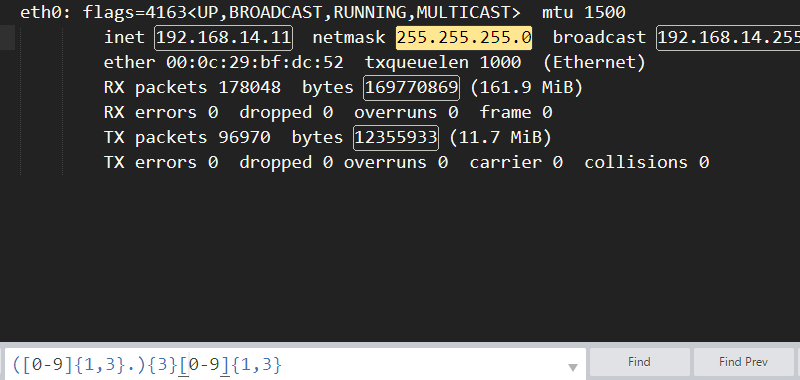
可以用sublime等工具快速的检测正则是否合适
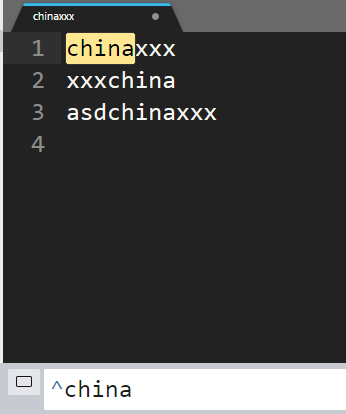
china  :  匹配此行中任意位置有china字符的行

^china : 匹配此以china开关的行

china$ : 匹配以china结尾的行

^china$ : 匹配仅有china五个字符的行

[Cc]hina : 匹配含有China或china的行

Ch.na : 匹配包含Ch两字母并且其后紧跟一个任意字符之后又有na两个字符的行

Ch.*na : 匹配一行中含Ch字符,并且其后跟0个或者多个字符,再继续跟na两字符
扩展正则
**口诀: 温家星**

?       : 匹配前面正则表达式的零个或一个扩展

+       : 匹配前面正则表达式的一个或多个扩展

*       : 前面出现0个或多个

{m,n}   : 前面出现m,n

|       : 匹配|符号前或后的正则表达式

()      : 匹配方括号括起来的正则表达式群,如g(la|oo)d

[a-z]   : 序列,如[a-Z] [0-9] [Cc]
几个例子: 1.+代表出现1次或多次

    [a-z]+

    [a-c]d+

    d[a-c]+

    (ab)+

    (d[a-c]+)+

2.()的例子

[root@n1 test]# egrep 'g(la|oo)d' test.md

good

glad
来自grep的man手册

   Repetition

       A regular expression may be followed by one of several repetition operators:

       ?      The preceding item is optional and matched at most once.

       *      The preceding item will be matched zero or more times.

       +      The preceding item will be matched one or more times.

       {n}    The preceding item is matched exactly n times.

       {n,}   The preceding item is matched n or more times.

       {,m}   The preceding item is matched at most m times.  This is a GNU extension.

       {n,m}  The preceding item is matched at least n times, but not more than m times.
grep参数
    -i, --ignore-case     不区分大小写

    -v, --invert-match    排除

    -c, --count           统计url出现次数

    -E  --extended-regexp 等价于egrep, grep -E 'a|b'

    -n, --line-number

    -r, --recursive       按照目录

    -o, --only-matching   只显示匹配行中匹配正则表达式的那部分

    -C -A -B

    grep -nr

    grep -oP
过滤ip
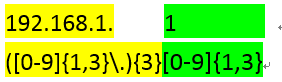
192.168.100.100

ifconfig|grep -oP "([0-9]{1,3}\.){3}[0-9]{1,3}"
过滤邮箱

cat >>tmp.txt<<EOF

iher-_@qq.com

hello

EOF

cat tmp.txt|grep -oP "[a-zA-Z0-9_-]+@[a-zA-Z0-9_-]+(\.[a-zA-Z]+)+"
统计baidu关键字的url在这个大文件中出现的次数
$ cat >file.txt<<EOF

wtmp begins Mon Feb 24 14:26:08 2014

192.168.0.1

162.12.0.123

"123"

123""123

njuhwc@163.com

njuhwc@gmil.com 123

www.baidu.com

tieba.baidu.com

www.google.com

www.baidu.com/search/index

EOF

grep -cn ".*baidu.com.*" file.txt

3
过滤jay的,非混音轨的mp3的内容
[root@lanny ~]# cat jay.txt

Jay_01_remix.mp3

jAy_02_rEmix.mp3

jaY_03_Remix.mp3

jay_05_ori.mp3

lanny.mp4

mo.3gp

lanny.mp3
思路: 先过滤mp3的内容,然后再mp3中找出jay的,然后再jay中找出非remix的内容
[root@lanny ~]# grep -E ".mp3" jay.txt|grep -i "jay"|grep -vi "remix"

jay_05_ori.mp3
[svc]linux正则及grep常用手法的更多相关文章
- [svc]linux正则实战(grep/sed/awk)
企业实战: 过滤ip 过滤出第二行的 192.168.2.11. eth0: flags=4163<UP,BROADCAST,RUNNING,MULTICAST> mtu 1500 ine ...
- Linux正则和grep命令
设置命令的默认参数和别名 每次都要输入 ls -l ,烦不烦,我想用 ll 来表示 ls -l, 可以,只要在 ~/.bashrc 中加上 alias ll='ls -l' ,然后运行 source ...
- Linux三剑客之grep常用参数详细总结
三剑客grep总结 grep : Linux三剑客老三 过滤需要的内容 参数: grep一般常用参数: -a :在二进制文件中,以文本文件的方式搜索数据 -c :计算找到 ’ 搜索字符串 ...
- [svc]linux常用手头命令-md版-2017年11月12日 12:31:56
相关代码 curl命令-网站如果3次不是200或301则报警 curl -o /dev/null -s -w "%{http_code}" baidu.com -k/--insec ...
- Linux中Grep常用的15个例子【转】
转自:https://www.aliyun.com/jiaocheng/1390860.html?spm=5176.100033.1.9.6a1e41e8Pdjynm 摘要:Grep命令主要用于从文件 ...
- Linux 使用grep过滤多个条件及grep常用过滤命令
这篇文章主要介绍了Linux 使用grep筛选多个条件及grep常用过滤命令,需要的朋友可以参考下 cat log.txt | grep 条件: cat log.txt | grep 条件一 | gr ...
- [转帖]「日常小记」linux中强大且常用命令:find、grep
「日常小记」linux中强大且常用命令:find.grep https://zhuanlan.zhihu.com/p/74379265 在linux下面工作,有些命令能够大大提高效率.本文就向大家介绍 ...
- linux命令系列 grep
grep, egrep, fgrep - print lines matching a pattern SYNOPSIS grep [OPTIONS] PATTERN [FILE...] grep [ ...
- centos 正则,grep,egrep,流式编辑器 sed,awk -F 多个分隔符 通配符 特殊符号. * + ? 总结 问加星 cat -n nl 输出文件内容并加上行号 alias放~/.bash_profile 2015-4-10 第十三节课
centos 正则,grep,egrep,流式编辑器 sed,awk -F 多个分隔符 通配符 特殊符号. * + ? 总结 问加星 cat -n nl 输出文件内容并加上行号 alias放~ ...
随机推荐
- POJ--2406Power Strings+KMP求字符串最小周期
题目链接:点击进入 事实上就是KMP算法next数组的简单应用.假设我们设这个字符串的最小周期为x 长度为len,那么由next数组的意义,我们知道len-next[len]的值就会等于x.这就是这个 ...
- 【Linux】Ubuntu13.10搭建gitlab报错信息及解决
error: Gitlab "bundler: command not found: unicorn_rails"soluton: cd /home/git/gitlab git ...
- mongobooster 的使用
mongobooster是mongodb的客户端工具 1.配置数据库 file->connect..->from URL 2.数据查询 选中数据库名,右击-Open Shell->输 ...
- redhat7.0安装ifconfig
问题描述: Setup is unable to find the "ifconfig" program on your machine. Please make sure it ...
- Ubuntu16.04 Arduino UNO R3开发板
使用的是国内改过的版本, usb芯片换成了ch341, 晶振不是原版的16MHz而是12MHz, 杜邦线孔布局和原版一致. 设备连接 在Ubuntu16.04下不需要驱动, 能直接认出ch341设备 ...
- CSS3 flex的使用方法
display:flex; align-items://水平对齐方式 justify-content://垂直对齐方式 flex://盒子所占大小(如果你盒子里面只有两个div,那么你设置其中之一个f ...
- 监听textarea文本框文本输入情况
// When the value of the text area changes... $("textarea").on("input", function ...
- ios中地图
参考文章 http://blog.csdn.net/tangaowen/article/details/6527901 http://www.cnblogs.com/tangbinblog/arch ...
- 听听各位对Ubuntu的UI的看法
2012-7-15 15:46 最近升级到Ubuntu 12.4 .发现其界面效果真的时越来越炫啦.我就在想,你Ubuntu你图什么啊, 你是以个Linux系统,你的重点在于让系统运行更稳定,更 ...
- 树莓派进阶之路 (013) - 树莓派2/3 C语言使用PWM
我手里面的是树莓派3,系统是Raspbian官方操作系统,已经安装好了wiringPi. PWM简介:脉宽调制(PWM)是指用微处理器的数字输出来对模拟电路进行控制,是一种对模拟信号电平 ...