
Struts2中实现文件上传的功能
1、首先得配置一下Struts得配置文件struts-xml:
 <?xml version="1.0" encoding="UTF-8" ?>

 <!DOCTYPE struts PUBLIC

     "-//Apache Software Foundation//DTD Struts Configuration 2.1.7//EN"

     "http://struts.apache.org/dtds/struts-2.1.7.dtd">

 <struts>

     <!-- 设置可否动态调用方法 -->

     <constant name="struts.enable.DynamicMethodInvocation" value="true"/>

     <!-- 设置访问路径的后缀名 -->

     <constant name="struts.action.extension" value="do,action"/>

     <!-- 设置上传文件的最大值  10M左右-->

     <constant name="struts.multipart.maxSize" value="10701096"/>

     <!--

         上传单个文件

      -->

     <package name="uploadfile" namespace="/uploadfile" extends="struts-default">

            <action name="uploadfile" class="it.web.action.UploadFileAction" method="execute">

                <result name="success">/WEB-INF/demo/uploadfile.jsp</result>

            </action>

     </package>

     <!--

         上传多个文件

     -->

     <package name="uploadfiles" namespace="/uploadfiles" extends="struts-default">

            <action name="uploadfiles" class="it.web.action.UploadFileAction" method="execute">

                <result name="success">/WEB-INF/demo/uploadfiles.jsp</result>

            </action>

     </package>

 </struts>
2、对应的action类为:
 package it.web.action;

 import java.io.File;

 import org.apache.commons.io.FileUtils;

 import org.apache.struts2.ServletActionContext;

 import com.opensymphony.xwork2.ActionContext;

 public class UploadFileAction {

     //上传单个文件字段

     private File image;  //文件(必须要和表单的name属性值一样)

     private String imageFileName;  //文件名称(表单的name属性值+FileName)

     private String imageContentType;//得到上传文件的类型(表单的name属性值+ContentType)

     //上传多个文件的字段

     private File[] images;

     private String[] imageFileNames;

     private String[] imagesContentType;

     public File getImage() {

         return image;

     }

     public void setImage(File image) {

         this.image = image;

     }

     public String getImageFileName() {

         return imageFileName;

     }

     public void setImageFileName(String imageFileName) {

         this.imageFileName = imageFileName;

     }

     public String getImageContentType() {

         return imageContentType;

     }

     public void setImageContentType(String imageContentType) {

         this.imageContentType = imageContentType;

     }

 /*************************************************************************/

     public File[] getImages() {

         return images;

     }

     public void setImages(File[] images) {

         this.images = images;

     }

     public String[] getImageFileNames() {

         return imageFileNames;

     }

     public void setImageFileNames(String[] imageFileNames) {

         this.imageFileNames = imageFileNames;

     }

     public String[] getImagesContentType() {

         return imagesContentType;

     }

     public void setImagesContentType(String[] imagesContentType) {

         this.imagesContentType = imagesContentType;

     }

     /*

      * 上传单个文件

      */

     public String execute() throws Exception{

         //image

         /*

          *   得到上传文件的真实路径

          */

         String realpath = ServletActionContext.getServletContext().getRealPath("/image");

         System.out.println(realpath);

         //判断文件是否存在

         if(image!=null){

             /*

              * 创建文件虚拟的

              *

              * new File(realpath):文件路径

              *

              * imageFileName:文件名称

              *

              */

             File savefile = new File(new File(realpath), imageFileName);

             if(!savefile.getParentFile().exists())

             {

                 savefile.getParentFile().mkdir();

                 FileUtils.copyFile(image, savefile);

                 ActionContext.getContext().put("message", "文件上传成功");

             }

         }

         return "success";

     }

     /*

      * 上传多个文件

      */

     public String execute1() throws Exception{

         //image

         /*

          *   得到上传文件的真实路径(需要保存的路径)

          */

         String realpath = ServletActionContext.getServletContext().getRealPath("/image");

         System.out.println(realpath);

         //判断文件是否存在

         if(images!=null){

             /*

              * 创建文件虚拟的

              *

              * new File(realpath):文件路径

              *

              * imageFileName:文件名称

              *

              */

             File savedir = new File(realpath);

             if(!savedir.getParentFile().exists())

             {

                 savedir.mkdirs();

                 for(int i=0;i<images.length;i++)

                 {

                     File savefile = new File(savedir,imageFileNames[i]);

                     FileUtils.copyFile(images[i], savefile);

                 }

                 ActionContext.getContext().put("message", "多个文件文件上传成功");

             }

         }

         return "success";

     }

 }
3、对应的上传单个文件的jsp页面为:
<%@ page language="java" import="java.util.*" pageEncoding="UTF-8"%>

<!DOCTYPE HTML PUBLIC "-//W3C//DTD HTML 4.01 Transitional//EN">

<html>

  <head>

  </head>

  <body>

    <form action="${pageContext.request.contextPath}/uploadfile/uploadfile" enctype="multipart/form-data" method="post">

        文件:<input type="file" name="image"/>

        <input type="submit" value="上传"/><br>

        文件类型:${imageContentType}

        文件上传状态:${message}

    </form>

  </body>

</html>
4、对应的上传多个文件的jsp页面为:
<%@ page language="java" import="java.util.*" pageEncoding="UTF-8"%>

<!DOCTYPE HTML PUBLIC "-//W3C//DTD HTML 4.01 Transitional//EN">

<html>

  <head>

  </head>

  <body>

    <form action="${pageContext.request.contextPath}/uploadfiles/uploadfiles" enctype="multipart/form-data" method="post">

        文件:<input type="file" name="images"/><br>

            <input type="file" name="images"/><br>

            <input type="file" name="images"/>

        <input type="submit" value="上传"/><br>

        文件上传状态:${message}

    </form>

  </body>

</html>
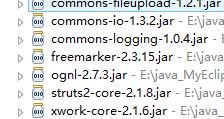
注:项目中用到的一些jar包如下:
Struts2中实现文件上传的功能的更多相关文章
- struts2中的文件上传,文件下载
文件上传: Servlet中的文件上传回顾 前台页面 1.提交方式post 2.表单类型 multipart/form-data 3.input type=file 表单输入项 后台 apache提交 ...
- 4.struts2中的文件上传,下载
Struts2中文件的上传下载,是借用commons里面的包实现文件的上传,需要导入两个jar commons-fileupload-1.2.2.jar commons-io-2.0.1.jar 实现 ...
- struts2中的文件上传和下载
天下大事,必做于细.天下难事,必作于易. 以前见过某些人,基础的知识还不扎实就去学习更难的事,这样必定在学习新的知识会非常迷惑结果 再回来又一次学习一下没有搞懂的知识,这必定会导致学习效率的下降!我写 ...
- struts2中的文件上传和文件下载
单文件文件上传 1.
- javaweb项目中的文件上传下载功能的实现
框架是基于spring+myBatis的. 前台页面的部分代码: <form action="${ctx}/file/upLoadFile.do"method="p ...
- 笨鸟先飞之Java(一)--使用struts2框架实现文件上传
无论是.net还是Java,我们最常接触到的就是文件的上传和下载功能,在Java里要实现这两个经常使用功能会有非常多种解决方案,可是struts2的框架却能给我们一个比較简单的方式,以下就一起来看吧: ...
- JavaWeb中的文件上传和下载功能的实现
导入相关支持jar包:commons-fileupload.jar,commons-io.jar 对于文件上传,浏览器在上传的过程中是将文件以流的形式提交到服务器端的,如果直接使用Servlet获取上 ...
- Struts2 之 实现文件上传和下载
Struts2 之 实现文件上传和下载 必须要引入的jar commons-fileupload-1.3.1.jar commons-io-2.2.jar 01.文件上传需要分别在struts.xm ...
- 转:在Struts 2中实现文件上传
(本文转自:http://www.blogjava.net/max/archive/2007/03/21/105124.html) 前一阵子有些朋友在电子邮件中问关于Struts 2实现文件上传的问题 ...
随机推荐
- jquery选择器之层级过滤选择器
$("ancestor descendant"):选取parent元素后所有的child元素 $("parent > child"):选取parent元素 ...
- 什么是Numpy的ndarray
什么是Numpy的ndarray 首先,Numpy的核心是ndarray. 然后,ndarray本质是数组,其不同于一般的数组,或者Python 的list的地方在于它可以有N 维(dimention ...
- [转载]linux下编译php中configure参数具体含义
编译N次了 原来这么回事 原文地址:linux下编译php中configure参数具体含义作者:捷心特 php编译参数的含义 ./configure –prefix=/usr/local/php ...
- 跨平台C/C++集成开发环境-Code::Blocks-内置GCC
Code::Blocks 是一个开放源码的全功能的跨平台C/C++集成开发环境. 相比于基于Delphi的Dev-C++共享C++IDE,Code::Blocks是开放源码软件.Code::Block ...
- linux前四天学习笔记
以下是在linux培训机构所学的内容,感觉比较乱 MySQL学习笔记MySQL的安装 linux中的超级管理员rootaixocm vnc的退出: F8 MySQL的特点.优点:关系型开源.免费c++ ...
- Dragon Balls(hdu3635带权并查集)
题意:n个城市有n个龙珠,T a,b 代表将龙珠a移动到b城市,Q a代表查询龙珠a所在城市,该城市有多少颗龙珠,该龙珠移动了多少次. 注意:移动时是将龙珠所在该城市所有龙珠都移动,每个龙珠不会再回 ...
- 解析JSON、扩展Fiddler
解析JSON.扩展Fiddler 按文章结构,这部分应该给出WCFRest项目示例,我想WinForm示例足够详尽了,况且WCFRest还不需要使用插件AppDomain那一套,于是把最近写的Fidd ...
- 新软件马上就要完成了,先发篇文章YY下
最近一直都在搞网站抓取方面的开发,闲着无聊逛逛论坛,发现有些帖子还是写的相当不错的,只是一篇一篇的点进去比较麻烦,于是就写了个小软件只是为了方便查看博客园和CSDN上的优秀文章.其实这个还可以拓展的, ...
- Android仿人人客户端(v5.7.1)——新鲜事之完整篇
转载请标明出处: http://blog.csdn.net/android_ls/article/details/9228083 声明:仿人人项目,所用所有图片资源都来源于其它Androi ...
- [资源]鸟哥的Linux私房菜
http://vbird.dic.ksu.edu.tw/linux_basic/linux_basic.php 当为[ d ]则是目录,例如上表档名为『.gconf』的那一行: 当为[ - ]则是文件 ...