
Loading class `com.mysql.jdbc.Driver'. This is deprecated警告处理,jdbc更新处
1.报错信息是这样的;

处理:提示信息表明数据库驱动com.mysql.jdbc.Driver'已经被弃用了、应当使用新的驱动com.mysql.cj.jdbc.Driver'
所以,按照提示更改jdbc.properties配置 .com.mysql.jdbc.Driver 改为 com.mysql.cj.jdbc.Driver

运行结果如下:PS 已经没有这一条报错或者警示了,一条一条处理报错。

2.仍存在报错信息
Fri Sep 07 17:48:01 GMT+08:00 2018 WARN: Establishing SSL connection without server's identity verification

处理:根据报错我们知道这是时间报错,没有指定明确的时区,是因为新版的mysql会询问是否SSL连接,返回一个Boolean值,我们需要手动指定true或者false。所以再次更改配置文件中的 url 满足其要求即可,如下:
"jdbc:mysql://localhost:3306/mybatis?characterEncoding=utf-8&serverTimezone=UTC&useSSL=false"
2.1、这里是配置了jdbc.properties,完整配置如下:
jdbc.DriverClassName=com.mysql.cj.jdbc.Driver
jdbc.url =jdbc:mysql://localhost:3306/student?serverTimezone=UTC&useSSL=false
jdbc.username=root
jdbc.password=root
2.2、mybatis-config.xml 中引入配置文件、配置数据源如下:
<environments default="development">
<environment id="development">
<!-- 使用jdbc事务管理,事务控制由mybatis-->
<transactionManager type="JDBC" />
<!-- 数据库连接池,由mybatis管理-->
<dataSource type="POOLED">
<property name="driver" value="${jdbc.DriverClassName}" />
<property name="url" value="${jdbc.url}" />
<property name="username" value="${jdbc.username}" />
<property name="password" value="${jdbc.password}" />
</dataSource>
</environment>
</environments>
运行结果如下:
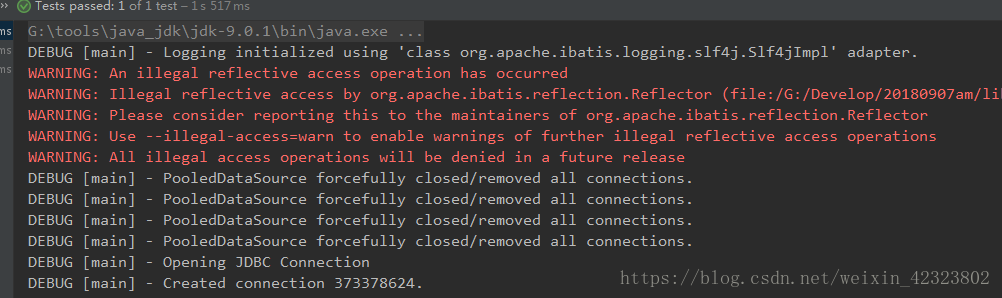
3、警告处理
WARNING: An illegal reflective access operation has occurred
WARNING: Illegal reflective access by org.apache.ibatis.reflection.Reflector (file:/G:/Develop/20180907am/lib/mybatis-3.4.6.jar) to method java.lang.Class.checkPackageAccess(java.lang.SecurityManager,java.lang.ClassLoader,boolean)
WARNING: Please consider reporting this to the maintainers of org.apache.ibatis.reflection.Reflector
WARNING: Use --illegal-access=warn to enable warnings of further illegal reflective access operations
WARNING: All illegal access operations will be denied in a future release
译文如下:
警告:发生了非法的反射访问操作
警告:通过org.apache. ibatis.com .reflection非法访问。方法java.lang.Class.checkPackageAccess(java.lang.SecurityManager,java.lang.ClassLoader,boolean)
警告:请考虑向org.apache. ibatistics . reflection.reflector的维护者报告此情况
警告:使用——非法访问=warn启用进一步的非法反射访问操作的警告
警告:所有非法访问操作将在未来版本中被拒绝
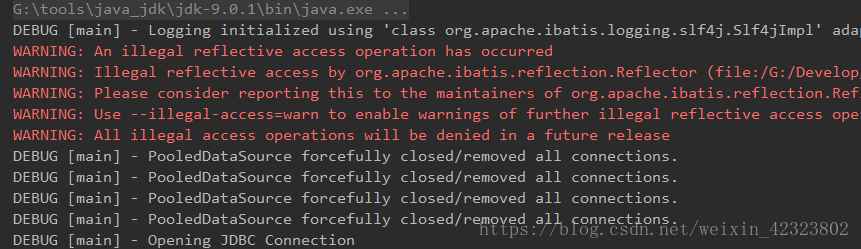
原因:JDK9的问题,非法反射,用回JDK8就可以了。JDK9版本作为小版本,相对JDK8,以及新出的JDK11这些长期版本来讲、有些许BUG正常,针对这个问题,我看了官方社区,有给出答案说是在未来可能对该问题进行优化处理,并不影响使用;
PS:在框架以后,建议小伙伴都使用JDK8版本开发学习,毕竟好多产品最近更新都已支持到了JDK8、并且、使用重量级的WEB服务器 weblogic 也仅仅支持到JDK8;
---------------------
作者:打豆豆。
来源:CSDN
原文:https://blog.csdn.net/weixin_42323802/article/details/82500458
版权声明:本文为博主原创文章,转载请附上博文链接!
Loading class `com.mysql.jdbc.Driver'. This is deprecated警告处理,jdbc更新处的更多相关文章
- Loading class `com.mysql.jdbc.Driver'. This is deprecated警告处理
com.mysql.jdbc.Driver 和 com.mysql.cj.jdbc.Driver的区别 mysql客户端6以后,数据库驱动com.mysql.jdbc.Driver'已经被弃用了.应当 ...
- Loading class `com.mysql.jdbc.Driver'. This is deprecated. The new driver class is `com.mysql.cj.jdbc.Driver'. The driver is automatically registered via the SPI and manual loading of the driver class
Loading class `com.mysql.jdbc.Driver'. This is deprecated. The new driver class is `com.mysql.cj.jdb ...
- 解决Loading class `com.mysql.jdbc.Driver'. This is deprecated. The new driver class is `com.mysql.cj.jdbc.Driver'.
异常: Loading class `com.mysql.jdbc.Driver'. This is deprecated. The new driver class is `com.mysql.cj ...
- Eclipse中使用MySql遇到:Loading class `com.mysql.jdbc.Driver'. This is deprecated. The new driver class is `com.mysql.cj.jdbc.Driver'. The driver is automatically registered via the SPI and manual loading o
在Eclipse中使用MySQL遇到了点小问题 如果对Eclipse中配置MySql还有疑问的可以参考一下这篇博客:https://blog.csdn.net/qq_38247544/article/ ...
- mysql 问题 Loading class `com.mysql.jdbc.Driver'. This is deprecated. The new driver class is `com.mysql.cj.jdb
异常错误:Loading class `com.mysql.jdbc.Driver'. This is deprecated. The new driver class is `com.mysql.c ...
- JDBC连接数据库报错:Loading class `com.mysql.jdbc.Driver'. This is deprecated.
使用JDBC连接数据库时出现报错, 报错内容:Loading class `com.mysql.jdbc.Driver'. This is deprecated. The new driver cla ...
- Cannot create JDBC driver of class '' for connect URL 'jdbc:mysql://127.0.0.1:3306/test'
原来的配置如下: <?xml version="1.0" encoding="UTF-8"?> <beans xmlns="http ...
- Loading class `com.mysql.jdbc.Driver'. This is deprecated. The new driver class is `com.mysql.cj.jdbc.Driver'.
在连接数据库时,使用了最新版本的mysql-Connector,所以导致老版本的“com.mysql.jdbc.Drive”不可行,要改为“com.mysql.cj.jdbc.Driver”
- Loading class `com.mysql.jdbc.Driver'. This is deprecated. The driver is automatically registered via the SPI and manual loading of the driver class is generally unnecessary.
简单介绍 声明:使用JDK9.MYSQL8.idea 报错处理 报错信息如下 原因 提示信息表明数据库驱动com.mysql.jdbc.Driver已经被弃用了.应当使用新的驱动com.mysql.c ...
随机推荐
- Swoole开启守护进程后如何关闭
查找相应端口号对应的PID(以我的为例,我的是9501端口) netstat -apn | 清除这个进程 启动客户端这时就会报错连不上了,证明服务已关
- ActiveMQ利用ajax收发消息
准备工作: 后台需要导包: activemq-all.jar activemq-web.jar jetty-all.jar 如果是maven项目: pom.xml <dependency> ...
- android中的rn项目更新gradle及补充二
修改build.gradle的版本,com.android.tools.build:gradle:2.1.0, 改为更高的,然后更改gradle/wrapper/gradle-wrapper.prop ...
- webpack常用的插件
webpack常用的开发插件 1.clean-webpack-plugin 运行webpack build时先把打包进入的文件夹清空 注意,它是以对象的方式去接收的 const { CleanWebp ...
- mysql注入大全及防御
0.明白存在的位置:get型 post型 cookie型 http头注入 1.先测试注入点,注册框.搜索框.地址栏啥的,判断是字符型,搜索型还是数字型 字符型 1' and '1'='1 成功, 1' ...
- python变量、对象和引用你真的明白了吗
python变量.对象和引用你真的明白了吗 变量.对象和引用 Python不像C++,Java等语言一样,他们可以不用事先声明变量类型而直接对变量进行赋值.对Python语言来讲,对象的类型和内存都是 ...
- auto_ptr为什么不能做为vector的元素
昨天看effectve c++的时候,发现了auto_ptr这个东西.由于我待过的公司都是用的老版c++,代码里智能指针什么的完全没有出现过,都是直接操作的原始指针.虽说我很少出错,但是总归还是不太安 ...
- 利用cmd运行java程序
在运行以下程序时,要确保正确配置java的环境变量!!! 此处仅仅使用“记事本”来写java程序!!! 1. 新建一个记事本文件,命名为HelloWorld.java 这里需要注意的是,要确保关闭了隐 ...
- Python核心编程正则表达式练习题1-1 识别后续的字符串:“bat”、“bit”、“but”、“hat”、“hit”或者“hut”
# 1-1 识别后续的字符串:“bat”.“bit”.“but”.“hat”.“hit”或者“hut”. import re # 正则表达式,|元字符表示选择“或” # character = 'ba ...
- robotframework 使用Chrome手机模拟器两种方法
Open Google Simulator1 ${device metrics}= Create Dictionary width=${360} height=${640} pixelRatio=${ ...