
R语言实战读书笔记(六)基本图形
#安装vcd包,数据集在vcd包中
library(vcd)
counts <- table(Arthritis$Improved)
counts
# 垂直
barplot(counts, main = "Simple Bar Plot", xlab = "Improvement",
ylab = "Frequency")
# 改为水平
barplot(counts, main = "Horizontal Bar Plot", xlab = "Frequency",
ylab = "Improvement", horiz = TRUE)
# 两个列
counts <- table(Arthritis$Improved, Arthritis$Treatment)
counts
# 堆砌条形图
barplot(counts, main = "Stacked Bar Plot", xlab = "Treatment",
ylab = "Frequency", col = c("red", "yellow", "green"),
legend = rownames(counts))

#分组条形图
barplot(counts, main = "Grouped Bar Plot", xlab = "Treatment",
ylab = "Frequency", col = c("red", "yellow", "green"),
legend = rownames(counts),
beside = TRUE)

states <- data.frame(state.region, state.x77)
means <- aggregate(states$Illiteracy, by = list(state.region), FUN = mean)
means
means <- means[order(means$x), ]
means
barplot(means$x, names.arg = means$Group.1)
title("Mean Illiteracy Rate")

library(vcd)
attach(Arthritis)
counts <- table(Treatment, Improved)
#棘状图
spine(counts, main = "Spinogram Example")
detach(Arthritis)

#屏幕分成2行2列,可以放4副图
par(mfrow = c(2, 2))
#图1中的数据
slices <- c(10, 12, 4, 16, 8)
#图1中的文字
lbls <- c("US", "UK", "Australia", "Germany", "France")
#饼图1
pie(slices, labels = lbls, main = "Simple Pie Chart")
#图2中的数据,是图1中数据的百分比
pct <- round(slices/sum(slices) * 100)
lbls2 <- paste(lbls, " ", pct, "%", sep = "")
pie(slices, labels = lbls2, col = rainbow(length(lbls)), main = "Pie Chart with Percentages")
#三维饼图
library(plotrix)
pie3D(slices, labels = lbls, explode = 0.1, main = "3D Pie Chart ")
#
mytable <- table(state.region)
lbls <- paste(names(mytable), "\n", mytable, sep = "")
pie(mytable, labels = lbls, main = "Pie Chart from a Table\n (with sample sizes)")

#扇形图
par(opar)
library(plotrix)
slices <- c(10, 12, 4, 16, 8)
lbls <- c("US", "UK", "Australia", "Germany", "France")
fan.plot(slices, labels = lbls, main = "Fan Plot")

#直方图
#2行2列
par(mfrow = c(2, 2))
#普通的直方图
hist(mtcars$mpg)
#指定12组
hist(mtcars$mpg, breaks = 12, col = "red",xlab = "Miles Per Gallon", main = "Colored histogram with 12 bins")
#freq=FALSE表示密度直方图
hist(mtcars$mpg, freq = FALSE, breaks = 12, col = "red", xlab = "Miles Per Gallon", main = "Histogram, rug plot, density curve")
#jitter是添加一些噪声,rug是在坐标轴上标出元素出现的频数。出现一次,就会画一个小竖杠。从rug的疏密可以看出变量是什么地方出现的次数多,什么地方出现的次数少。
#轴须图是实际数据值的一种一维呈现方式。如果数据中有很多结(相同的值),可以使用如下代码将数据打散布,会向每个数据点添加一个小的随机值,以避免重叠点产生的影响。
rug(jitter(mtcars$mpg))
#画密度线
lines(density(mtcars$mpg), col = "blue", lwd = 2)
# Histogram with Superimposed Normal Curve
x <- mtcars$mpg
h <- hist(x, breaks = 12, col = "red", xlab = "Miles Per Gallon", main = "Histogram with normal curve and box")
xfit <- seq(min(x), max(x), length = 40)
#正态分布
yfit <- dnorm(xfit, mean = mean(x), sd = sd(x))
yfit <- yfit * diff(h$mids[1:2]) * length(x)
lines(xfit, yfit, col = "blue", lwd = 2)
#添加一个框
box()

par(mfrow = c(2, 1))
d <- density(mtcars$mpg)
plot(d)
d <- density(mtcars$mpg)
plot(d, main = "Kernel Density of Miles Per Gallon")
#画多边形
polygon(d, col = "red", border = "blue")
#添加棕色轴须图
rug(mtcars$mpg, col = "brown")

#双倍线宽
par(lwd = 2)
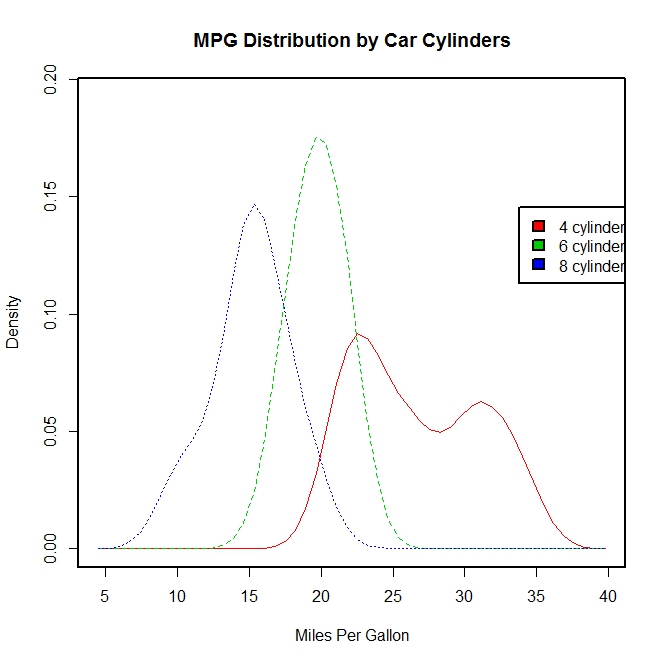
library(sm)
attach(mtcars)
#产生一个因子cyl.f,cyl是mtcars的一个列
cyl.f <- factor(cyl, levels = c(4, 6, 8),labels = c("4 cylinder", "6 cylinder", "8 cylinder"))
sm.density.compare(mpg, cyl, xlab = "Miles Per Gallon")
title(main = "MPG Distribution by Car Cylinders")
#指定颜色值
colfill <- c(2:(2 + length(levels(cyl.f))))
cat("Use mouse to place legend...", "\n\n")
#locator表示在鼠标点击的位置上添加图例
legend(locator(1), levels(cyl.f), fill = colfill)
detach(mtcars)
par(lwd = 1)
boxplot(mpg ~ cyl, data = mtcars, main = "Car Milage Data", xlab = "Number of Cylinders", ylab = "Miles Per Gallon")

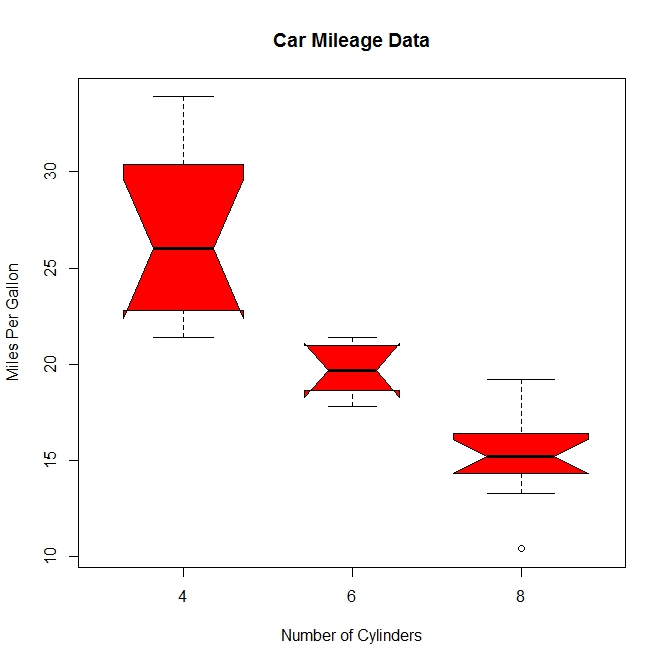
#notch=TRUE含凹槽的箱线图,有凹槽不重叠,表示中位数有显著差异,如下图,都有明显差异,
boxplot(mpg ~ cyl, data = mtcars, notch = TRUE, varwidth = TRUE, col = "red", main = "Car Mileage Data", xlab = "Number of Cylinders", ylab = "Miles Per Gallon")
mtcars$cyl.f <- factor(mtcars$cyl, levels = c(4, 6, 8), labels = c("4", "6", "8"))
mtcars$am.f <- factor(mtcars$am, levels = c(0, 1), labels = c("auto", "standard"))
boxplot(mpg ~ am.f * cyl.f, data = mtcars, varwidth = TRUE, col = c("gold", "darkgreen"), main = "MPG Distribution by Auto Type", xlab = "Auto Type")
#如下图,再一次清晰显示油耗随着缸数下降而减少,对于四和六缸,标准变速箱的油耗更高。对于八缸车型,油耗似乎没有差别
#也可以从箱线图的宽度看出,四缸标准变速成箱的车型和八缸自动变速箱的车型在数据集中最常见

dotchart(mtcars$mpg, labels = row.names(mtcars), cex = 0.7, main = "Gas Milage for Car Models", xlab = "Miles Per Gallon")

x <- mtcars[order(mtcars$mpg), ]
x$cyl <- factor(x$cyl)
x$color[x$cyl == 4] <- "red"
x$color[x$cyl == 6] <- "blue"
x$color[x$cyl == 8] <- "darkgreen"
dotchart(x$mpg, labels = row.names(x), cex = 0.7,
pch = 19, groups = x$cyl,
gcolor = "black", color = x$color,
main = "Gas Milage for Car Models\ngrouped by cylinder",
xlab = "Miles Per Gallon")

R语言实战读书笔记(六)基本图形的更多相关文章
- R语言实战读书笔记(三)图形初阶
这篇简直是白写了,写到后面发现ggplot明显更好用 3.1 使用图形 attach(mtcars)plot(wt, mpg) #x轴wt,y轴pgabline(lm(mpg ~ wt)) #画线拟合 ...
- R语言实战读书笔记(二)创建数据集
2.2.2 矩阵 matrix(vector,nrow,ncol,byrow,dimnames,char_vector_rownames,char_vector_colnames) 其中: byrow ...
- R语言实战读书笔记1—语言介绍
第一章 语言介绍 1.1 典型的数据分析步骤 1.2 获取帮助 help.start() help("which") help.search("which") ...
- R语言实战读书笔记(八)回归
简单线性:用一个量化验的解释变量预测一个量化的响应变量 多项式:用一个量化的解决变量预测一个量化的响应变量,模型的关系是n阶多项式 多元线性:用两个或多个量化的解释变量预测一个量化的响应变量 多变量: ...
- R语言实战读书笔记2—创建数据集(上)
第二章 创建数据集 2.1 数据集的概念 不同的行业对于数据集的行和列叫法不同.统计学家称它们为观测(observation)和变量(variable) ,数据库分析师则称其为记录(record)和字 ...
- R语言实战读书笔记(五)高级数据管理
5.2.1 数据函数 abs: sqrt: ceiling:求不小于x的最小整数 floor:求不大于x的最大整数 trunc:向0的方向截取x中的整数部分 round:将x舍入为指定位的小数 sig ...
- R语言实战读书笔记(四)基本数据管理
4.2 创建新变量 几个运算符: ^或**:求幂 x%%y:求余 x%/%y:整数除 4.3 变量的重编码 with(): within():可以修改数据框 4.4 变量重命名 包reshape中有个 ...
- R语言实战读书笔记(一)R语言介绍
1.3.3 工作空间 getwd():显示当前工作目录 setwd():设置当前工作目录 ls():列出当前工作空间中的对象 rm():删除对象 1.3.4 输入与输出 source():执行脚本
- R语言实战读书笔记(十三)广义线性模型
# 婚外情数据集 data(Affairs, package = "AER") summary(Affairs) table(Affairs$affairs) # 用二值变量,是或 ...
随机推荐
- 《Java并发编程实战》读书笔记一 -- 简介
<Java并发编程实战>读书笔记一 -- 简介 并发的历史 并发的历史,也是人类利用有限的资源去提高生产效率的一个的例子. 设想现在有台计算机,这台计算机具有以下的资源: 单核CPU一个 ...
- shell中变量字符串的截取 与 带颜色字体、背景输出
字符串截取 假设我们定义了一个变量为:file=/dir1/dir2/dir3/my.file.txt 可以用${ }分别替换得到不同的值:${file#*/}:删掉第一个 /及其左边的字符串:dir ...
- python基础学习笔记——字典
字典(Dictionary) 字典是另一种可变容器模型,且可存储任意类型对象. 字典的每个键值 key=>value 对用冒号 : 分割,每个键值对之间用逗号 , 分割,整个字典包括在花括号 { ...
- JAVA-基础(六) Java.serialization 序列化
序 列 化 序列化(serialization)是把一个对象的状态写入一个字节流的过程. Serializable接口 只有一个实现Serializable接口的对象可以被序列化工具存储和恢复.Ser ...
- python面试题解析(数据库和缓存)
1. 答: 关系型数据库:Mysql,Oracel,Microsoft SQL Server 非关系型数据库:MongoDB,memcache,Redis. 2. 答: MyI ...
- SVN 删除所有目录下的“.svn”文件夹,让文件夹脱离SVN控制
SVN 删除所有目录下的“.svn”文件夹,将如下语句拷备到记事本,并保存为 *.reg,双击导入注册表,在文件夹右键中就多了一条“Delete SVN Folders”,点击就可以删处此目录下的所有 ...
- Apache 根据不同的端口 映射不同的站点
以前,在本地新建个项目,总是在Apache的htdocs目录下新建个项目目录,今年弄了个别人写好的网站源码,因为该系统的作者假定网站是放在根目录的,放在二级目录下会出错.所以无奈,只能想办法,根据端口 ...
- day03_03 第一个Python程序
Python的安装 之前安装了python2.7.11,接下来的课程因为是python3的,需要再安装一个python3版本...... 1.进入python.org进行选择安装 2.或者选择课件里的 ...
- hdu1599 find the mincost route floyd求出最小权值的环
find the mincost route Time Limit: 1000/2000 MS (Java/Others) Memory Limit: 32768/32768 K (Java/O ...
- 一句话学Java——Java重载和重写
概念:重载是指两个不同的函数有相同的名称,可以是在本类之中的函数之间的重载,也可以是子类和父类的函数之间的函数重载. 重写:只能是子类重写父类的函数.这是多态的基础. 重写的规则: 参数:重写 ...