
cdh版hbase构建Phoenix 遇到的坑
Phoenix 构建cdh版hbase遇到的坑
1. 安装phoenix
下载:在github上下载对应版本https://github.com/apache/phoenix
解压:略
编译:
修改根目录及其子目录下的pom.xml文件,使cdh版本对应自己集群版本。如图所示
注意:编译中修改版本号遵循原始的写法。4.14.0-cdh5.12.1 版本不可以写成4.14-cdh5.12.1,因为在编译时会有正则校验,书写不规范会导致编译不通过。
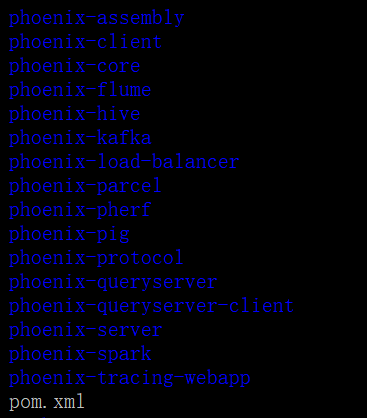
命令:
 vim pom.xml

/cdh5.  #搜索
修改所有的cdh版本号

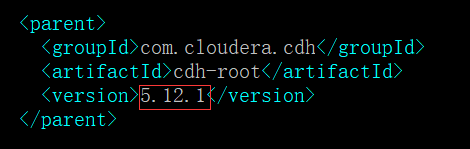
编译:mvn clean package -DskipTests
拷贝jar :将下面的jar包拷贝至每一台RegionServer的lib下面
/opt/phoenix/APACHE_PHOENIX-4.14.-cdh5.12.1.p0./lib/phoenix/phoenix-4.14.-cdh5.12.1-server.jar
2. 配置hbase-site.xml
注意前方高能:phoenix4.8版本是个分水岭,配置有所不同
- phoenix4.8以下版本的配置如下:
配置HMaster的hbase-site.xml
<!-- Phoenix订制的索引负载均衡器 -->

<property>

 <name>hbase.master.loadbalancer.class</name> <value>org.apache.phoenix.hbase.index.balancer.IndexLoadBalancer</value>

</property>

<!-- Phoenix订制的索引观察者 -->

<property>

 <name>hbase.coprocessor.master.classes</name> <value>org.apache.phoenix.hbase.index.master.IndexMasterObserver</value>

</property>
配置RegionServer的hbase-site.xml
<!-- Enables custom WAL edits to be written, ensuring proper writing/replay of the index updates. This codec supports the usual host of WALEdit options, most notably WALEdit compression. -->

<property>

  <name>hbase.regionserver.wal.codec</name>

  <value>org.apache.hadoop.hbase.regionserver.wal.IndexedWALEditCodec</value>

</property>

<!-- Prevent deadlocks from occurring during index maintenance for global indexes (HBase 0.98.4+ and Phoenix 4.3.1+ only) by ensuring index updates are processed with a higher priority than data updates. It also prevents deadlocks by ensuring metadata rpc calls are processed with a higher priority than data rpc calls -->

<property>

  <name>hbase.region.server.rpc.scheduler.factory.class</name>

  <value>org.apache.hadoop.hbase.ipc.PhoenixRpcSchedulerFactory</value>

  <description>Factory to create the Phoenix RPC Scheduler that uses separate queues for index and metadata updates</description>

</property>

<property>

  <name>hbase.rpc.controllerfactory.class</name>

  <value>org.apache.hadoop.hbase.ipc.controller.ServerRpcControllerFactory</value>

  <description>Factory to create the Phoenix RPC Scheduler that uses separate queues for index and metadata updates</description>

</property>

 <!-- To support local index regions merge on data regions merge you will need to add the following parameter to hbase-site.xml in all the region servers and restart. (It’s applicable for Phoenix 4.3+ versions) -->

 <property>

   <name>hbase.coprocessor.regionserver.classes</name>

     <value>org.apache.hadoop.hbase.regionserver.LocalIndexMerger</value>

   </property>
- phoenix4.8+版本只需添加以下配置
<!-- Enables custom WAL edits to be written, ensuring proper writing/replay of the index updates. This codec supports the usual host of WALEdit options, most notably WALEdit compression. -->

<property>

  <name>hbase.regionserver.wal.codec</name>

  <value>org.apache.hadoop.hbase.regionserver.wal.IndexedWALEditCodec</value>

</property>

<!-- Prevent deadlocks from occurring during index maintenance for global indexes (HBase 0.98.4+ and Phoenix 4.3.1+ only) by ensuring index updates are processed with a higher priority than data updates. It also prevents deadlocks by ensuring metadata rpc calls are processed with a higher priority than data rpc calls -->

<property>

  <name>hbase.region.server.rpc.scheduler.factory.class</name>

  <value>org.apache.hadoop.hbase.ipc.PhoenixRpcSchedulerFactory</value>

  <description>Factory to create the Phoenix RPC Scheduler that uses separate queues for index and metadata updates</description>

</property>

<property>

  <name>hbase.rpc.controllerfactory.class</name>

  <value>org.apache.hadoop.hbase.ipc.controller.ServerRpcControllerFactory</value>

   <description>Factory to create the Phoenix RPC Scheduler that uses separate queues for index and metadata updates</description>

</property>
- 解释
在4.8版本之后,安装Phoenix需要把hbase-site.xml文件中的这三个配置项给删掉,因为这三个配置项在4.7及之前的版本会导致在”security enabled”的情况下,每次建立和phoenix server的会话时都会建立一个新的连接实例,短时间内创建大量连接会触发Zookeeper内置的保护机制,拒绝连接。
简单来说,就是HBase在重启的时候,之前赋值到hbase lib目录下的phoenix-4.X.X-HBase-1.X-server.jar包会读取hbase-site.xml文件,结果发现了这三个过期的配置项,然后引起了异常,把这三个配置项删掉就好。。。。。。
(MMP,就这个搞了半天)
山重水复已无路,柳暗花明又一村。感谢这位熊蝶
https://blog.csdn.net/silentasriddle/article/details/78758950
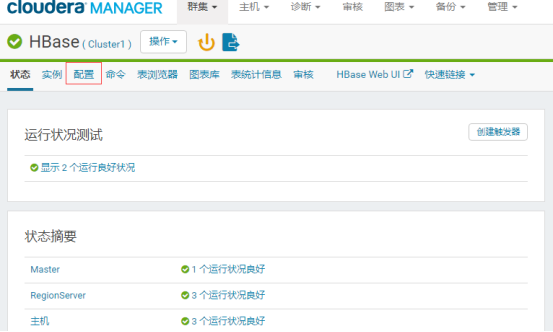
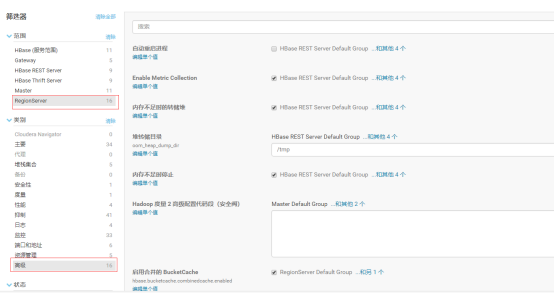
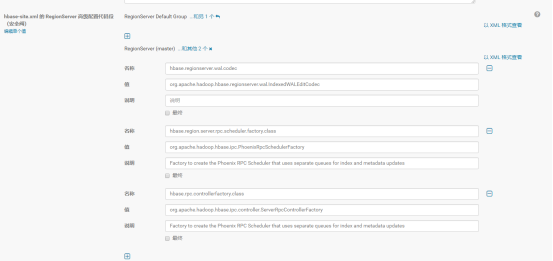
如果是cdh版本的hbase,则在管理界面可直接修改,如下图(phoenxi 4.14的)
3. 修改和zookeeper相关的配置保证启动时通信不超时
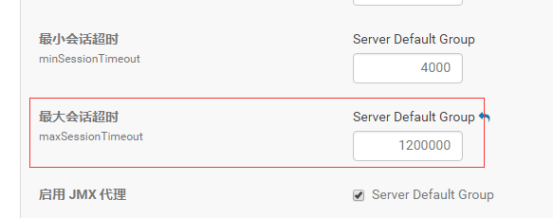
修改zookeeper的配置maxSessionTimeout
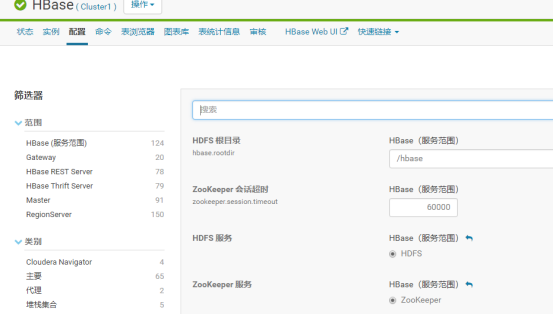
默认是6000,改为1200000,单位是ms。这个值要大于hbase中的值。
修改hbase的配置
QQ:1710816711(欢迎交流,广告勿扰)
cdh版hbase构建Phoenix 遇到的坑的更多相关文章
- CDH版hbase-0.98.1单机安装
HBase 的安装有两种方式:单机安装和分布式安装.HBase的单机安装了解即可,大家重点掌握HBase 分布式集群的安装.下面我们分别进行介绍. HBase 单机安装 HBase 需要运行在 Had ...
- 使用phoenix踩的坑与设计思考
本文主要介绍在压测HBase的二级索引phoenix时踩的一个坑,使用时需要特别注意,而且背后的原因也很有意思,可以看出HBase和Phoenix对元数据设计上的差异. 1.问题介绍 在做phoeni ...
- Maven编译并打包Mahout CDH版源码
目录 1. 问题描述 最近在使用Mahout里的推荐算法进行实验,由于业务需求,需要修改Mahout源码,将原本输出到HDFS上的结果输出到HBase中.由于Mahout发布的源码都是Maven项目, ...
- Unable to connect to HBase using Phoenix JDBC Driver
Feb 01, 2017; 5:21pm Unable to connect to HBase using Phoenix JDBC Driver 9 posts Hi All, I am try ...
- CDH版Phoenix的安装(图文详解)
不多说,直接上干货! 写在前面的话 我这里,四个节点的bigdata集群.分别为cmbigdata1.cmbigdata2.cmbigdata3和cmbigdata4. https://i.cnblo ...
- Hbase与Phoenix整合
目录 一.简介 二.安装 三.Phoenix Shell操作 SCHEMA操作 1.创建schema 2.使用schema 3.删除schema 表操作 1.显示所有表 2.创建表 3.表数据的增删改 ...
- CDH版本Hbase二级索引方案Solr key value index
概述 在Hbase中,表的RowKey 按照字典排序, Region按照RowKey设置split point进行shard,通过这种方式实现的全局.分布式索引. 成为了其成功的最大的砝码. 然而单一 ...
- Hadoop zookeeper hbase spark phoenix (HA)搭建过程
环境介绍: 系统:centos7 软件包: apache-phoenix-4.14.0-HBase-1.4-bin.tar.gz 下载链接:http://mirror.bit.edu.cn/apac ...
- hbase构建二级索引解决方案
关注公众号:大数据技术派,回复"资料",领取1024G资料. 1 为什么需要二级索引 HBase的一级索引就是rowkey,我们仅仅能通过rowkey进行检索.假设我们相对Hbas ...
随机推荐
- Python 的 Mixin 类(转)
转1:https://www.cnblogs.com/aademeng/articles/7262520.html 转2:https://blog.csdn.net/u010377372/articl ...
- mysql存储emoji表情报错的处理方法【更改编码为utf8mb4】
utf-8编码可能2个字节.3个字节.4个字节的字符,但是MySQL的utf8编码只支持3字节的数据,而移动端的表情数据是4个字节的字符.如果直接往采用utf-8编码的数据库中插入表情数据,Java程 ...
- 利用Filter和HttpServletRequestWrapper实现请求体中token校验
先说一下项目的背景,系统传参为json格式,token为其中一个必传参数,此时如果在过滤器中直接读取request,则后续controller中通过RequestBody注解封装请求参数是会报stre ...
- (二十二)JSP基础语法
一.基础语法 1.1 JSP表达式 JSP脚本表达式(expression)用于将程序数据输出到客户端 语法:<%= 变量或表达式 %> 1 <body> 2 5+3=< ...
- redis的下载和安装
下载 http://download.redis.io 这里我们以redis的5.0.5版本和centos7环境为基础介绍 安装 1.将下载的redis-5.0.5.tar.gz文件上传到linux上 ...
- linux安装tmux分屏插件
linuxtmux分屏 一.安装tmux 二.基本使用 三.鼠标操作 一.安装tmux yum install -y tmux TMUX2版本以下 二.基本使用 使用tmux一般使用命令和快捷键来操作 ...
- TCP/IP及http协议 SOAP REST
TCP/IP及http协议: TCP/IP协议主要解决数据如何在网络中传输, 而HTTP是应用层协议,主要解决如何包装数据 SOAP:简单对象访问协议(Simple Object Access Pro ...
- Docker启动Elasticsearch报错vm.max_map_count
报错信息如下 max virtual memory areas vm.max_map_count [65530] is too low, increase to at least [262144] 临 ...
- 分享一张理解数据库inner join,left join,right join,full join的图
- 关于NSOperationQueue,一个容易让初学者误解的问题
凡是学习NSOperationQueue的人,都会遇到setMaxConcurrentOperationCount这个函数.在网上的许多博文中,都将setMaxConcurrentOperationC ...