
HAProxy实现slave负载均衡[高可用]
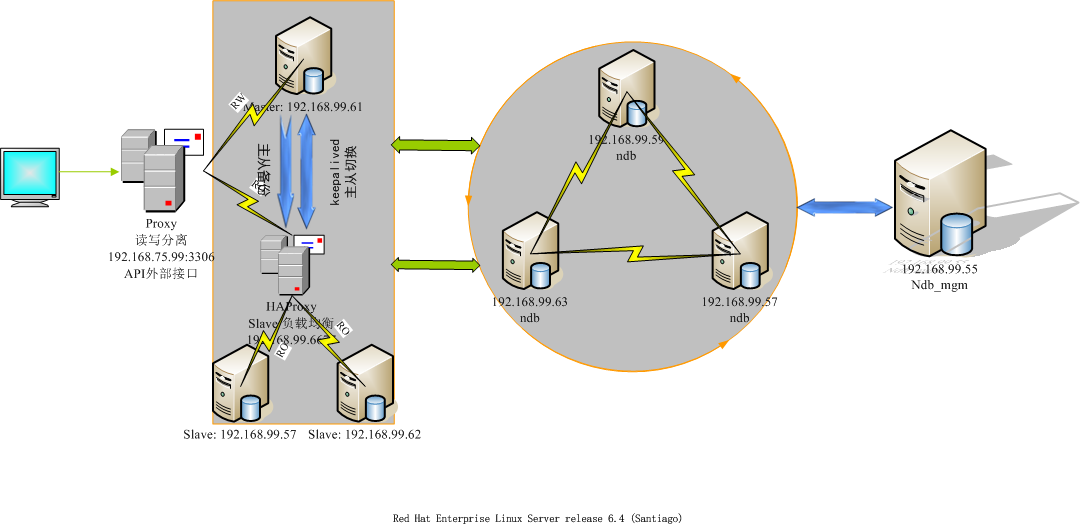
下面要执行的是HAProxy部分
这是一个集群,其他的部分在:
mysql-slave负载均衡[高可用]

1.安装haproxy
tar zxvf haproxy-1.4.13.tar.gz

cd haproxy-1.4.13/

mkdir -p /usr/local/haproxy

make TARGET=linux26 PREFIX=/usr/local/haproxy  ##我的系统内核为2.6,所以target=linux26

make install PREFIX=/usr/local/haproxy
2.配置文件
mkdir /etc/haproxy

touch /etc/haproxy/haproxy.cfg

vim /etc/haproxy/haproxy.cfg
haproxy.cfg
global

    log         127.0.0.1 local2

    chroot      /var/lib/haproxy

    pidfile     /var/run/haproxy.pid

    maxconn     4000

    user        haproxy

    group       haproxy

    daemon

    stats socket /var/lib/haproxy/stats

defaults

    mode                    tcp

    log                     global

    option                  dontlognull

    option                  redispatch

    retries                 3

    timeout http-request    10s

    timeout queue           1m

    timeout connect         10s

    timeout client          1m

    timeout server          1m

    timeout http-keep-alive 10s

    timeout check           10s

    maxconn                 600

listen stats

    mode http

    bind :6677

    stats enable

    stats hide-version

    stats uri     /haproxyadmin?stats

    stats realm   Haproxy\ Statistics

    stats auth    admin:admin

    stats admin if TRUE

frontend  main 192.168.99.55:9090

    default_backend             mysql

backend mysql

    balance     leastconn

    server slave75.57 192.168.99.57:3306 check port 3306 maxconn 300

    server slave75.62 192.168.99.62:3306 check port 3306 maxconn 300
haproxy服务脚本
#!/bin/sh

#

# haproxy

#

# chkconfig:   - 85 15

# description:  HAProxy is a free, very fast and reliable solution \

#               offering high availability, load balancing, and \

#               proxying for TCP and  HTTP-based applications

# processname: haproxy

# config:      /etc/haproxy/haproxy.cfg

# pidfile:     /var/run/haproxy.pid

# Source function library.

. /etc/rc.d/init.d/functions

# Source networking configuration.

. /etc/sysconfig/network

# Check that networking is up.

[ "$NETWORKING" = "no" ] && exit 0

exec="/usr/sbin/haproxy"

prog=$(basename $exec)

[ -e /etc/sysconfig/$prog ] && . /etc/sysconfig/$prog

cfgfile=/etc/haproxy/haproxy.cfg

pidfile=/var/run/haproxy.pid

lockfile=/var/lock/subsys/haproxy

check() {

    $exec -c -V -f $cfgfile $OPTIONS

}

start() {

    $exec -c -q -f $cfgfile $OPTIONS

    if [ $? -ne 0 ]; then

        echo "Errors in configuration file, check with $prog check."

        return 1

    fi

    echo -n $"Starting $prog: "

    # start it up here, usually something like "daemon $exec"

    daemon $exec -D -f $cfgfile -p $pidfile $OPTIONS

    retval=$?

    echo

    [ $retval -eq 0 ] && touch $lockfile

    return $retval

}

stop() {

    echo -n $"Stopping $prog: "

    # stop it here, often "killproc $prog"

    killproc $prog

    retval=$?

    echo

    [ $retval -eq 0 ] && rm -f $lockfile

    return $retval

}

restart() {

    $exec -c -q -f $cfgfile $OPTIONS

    if [ $? -ne 0 ]; then

        echo "Errors in configuration file, check with $prog check."

        return 1

    fi

    stop

    start

}

reload() {

    $exec -c -q -f $cfgfile $OPTIONS

    if [ $? -ne 0 ]; then

        echo "Errors in configuration file, check with $prog check."

        return 1

    fi

    echo -n $"Reloading $prog: "

    $exec -D -f $cfgfile -p $pidfile $OPTIONS -sf $(cat $pidfile)

    retval=$?

    echo

    return $retval

}

force_reload() {

    restart

}

fdr_status() {

    status $prog

}

case "$1" in

    start|stop|restart|reload)

        $1

        ;;

    force-reload)

        force_reload

        ;;

    check)

        check

        ;;

    status)

        fdr_status

        ;;

    condrestart|try-restart)

        [ ! -f $lockfile ] || restart

        ;;

    *)

        echo $"Usage: $0 {start|stop|status|restart|try-restart|reload|force-reload}"

        exit 2

esac
3.启动
service haproxy start

netstat -tlnp | grep haproxy

tcp        0      0 0.0.0.0:6677                0.0.0.0:*                   LISTEN      32360/haproxy

tcp        0      0 192.168.75.55:9090          0.0.0.0:*                   LISTEN      32360/haproxy

ps aux | grep haproxy

haproxy  32360  0.0  0.0  14416  1524 ?        Ss   15:12   0:00 /usr/sbin/haproxy -D -f /etc/haproxy/haproxy.cfg -p /var/run/haproxy.pid

root     32685  0.0  0.0 103244   840 pts/1    S+   15:32   0:00 grep haproxy
4.检测
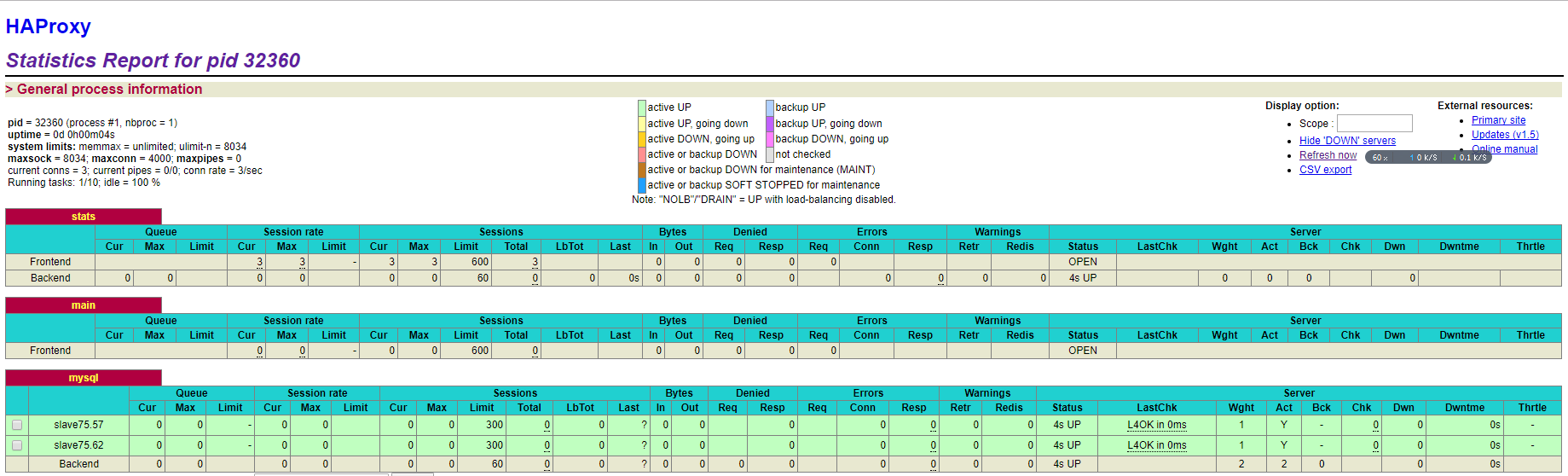
4.1浏览器
浏览器地址栏: http://192.168.99.55:6677/haproxyadmin?stats
上面的这个配置在haproxy.cfg里面
4.2navicat
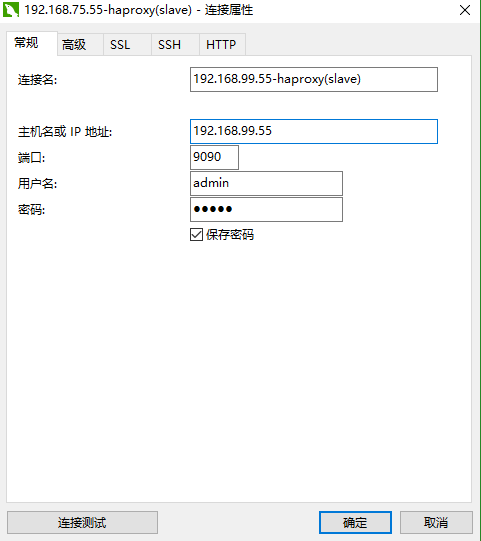 第一次连接连的是62
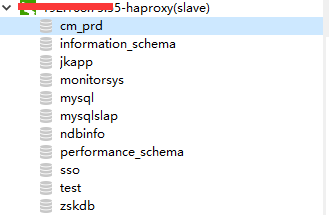 关闭, 重新连接
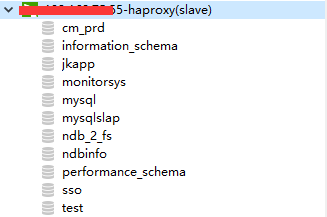 这次连的是57
看数据库不同从而分析, 成功!
完毕!
HAProxy实现slave负载均衡[高可用]的更多相关文章
- linux系统下对网站实施负载均衡+高可用集群需要考虑的几点
随着linux系统的成熟和广泛普及,linux运维技术越来越受到企业的关注和追捧.在一些中小企业,尤其是牵涉到电子商务和电子广告类的网站,通常会要求作负载均衡和高可用的Linux集群方案. 那么如何实 ...
- Linux下"负载均衡+高可用"集群的考虑点 以及 高可用方案说明(Keepalive/Heartbeat)
当下Linux运维技术越来越受到企业的关注和追捧, 在某些企业, 尤其是牵涉到电子商务和电子广告类的网站,通常会要求作负载均衡和高可用的Linux集群方案.那么如何实施Llinux集群架构,才能既有效 ...
- 实现基于Haproxy+Keepalived负载均衡高可用架构
1.项目介绍: 上上期我们实现了keepalived主从高可用集群网站架构,随着公司业务的发展,公司负载均衡服务已经实现四层负载均衡,但业务的复杂程度提升,公司要求把mobile手机站点作为单独的服务 ...
- Nginx+Keepalived负载均衡高可用
Nginx+Keepalived负载均衡高可用方案: Nginx 使用平台:unix.linux.windows. 功能: A.www web服务 http 80 b.负载均衡(方向代理proxy) ...
- LVS+Keepalived-DR模式负载均衡高可用集群
LVS+Keepalived DR模式负载均衡+高可用集群架构图 工作原理: Keepalived采用VRRP热备份协议实现Linux服务器的多机热备功能. VRRP,虚拟路由冗余协议,是针对路由器的 ...
- Lvs+keepAlived实现负载均衡高可用集群(DR实现)
第1章 LVS 简介 1.1 LVS介绍 LVS是Linux Virtual Server的简写,意为Linux虚拟服务器,是虚拟的服务器集群系统,可在UNIX/LINUX平台下实现负载均衡集群功能. ...
- JAVAEE——宜立方商城03:Nginx负载均衡高可用、Keepalived+Nginx实现主备
1 nginx负载均衡高可用 1.1 什么是负载均衡高可用 nginx作为负载均衡器,所有请求都到了nginx,可见nginx处于非常重点的位置,如果nginx服务器宕机后端web服务将无法提供服务, ...
- Nginx负载均衡高可用
1. Nginx负载均衡高可用 首先介绍一下Keepalived,它是一个高性能的服务器高可用或热备解决方案,Keepalived主要来防止服务器单点故障的发生问题,可以通过其与Nginx的配合实 ...
- Keepalived+Nginx实现负载均衡高可用
一.负载均衡高可用 Nginx作为负载均衡器,所有请求都到了Nginx,可见Nginx处于非常重点的位置,如果Nginx服务器宕机后端web服务将无法提供服务,影响严重. 为了避免负载均衡服务器的宕机 ...
随机推荐
- iOS 测试企业应用的分发
开发者能够方便地来做iOS应用的测试分发,目前可以选用“浦公英”和“Fir.im”来做. 生成IPA文件 生成应用的 IPA 文件可以使用命令行 xcodebuild exportArchive -e ...
- 记录一则ORA-600 [13011]错误
环境:Solaris 10 + Oracle 11.2.0.1 现象:alert告警日志定期出现ORA-600 [13011]错误 1.故障现象 2.初步分析 3.匹配MOS 4.定位解决 1.故障现 ...
- vmvare 将主机的文件复制到虚拟机系统中 安装WMware tools
在虚拟机里的ubuntu这里找到VMware tools包
- Nginx使用rewrite重新定向
[Rewrite重定向]Nginx使用rewrite重新定向 使用nginx做重新定向. nginx参考网址:http://blog.sina.com.cn/s/blog_97688f8e0100 ...
- Bootstrap-常用图标glyphicon
<!DOCTYPE html> <html lang="zh-cn"> <head> <meta charset="utf-8& ...
- PHP 中最全的设计模式(23种)
https://my.oschina.net/botkenni/blog/1603660 PHP 中最全的设计模式(23种) 原 botkenni 发布于 01/07 21:22 字数 8726 阅读 ...
- SQL中的replace函数
REPLACE 用第三个表达式替换第一个字符串表达式中出现的所有第二个给定字符串表达式. 语法 REPLACE ( 'string_expression1' , 'string_expression2 ...
- TP父类及模板继承
一.TP父类方法继承 session用法 用登录页面做例子 <?php namespace Home\Controller; use Think\Controller; class LoginC ...
- 删除SQL Server大容量日志的方法(转)
删除SQL Server大容量日志的方法 亲自实践的方法 1.分享数据库,如果提示被其他连接占用,不能分离,刚勾上drop connections 2.复制下所有文件,一定要备份好,以防自己操作失误 ...
- 使用js调用js
直接上源码: <div class="choose"> choose a mode<br> <hr> <button type=" ...