
FileUtils【获取SD卡根目录、读写文件、移动、复制、删除文件、获取文件名、后缀名操作类】
版权声明:本文为HaiyuKing原创文章,转载请注明出处!
前言
封装了获取SD卡根目录路径、以及对文件读写、获取文件名等相关操作。
因为需要用到android.permission.READ_EXTERNAL_STORAGE权限,所以依赖《Android6.0运行时权限(基于RxPermission开源库)》。
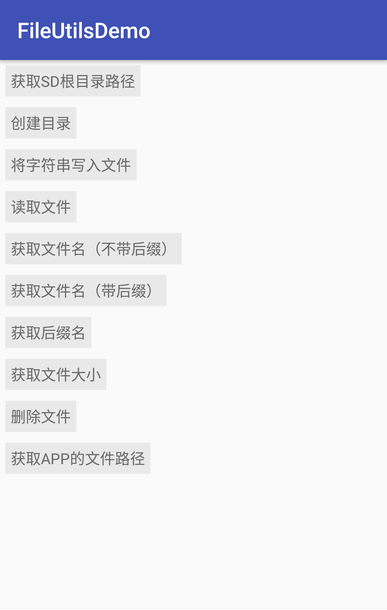
效果图
代码分析
较常用的应该是获取SD卡根目录路径、获取文件名、创建目录操作。
使用步骤
一、项目组织结构图
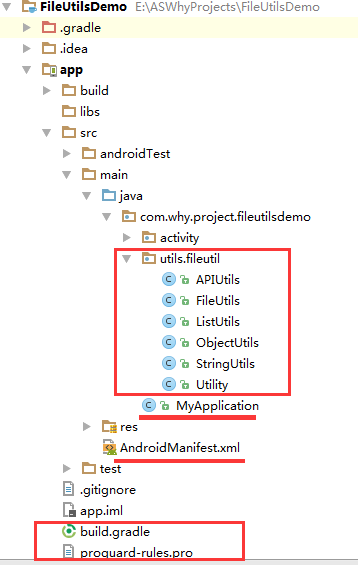
注意事项:
1、 导入类文件后需要change包名以及重新import R文件路径
2、 Values目录下的文件(strings.xml、dimens.xml、colors.xml等),如果项目中存在,则复制里面的内容,不要整个覆盖
二、导入步骤
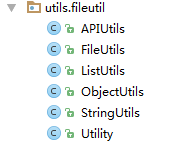
将fileutil包复制到项目中
创建一个包含以下代码的MyApplication.java(自定义的Application子类)
package com.why.project.fileutilsdemo;

import android.app.Application;

import android.content.Context;

/**

 * Created by HaiyuKing

 * Used 自定义Application【系统上下文】

 */

public class MyApplication extends Application {

    /**系统上下文*/

    private static Context mAppContext;

    @Override

    public void onCreate() {

        super.onCreate();

        mAppContext = getApplicationContext();

    }

    /**获取系统上下文:用于FileUtils工具类、Utility类*/

    public static Context getAppContext()

    {

        return mAppContext;

    }

}
在AndroidManifest.xml中声明这个MyApplication并添加权限
<?xml version="1.0" encoding="utf-8"?>

<manifest xmlns:android="http://schemas.android.com/apk/res/android"

          package="com.why.project.fileutilsdemo">

    <!-- ======================(FileUtil)========================== -->

    <!-- 向SD卡写入数据权限 -->

    <uses-permission android:name="android.permission.READ_EXTERNAL_STORAGE"/>

    <uses-permission android:name="android.permission.WRITE_EXTERNAL_STORAGE"/>

    <application

        android:allowBackup="true"

        android:icon="@mipmap/ic_launcher"

        android:label="@string/app_name"

        android:supportsRtl="true"

        android:theme="@style/AppTheme"

        android:name=".MyApplication">

        <activity android:name=".activity.MainActivity">

            <intent-filter>

                <action android:name="android.intent.action.MAIN"/>

                <category android:name="android.intent.category.LAUNCHER"/>

            </intent-filter>

        </activity>

    </application>

</manifest>
添加运行时权限的处理(本demo中采用的是修改targetSDKVersion=22)
在build.gradle中导入第三方库:org.apache.httpcomponents:httpcore:4.4.4
apply plugin: 'com.android.application'

android {

    compileSdkVersion 25

    buildToolsVersion "25.0.3"

    defaultConfig {

        applicationId "com.why.project.fileutilsdemo"

        minSdkVersion 15

        targetSdkVersion 22

        versionCode 1

        versionName "1.0"

        testInstrumentationRunner "android.support.test.runner.AndroidJUnitRunner"

    }

    buildTypes {

        release {

            minifyEnabled true

            proguardFiles getDefaultProguardFile('proguard-android.txt'), 'proguard-rules.pro'

        }

    }

}

dependencies {

    //FileUtils

    compile 'org.apache.httpcomponents:httpcore:4.4.4'

    compile fileTree(dir: 'libs', include: ['*.jar'])

    androidTestCompile('com.android.support.test.espresso:espresso-core:2.2.2', {

        exclude group: 'com.android.support', module: 'support-annotations'

    })

    compile 'com.android.support:appcompat-v7:25.3.1'

    testCompile 'junit:junit:4.12'

}
对于Eclipse开发环境,在libs目录下导入httpcore-4.4.4.jar包即可。
链接:http://pan.baidu.com/s/1pKUzNiN 密码:xa8c
三、使用方法
private void initEvents() {

        //获取SD卡路径

        tv_getSdPath.setOnClickListener(new View.OnClickListener() {

            @Override

            public void onClick(View v) {

                String sdPath = FileUtils.getSDPath();

                Log.w(TAG,"sdPath="+sdPath);

            }

        });

        //创建目录

        tv_makeFolders.setOnClickListener(new View.OnClickListener() {

            @Override

            public void onClick(View v) {

                String fileForderPath = FileUtils.getSDPath() + File.separator + "fileUtilDir" + File.separator;

                Log.w(TAG,"fileForderPath="+fileForderPath);

                boolean makeFolderState = FileUtils.makeFolders(fileForderPath);

                Log.w(TAG,"makeFolderState="+makeFolderState);

            }

        });

        //将字符串写入文件

        tv_writeFile.setOnClickListener(new View.OnClickListener() {

            @Override

            public void onClick(View v) {

                String filePath = FileUtils.getSDPath() + File.separator + "fileUtilDir" + File.separator + "file.txt";

                Log.w(TAG,"filePath="+filePath);

                String content = "将字符串内容添加到文本文件中";

                boolean writeFileState = FileUtils.writeFile(filePath,content);

                Log.w(TAG,"writeFileState="+writeFileState);

            }

        });

        //读取文件

        tv_readFile.setOnClickListener(new View.OnClickListener() {

            @Override

            public void onClick(View v) {

                String filePath = FileUtils.getSDPath() + File.separator + "fileUtilDir" + File.separator + "file.txt";

                Log.w(TAG,"filePath="+filePath);

                String readContent = FileUtils.readFile(filePath);

                Log.w(TAG,"readContent="+readContent);

            }

        });

        //获取文件名(不带后缀)

        tv_getFileNameWithoutExtension.setOnClickListener(new View.OnClickListener() {

            @Override

            public void onClick(View v) {

                String filePath = FileUtils.getSDPath() + File.separator + "fileUtilDir" + File.separator + "file.txt";

                Log.w(TAG,"filePath="+filePath);

                String fileNameWithoutExtension = FileUtils.getFileNameWithoutExtension(filePath);

                Log.w(TAG,"fileNameWithoutExtension="+fileNameWithoutExtension);

            }

        });

        //获取文件名(带后缀)

        tv_getFileName.setOnClickListener(new View.OnClickListener() {

            @Override

            public void onClick(View v) {

                String filePath = FileUtils.getSDPath() + File.separator + "fileUtilDir" + File.separator + "file.txt";

                Log.w(TAG,"filePath="+filePath);

                String fileName = FileUtils.getFileName(filePath);

                Log.w(TAG,"fileName="+fileName);

            }

        });

        //获取后缀名

        tv_getFileExtension.setOnClickListener(new View.OnClickListener() {

            @Override

            public void onClick(View v) {

                String filePath = FileUtils.getSDPath() + File.separator + "fileUtilDir" + File.separator + "file.txt";

                Log.w(TAG,"filePath="+filePath);

                String fileExtension = FileUtils.getFileExtension(filePath);

                Log.w(TAG,"fileExtension="+fileExtension);

            }

        });

        //获取文件大小

        tv_getFileSize.setOnClickListener(new View.OnClickListener() {

            @Override

            public void onClick(View v) {

                String filePath = FileUtils.getSDPath() + File.separator + "fileUtilDir" + File.separator + "file.txt";

                Log.w(TAG,"filePath="+filePath);

                long fileSize = FileUtils.getFileSize(filePath);

                Log.w(TAG,"fileSize="+fileSize);

            }

        });

        //删除文件

        tv_deleteFileRecursion.setOnClickListener(new View.OnClickListener() {

            @Override

            public void onClick(View v) {

                String filePath = FileUtils.getSDPath() + File.separator + "fileUtilDir" + File.separator + "file.txt";

                Log.w(TAG,"filePath="+filePath);

                FileUtils.deleteFileRecursion(filePath);

            }

        });

        //获取APP的文件路径

        tv_getAppFilePath.setOnClickListener(new View.OnClickListener() {

            @Override

            public void onClick(View v) {

                String appFilePath = FileUtils.getAppFilePath();

                Log.w(TAG,"appFilePath="+appFilePath);

            }

        });

    }

混淆配置
#=====================httpcore=====================

#android Studio环境中不需要,eclipse环境中需要

#-libraryjars libs/httpcore-4.4.4.jar

-dontwarn org.apache.http.**

-keep class org.apache.http.**{*;}
参考资料
项目demo下载地址
https://github.com/haiyuKing/FileUtilsDemo
FileUtils【获取SD卡根目录、读写文件、移动、复制、删除文件、获取文件名、后缀名操作类】的更多相关文章
- android 获取sd卡根目录
dir:/storage/emulated/0 也就是 sdcard目录 ====== android 获取sd卡根目录 public String getSDPath(){ File ...
- 【译】如何在 Android 5.0 上获取 SD卡 的读写权限
因为最近项目需要,涉及到 SD卡 的读写操作,然而申请 <!-- 读写权限 --> <uses-permission android:name="android.permi ...
- Android:创建文件或文件夹以及获取sd卡根目录
目录结构: 功能,可以根据录入的目录或者文件夹生成相应的文件或者文件夹 首先需要添加一个权限: <uses-permission android:name="android.permi ...
- Android获取SD卡路径/内存的几种方法
Android获取SD卡路径 本篇将会带领大家学习如何获取android路径的几种常见用法,但在我开始bb之前需要大家清楚android中内存和外存之间的区别,下面进行简短介绍:android中的内存 ...
- 与众不同 windows phone (37) - 8.0 文件系统: StorageFolder, StorageFile, 通过 Uri 引用文件, 获取 SD 卡中的文件
[源码下载] 与众不同 windows phone (37) - 8.0 文件系统: StorageFolder, StorageFile, 通过 Uri 引用文件, 获取 SD 卡中的文件 作者:w ...
- 无废话Android之android下junit测试框架配置、保存文件到手机内存、android下文件访问的权限、保存文件到SD卡、获取SD卡大小、使用SharedPreferences进行数据存储、使用Pull解析器操作XML文件、android下操作sqlite数据库和事务(2)
1.android下junit测试框架配置 单元测试需要在手机中进行安装测试 (1).在清单文件中manifest节点下配置如下节点 <instrumentation android:name= ...
- MVP+RXJAVA+RecyclerView实现sd卡根目录下的所有文件中的照片加载并显示
初学Rxjava,目前只能遍历加载指定目录下的所有文件夹中的照片,文件夹中如果还嵌套有文件夹目前还没找到实现方法. 先看mvp目录结构: 很抱歉,没有model. 接下来是view层的接口代码和pre ...
- Android 读取手机SD卡根目录下某个txt文件的文件内容
1.先看activity_main.xml文件: <LinearLayout xmlns:android="http://schemas.android.com/apk/res/and ...
- 获取SD卡中的音乐文件
小编近期在搞一个音乐播放器App.练练手: 首先遇到一个问题.怎么获取本地的音乐文件? /** * 获取SD卡中的音乐文件 * * @param context * @return */ public ...
随机推荐
- 树莓派.设置无线网卡为AP工作模式(pi2和pi3)
树莓派2的设置办法: 1. 安装NetworkManager管理工具(可选),以支持nmcli命令 sudo apt-get install -y network-manager 2. 安装hosta ...
- golang 并发模式笔记
1.并发并不是并行,前者是优先对时间片的抢占,后者是真多核. go中多线程时直接要求并行的方法是: 亦不可滥用,CPU密集型,并发度很高的场景适用. 2.go起的协程 3. function that ...
- BZOJ_2764_[JLOI2011]基因补全_DP_高精度
BZOJ_2764_[JLOI2011]基因补全_DP_高精度 Description 在生物课中我们学过,碱基组成了DNA(脱氧核糖核酸),他们分别可以用大写字母A,C,T,G表示,其中A总与T配对 ...
- python 安装cv2
问题描述:import cv2 报错提示未安装此包. 解决措施: 1.cmd框中输入pip install cv2,若安装成功,则恭喜你一次性成功,如提示"无法找到与你当前版本的匹配&quo ...
- Python核心编程
对<Python核心编程>的褒奖" The long-awaited second edition of Wesley Chun's Core PythonProgramming ...
- html select 标签设置默认选中
方法有两种. 第一种通过<select>的属性来设置选中项,此方法可以在动态语言如php在后台根据需要控制输出结果. 1 2 3 4 5 < select id = " ...
- 带logo图片或不带logo图片的二维码生成与解析,亲测成功
最近公司需要实现二维码功能,本人经过一顿百度,终于实现了,因有3个功能:不带logo图片.带logo图片.解析二维码,篇幅较长,请耐心读之,直接复制粘贴即可. 前提:myeclipse10:jar包: ...
- 用keras实现人脸关键点检测(2)
上一个代码只能实现小数据的读取与训练,在大数据训练的情况下.会造内存紧张,于是我根据keras的官方文档,对上一个代码进行了改进. 用keras实现人脸关键点检测 数据集:https://pan.ba ...
- ES 18 - (底层原理) Elasticsearch写入索引数据的过程 以及优化写入过程
目录 1 Lucene操作document的流程 1.1 添加document的流程 1.2 删除document的流程 2 优化写入流程 - 实现近实时搜索 2.1 流程的改进思路 2.2 设置re ...
- .NET(C#、VB)APP开发——Smobiler平台控件介绍:SliderView控件
SliderView控件 一. 样式一 我们要实现上图中的效果,需要如下的操作: 从工具栏上的“Smobiler Components”拖动一个SliderView控件到窗体界面上 ...