
《DSP using MATLAB》Problem 8.25


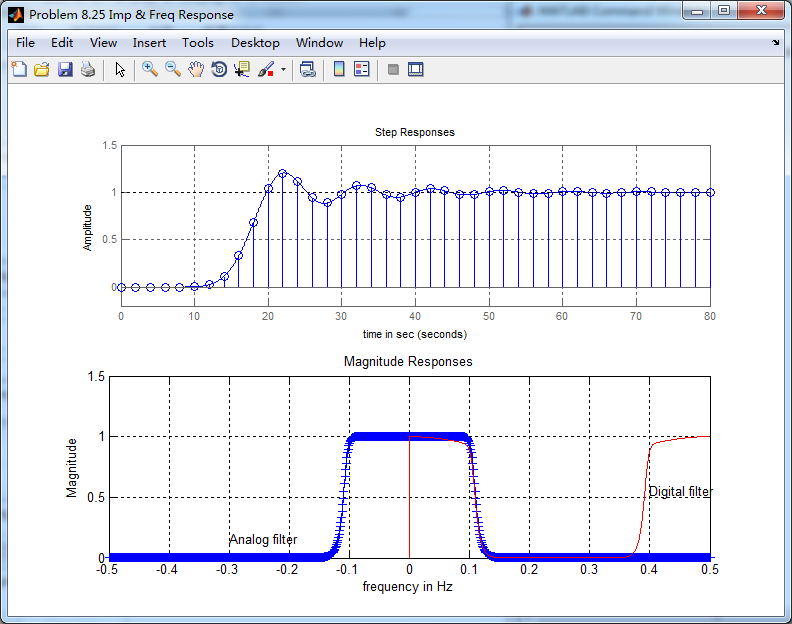
用match-z方法,将模拟低通转换为数字低通
代码:
%% ------------------------------------------------------------------------

%%            Output Info about this m-file

fprintf('\n***********************************************************\n');

fprintf('        <DSP using MATLAB> Problem 8.25 \n\n');

banner();

%% ------------------------------------------------------------------------

% -------------------------------

%       ω = ΩT = 2πF/fs

% Digital Filter Specifications:

% -------------------------------

wp = 0.4*pi;                     % digital passband freq in rad/sec

ws = 0.6*pi;                     % digital stopband freq in rad/sec

Rp = 0.5;                        % passband ripple in dB

As = 50;                         % stopband attenuation in dB

Ripple = 10 ^ (-Rp/20)           % passband ripple in absolute

Attn = 10 ^ (-As/20)             % stopband attenuation in absolute

% Analog prototype specifications: Inverse Mapping for frequencies

T = 2;                       % set T = 1

Fs = 1/T;

OmegaP = wp/T;               % prototype passband freq

OmegaS = ws/T;               % prototype stopband freq

% Analog Butterworth Prototype Filter Calculation:

[cs, ds] = afd_butt(OmegaP, OmegaS, Rp, As);

% Calculation of second-order sections:

fprintf('\n***** Cascade-form in s-plane: START *****\n');

[CS, BS, AS] = sdir2cas(cs, ds)

fprintf('\n***** Cascade-form in s-plane: END *****\n');

% Calculation of Frequency Response:

[db_s, mag_s, pha_s, ww_s] = freqs_m(cs, ds, 0.5*pi);

% Calculation of Impulse Response:

%[ha, x, t] = impulse(cs, ds);

% Impulse Invariance Transformation:

%[b, a] = imp_invr(cs, ds, T);

% Calculation of Step Response:

[ha, x, t] = step(cs, ds);

% Step Invariance Transformation:

[b, a] = stp_invr(cs, ds, T); [C, B, A] = dir2par(b, a)

% Calculation of Frequency Response:

[db, mag, pha, grd, ww] = freqz_m(b, a);

%% -----------------------------------------------------------------

%%                             Plot

%% -----------------------------------------------------------------

figure('NumberTitle', 'off', 'Name', 'Problem 8.25 Analog Butterworth lowpass')

set(gcf,'Color','white');

M = 1;                          % Omega max

subplot(2,2,1); plot(ww_s, mag_s);  grid on; axis([-M, M, 0, 1.2]);

xlabel(' Analog frequency in \pi units'); ylabel('|H|'); title('Magnitude in Absolute');

set(gca, 'XTickMode', 'manual', 'XTick', [-0.3, -0.2, 0, 0.2, 0.3, 0.4, 0.6]);

set(gca, 'YTickMode', 'manual', 'YTick', [0, 0.0032, 0.5, 0.9441, 1]);

subplot(2,2,2); plot(ww_s, db_s);  grid on; %axis([0, M, -50, 10]);

xlabel('Analog frequency in \pi units'); ylabel('Decibels'); title('Magnitude in dB ');

set(gca, 'XTickMode', 'manual', 'XTick', [-0.3, -0.2, 0, 0.4, 0.6]);

set(gca, 'YTickMode', 'manual', 'YTick', [-65, -50, -1, 0]);

set(gca,'YTickLabelMode','manual','YTickLabel',['65';'50';' 1';' 0']);

subplot(2,2,3); plot(ww_s, pha_s/pi);  grid on; axis([-M, M, -1.2, 1.2]);

xlabel('Analog frequency in \pi nuits'); ylabel('radians'); title('Phase Response');

set(gca, 'XTickMode', 'manual', 'XTick', [-0.3, -0.2, 0, 0.4, 0.6]);

set(gca, 'YTickMode', 'manual', 'YTick', [-1:0.5:1]);

subplot(2,2,4); plot(t, ha); grid on; %axis([0, 30, -0.05, 0.25]);

xlabel('time in seconds'); ylabel('ha(t)'); title('Step Response');

figure('NumberTitle', 'off', 'Name', 'Problem 8.25 Digital Butterworth lowpass')

set(gcf,'Color','white');

M = 2;                          % Omega max

subplot(2,2,1); plot(ww/pi, mag); axis([0, M, 0, 1.2]); grid on;

xlabel(' frequency in \pi units'); ylabel('|H|'); title('Magnitude Response');

set(gca, 'XTickMode', 'manual', 'XTick', [0, 0.4, 0.6, 1.0, M]);

set(gca, 'YTickMode', 'manual', 'YTick', [0, 0.0032, 0.5, 0.9441, 1]);

subplot(2,2,2); plot(ww/pi, pha/pi); axis([0, M, -1.1, 1.1]); grid on;

xlabel('frequency in \pi nuits'); ylabel('radians in \pi units'); title('Phase Response');

set(gca, 'XTickMode', 'manual', 'XTick', [0, 0.4, 0.6, 1.0, M]);

set(gca, 'YTickMode', 'manual', 'YTick', [-1:1:1]);

subplot(2,2,3); plot(ww/pi, db); axis([0, M, -100, 10]); grid on;

xlabel('frequency in \pi units'); ylabel('Decibels'); title('Magnitude in dB ');

set(gca, 'XTickMode', 'manual', 'XTick', [0, 0.4, 0.6, 1.0, M]);

set(gca, 'YTickMode', 'manual', 'YTick', [-70, -50, -1, 0]);

set(gca,'YTickLabelMode','manual','YTickLabel',['70';'50';' 1';' 0']);

subplot(2,2,4); plot(ww/pi, grd); grid on; %axis([0, M, 0, 35]);

xlabel('frequency in \pi units'); ylabel('Samples'); title('Group Delay');

set(gca, 'XTickMode', 'manual', 'XTick', [0, 0.4, 0.6, 1.0, M]);

%set(gca, 'YTickMode', 'manual', 'YTick', [0:5:35]);

figure('NumberTitle', 'off', 'Name', 'Problem 8.25 Pole-Zero Plot')

set(gcf,'Color','white');

zplane(b,a);

title(sprintf('Pole-Zero Plot'));

%pzplotz(b,a);

% ----------------------------------------------

%       Calculation of Impulse Response

% ----------------------------------------------

figure('NumberTitle', 'off', 'Name', 'Problem 8.25 Imp & Freq Response')

set(gcf,'Color','white');

t = [0:0.01:80]; subplot(2,1,1); step(cs,ds,t); grid on;      % Step response of the analog filter

axis([0,80,-0.2,1.5]);hold on

n = [0:1:80/T]; hn = filter(b,a,stepseq(0,0,80/T));           % Step response of the digital filter

stem(n*T,hn); xlabel('time in sec'); title ('Step Responses');

hold off

% Calculation of Frequency Response:

[dbs, mags, phas, wws] = freqs_m(cs, ds, 2*pi/T);             % Analog frequency   s-domain

[dbz, magz, phaz, grdz, wwz] = freqz_m(b, a);                 % Digital  z-domain

%% -----------------------------------------------------------------

%%                             Plot

%% -----------------------------------------------------------------

subplot(2,1,2); plot(wws/(2*pi),mags,'b+', wwz/(2*pi)*Fs,magz,'r'); grid on;

xlabel('frequency in Hz'); title('Magnitude Responses'); ylabel('Magnitude');

text(-0.3,0.15,'Analog filter'); text(0.4,0.55,'Digital filter');
运行结果:
通带、阻带绝对指标

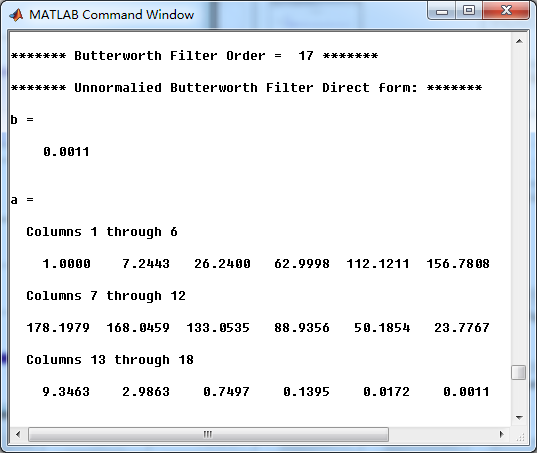
模拟原型Butterworth低通滤波器,直接形式系数
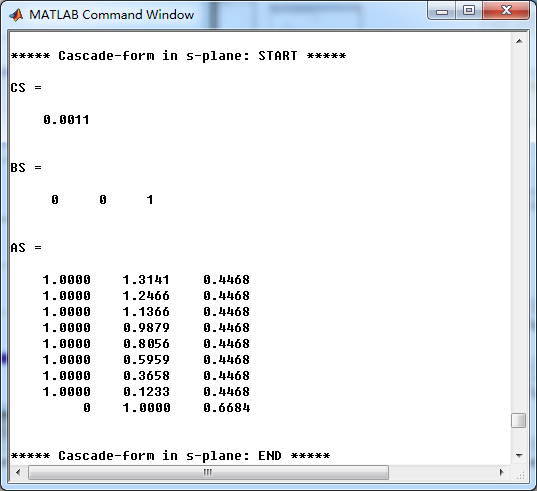
模拟原型Butterworth低通滤波器,串联形式系数
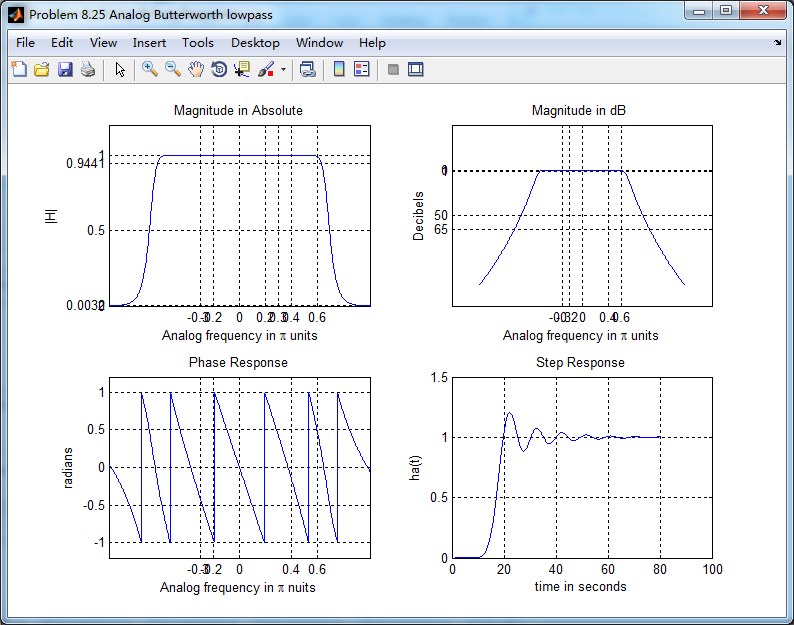
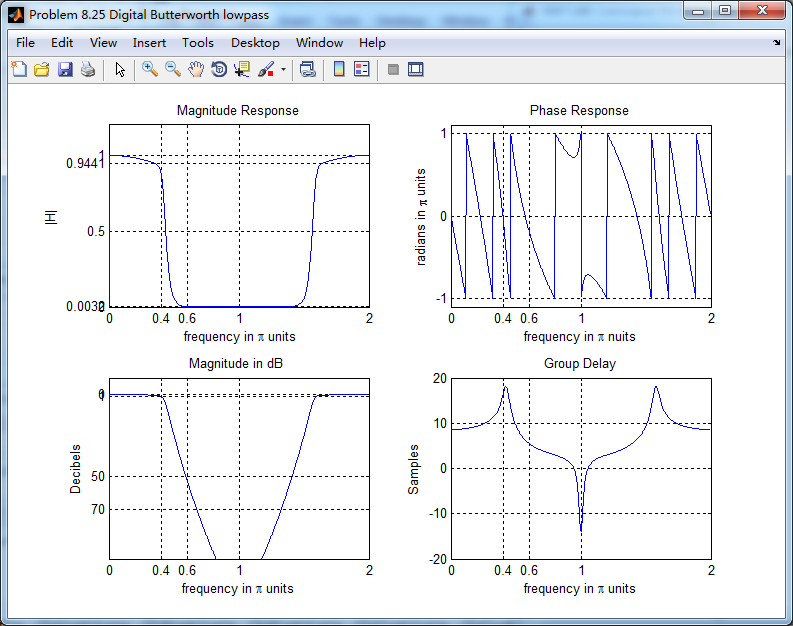
转换成数字低通后,并联形式系数

《DSP using MATLAB》Problem 8.25的更多相关文章
- 《DSP using MATLAB》Problem 7.25
代码: %% ++++++++++++++++++++++++++++++++++++++++++++++++++++++++++++++++++++++++++++++++ %% Output In ...
- 《DSP using MATLAB》示例Example7.25
今天清明放假的第二天,早晨出去吃饭时天气有些阴,十点多开始“清明时节雨纷纷”了. 母亲远在他乡看孙子,挺劳累的.父亲照顾生病的爷爷…… 我打算今天把<DSP using MATLAB>第7 ...
- 《DSP using MATLAB》Problem 7.27
代码: %% ++++++++++++++++++++++++++++++++++++++++++++++++++++++++++++++++++++++++++++++++ %% Output In ...
- 《DSP using MATLAB》Problem 7.14
代码: %% ++++++++++++++++++++++++++++++++++++++++++++++++++++++++++++++++++++++++++++++++ %% Output In ...
- 《DSP using MATLAB》Problem 7.13
代码: %% ++++++++++++++++++++++++++++++++++++++++++++++++++++++++++++++++++++++++++++++++ %% Output In ...
- 《DSP using MATLAB》Problem 6.23
代码: %% ++++++++++++++++++++++++++++++++++++++++++++++++++++++++++++++++++++++++++++++++ %% Output In ...
- 《DSP using MATLAB》Problem 5.24-5.25-5.26
代码: function y = circonvt(x1,x2,N) %% N-point Circular convolution between x1 and x2: (time domain) ...
- 《DSP using MATLAB》Problem 4.21
快到龙抬头,居然下雪了,天空飘起了雪花,温度下降了近20°. 代码: %% -------------------------------------------------------------- ...
- 《DSP using MATLAB》Problem 4.15
只会做前两个, 代码: %% ---------------------------------------------------------------------------- %% Outpu ...
随机推荐
- 2008年最佳Web设计/前端开发技巧、脚本及资源总结
工具&Web应用 13个可能会让你说”Thank You”的必不可少的开源应用 14个免费工具让你了解为什么人们会放弃访问你的网站 40+CSS生成器 74个我们可能已经忘记的适合网页设计师的 ...
- sql(2) DISTINCT
SELECT DISTNCT 列名称 FROM 表名称SQL SELECT DISTINCT 语句在表中,可能会包含重复值. 关键词 DISTINCT 用于返回唯一不同的值. 语法:新建数据库 tes ...
- PHP 添加 跨域头
我将下面的代码,放在Codeigniter 项目中的index.php 中的 header('Access-Control-Allow-Origin: *'); header('Access-Cont ...
- SUBTRACT
SUBTRACT 给出一个长度为n序列\(\{a_i\}\),定义一个操作,记做\(con(a,i)\),意思是用\(a_i-a_{i+1}\)替代\(a_i,a_{i+1}\),显然最后一个数字不能 ...
- jq给页面添加覆盖层遮罩的实例
先引入jq代码,然后代码如下: $(function(){ var docHeight = $(document).height(); //获取窗口高度 $('body').append('<d ...
- keepalived中vrrp_script,track_script,notify的使用方法
keepalived中vrrp_script,track_script,notify的使用方法转自:https://blog.51cto.com/liuzhengwei521/1929589 可以在k ...
- Arthas 3.1.2 版本发布 | 增加 logger/heapdump/vmoption 命令
最近偶尔有用户反馈某些 HTTP 接口出现超时问题,而 web 服务端的 Trace 监控没有出现 http 返回值为 503 等异常情况.出现这种情况一般是web容器出现问题,客户端连 Arthas ...
- oxyplot 禁止拖动,缩放
<oxy:Plot> IsZoomEnabled= IsPanEnabled=/> IsZoomEnabled= IsPanEnabled=/> 关键代码: IsZoomE ...
- (4)mysql约束
完整性约束 1.设置非空约束 not null 简称 NK约束 创建表时设置非空 CREATE TABLE tb_meng2(id INT NOT NULL,age INT); 2.设置字段默认值 默 ...
- pinmap 和 pin allocation
串口管脚分配