
pandas包学习笔记
pandas
是基于numpy和matplotlib的
import pandas as pd
# Print the values of homelessness

print(homelessness.values)

# Print the column index of homelessness

print(homelessness.columns)

# Print the row index of homelessness

print(homelessness.index)
- .values:查看每列的值
- .columns:查看所有列名
- .index:查看索引
zip
zip() 函数用于将可迭代对象作为参数,将对象中对应的元素打包成一个个元组,然后返回由这些元组组成的对象。
如果各个可迭代对象的元素个数不一致,则返回的对象长度与最短的可迭代对象相同。简书
利用 * 号操作符,与zip相反,进行解压。
# Zip the 2 lists together into one list of (key,value) tuples: zipped

zipped = list(zip(list_keys,list_values))

# Inspect the list using print()

print(zipped)

# Build a dictionary with the zipped list: data

data = dict(zipped)

# Build and inspect a DataFrame from the dictionary: df

df = pd.DataFrame(data)

print(df)
read_csv
# Read in the file: df1

df1 = pd.read_csv(data_file)

# Create a list of the new column labels: new_labels

new_labels = ['year', 'population']

# Read in the file, specifying the header and names parameters: df2

df2 = pd.read_csv(data_file, header=0, names=new_labels)

# Print both the DataFrames

print(df1)

print(df2)
与r相比,读入数据的时候不用加引号
# Read the raw file as-is: df1

df1 = pd.read_csv(file_messy)

# Print the output of df1.head()

print(df1.head())

# Read in the file with the correct parameters: df2

df2 = pd.read_csv(file_messy, delimiter=' ', header=3, comment='#')

# Print the output of df2.head()

print(df2.head())

# Save the cleaned up DataFrame to a CSV file without the index

df2.to_csv(file_clean, index=False)

# Save the cleaned up DataFrame to an excel file without the index

df2.to_excel('file_clean.xlsx', index=False)

<script.py> output:

                                                       The following stock data was collect on 2016-AUG-25 from an unknown source

    These kind of comments are not very useful                                                  are they?

    Probably should just throw this line away too          but not the next since those are column labels

    name Jan Feb Mar Apr May Jun Jul Aug Sep Oct No...                                                NaN

    # So that line you just read has all the column...                                                NaN

    IBM 156.08 160.01 159.81 165.22 172.25 167.15 1...                                                NaN

         name     Jan     Feb     Mar     Apr  ...     Aug     Sep     Oct     Nov     Dec

    0     IBM  156.08  160.01  159.81  165.22  ...  152.77  145.36  146.11  137.21  137.96

    1    MSFT   45.51   43.08   42.13   43.47  ...   45.51   43.56   48.70   53.88   55.40

    2  GOOGLE  512.42  537.99  559.72  540.50  ...  636.84  617.93  663.59  735.39  755.35

    3   APPLE  110.64  125.43  125.97  127.29  ...  113.39  112.80  113.36  118.16  111.73

    [4 rows x 13 columns]
Plotting with pandas
是基于matplotlib的
熊猫绘图,哈哈哈
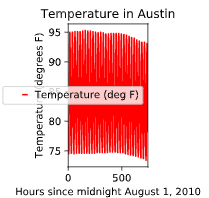
# Create a plot with color='red'设置线条颜色

df.plot(color='red')

# Add a title自定义标题

plt.title('Temperature in Austin')

# Specify the x-axis label 自定义x轴标题

plt.xlabel('Hours since midnight August 1, 2010')

# Specify the y-axis label 自定义y轴标题

plt.ylabel('Temperature (degrees F)')

# Display the plot

plt.show()
不知道可否这样理解,于Python来讲,就是在调用方法??
 Plot all columns (default)

df.plot()

plt.show()

# Plot all columns as subplots

df.plot(subplots=True)

plt.show()

# Plot just the Dew Point data

column_list1 = ['Dew Point (deg F)']

df[column_list1].plot()

plt.show()

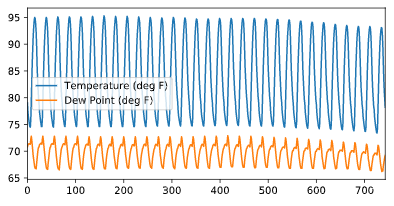
# Plot the Dew Point and Temperature data, but not the Pressure data

column_list2 = ['Temperature (deg F)','Dew Point (deg F)']

df[column_list2].plot()

plt.show()
Visual exploratory data analysis
折线图
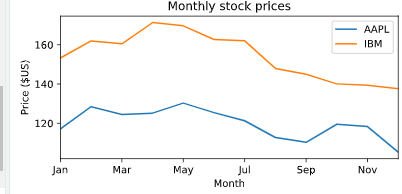
# Create a list of y-axis column names: y_columns

y_columns = ['AAPL', 'IBM']

# Generate a line plot

df.plot(x='Month', y=y_columns)

# Add the title

plt.title('Monthly stock prices')

# Add the y-axis label

plt.ylabel('Price ($US)')

# Display the plot

plt.show()
散点图
# Generate a scatter plot

df.plot(kind='scatter', x='hp', y='mpg',s=sizes)

# Add the title

plt.title('Fuel efficiency vs Horse-power')

# Add the x-axis label

plt.xlabel('Horse-power')

# Add the y-axis label

plt.ylabel('Fuel efficiency (mpg)')

# Display the plot

plt.show()
目前可以看出来学习R 包的套路和python包的套路是一致的
# Make a list of the column names to be plotted: cols

cols = ['weight' , 'mpg']

# Generate the box plots

df[cols].plot(kind='box',subplots=True)

# Display the plot

plt.show()

有包的可以掉包,不过应该是主要集中于一些基本的包,希望还是可以自己写一些包,或者函数。这样可以实现自己想实现的功能。
panadas hist pdf cdf

Statistical exploratory data analysis
# Print the number of countries reported in 2015

print(df['2015'].count())

# Print the 5th and 95th percentiles

print(df.quantile([0.05,0.95]))

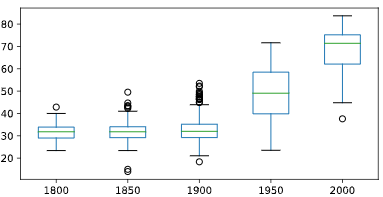
# Generate a box plot

years = ['1800','1850','1900','1950','2000']

df[years].plot(kind='box')

plt.show()
其实有时候觉得,写这么多的代码应该是无用的,记一些常见的封装好的函数以后也会忘记的,真正的是解决问题的思路是要整明白的
慢慢来吧,代码量应该是不够的
descripe
这个函数就是R里面的summary函数,描述统计信息
Separating populations
常记的几个函数
- describe
- head
- loc
- iloc
index series
# Prepare a format string: time_format

time_format = '%Y-%m-%d %H:%M'

# Convert date_list into a datetime object: my_datetimes

my_datetimes = pd.to_datetime(date_list, format=time_format)

# Construct a pandas Series using temperature_list and my_datetimes: time_series

time_series = pd.Series(temperature_list, index=my_datetimes)
resample()
重新确定frequency的函数,可以结合基础函数如:agg,groupby,mean等,进行时间序列批量处理
可以进行某一时间段的统计
# Downsample to 6 hour data and aggregate by mean: df1

df1 = df.loc[:,'Temperature'].resample('6h').mean()

# Downsample to daily data and count the number of data points: df2

df2 = df.loc[:,'Temperature'].resample('D').count()

date

2010-01-01 00:00:00    44.200000

2010-01-01 06:00:00    45.933333

2010-01-01 12:00:00    57.766667

2010-01-01 18:00:00    49.450000

2010-01-02 00:00:00    44.516667

Freq: 6H, Name: Temperature, dtype: float64

Date

2010-01-01    24

2010-01-02    24

2010-01-03    24

2010-01-04    24

2010-01-05    24

Freq: D, Name: Temperature, dtype: int64
比如这个demo
# Extract temperature data for August: august

august = df['Temperature']['2010-August']

# Downsample to obtain only the daily highest temperatures in August: august_highs

august_highs = august.resample('D').max()

# Extract temperature data for February: february

february = df['Temperature']['2010-Feb']

# Downsample to obtain the daily lowest temperatures in February: february_lows

february_lows = february.resample('D').min()
.str.contains()
查询待匹配的xx
# Extract data for which the destination airport is Dallas: dallas

dallas = df['Destination Airport'].str.contains('DAL')
# Reset the index of ts2 to ts1, and then use linear interpolation to fill in the NaNs: ts2_interp

ts2_interp = ts2.reindex(ts1.index).interpolate(how='linear')

# Compute the absolute difference of ts1 and ts2_interp: differences

differences = np.abs(ts1 - ts2_interp)

# Generate and print summary statistics of the differences

print(differences.describe())
**reindex就是重新定义索引,这个函数挺好用的,并且重新定义索引的方法不仅仅这一个,可以多多积累
时区处理方法
# Combine two columns of data to create a datetime series: times_tz_none

times_tz_none = pd.to_datetime( la['Date (MM/DD/YYYY)'] + ' ' + la['Wheels-off Time'] )

# Localize the time to US/Central: times_tz_central

times_tz_central = times_tz_none.dt.tz_localize('US/Central')

# Convert the datetimes from US/Central to US/Pacific转化为太平洋时区

times_tz_pacific = times_tz_central.dt.tz_convert('US/Pacific')
导入和处理数据
最基本的导入数据
# Import pandas

import pandas as pd

# Read in the data file: df

df = pd.read_csv(data_file)

# Print the output of df.head()

print(df.head())

# Read in the data file with header=None: df_headers

df_headers = pd.read_csv(data_file, header=None)

# Print the output of df_headers.head()

print(df_headers.head())
drop()
删除某行或者某列
突然发现pd.to_与R语言的as.的作用是一样的可以直接转化成某种类型
总结
感觉单独学这个视频的作用不大,和pandas 处理时间序列的视频课程基本上是重复的
还是多看看实际项目的应用吧,还有就是进pandas官网学习
numpy的笔记还没看。。先去学下
pandas包学习笔记的更多相关文章
- R parallel包学习笔记2
这个部分我在datacamp上面学习笔记,可视化的性能很差,使用的函数也很少. 可以参考一下大佬的博客园个人感觉他们讲的真的很详细 https://cosx.org/2016/09/r-and-par ...
- R Tidyverse dplyr包学习笔记2
Tidyverse 学习笔记 1.gapminder 我理解的gapminder应该是一个内置的数据集 加载之后使用 > # Load the gapminder package > li ...
- pandas时间序列学习笔记
目录 创建一个时间序列 pd.date_range() info() asfred() shifted(),滞后函数 diff()求差分 加减乘除 DataFrame.reindex() 通过data ...
- pandas库学习笔记(二)DataFrame入门学习
Pandas基本介绍——DataFrame入门学习 前篇文章中,小生初步介绍pandas库中的Series结构的创建与运算,今天小生继续“死磕自己”为大家介绍pandas库的另一种最为常见的数据结构D ...
- java.util.concurrent包学习笔记(一)Executor框架
类图: 其实从类图我们能发现concurrent包(除去java.util.concurrent.atomic 和 java.util.concurrent.locks)中的内容并没有特别多,大概分为 ...
- 初步了解pandas(学习笔记)
1 pandas简介 pandas 是一种列存数据分析 API.它是用于处理和分析输入数据的强大工具,很多机器学习框架都支持将 pandas 数据结构作为输入. 虽然全方位介绍 pandas API ...
- scikit-learn包学习笔记1
dataset 在scikit-learn包自带的数据集,R包也自带数据集iris鸢尾花数据集,做训练集.特征较少. from sklearn import datasets # Import nec ...
- pyecharts包学习笔记
目录 pyecharts包简介 特性 or 优点 版本 pyecharts包简介 精巧的图表设计.原作者说,当数据分析遇到数据可视化的时候github,该包就诞生了. 可以批量,直观的输出可视化图标吧 ...
- pandas库学习笔记(一)Series入门学习
Pandas基本介绍: pandas is an open source, BSD-licensed (permissive free software licenses) library provi ...
随机推荐
- C语言编写程序的大小端问题
有时候,用C语言写程序需要知道大端模式还是小端模式,,由于寄存器大于一个字节(8bit),就会存在一个字节安排的问题,例如(16bit)的short型,(32bit)的int型,具体需要看具体的编译器 ...
- qt creator源码全方面分析(2-9)
目录 Semantic Highlighting 通用高亮 高亮和折叠块 Semantic Highlighting Qt Creator将C++,QML和JavaScript语言理解为代码,而不是纯 ...
- cf912D
题意简述:往n*m的网格中放k条鱼,一个网格最多放一条鱼,然后用一个r*r的网随机去捞鱼,问怎么怎么放鱼能使得捞鱼的期望最大,输出这个期望 题解:肯定优先往中间放,这里k不大,因此有别的简单方法,否则 ...
- 堆优化 dijkstra 简介
dijkstra 前言 原本我真的不会什么 dijkstra 只用那已死的 spfa ,还有各种玄学优化,可是,我不能相信一个已死的算法,就像我不能相信自己. ps : 虽然他已经活了 序 我站在镜子 ...
- 10maven依赖继承、统一版本/编码
A > B > C A依赖于B,B依赖于C,如果A想间接依赖C,那么B和C之间的依赖范围必须是compile,不然A依赖不了C 但是有点麻烦,因为每次A想依赖于C都要确认B和C之间的 ...
- redis缓存优化
redis缓存优化 一.问题 在Javaweb项目中,如果每次刷新,所有资源都重新从数据库中读取,这样每次效率会很低,在这里可以使用redis非关系型数据库,将一些不经常变化得资源加载进内存中.提高效 ...
- 洛谷P1464 Function HDU P1579 Function Run Fun
洛谷P1464 Function HDU P1579 Function Run Fun 题目描述 对于一个递归函数w(a,b,c) 如果a≤0 or b≤0 or c≤0就返回值11. 如果a> ...
- 进程无法连接到 Subscriber"XXXXXXX"
进程无法连接到 Subscriber“APP07”. 在订阅的机器上config 添加别名 APP07
- 旷视向左、商汤向右,AI一哥之名将落谁家
编辑 | 于斌 出品 | 于见(mpyujian) AI风口历经多年洗礼之后,真正意义上的AI第一股终于要来了. 相比于聚焦在语音识别技术上的科大讯飞.立足互联网产业的百度.发力人形机器人领域的优必选 ...
- EntityManager的Clear方法的使用
在日常开发中,如果使用hibernate的话,常常会被hibernate的事务搞得焦头烂额.今天解决了之前项目中一直存在的问题,记录一下. 问题描述 有一张表TemplateCopy,如下 publi ...