
ELK实战-elasticsearch安装
操作系统:
| centos版本 | 7.4 |
| 防火墙 | 关闭 |
| selinux | 关闭 |
| elasticsearch版本 | 6.3.2 |
| java版本 | 1.8 |
| server1 | 192.168.10.126 |
| server2 | 192.168.10.127 |
[root@server1 ~]# wget -c https://artifacts.elastic.co/downloads/elasticsearch/elasticsearch-6.3.2.tar.gz
[root@server1 ~]# tar zxf elasticsearch-6.3.2.tar.gz -C /usr/local/
[root@server1 ~]# yum -y install java
[root@server1 ~]# vim /etc/hosts
192.168.10.126 server1
192.168.10.127 server2
192.168.10.128 server3
[root@server1 ~]# vim /etc/profile
export ELASTICSEARCH_HOME=/usr/local/elasticsearch-6.3.2
export PATH=$ELASTICSEARCH_HOME/bin:$PATH
[root@server1 ~]# source /etc/profile
[root@server1 ~]# useradd elasticsearch
[root@server1 ~]# chown elasticsearch.elasticsearch /usr/local/elasticsearch-6.3.2/ -R
[root@server1 ~]# vim /etc/security/limits.conf
#最大用户进程数
* soft nproc 20480
* hard nproc 20480
#调整进程最大打开文件描述符
* soft nofile 65536
* hard nofile 65536
#最大锁定内存地址空间
* soft memlock unlimited
* hard memlock unlimited
[root@server1 ~]# vim /etc/sysctl.conf
#配置系统最大打开文件描述符
fs.file-max=655360
#限制一个Java线程数量,进程可以拥有的VMA(虚拟内存区域)的大小
vm.max_map_count = 262144
[root@server1 ~]# vim /etc/security/limits.d/20-nproc.conf
* soft nproc 4096
#root soft nproc unlimited
* soft nproc 20480
[root@server1 ~]# vim /usr/local/elasticsearch-6.3.2/config/jvm.options
#设置java内存资源使用为物理内存的一半
-Xms1g
-Xmx1g
[root@server1 ~]# vim /usr/local/elasticsearch-6.3.2/config/elasticsearch.yml
#集群名称
cluster.name: esbigdata
#节点名
node.name: server1
#指定该节点是否有资格被选举为主,默认为true
node.master: true
#指定该节点是否存储索引数据
node.data: true
#设置索引数据的存储路径
path.data: /data/elasticsearch
#设置日志文件存储路径
path.logs: /usr/local/elasticsearch-6.3.2/logs
#设置为true用来锁住物理内存
bootstrap.memory_lock: true
#设置提供服务的ip地址
network.host: 0.0.0.0
#设置提供服务的http端口
http.port: 9200
#设置集群中最少的主节点数,默认为1
discovery.zen.minimum_master_nodes: 1
#设置集群中master节点的初始列表,master节点初始列表中对应的端口时9300,即为集群交互通信端口
discovery.zen.ping.unicast.hosts: ["192.168.10.126:9300", "192.168.10.127:9300"]
[root@server1 ~]# sysctl -p
[root@server1 ~]# mkdir -p /data/elasticsearch
[root@server1 ~]# chmod 755 /data/elasticsearch
[root@server1 ~]# chmod 755 /data/elasticsearch -R
[root@server1 ~]# chown elasticsearch.elasticsearch -R /data/elasticsearch
[root@server1 ~]# su - elasticsearch
[elasticsearch@server1 ~]$ cd /usr/local/elasticsearch-6.3.2/bin/
#切换到elasticsearch用户启动服务,-d放到后台运行
[elasticsearch@server1 bin]$ elasticsearch -d
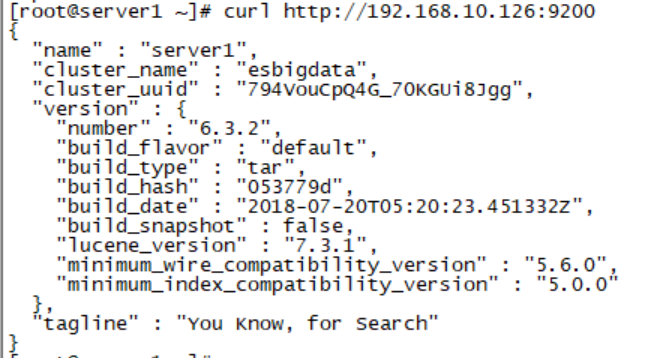
[root@server1 ~]# curl http://192.168.10.126:9200
#############################################################################
[root@server2 ~]# tar zxf elasticsearch-6.3.2.tar.gz -C /usr/local/
[root@server2 ~]# vim /etc/profile
export ELASTICSEARCH_HOME=/usr/local/elasticsearch-6.3.2
export PATH=$ELASTICSEARCH_HOME/bin:$PATH
[root@server2 ~]# source /etc/profile
[root@server2 ~]# vim /etc/hosts
192.168.10.126 server1
192.168.10.127 server2
192.168.10.128 server3
[root@server2 ~]# useradd elasticsearch
[root@server2 ~]# chown elasticsearch.elasticsearch /usr/local/elasticsearch-6.3.2/ -R
[root@server2 ~]# vim /etc/security/limits.conf
* soft nproc 20480
* hard nproc 20480
* soft nofile 65536
* hard nofile 65536
* soft memlock unlimited
* hard memlock unlimited
[root@server2 ~]# vim /etc/sysctl.conf
fs.file-max=655360
vm.max_map_count = 262144
[root@server2 ~]# vim /usr/local/elasticsearch-6.3.2/config/elasticsearch.yml
cluster.name: esbigdata
node.name: server1
node.master: true
node.data: true
path.data: /data/elasticsearch
path.logs: /usr/local/elasticsearch-6.3.2/logs
bootstrap.memory_lock: true
network.host: 0.0.0.0
http.port: 9200
discovery.zen.minimum_master_nodes: 1
discovery.zen.ping.unicast.hosts: ["192.168.10.126:9300", "192.168.10.127:9300"]
[root@server2 ~]# mkdir -p /data/elasticsearch
[root@server2 ~]# chmod 755 /data/elasticsearch
[root@server2 ~]# chmod 755 /data/elasticsearch -R
[root@server2 ~]# chown elasticsearch.elasticsearch -R /data/elasticsearch
[root@server2 ~]# chmod 755 -R /usr/local/elasticsearch-6.3.2
[root@server2 ~]# sysctl -p
[root@server1 ~]# curl http://192.168.10.126:9200
[root@server1 ~]# yum -y install nodejs npm git
[root@server1 ~]# git clone git://github.com/mobz/elasticsearch-head.git
#修改npm的源为淘宝国内镜像点
[root@server1 ~]# npm config set registry https://registry.npm.taobao.org/
[root@server1 local]# cd /usr/local/
[root@server1 local]# npm config set registry http://registry.npm.taobao.org/
[root@server1 local]# cd /usr/local/elasticsearch-head
[root@server1 elasticsearch-head]# npm install
[root@server1 _site]# cd /usr/local/elasticsearch-head/_site
[root@server1 _site]# vim app.js
4374 this.base_uri = this.config.base_uri || this.prefs.get("app-base_uri") || "http://192.168.10.126:9200";
[root@server1 _site]# vim /usr/local/elasticsearch-6.3.2/config/elasticsearch.yml
#表示开启跨域访问支持,默认为false
http.cors.enabled: true
#表示跨域访问允许的域名地址,可以使用正则表达式,这里的*表示允许所有域名访问
http.cors.allow-origin: "\*"
[root@server1 elasticsearch-head]# npm run start
浏览器里面输入:http://192.168.10.126:9100/

ELK实战-elasticsearch安装的更多相关文章
- elk之elasticsearch安装
环境: centos7 jdk8 参考: https://www.elastic.co/guide/en/elasticsearch/reference/current/rpm.htmlhttp:// ...
- ELK之elasticsearch安装&&kibana安装
1.ES和Kibana安装都是开箱即用的? 解压缩就可以用 elasticsearch解压缩之后,双击下图中的elasticsearch.bat,启动,kibana也是一样 双击之后, 我们看到上图有 ...
- ELK日志监控平台安装部署简介--Elasticsearch安装部署
最近由于工作需要,需要搭建一个ELK日志监控平台,本次采用Filebeat(采集数据)+Elasticsearch(建立索引)+Kibana(展示)架构,实现日志搜索展示功能. 一.安装环境描述: 1 ...
- elk实战分析nginx日志文档
elk实战分析nginx日志文档 架构: kibana <--- es-cluster <--- logstash <--- filebeat 环境准备:192.168.3.1 no ...
- ELK之elasticsearch6安装认证模块search guard
参考:https://www.cnblogs.com/marility/p/9392645.html 1,安装环境及软件版本 程序 版本 安装方式 elasticsearch 6.3.1 rpm ...
- Centos7中ELK集群安装流程
Centos7中ELK集群安装流程 说明:三个版本必须相同,这里安装5.1版. 一.安装Elasticsearch5.1 hostnamectl set-hostname elk vim /e ...
- Kibana安装(图文详解)(多节点的ELK集群安装在一个节点就好)
对于Kibana ,我们知道,是Elasticsearch/Logstash/Kibana的必不可少成员. 前提: Elasticsearch-2.4.3的下载(图文详解) Elasticsearch ...
- 全文搜索引擎 Elasticsearch 安装
全文搜索引擎 Elasticsearch 安装 学习了:http://www.ruanyifeng.com/blog/2017/08/elasticsearch.html 拼音:https://www ...
- Filebeat-1.3.1安装和设置(图文详解)(多节点的ELK集群安装在一个节点就好)(以Console Output为例)
前期博客 Filebeat的下载(图文讲解) 前提 Elasticsearch-2.4.3的下载(图文详解) Elasticsearch-2.4.3的单节点安装(多种方式图文详解) Elasticse ...
随机推荐
- thinkjs解决跨域
this.header("Access-Control-Allow-Origin", "*"); 将上面的代码在请求发送之前执行即可 如果不知道放在哪里 可以参 ...
- vue-learning:24 - component - 目录
component 组件 组件的概念 Vue 组件同时也都是 Vue 实例,可接受相同的选项对象option (除了一些根级特有的选项) 和使用相同的生命周期钩子,以及模板调用方式. 组件的构建和注册 ...
- 30分钟全方位了解阿里云Elasticsearch(附公开课完整视频)
摘要: 阿里云Elasticsearch提供100%兼容开源Elasticsearch的功能,以及Security.Machine Learning.Graph.APM等商业功能,致力于数据分析.数据 ...
- C++Review7_STL、容器、迭代器
我之前的博文中有专门的5篇整理并介绍了STL的概念: STL1——整体介绍:https://www.cnblogs.com/grooovvve/p/10467794.html STL2——泛型编程(模 ...
- win10安装Keras报错处理
本机已经安装好TensorFlow安装Keras的过程中遇到了些问题,解决后做一下记录: 1.Keras与TensorFlow的关系 Keras默认以TensorFlow为后端,同时可选以Theano ...
- easyUI demo2
图片: 代码: jsp <%@ page language="java" import="java.util.*" pageE ...
- TestStand 界面重置【小技巧】
有几种情况可能会使用到这个功能: (1)当界面调整的很乱的时候 (2)当界面突然消失的时候(但是软件进程还在)--快捷键 Alt+V 会弹出菜单,再点击Reset UI Configuration即可 ...
- 使用element的upload组件实现一个完整的文件上传功能(下)
本篇文章是<使用element的upload组件实现一个完整的文件上传功能(上)>的续篇. 话不多说,接着上一篇直接开始 一.功能完善—保存表格中每一列的文件列表状态 1.思路 保存表格中 ...
- DOCKER学习_004:Docker网络
一 简介 当Docker进程启动时,会在主机上创建一个名为docker0的虚拟网桥,此主机上启动的docker容器会连接到这个虚拟网桥上.虚拟网桥的工作方式和物理交换机类似,这样主机上的所有容器就通过 ...
- XRPC之接口双向调用
一般远程接口调用的服务都是基于客户端主动调用服务端,由服务端来提供相关的接口服务:在新版本的XRPC中引入了一个新的功能,即接口双向通讯,组件提供服务创建客户会话的接口代理并调用客户提供的接口服务.接 ...