
Nginx安装 默认虚拟主机 Nginx用户认证 Nginx域名重定向
Nginx安装
- cd /usr/local/src
(http://nginx.org/en/download.html)
- wget http://nginx.org/download/nginx-1.13.9.tar.gz
- tar zxf nginx-1.12.1.tar.gz
- ./configure --prefix=/usr/local/nginx
- make && make install
- vim /etc/init.d/nginx //复制如下内容
#!/bin/bash

# chkconfig: -

# description: http service.

# Source Function Library

. /etc/init.d/functions

# Nginx Settings

NGINX_SBIN="/usr/local/nginx/sbin/nginx"

NGINX_CONF="/usr/local/nginx/conf/nginx.conf"

NGINX_PID="/usr/local/nginx/logs/nginx.pid"

RETVAL=

prog="Nginx"

start()

{

echo -n $"Starting $prog: "

mkdir -p /dev/shm/nginx_temp

daemon $NGINX_SBIN -c $NGINX_CONF

RETVAL=$?

echo

return $RETVAL

}

stop()

{

echo -n $"Stopping $prog: "

killproc -p $NGINX_PID $NGINX_SBIN -TERM

rm -rf /dev/shm/nginx_temp

RETVAL=$?

echo

return $RETVAL

}

reload()

{

echo -n $"Reloading $prog: "

killproc -p $NGINX_PID $NGINX_SBIN -HUP

RETVAL=$?

echo

return $RETVAL

}

restart()

{

stop

start

}

configtest()

{

$NGINX_SBIN -c $NGINX_CONF -t

return

}

case "$1" in

start)

start

;;

stop)

stop

;;

reload)

reload

;;

restart)

restart

;;

configtest)

configtest

;;

*)

echo $"Usage: $0 {start|stop|reload|restart|configtest}"

RETVAL=

esac

exit $RETVAL
- chmod 755 /etc/init.d/nginx
- chkconfig --add nginx
- chkconfig nginx on
- cd /usr/local/nginx/conf/; mv nginx.conf nginx.conf.bak
- vim nginx.conf //写入如下内容(参考)
user nobody nobody;

worker_processes ;

error_log /usr/local/nginx/logs/nginx_error.log crit;

pid /usr/local/nginx/logs/nginx.pid;

worker_rlimit_nofile ;

events

{

use epoll;

worker_connections ;

}

http

{

include mime.types;

default_type application/octet-stream;

server_names_hash_bucket_size ;

server_names_hash_max_size ;

log_format combined_realip '$remote_addr $http_x_forwarded_for [$time_local]'

' $host "$request_uri" $status'

' "$http_referer" "$http_user_agent"';

sendfile on;

tcp_nopush on;

keepalive_timeout ;

client_header_timeout 3m;

client_body_timeout 3m;

send_timeout 3m;

connection_pool_size ;

client_header_buffer_size 1k;

large_client_header_buffers  4k;

request_pool_size 4k;

output_buffers  32k;

postpone_output ;

client_max_body_size 10m;

client_body_buffer_size 256k;

client_body_temp_path /usr/local/nginx/client_body_temp;

proxy_temp_path /usr/local/nginx/proxy_temp;

fastcgi_temp_path /usr/local/nginx/fastcgi_temp;

fastcgi_intercept_errors on;

tcp_nodelay on;

gzip on;

gzip_min_length 1k;

gzip_buffers  8k;

gzip_comp_level ;

gzip_http_version 1.1;

gzip_types text/plain application/x-javascript text/css text/htm

application/xml;

server

{

listen ;

server_name localhost;

index index.html index.htm index.php;

root /usr/local/nginx/html;

location ~ \.php$

{

include fastcgi_params;

fastcgi_pass unix:/tmp/php-fcgi.sock;

fastcgi_index index.php;

fastcgi_param SCRIPT_FILENAME /usr/local/nginx/html$fastcgi_script_name;

}

}

}
- /usr/local/nginx/sbin/nginx -t
- /etc/init.d/nginx start
- netstat -lntp |grep 80
- 测试php解析
vi /usr/local/nginx/html/1.php //加入如下内容
<?php
echo "test php scripts.";
?>
curl localhost/1.php

Nginx安装 默认虚拟主机 Nginx用户认证 Nginx域名重定向的更多相关文章
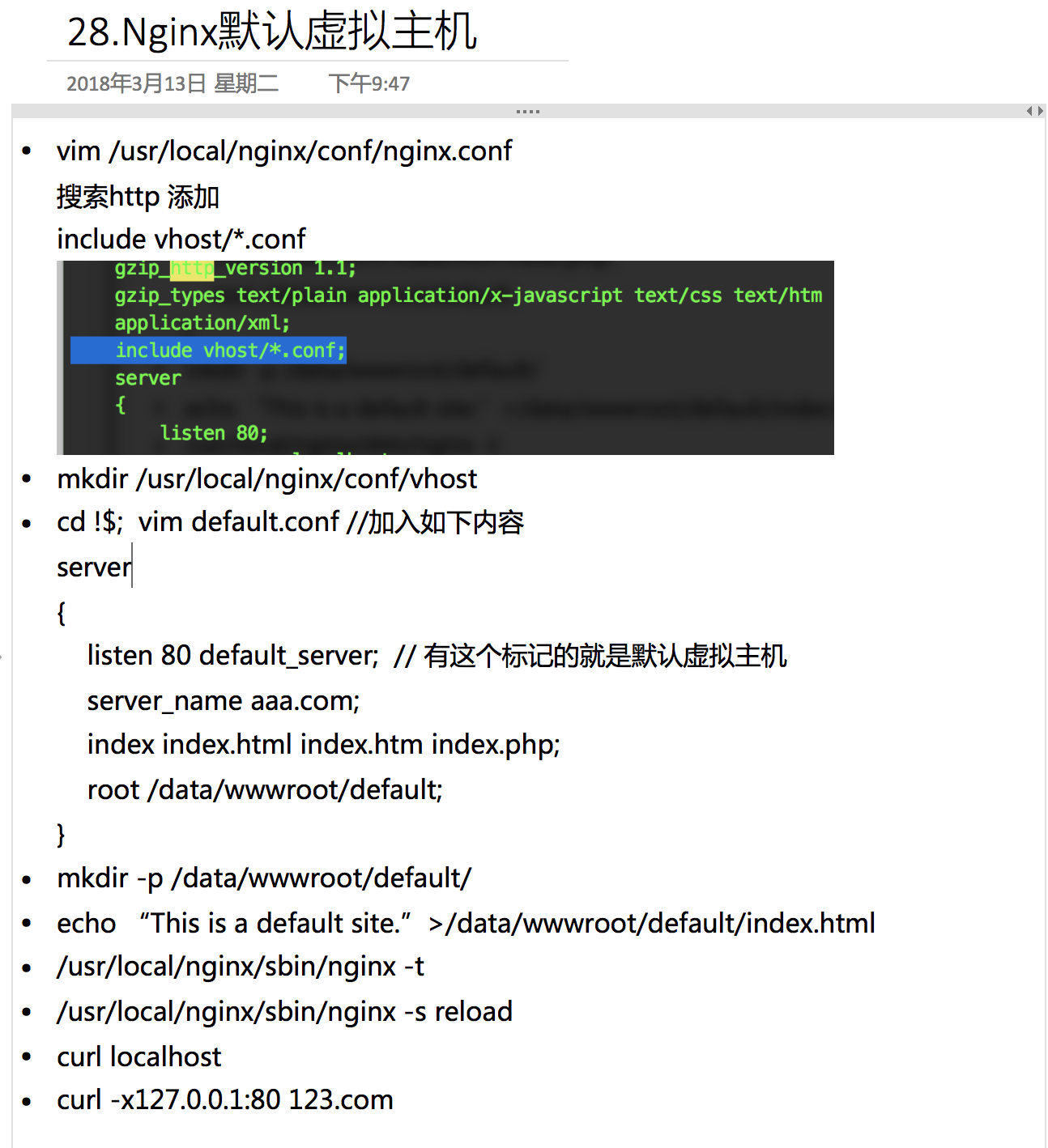
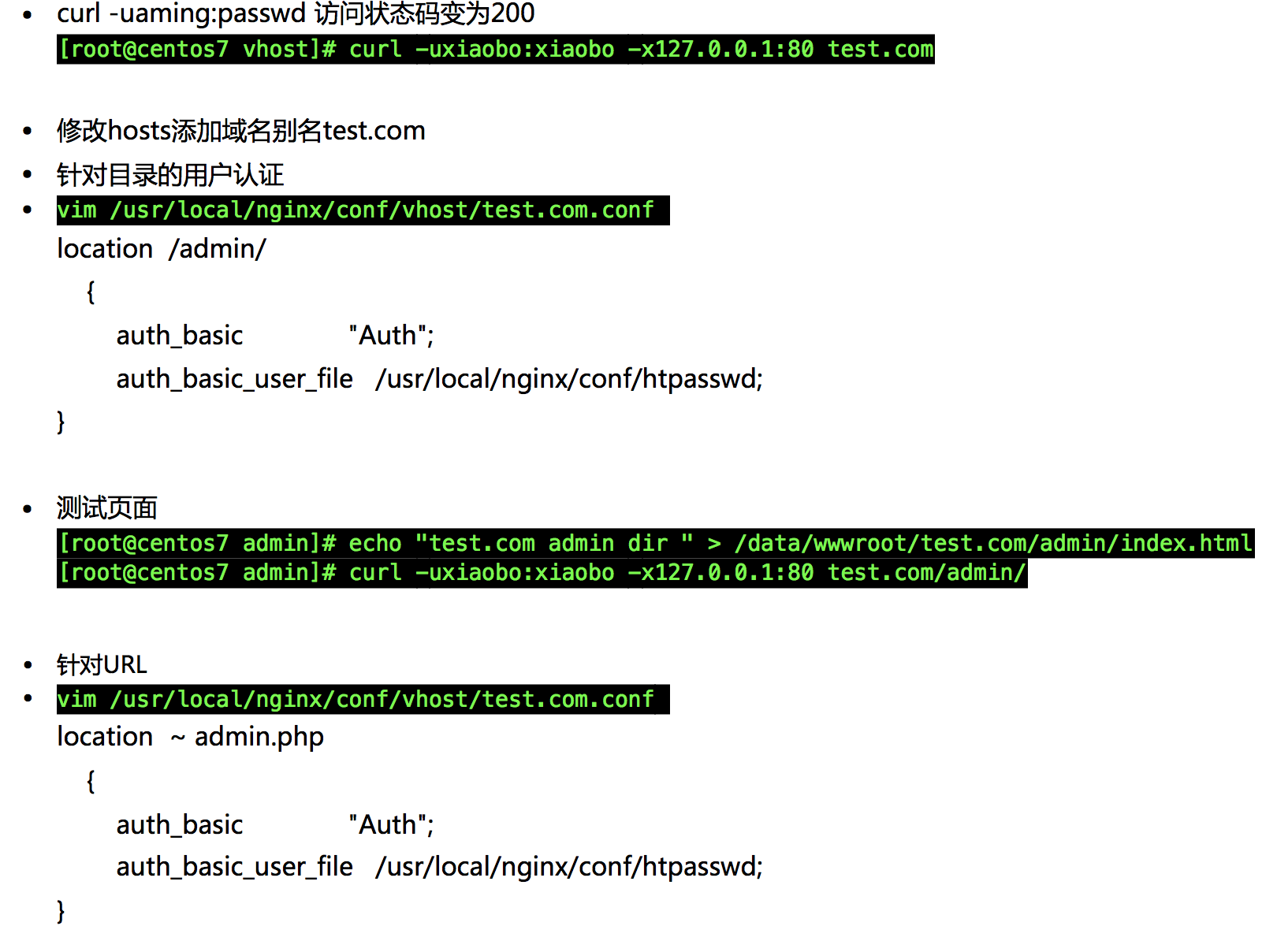
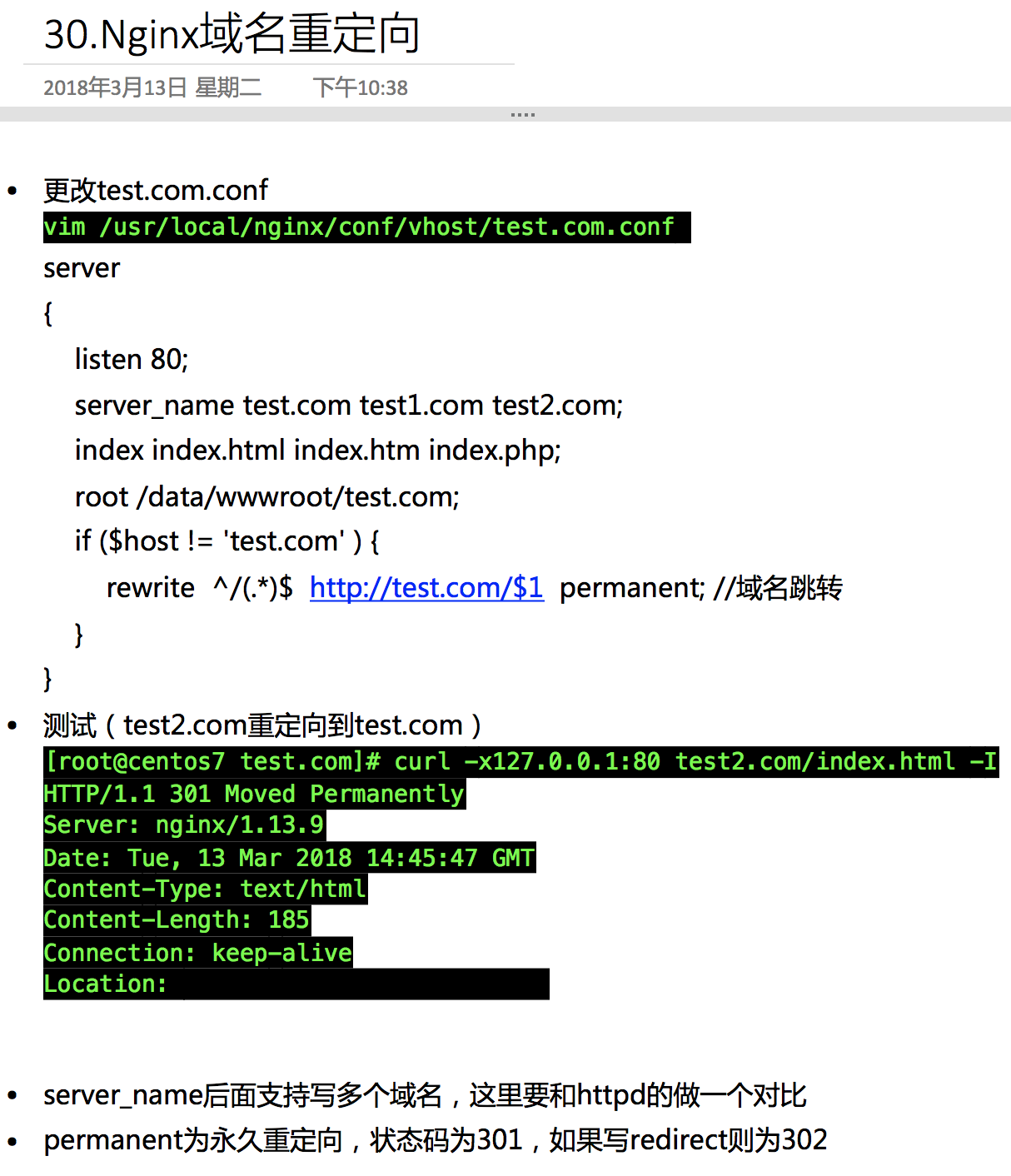
- Nginx安装、默认虚拟主机、Nginx用户认证和域名重定向
6月7日任务 12.6 Nginx安装12.7 默认虚拟主机12.8 Nginx用户认证12.9 Nginx域名重定向 扩展nginx.conf 配置详解 http://www.ha97.com/51 ...
- nginx创建默认虚拟主机
创建默认虚拟主机配置文件作用:禁止任何人通过ip或未允许的域名访问web服务. 如:vim vhosts/default.conf server { listen 80 default; server ...
- LNMP配置——Nginx配置 —— 默认虚拟主机
一.配置 首先修改配置文件 #vi /usr/local/nginx/conf/nginx.conf 在最后一个结束符号}前加一行配置: include vhost/*.conf; 意思就是/usr/ ...
- Linux centosVMware Nginx安装、 默认虚拟主机、Nginx用户认证、Nginx域名重定向
一. Nginx安装 cd /usr/local/src wget http://nginx.org/download/nginx-1.12.1.tar.gz 版本在http://nginx.org/ ...
- LAMP 1.8默认虚拟主机
默认虚拟主机是为了解决别人域名恶心绑定自己的服务器ip,可导致服务器上的网站排名靠后,即干扰seo优化 我们访问指定的两个网站可以直接访问,ip也可以访问 打开配置文件 vim /usr/local/ ...
- apache禁止默认虚拟主机
禁止默认虚拟主机:作用使除特定域名外,其它的域名/ip无法访问此站点. 在虚拟主机配置文件中 即:/usr/local/apache2/conf/extra/httpd-vhosts.conf 将其中 ...
- nginx的安装 、Nginx默认虚拟主机、nginx用户认证、nginx 域名重定向
1.nginx:官网:www.nginx.org 下载:wget -c http://nginx.org/download/nginx-1.14.0.tar.gz解压:tar -zxvf nginx ...
- [转] linux学习第四十四篇:Nginx安装,Nginx默认虚拟主机,Nginx域名重定向
Nginx安装 进入存放源码包的目录: cd /usr/local/src 下载源码包: wget http://nginx.org/download/nginx-1.12.1.tar.gz 解压: ...
- centos LAMP第二部分apache配置 下载discuz!配置第一个虚拟主机 安装Discuz! 用户认证 配置域名跳转 配置apache的访问日志 配置静态文件缓存 配置防盗链 访问控制 apache rewrite 配置开机启动apache tcpdump 第二十节课
centos LAMP第二部分apache配置 下载discuz!配置第一个虚拟主机 安装Discuz! 用户认证 配置域名跳转 配置apache的访问日志 配置静态文件缓存 配置防盗链 ...
随机推荐
- Android SDK下载和更新失败解决方法
原因是dl-ssl.google.com访问不到,解决方法就是修改C:\Windows\System32\drivers\etc\hosts文件.添加一行: 74.125.237.1 dl ...
- Android开发(五)——计时器
发送验证码后倒计时,Android自带计时器CountDownTimer,重写自己的计时器以实现跟新View的效果. package com.lgaoxiao.widget; import andro ...
- java判断集合是否相等
1,使用commons-collection-3.2.1.jar包中的CollectionUtils.isEqualCollection()方法 2,还有其他集合操作:disjunction(a,b集 ...
- 4. 支持向量机(SVM)原理
1. 感知机原理(Perceptron) 2. 感知机(Perceptron)基本形式和对偶形式实现 3. 支持向量机(SVM)拉格朗日对偶性(KKT) 4. 支持向量机(SVM)原理 5. 支持向量 ...
- Python- requests详解
Requests 是用Python语言编写,基于 urllib,采用 Apache2 Licensed 开源协议的 HTTP 库.它比 urllib 更加方便,可以节约我们大量的工作,完全满足 HTT ...
- [转]JS组件系列——表格组件神器:bootstrap table
原文地址:https://www.cnblogs.com/landeanfen/p/4976838.html 前言:之前一直在忙着各种什么效果,殊不知最基础的Bootstrap Table用法都没有涉 ...
- Virtual DOM 虚拟DOM的理解(转)
作者:戴嘉华 转载请注明出处并保留原文链接( #13 )和作者信息. 目录: 1 前言 2 对前端应用状态管理思考 3 Virtual DOM 算法 4 算法实现 4.1 步骤一:用JS对象模拟DOM ...
- mypy 支持静态类型编程的python变种
每种编程语言都有一群固定的用户,对于那些习惯将不同编程语言用成同样的感觉的人来说,最是难受.因为每种语言都有它独特的设计『哲学』和擅长的应用领域. PHP给大家的一贯的印象都是动态弱类型语言,Pyth ...
- webpack9--删除冗余的CSS
我们在写代码的时候可能有些CSS并没有用到,我们如何利用webpack将冗余的CSS清除掉呢? 可以使用 purifycss-webpack 达到该目的. 1.安装 purifycss-webpack ...
- webpack5--css 打包
1.在 src 文件夹下面新建 css 文件夹,创建 common.css body{ background-color: #f2f2f2; } a{ color: #188eee; text-dec ...