
CDH的安装和设置
采用伪分布模式安装和设置CDH,前提是已经安装了Java和SSH。
1. 下载hadoop-2.6.0-cdh5.9.0,复制到/opt/下,再解压;
2. 进入/opt/hadoop-2.6.0-cdh5.9.0/etc/hadoop/,在hadoop-env.sh中添加:
export JAVA_HOME=/opt/jdk1.8.0_121

export HADOOP_HOME=/opt/hadoop-2.6.0-cdh5.9.0
修改配置文件core-tite.xml:
<?xml version="1.0" encoding="UTF-8"?>

<?xml-stylesheet type="text/xsl" href="configuration.xsl"?>

<!--

  Licensed under the Apache License, Version 2.0 (the "License");

  you may not use this file except in compliance with the License.

  You may obtain a copy of the License at

    http://www.apache.org/licenses/LICENSE-2.0

  Unless required by applicable law or agreed to in writing, software

  distributed under the License is distributed on an "AS IS" BASIS,

  WITHOUT WARRANTIES OR CONDITIONS OF ANY KIND, either express or implied.

  See the License for the specific language governing permissions and

  limitations under the License. See accompanying LICENSE file.

-->

<!-- Put site-specific property overrides in this file. -->

<configuration>

    <property>

        <name>hadoop.tmp.dir</name>

        <value>/home/hadoop/tmp</value>

    </property>

    <property>

        <name>fs.default.name</name>

        <value>hdfs://192.168.1.104:9000</value>

    </property>

</configuration>
其中hadoop.tmp.dir最好自己设置,不要采用默认的设置,因为默认的设置是在/tmp/下面,机器重启以后会被删除掉,造成Hadoop不能运行,要再次格式化NameNode才能运行。
hdfs-site.xml:
<?xml version="1.0" encoding="UTF-8"?>

<?xml-stylesheet type="text/xsl" href="configuration.xsl"?>

<!--

  Licensed under the Apache License, Version 2.0 (the "License");

  you may not use this file except in compliance with the License.

  You may obtain a copy of the License at

    http://www.apache.org/licenses/LICENSE-2.0

  Unless required by applicable law or agreed to in writing, software

  distributed under the License is distributed on an "AS IS" BASIS,

  WITHOUT WARRANTIES OR CONDITIONS OF ANY KIND, either express or implied.

  See the License for the specific language governing permissions and

  limitations under the License. See accompanying LICENSE file.

-->

<!-- Put site-specific property overrides in this file. -->

<configuration>

    <property>

        <name>dfs.replication</name>

        <value>1</value>

    </property>

    <property>

        <name>dfs.name.dir</name>

        <value>/opt/hdfs/name</value>

    </property>

    <property>

        <name>dfs.data.dir</name>

        <value>/opt/hdfs/data</value>

    </property>

    <property>

            <name>dfs.tmp.dir</name>

            <value>/opt/hdfs/tmp</value>

    </property>

</configuration>
mapred-site.xml:
<?xml version="1.0"?>

<?xml-stylesheet type="text/xsl" href="configuration.xsl"?>

<!--

  Licensed under the Apache License, Version 2.0 (the "License");

  you may not use this file except in compliance with the License.

  You may obtain a copy of the License at

    http://www.apache.org/licenses/LICENSE-2.0

  Unless required by applicable law or agreed to in writing, software

  distributed under the License is distributed on an "AS IS" BASIS,

  WITHOUT WARRANTIES OR CONDITIONS OF ANY KIND, either express or implied.

  See the License for the specific language governing permissions and

  limitations under the License. See accompanying LICENSE file.

-->

<!-- Put site-specific property overrides in this file. -->

<configuration>

    <property>

        <name>mapreduce.framework.name</name>

        <value>yarn</value>

    </property>

    <property>

        <name>mapred.job.tracker</name>

        <value>hdfs://192.168.1.104:9001</value>

    </property>

</configuration>
3. 在/etc/profile后面加上:
export HADOOP_HOME=/opt/hadoop-2.6.0-cdh5.9.0

export PATH=$PATH:$HADOOP_HOME/bin
并且输入命令:
source /etc/profile
使设置生效。
4. 输入命令:
hadoop namenode -format
格式化NameNode,如果结果提示Successful表明格式化成功。
5. 进入/opt/hadoop-2.6.0-cdh5.9.0/etc/hadoop/sbin,输入命令:
./start-all.sh
启动Hadoop。为了检验是否启动成功,输入命令:
jps
如果结果包含了以下几个进程,则表明启动成功:
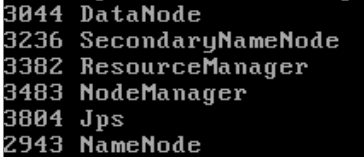
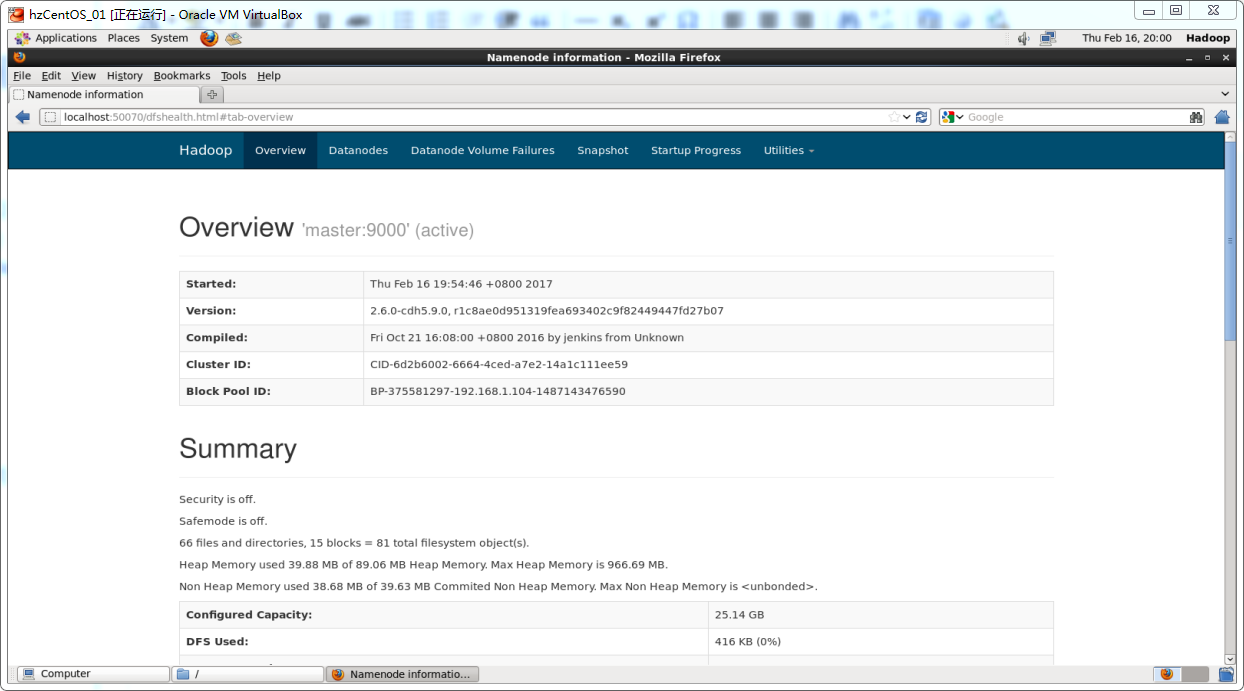
也可以在浏览器里面输入地址http://localhost:50070,检验是否启动成功:
CDH的安装和设置的更多相关文章
- CentOS7安装CDH 第五章:CDH的安装和部署-CDH5.7.0
相关文章链接 CentOS7安装CDH 第一章:CentOS7系统安装 CentOS7安装CDH 第二章:CentOS7各个软件安装和启动 CentOS7安装CDH 第三章:CDH中的问题和解决方法 ...
- Hadoop的安装与设置(1)
在Ubuntu下安装与设置Hadoop的主要过程. 1. 创建Hadoop用户 创建一个用户,用户名为hadoop,在home下创建该用户的主目录,就不详细介绍了. 2. 安装Java环境 下载Lin ...
- linux下MySQL安装及设置
转自:http://www.entage.net/1/viewspace-25420 1. 关于本文 本文将以MySQL 5.0.51为例,以CentOS 5为平台,讲述MySQL数据库的安装和 ...
- Coudera-Manager/CDH的安装和部署
由于之前部署的集群采用的是用apache hadoop的方式来实现,但是考虑到运维的成本问题,下面将apache hadoop转换成cloudera cdh.下面主要讲解一下cloudera cdh的 ...
- 在Ubuntu 12.04安装和设置Samba实现网上邻居共享
转载:http://www.startos.com/ubuntu/tips/2012031333097.html 有微小改动. Samba 是一款功能强大的共享工具,可以实现与win ...
- RESTheart安装与设置
作者:Maurizio Turatti, 最后在Feb 25, 2016时被 Andrea Di Cesare更新 安装与设置 1. 快速开始 Docker Vagrant Bare metal 2. ...
- cdh 上安装spark on yarn
在cdh 上安装spark on yarn 还是比较简单的,不需要独立安装什么模块或者组件. 安装服务 选择on yarn 模式:上面 Spark 在spark 服务中添加 在yarn 服务中添加 g ...
- 安装、设置与启动MySql绿色版的方法
原文:安装.设置与启动MySql绿色版的方法 1.解压 mysql-noinstall-5.1.30-win32.zip(下载地址http://dev.mysql.com/downloads/mysq ...
- ubuntu显卡驱动安装及设置
转自: Ubuntu 14.04 Nvidia显卡驱动安装及设置 更换主板修复grub 引导后,无法从Nvidia进入系统(光标闪烁), 可能是显卡驱动出了问题. 1. 进入BIOS设置, 从集成 ...
随机推荐
- 使用PHP+Sphinx建立高效的站内搜索引擎
1. 为什么要使用Sphinx 假设你现在运营着一个论坛,论坛数据已经超过100W,很多用户都反映论坛搜索的速度非常慢,那么这时你就可以考虑使用Sphinx了(当然其他的全文检索程序或方 ...
- Javascript与Objective-C 字符串与数组的方法类比
table {border-collapse:collapse;} table td {border:1px solid #ccc;} String vs NSString JavaScript st ...
- Java生成8位随机邀请码,不重复
public static String[] chars = new String[] { "a", "b", "c", "d&q ...
- Java中的Future模式原理自定义实现
摘要:Future模式类似于js中的ajax等,是一个异步获取数据的机制,这里我把自己的一些形象理解通过代码实现了一下.该机制可以形象的理解为:调用获取数据的方法,首先获得一个没有装数据的空箱子(这个 ...
- JAVAWEB开发之HttpServletResponse和HttpServletRequest详解(下)(各种乱码、验证码、重定向和转发)
HttpServletRequest获取请求头信息 (1)获取客户机请求头 String getHeader(String name) Enumeration<String> getHe ...
- securecrt 多窗口执行命令
首先在SecureCRT里同时打开多个服务器session(必须是有相同目录结构) 选择菜单栏View –>Chat Windows 对号,此时所有服务器连接下方应该有个空白的部分 在空白的部分 ...
- [转]MySQL导入.sql文件及常用命令
From : http://blog.csdn.net/muziduoxi/article/details/6091202 在MySQL Qurey Brower中直接导入*.sql脚本,是不能一 ...
- kafak-python使用补充
kafka-python的心跳报文使用的是一个独立的线程,以固定的时间(heartbeat_interval_ms,默认是3000ms)间隔发生心跳信息 member_id唯一标识一个客户端的cons ...
- 利用js实现 禁用浏览器后退 浏览器返回
现在很多的内部系统,一些界面,都是用户手动点击退出按钮的.但是为了避免,用户误操作 点击浏览器后退,或者用鼠标手势后退什么的.容易出现误操作. 所以在有些页面上,适当的禁用浏览器的后退, ...
- CImg、libjpeg--介绍、配置(操作JPEG)
关于处理图片,之前写了两篇博客关于ImageMagick的: <ImageMagick–介绍> <ImageMagick–VS2015环境配置.开发(registrykeylooku ...