
RYU 灭龙战 fourth day (1)
RYU 灭龙战 fourth day (1)
前言
对于流量的监控,对于一个网络管理人员来说是非常重要的,可以从可视化的角度,方便检测出哪里的设备出了问题;而在传统网络中,如果是哪里的设备出了问题的话,则需要进行人工的排查,这种排查往往绝大部分依赖于经验上,这也是SDN一个小小的好处吧。这次实验就基于上次实验的基础上,加入流量监控。
实现方案
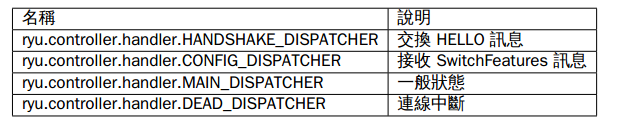
- 交换机状态
# Copyright (C) 2016 Nippon Telegraph and Telephone Corporation.

#

# Licensed under the Apache License, Version 2.0 (the "License");

# you may not use this file except in compliance with the License.

# You may obtain a copy of the License at

#

#    http://www.apache.org/licenses/LICENSE-2.0

#

# Unless required by applicable law or agreed to in writing, software

# distributed under the License is distributed on an "AS IS" BASIS,

# WITHOUT WARRANTIES OR CONDITIONS OF ANY KIND, either express or

# implied.

# See the License for the specific language governing permissions and

# limitations under the License.

from operator import attrgetter

from ryu.app import simple_switch_13

from ryu.controller import ofp_event

from ryu.controller.handler import MAIN_DISPATCHER, DEAD_DISPATCHER

from ryu.controller.handler import set_ev_cls

from ryu.lib import hub

#继承simple_switch_13,OpenFlow1.3 mac学习

class SimpleMonitor13(simple_switch_13.SimpleSwitch13):

    #初始化函数

    def __init__(self, *args, **kwargs):

        super(SimpleMonitor13, self).__init__(*args, **kwargs)

        #数据路径的集合

        self.datapaths = {}

        #每次流表监控的时间戳

        self.monitor_thread = hub.spawn(self._monitor)

    #消息类型StateChange,交换机的状态为一般状态(MAIN_DISPATCHER) 或者连接中断状态(DEAD_DISPATCHER)

    @set_ev_cls(ofp_event.EventOFPStateChange,

                [MAIN_DISPATCHER, DEAD_DISPATCHER])

    def _state_change_handler(self, ev):

        #得到数据路径

        datapath = ev.datapath

        #如果交换机状态为一般连接状态,并且该消息的数据路径id不在数据路径集合中,则把该数据路径id加入数据路径集合中

        if ev.state == MAIN_DISPATCHER:

            if datapath.id not in self.datapaths:

                self.logger.debug('register datapath: %016x', datapath.id)

                self.datapaths[datapath.id] = datapath

        #如果交换机状态为断开链接状态,且该消息的数据路径在数据路径集合中,则把该数据路径id从数据路径集合中去除

        elif ev.state == DEAD_DISPATCHER:

            if datapath.id in self.datapaths:

                self.logger.debug('unregister datapath: %016x', datapath.id)

                del self.datapaths[datapath.id]

    #对于在数据路径集合中的交换机每间隔10s发送请求,来获得交换机的消息

    def _monitor(self):

        while True:

            for dp in self.datapaths.values():

                self._request_stats(dp)

            hub.sleep(10)

    #_request_stats方法用来定期发送,OFPFlowStatsRequest、OFPPortStatsRequest消息给交换机

    def _request_stats(self, datapath):

        self.logger.debug('send stats request: %016x', datapath.id)

        ofproto = datapath.ofproto

        parser = datapath.ofproto_parser

        req = parser.OFPFlowStatsRequest(datapath)

        datapath.send_msg(req)

        req = parser.OFPPortStatsRequest(datapath, 0, ofproto.OFPP_ANY)

        datapath.send_msg(req)

    #用来处理EventOFPFlowStatsReply数据包,在交换机状态为一般链接状态

    @set_ev_cls(ofp_event.EventOFPFlowStatsReply, MAIN_DISPATCHER)

    def _flow_stats_reply_handler(self, ev):

        body = ev.msg.body

        self.logger.info('datapath         '

                         'in-port  eth-dst           '

                         'out-port packets  bytes')

        self.logger.info('---------------- '

                         '-------- ----------------- '

                         '-------- -------- --------')

        #输出消息的数据路径id,入端口,目的mac,出端口,packets数目,以及byte大小,并按入端口,目的mac作为排序

        for stat in sorted([flow for flow in body if flow.priority == 1],

                           key=lambda flow: (flow.match['in_port'],

                                             flow.match['eth_dst'])):

            self.logger.info('%016x %8x %17s %8x %8d %8d',

                             ev.msg.datapath.id,

                             stat.match['in_port'], stat.match['eth_dst'],

                             stat.instructions[0].actions[0].port,

                             stat.packet_count, stat.byte_count)

    # 用来处理EventOFPPortStatsReply数据包,在交换机状态为一般链接状态

    @set_ev_cls(ofp_event.EventOFPPortStatsReply, MAIN_DISPATCHER)

    def _port_stats_reply_handler(self, ev):

        body = ev.msg.body

        self.logger.info('datapath         port     '

                         'rx-pkts  rx-bytes rx-error '

                         'tx-pkts  tx-bytes tx-error')

        self.logger.info('---------------- -------- '

                         '-------- -------- -------- '

                         '-------- -------- --------')

        #打印出对应的数据的数据路径id,以及交换机端口,以及接收数据包数目,接收字节数目,接收数据错误率,以及相应的发送数据包数目,发送字节数目,发送错误数

        for stat in sorted(body, key=attrgetter('port_no')):

            self.logger.info('%016x %8x %8d %8d %8d %8d %8d %8d',

                             ev.msg.datapath.id, stat.port_no,

                             stat.rx_packets, stat.rx_bytes, stat.rx_errors,

                             stat.tx_packets, stat.tx_bytes, stat.tx_errors)
实验过程
- 打开一终端,打开mininet
sudo mn --topo single,3 --mac --switch ovsk,protocols=OpenFlow13 --controller remote
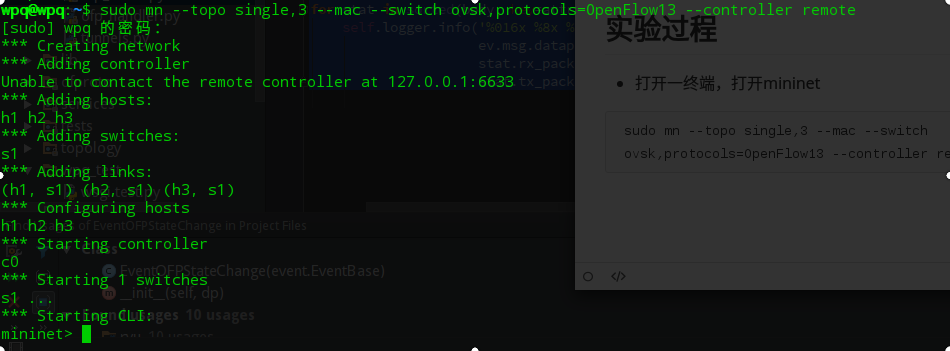
此时还没有执行ryu应用,所以对应的6633端口无应用相应,在wireshark查看可得各种TCP握手失败

- 另一种 执行ryu应用,目录为.../ryu/app
ryu-manager --verbose ./simple_monitor_13.py
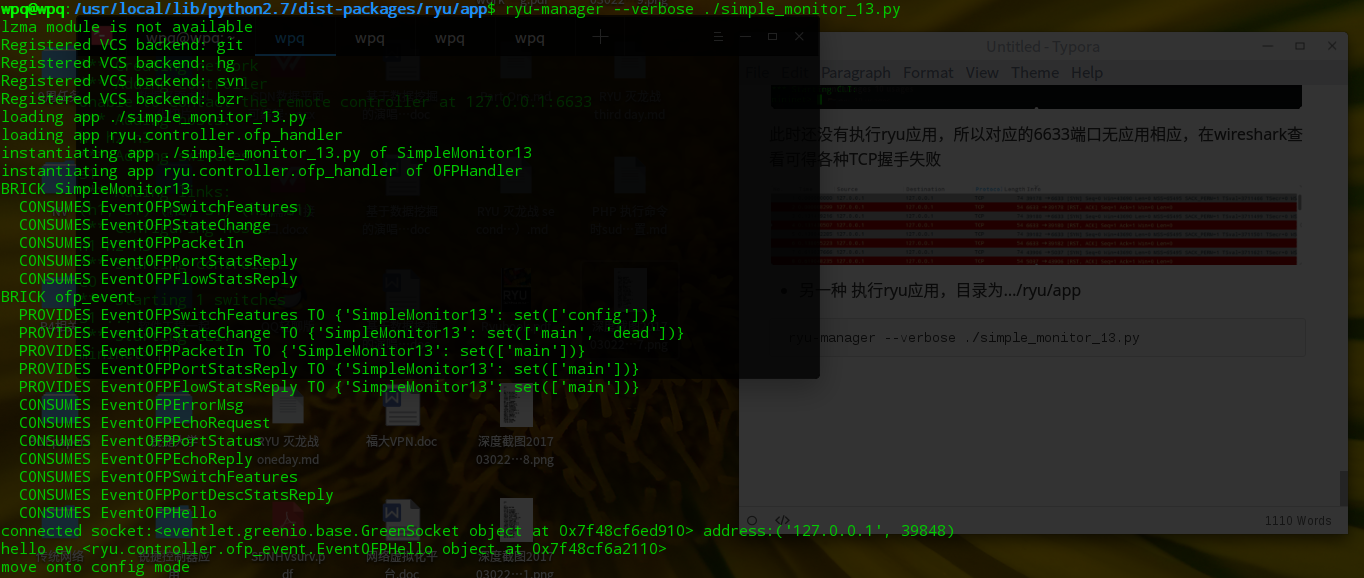

由上次实验可知,此时还没有优先级大于0的流表,所以没有显示出来。此时模仿上次一样h1 ping h2让其下发流表
- mininet端口互ping,触发控制器下发流表
h1 ping h2
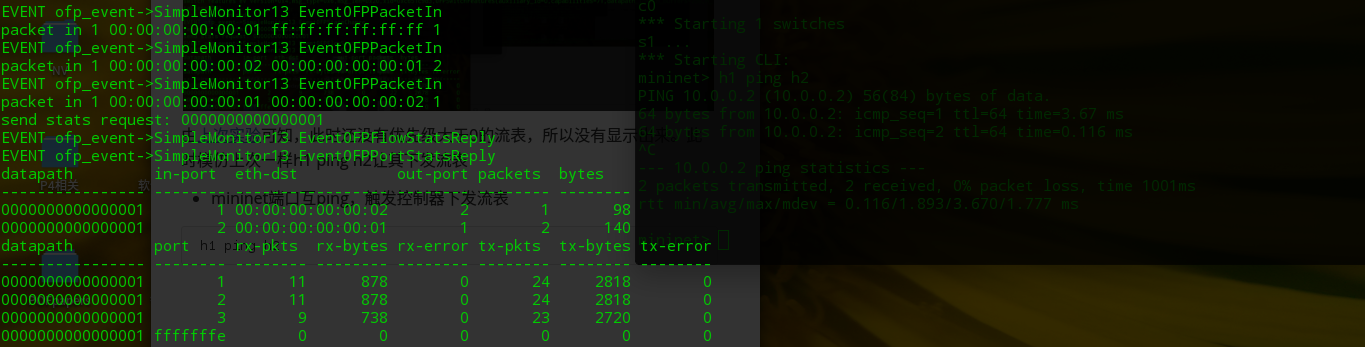
可以看到流表增加了,可看到实时的流量检测
总结
基于上次实验的扩展吧
利用OpenFlow的相应消息可以做的一些特定功能
RYU 灭龙战 fourth day (1)的更多相关文章
- RYU 灭龙战 fourth day (2)
RYU 灭龙战 fourth day (2) 前言 之前试过在ODL调用他们的rest api,一直想自己写一个基于ODL的rest api,结果还是无果而终.这个小目标却在RYU身上实现了.今日说法 ...
- RYU 灭龙战 third day
RYU 灭龙战 third day 前言 传统的交换机有自学习能力.然而你知道在SDN的世界里,脑子空空的OpenFlow交换机是如何学习的吗?今日说法带你领略SDN的mac学习能力. RYUBook ...
- RYU 灭龙战 second day(内容大部分引自网络)
RYU 灭龙战 second day(内容大部分引自网络) 写好的markdown重启忘了保存...再写一次RLG 巨龙的稀有装备-RYU代码结构 RYU控制器代码结构的总结 RYU入门教程 RYU基 ...
- RYU 灭龙战 first day
RYU 灭龙战 first day 前言 由于RYU翻译过来是龙的意思,此次主题就叫灭龙战吧 灵感来源 恶龙的三位真火-问题所在 参照了官方文档的基本操作 笔者以此执行 一个终端里 sudo mn - ...
- mininet和ryu控制器的连接
1.执行ryu应用程式:ryu-manager --verbose ryu.app.simple_switch_13 2.启动mininet,配置如下:创建3个host,1个交换器(open vSwi ...
- Ubuntu下搭建ryu环境
RYU环境搭建总共四步: step1:首先下载相应的python套件,并且更新pip $ sudo apt-get install python-pip python-dev build-essent ...
- Ryu
What's Ryu? Ryu is a component-based software defined networking framework. Ryu provides software co ...
- PIC12F629帮我用C语言写个程序,控制三个LED亮灭
http://power.baidu.com/question/240873584599025684.html?entry=browse_difficult PIC12F629帮我用C语言写个程序,控 ...
- (三)开关检测来控制LED灯的亮灭
开关检测案例一: 具体电路图如下: K1--K4闭合,控制 D1—D4 亮灭 产生的问题: 1.关于 R8 R9 R7 R10 的阻值选择问题,倘若太大的话, 比如10K 不管开关断开还是闭合,好像 ...
随机推荐
- 基于duxshop遍历无限级分销用户的纵向递归
/**获取基准数据 * @param $ids 父id 多个逗号分隔 * @return array */ public function saleBase($ids) { $data=$this-& ...
- 随手练——ZOJ-1074 To the Max(最大矩阵和)
To the Max http://acm.zju.edu.cn/onlinejudge/showProblem.do?problemCode=1074 动态规划(O(n^3)) 获得一维数组的最大子 ...
- Python3使用tkinter编写GUI程序
目录 @(Python3中tkinter写的HTTP测试工具代码支持正则表达式和XPATH) 程序非常简单,暂时只支持GET方法,使用内置库tkinter编写GUI窗口,在Mac下运行效果图如下,wi ...
- window.location对象详解
window.location.href(当前URL) 结果如下: http://www.myurl.com:8866/test?id=123&username=xxx window.loca ...
- Apple 相关官方地址
https://developer.apple.com/download/more/ 证书制作地址: https://developer.apple.com/account/ios/profile/ ...
- Android github上的好的开源项目汇总
转自:http://blog.csdn.net/ithomer/article/details/8882236 GitHub 上的开源项目不胜枚举,越来越多的开源项目正在迁移到GitHub平台上.基于 ...
- Spark1.0.0属性配置
1:Spark1.0.0属性配置方式 Spark属性提供了大部分应用程序的控制项,并且可以单独为每个应用程序进行配置. 在Spark1.0.0提供了3种方式的属性配置: SparkConf方式 Spa ...
- odoo之可选择多个内容显示问题
<field name="partner_id" widget="many2many_tags" options="{'no_create': ...
- 20155209林虹宇 Exp7 网络欺诈防范
Exp7 网络欺诈防范 简单应用SET工具建立冒名网站 kali要作为web服务器让靶机访问冒名网站,所以要使用阿帕奇web服务器软件. 要阿帕奇使用80端口.进入配置文件/etc/apache2/p ...
- 20155227《网络对抗》Exp3 免杀原理与实践
20155227<网络对抗>Exp3 免杀原理与实践 实践内容 正确使用msf编码器,msfvenom生成如jar之类的其他文件,veil-evasion,自己利用shellcode编程等 ...