
WPF的模版
此例子来自《深入浅出WPF》,刘铁猛。
VS2010
源码1:不使用Bingding
源码2:使用Binding
下面展示一些代码:
主窗体XAML代码:
<Window x:Class="WpfApplication1.MainWindow"

        xmlns="http://schemas.microsoft.com/winfx/2006/xaml/presentation"

        xmlns:x="http://schemas.microsoft.com/winfx/2006/xaml"

        xmlns:local="clr-namespace:WpfApplication1"

        Title="MainWindow" Height="350" Width="623" ResizeMode="NoResize">

    <Window.Resources>

        <local:AutomakerToLogoPathConverter x:Key="a2l"></local:AutomakerToLogoPathConverter>

        <local:NameToPhotoPathConverter x:Key="n2p"></local:NameToPhotoPathConverter>

        <DataTemplate x:Key="carDetailViewTemplate">

            <Border BorderBrush="Black" BorderThickness="1" CornerRadius="6">

                <StackPanel Margin="5">

                    <Image Width="400" Height="250" Source="{Binding Name,Converter={StaticResource n2p}}"></Image>

                    <StackPanel Orientation="Horizontal" Margin="5,0">

                        <TextBlock Text="Name:" FontWeight="Bold" FontSize="20"></TextBlock>

                        <TextBlock Text="{Binding Name}" FontSize="20" Margin="5,0"></TextBlock>

                    </StackPanel>

                    <StackPanel Orientation="Horizontal" Margin="5,0">

                        <TextBlock Text="Automaker:" FontWeight="Bold"></TextBlock>

                        <TextBlock Text="{Binding Automaker}" Margin="5,0"></TextBlock>

                        <TextBlock Text="Year:" FontWeight="Bold"></TextBlock>

                        <TextBlock Text="{Binding Year}" Margin="5,0"></TextBlock>

                        <TextBlock Text="Top Speed:" FontWeight="Bold"></TextBlock>

                        <TextBlock Text="{Binding TopSpeed}" Margin="5,0"></TextBlock>

                    </StackPanel>

                </StackPanel>

            </Border>

        </DataTemplate>

        <DataTemplate x:Key="carListItemViewTemplate">

            <Grid Margin="2">

                <StackPanel Orientation="Horizontal">

                    <Image Source="{Binding Automaker,Converter={StaticResource a2l}}" Grid.RowSpan="3" Width="64" Height="64"></Image>

                    <StackPanel Margin="5,10">

                        <TextBlock Text="{Binding Name}" FontSize="16" FontWeight="Bold"></TextBlock>

                        <TextBlock Text="{Binding Year}" FontSize="14"></TextBlock>

                    </StackPanel>

                </StackPanel>

            </Grid>

        </DataTemplate>

    </Window.Resources>

    <StackPanel Orientation="Horizontal" Margin="5">

        <UserControl ContentTemplate="{StaticResource carDetailViewTemplate}" Content="{Binding SelectedItem,ElementName=listBoxCars}"></UserControl>

        <ListBox x:Name="listBoxCars" Width="180" Margin="5,0" ItemTemplate="{StaticResource carListItemViewTemplate}"></ListBox>

    </StackPanel>

</Window>
XAML文件
主窗体XAML文件的后台:
using System;

using System.Collections.Generic;

using System.Linq;

using System.Text;

using System.Windows;

using System.Windows.Controls;

using System.Windows.Data;

using System.Windows.Documents;

using System.Windows.Input;

using System.Windows.Media;

using System.Windows.Media.Imaging;

using System.Windows.Navigation;

using System.Windows.Shapes;

namespace WpfApplication1

{

    /// <summary>

    /// MainWindow.xaml 的交互逻辑

    /// </summary>

    public partial class MainWindow : Window

    {

        public MainWindow()

        {

            InitializeComponent();

            InitialCarList();

        }

        private void InitialCarList()

        {

            List<Car> carList = new List<Car>()

            {

                new Car(){Automaker="VolksWagen",Name="Beetle",Year="",TopSpeed=""},

                new Car(){Automaker="VolksWagen",Name="Golf GTI",Year="",TopSpeed=""},

                new Car(){Automaker="VolksWagen",Name="Jetta",Year="",TopSpeed=""},

                new Car(){Automaker="VolksWagen",Name="Pheaton",Year="",TopSpeed=""}

            };

            listBoxCars.ItemsSource = carList;

        }

    }

}
后台代码
实体Car类:
using System;

using System.Collections.Generic;

using System.Linq;

using System.Text;

using System.Windows;

using System.Windows.Controls;

using System.Windows.Data;

using System.Windows.Documents;

using System.Windows.Input;

using System.Windows.Media;

using System.Windows.Media.Imaging;

using System.Windows.Navigation;

using System.Windows.Shapes;

namespace WpfApplication1

{

    /// <summary>

    /// MainWindow.xaml 的交互逻辑

    /// </summary>

    public partial class MainWindow : Window

    {

        public MainWindow()

        {

            InitializeComponent();

            InitialCarList();

        }

        private void InitialCarList()

        {

            List<Car> carList = new List<Car>()

            {

                new Car(){Automaker="VolksWagen",Name="Beetle",Year="",TopSpeed=""},

                new Car(){Automaker="VolksWagen",Name="Golf GTI",Year="",TopSpeed=""},

                new Car(){Automaker="VolksWagen",Name="Jetta",Year="",TopSpeed=""},

                new Car(){Automaker="VolksWagen",Name="Pheaton",Year="",TopSpeed=""}

            };

            listBoxCars.ItemsSource = carList;

        }

    }

}
Car类
下面是两个Converter:
using System;

using System.Collections.Generic;

using System.Linq;

using System.Text;

using System.Windows.Data;

using System.Windows.Media.Imaging;

namespace WpfApplication1

{

    class AutomakerToLogoPathConverter:IValueConverter

    {

        #region IValueConverter 成员

        public object Convert(object value, Type targetType, object parameter, System.Globalization.CultureInfo culture)

        {

            string uriStr = string.Format(@"/Resources/Logos/{0}.jpg",(string)value);

            return new BitmapImage(new Uri(uriStr, UriKind.Relative));

        }

        public object ConvertBack(object value, Type targetType, object parameter, System.Globalization.CultureInfo culture)

        {

            throw new NotImplementedException();

        }

        #endregion

    }

}
AutomakerToLogoPathConverter
using System;

using System.Collections.Generic;

using System.Linq;

using System.Text;

using System.Windows.Data;

using System.Windows.Media.Imaging;

namespace WpfApplication1

{

    class NameToPhotoPathConverter:IValueConverter

    {

        #region IValueConverter 成员

        public object Convert(object value, Type targetType, object parameter, System.Globalization.CultureInfo culture)

        {

            string uriStr = string.Format(@"/Resources/Images/{0}.jpg",(string)value);

            return new BitmapImage(new Uri(uriStr, UriKind.Relative));

        }

        public object ConvertBack(object value, Type targetType, object parameter, System.Globalization.CultureInfo culture)

        {

            throw new NotImplementedException();

        }

        #endregion

    }

}
NameToPhotoPathConverter
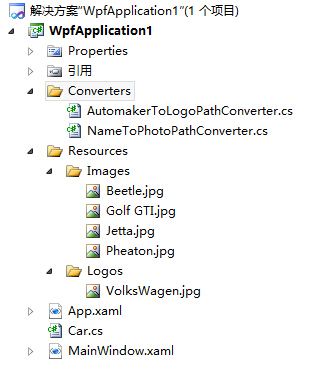
下面是文档结构:
WPF的模版的更多相关文章
- WPF Template模版之DataTemplate与ControlTemplate【一】
WPF Template模版之DataTemplate与ControlTemplate[一] 标签: Wpf模版 2015-04-19 11:52 510人阅读 评论(0) 收藏 举报 分类: -- ...
- WPF Template模版之寻找失落的控件【三】
“井水不犯河水”常用来形容两个组织之间界限分明.互不相干,LogicTree与控件内部这颗小树之间就保持着这种关系.换句话说,如果UI元素树上有个X:Name=“TextBox1”的控件,某个控件内部 ...
- WPF Template模版之DataTemplate与ControlTemplate的关系和应用【二】
1. DataTemplate和ControlTemplate的关系 学习过DataTemplate和ControlTemplate,你应该已经体会到,控件只是数据的行为和载体,是个抽象的概念,至于它 ...
- 【转】WPF Template模版之DataTemplate与ControlTemplate的关系和应用(二)
1. DataTemplate和ControlTemplate的关系 学习过DataTemplate和ControlTemplate,你应该已经体会到,控件只是数据的行为和载体,是个抽象的概念,至于它 ...
- 【转】WPF Template模版之DataTemplate与ControlTemplate(一)
WPF系统不但支持传统的Winfrom编程的用户界面和用户体验设计,更支持使用专门的设计工具Blend进行专业设计,同时还推出了以模板为核心的新一代设计理念. 1. 模板的内涵 作为表现形式,每个控件 ...
- WPF三大模板简介(Z)
WPF三大模板简介 WPF支持以下类型的模板: (1) 控件模板.控件模板可以将自定义模板应用到某一特定类型的所有控件,或是控件的某一实例.决定控件外观的是ControlTemplate,它决定了 ...
- WPF三大模板简介
WPF支持以下类型的模板: (1) 控件模板.控件模板可以将自定义模板应用到某一特定类型的所有控件,或是控件的某一实例.决定控件外观的是ControlTemplate,它决定了控件“长成什么样子”,因 ...
- 在普通的"类库"项目中添加 WPF 的 Window 对象
最近开发一个 WPF 项目, 在此项目中有个类库工程, 在开发的过程中发现在类库工程中竟然添加不了 WPF 窗口对象和一些其他的 WPF 对象,在新建窗口中选 WPF 类型,只有一个 “用户控件(WP ...
- WPF/Silverlight HierarchicalDataTemplate 模版的使用(转)
上一篇 对Wpf/Silverlight Template 进行了总结,本篇继续上一篇,主要是介绍 HierarchicalDataTemplate 的使用方法.HierarchicalDataTem ...
随机推荐
- 開始折腾cocos2d-x,使用批处理来创建项目
開始抽出时间学习cocos2d-x了.尽管C和C++还都不咋地.只是在开发中学习记忆也许会更深吧. so决定从今天開始正式学习的用自己的空暇时间折腾它了.正好这个五一没什么事.昨天搭建了一下开发环境. ...
- MVC入门教程-视图中的Layout使用
本文目标 1.能够重用Razor模板进行页面的组件化搭建 本文目录 1.母板页_Layout.cshtml 2.用户自定义控件 3.默认Layout引用的使用(_ViewStart.cshtml) 1 ...
- LAMP环境部署总结
linux+apche+mysql+php 此次用到的工具有:/etc/init.d/iptables , selinux, useradd, yum,chkconfig,sshd,visudo,cr ...
- 让iOS开发变得更有效率-分类、工具类
在工作中整理的一些分类与工具类,分享给大家.这些工具类可以减少项目中的代码量,让代码变得更简洁,可以大大的提升项目的效率,直接拖到项目中使用即可.下载地址:https://github.com/lee ...
- iOS 应用性能测试的相关方法、工具及技巧
用户不喜欢等待.他们不关心也不应该关心一个应用初始化的时候需要什么,他们只想尽快地完成他们的任务.你的应用应该几乎是瞬间启动的,其界面应当如丝般顺滑.在充满竞争的软件市场中,应用的性能是关键的优势之一 ...
- hdu2025java字符题
查找最大元素 Time Limit: 2000/1000 MS (Java/Others) Memory Limit: 65536/32768 K (Java/Others)Total Submiss ...
- Windows 下多线程编程技术
(1) 线程的创建:(主要以下2种) CWinThread* AfxBeginThread(AFX_THREADPROC pfnThreadProc, LPVOID lParam, int nPrio ...
- dll注册到GAC还是bin - sharepoint程序
通常来说程序在使用dll的时候,会先去GAC中查找是否有存在合适的dll,然后才会到应用程序下的bin目录去查找: 前几天遇到了一个奇葩问题,web项目工程添加了一个第三方dll的引用,然后把这个第三 ...
- win8 需要管理员权限才能删除此应用程序
在win8系统里面 安装了 dotfuscator,安装在c盘,结果发现运行是提示需要有管理员权限,想重新删除后安装也不行,删除的时候提示也需要管理员权限,网上查了一下资料,windows自xp开始, ...
- C++话题
1.多态地实现 A:C++中多态的实现原理是怎样的? Q:通过迟邦定技术(late binding)实现. 具体实现原理如下: 1. 基类中函数带virtual关键字,表示该方法为虚函数. 2. 子类 ...