
APP接口自动化测试JAVA+TestNG(三)之HTTP接口测试实例
前两篇普及相关基础知识后,本篇主要对举例对国家气象局接口自动化测试进行讲解(Get请求及结果断言),以达到自动化测试入门目的,除了前两篇的一些了解外,需要有一定的JAVA知识(HTTP相关)。
目录
以下实例均为本次总结再次编写,,如转载还请保留出处与作者姓名Findyou,谢谢!
3.1.1 待测接口说明
1.国家气象局天气预报接口
例:北京市天气
- 接口的址:http://www.weather.com.cn/data/cityinfo/101010100.html
- 请求方式:GET
- 请求结果:
{

    "weatherinfo": {

        "city": "北京",

        "cityid": "101010100",

        "temp1": "15℃",

        "temp2": "5℃",

        "weather": "多云",

        "img1": "d1.gif",

        "img2": "n1.gif",

        "ptime": "08:00"

    }

}
2.测试目标
请求对应cityid代码,返回的城市是否是预期城市。
3.1.2 新建JAVA工程
步骤同上一篇2.2.2.1新建JAVA工程,不再复述,如不懂请百度Eclipse新建工程
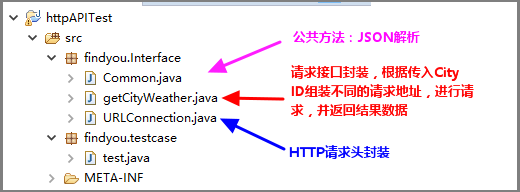
1.工程结构说明
2.Common.java源码
package findyou.Interface;

import org.codehaus.jettison.json.JSONException;

import org.codehaus.jettison.json.JSONObject;

public class Common {

    /**

     * 解析Json内容

     *

     * @author Findyou

     * @version 1.0 2015/3/23

     * @return JsonValue 返回JsonString中JsonId对应的Value

     **/

    public static String getJsonValue(String JsonString, String JsonId) {

        String JsonValue = "";

        if (JsonString == null || JsonString.trim().length() < 1) {

            return null;

        }

        try {

            JSONObject obj1 = new JSONObject(JsonString);

            JsonValue = (String) obj1.getString(JsonId);

        } catch (JSONException e) {

            e.printStackTrace();

        }

        return JsonValue;

    }

}
3.getCityWeathe.java源码
package findyou.Interface;

import java.io.BufferedReader;

import java.io.DataOutputStream;

import java.io.IOException;

import java.io.InputStreamReader;

import java.net.HttpURLConnection;

public class getCityWeather {

    private String url="";


    public String geturl() {

        return url;

    }

    public String getHttpRespone(String cityCode) throws IOException {

        String line = "";

        String httpResults = "";

        url=("http://www.weather.com.cn/data/cityinfo/"

                + cityCode + ".html");

        try {

            HttpURLConnection connection = URLConnection

                    .getConnection(url);

            DataOutputStream out = null;

            // 建立实际的连接

            connection.connect();

            out = new DataOutputStream(connection.getOutputStream());

            out.flush();

            out.close();

            BufferedReader reader = new BufferedReader(new InputStreamReader(

                    connection.getInputStream()));

            while ((line = reader.readLine()) != null) {

                httpResults = httpResults + line.toString();

            }

            reader.close();

            // 断开连接

            connection.disconnect();

        } catch (Exception e) {

            e.printStackTrace();

        }

        return httpResults;

    }

}
4.URLConnection.java源码
package findyou.Interface;

import java.net.HttpURLConnection;

import java.net.URL;

public class URLConnection {

    public static HttpURLConnection getConnection(String url){

        HttpURLConnection connection = null;

        try {

            // 打开和URL之间的连接

            URL postUrl = new URL(url);

            connection = (HttpURLConnection) postUrl.openConnection();

             // 设置通用的请求属性

            connection.setDoOutput(true);

            connection.setDoInput(true);

            connection.setRequestMethod("GET");

            connection.setUseCaches(false);

            connection.setInstanceFollowRedirects(true);

            connection.setRequestProperty("Content-Type", "application/json");

            connection.setRequestProperty("Charset", "utf-8");

            connection.setRequestProperty("Accept-Charset", "utf-8");

        } catch (Exception e) {

            e.printStackTrace();

        }

        return connection;

    }

}
3.1.3 编写测试用例
1.测试用例(常见"二"一般的写法)
package findyou.testcase;

import java.io.IOException;

import org.testng.Assert;

import org.testng.Reporter;

import org.testng.annotations.Test;

import findyou.Interface.Common;

import findyou.Interface.getCityWeather;

public class test {

    public String httpResult= null, weatherinfo= null, city=null,exp_city = null;

    public static String cityCode="";

    public static getCityWeather weather=new getCityWeather();

    @Test(groups = { "BaseCase"})

    public void getShenZhen_Succ() throws IOException{

        exp_city="深圳";

        cityCode="101280601";

        Reporter.log("【正常用例】:获取"+exp_city+"天气成功!");

        httpResult=weather.getHttpRespone(cityCode);

        Reporter.log("请求地址: "+weather.geturl());

        Reporter.log("返回结果: "+httpResult);

        weatherinfo=Common.getJsonValue(httpResult, "weatherinfo");

        city=Common.getJsonValue(weatherinfo, "city");

        Reporter.log("用例结果: resultCode=>expected: " + exp_city + " ,actual: "+ city);

        Assert.assertEquals(city,exp_city);

    }


    @Test(groups = { "BaseCase"})

    public void getBeiJing_Succ() throws IOException{

        exp_city="北京";

        cityCode="101010100";

        Reporter.log("【正常用例】:获取"+exp_city+"天气成功!");

        httpResult=weather.getHttpRespone(cityCode);

        Reporter.log("请求地址: "+weather.geturl());

        Reporter.log("返回结果: "+httpResult);

        weatherinfo=Common.getJsonValue(httpResult, "weatherinfo");

        city=Common.getJsonValue(weatherinfo, "city");

        Reporter.log("用例结果: resultCode=>expected: " + exp_city + " ,actual: "+ city);

        Assert.assertEquals(city,exp_city);

    }


    @Test(groups = { "BaseCase"})

    public void getShangHai_Succ() throws IOException{

        exp_city="上海";

        cityCode="101020100";

        Reporter.log("【正常用例】:获取"+exp_city+"天气成功!");

        httpResult=weather.getHttpRespone(cityCode);

        Reporter.log("请求地址: "+weather.geturl());

        Reporter.log("返回结果: "+httpResult);

        weatherinfo=Common.getJsonValue(httpResult, "weatherinfo");

        city=Common.getJsonValue(weatherinfo, "city");

        Reporter.log("用例结果: resultCode=>expected: " + exp_city + " ,actual: "+ city);

        Assert.assertEquals(city,exp_city);

    }

}
2.简化后的用例
如何返回值格式与请求格式固定,用例优化如下package findyou.testcase; import java.io.IOException; import org.testng.Assert; import org.testng.Reporter; import org.testng.annotations.Test; import findyou.Interface.Common; import findyou.Interface.getCityWeather; public class test { public String httpResult= null, weatherinfo= null, city=null,exp_city = null; public static String cityCode=""; getCityWeather weather=new getCityWeather(); @Test(groups = { "BaseCase"}) public void getShenZhen_Succ() throws IOException{ exp_city="深圳"; cityCode="101280601"; resultCheck(cityCode, exp_city); } @Test(groups = { "BaseCase"}) public void getBeiJing_Succ() throws IOException{ exp_city="北京"; cityCode="101010100"; resultCheck(cityCode, exp_city); } @Test(groups = { "BaseCase"}) public void getShangHai_Succ() throws IOException{ exp_city="上海"; cityCode="101020100"; resultCheck(cityCode, exp_city); } public void resultCheck(String cityCode_str, String exp_city_str) throws IOException{ Reporter.log("【正常用例】:获取"+exp_city_str+"天气成功!"); httpResult=weather.getHttpRespone(cityCode_str); Reporter.log("请求地址: "+weather.geturl()); Reporter.log("返回结果: "+httpResult); weatherinfo=Common.getJsonValue(httpResult, "weatherinfo"); city=Common.getJsonValue(weatherinfo, "city"); Reporter.log("用例结果: resultCode=>expected: " + exp_city_str + " ,actual: "+ city); Assert.assertEquals(city,exp_city_str); } }工程下载地址: https://pan.baidu.com/s/1HL2WPkYNwJ3kx4WH5hSvZA 密码: 7nm5
3.1.4 执行测试用例


TestNG自动化测试系列实例,基本已完毕,Post方法由于篇幅问题,则再不贴出来了,了解了以上实例,Post方法没有太大问题。后续如有时间看心情再上持续集成、自动化部署、自动化用例执行与测试报告输出博文~~~
APP接口自动化测试JAVA+TestNG(三)之HTTP接口测试实例的更多相关文章
- APP接口自动化测试JAVA+TestNG(二)之TestNG简介与基础实例
前言 继上篇环境篇后,本篇主要对TestNG进行介绍,给出最最基础的两个实例,通过本文后,学会并掌握TestNG测试用例的编写与运行,以及生成美化后的报告.下一篇为HTTP接口实战(国家气象局接口自动 ...
- APP接口自动化测试JAVA+TestNG(一)之框架环境搭建
前言 好久不曾写点啥,去年换到新公司组测试团队与培养建设花费大量时间与精力,终于架构成型与稳定有时间可以打打酱油了.很久没有总结点啥,提笔想写的内容太多,先放APP接口自动化的内容吧,这个估计大家比较 ...
- 零成本实现接口自动化测试 – Java+TestNG 测试Restful service
接口自动化测试 – Java+TestNG 测试 Restful Web Service 关键词:基于Rest的Web服务,接口自动化测试,数据驱动测试,测试Restful Web Service, ...
- (转)接口自动化测试 – Java+TestNG 测试 Restful Web Service
本文主要介绍如何用Java针对Restful web service 做接口自动化测试(数据驱动),相比UI自动化,接口自动化稳定性可靠性高,实施难易程度低,做自动化性价比高.所用到的工具或类库有 T ...
- 【Java学习笔记之二十二】解析接口在Java继承中的用法及实例分析
一.定义 Java接口(Interface),是一系列方法的声明,是一些方法特征的集合,一个接口只有方法的特征没有方法的实现,因此这些方法可以在不同的地方被不同的类实现,而这些实现可以具有不同的行为( ...
- Effective Java 第三版——35. 使用实例属性替代序数
Tips <Effective Java, Third Edition>一书英文版已经出版,这本书的第二版想必很多人都读过,号称Java四大名著之一,不过第二版2009年出版,到现在已经将 ...
- Effective Java 第三版——89. 对于实例控制,枚举类型优于READRESOLVE
Tips 书中的源代码地址:https://github.com/jbloch/effective-java-3e-source-code 注意,书中的有些代码里方法是基于Java 9 API中的,所 ...
- python接口自动化测试二十:函数写接口测试
# coding:utf-8import requestsimport refrom bs4 import BeautifulSoup # s = requests.session() # 全局的s ...
- 接口自动化测试框架搭建 – Java+TestNG 测试Restful service
接口自动化测试 – Java+TestNG 测试 Restful Web Service 关键词:基于Rest的Web服务,接口自动化测试,数据驱动测试,测试Restful Web Service, ...
随机推荐
- MVC自定义分页(附表跳转页Loading提示)
之前我发表了一篇MVC无刷新分页的文章,里面用的是MvcPager控件,但是那个受那个控件限制,传值只能用PagedList,各方面都受到了限制,自由度不够高,现在还是做MVC无刷新分页,但是想直接用 ...
- Call for Papers IEEE/ACM International Conference on Advances in Social Network Analysis and Mining (ASONAM)
IEEE/ACM International Conference on Advances in Social Network Analysis and Mining (ASONAM) 2014 In ...
- Expert 诊断优化系列------------------语句调优三板斧
前面三篇通过CPU.内存.磁盘三巨头,讲述了如何透过现在看本质,怎样定位服务器三巨头反映出的问题.为了方便阅读给出链接: SQL SERVER全面优化-------Expert for SQL Ser ...
- ENode通信层性能测试结果
测试环境 两台笔记本网线直连,通过测速工具(jperf)测试,确定两台电脑之间的数据传输速度可以达到1Gbps,即千兆网卡的最大速度.两台电脑硬件配置如下: client服务器,CPU:Intel i ...
- Spring Rabbitmq HelloWorld实例
之前的博客和大家分享了Rabbitmq的基本框架,及其工作原理,网址为 < http://www.cnblogs.com/jun-ma/p/4840869.html >.今天呢,想和大家一 ...
- Hadoop学习笔记—1.基本介绍与环境配置
一.Hadoop的发展历史 说到Hadoop的起源,不得不说到一个传奇的IT公司—全球IT技术的引领者Google.Google(自称)为云计算概念的提出者,在自身多年的搜索引擎业务中构建了突破性的G ...
- Hadoop学习笔记—6.Hadoop Eclipse插件的使用
开篇:Hadoop是一个强大的并行软件开发框架,它可以让任务在分布式集群上并行处理,从而提高执行效率.但是,它也有一些缺点,如编码.调试Hadoop程序的难度较大,这样的缺点直接导致开发人员入门门槛高 ...
- Redhat环境下编译安装Google Bazel
Redhat环境下编译安装bazel 作者:Jack47 目前Google Bazel没有提供各个操作系统下的二进制安装包,只提供源代码,需要我们自己编译安装,详情可以见我翻译的中文版Google B ...
- Module Zero之语言管理
返回<Module Zero学习目录> 概览介绍 如何开启 管理语言 管理本地化文本 概览介绍 ABP定义了一个健壮的UI本地化系统,它可用于服务端和客户端.它允许在不同的资源中(Reso ...
- 修改注册表 去除Windows快捷方式图标小箭头
一些朋友不喜欢Windows系统中快捷方式图标上面的小箭头,下面介绍如何修改注册表去除快捷方式图标上的小箭头. 1.开始->运行->输入regedit,启动注册表编辑器,然后; 2.依次展 ...