
登陆整合实现-QQ互联认证(ASP.NET版本)
        QQSettingConfig qqSettingConfig = MySiteConfig.GetConfig<QQSettingConfig>();//配置对象 配置QQ的 app id appkey 回调地址

        public void ProcessRequest(HttpContext context)

        {

            context.Response.ContentType = "text/plain";

            string state = new Random().Next(, ).ToString();//随机数

            context.Session["state"] = state;

            string callback = System.Web.HttpUtility.UrlEncode(qqSettingConfig.CallBackAddress + "/QQCallBack.aspx", Encoding.UTF8);//回调处理地址

            string url = string.Format("https://graph.qq.com/oauth2.0/authorize?client_id={0}&response_type=code&redirect_uri={1}&state={2}", qqSettingConfig.APPID, callback, state);//互联地址

            context.Response.Redirect(url);

        }
QQSettingConfig qqSettingConfig = MySiteConfig.GetConfig<QQSettingConfig>();//配置对象 配置QQ的 app id appkey 回调地址
protected void Page_Load(object sender, EventArgs e)

        {

            if (!IsPostBack)

            {

                try

                {

                    string code = HttpContext.Current.QueryString["code"];

                    string state = HttpContext.Current.QueryString["state"];

                    ValidCodeState(code, state);

                    QQOauthInfo qqOauthInfo = GetOauthInfo(code);

                    string openID = GetOpenID(qqOauthInfo);

                    string nickName = GetUserInfo(qqOauthInfo, openID);

                    if (string.IsNullOrEmpty(nickName))

                    {

                        WriteErrMsg("获取不到昵称");

                    }

                    #region 开始进行注册或者登录

                    OauthUserModel oauthUserModel = BLL.OauthUserBll.GetInfoByOpenId("qq", openID);

                    if (!oauthUserModel.IsNull)

                    {

                        //已经绑定过则登录

                        DealLogin(oauthUserModel);

                    }

                    else

                    {

                        //进行绑定

                        this.TxtRegUserName.Text = nickName;

                        this.hidenNiName.Value = nickName;

                        this.hidenOpenID.Value = openID;

                        this.LabelNiName.Text = nickName;

                        this.LabelOpenID.Text = openID;

                    }

                    #endregion

                }

                catch (Exception ex)

                {

                    //ShowError("出错了:"+ ex.Message);

                }

            }

        }
/// <summary>

        /// 验证code和state

        /// </summary>

        /// <param name="code"></param>

        /// <param name="state"></param>

        private void ValidCodeState(string code, string state)

        {

            if (string.IsNullOrEmpty(code) || string.IsNullOrEmpty(state))

            {

                ShowError("CODE或者STATE为空");

            }

            if (Session["state"] == null || Session["state"].ToString() != state)

            {

                ShowError("STATE不正确");

            }

        }
QQOauthInfo qqOauthInfo = GetOauthInfo(code);

方法如下

 /// <summary>

        /// 获取oauth信息

        /// </summary>

        /// <param name="code"></param>

        /// <returns></returns>

        private QQOauthInfo GetOauthInfo(string code)

        {

            string callback = System.Web.HttpUtility.UrlEncode(qqSettingConfig.CallBackAddress + "/QQCallBack.aspx", Encoding.UTF8);

            string url = string.Format("https://graph.qq.com/oauth2.0/token?grant_type={0}&client_id={1}&client_secret={2}&code={3}&redirect_uri={4}", "authorization_code", qqSettingConfig.APPID, qqSettingConfig.APPKEY, code, callback);

            string res = LoadHtmlUserGetType(url, Encoding.UTF8);

            if (!res.Contains("access_token="))

            {

                ShowError("出错了:空access_token");

            }

            QQOauthInfo qqOauthInfo = new QQOauthInfo();

            qqOauthInfo.AccessToken = CutString(res, "access_token=", "&expires_in=");

            qqOauthInfo.ExpiresIn = CutString(res, "&expires_in=", "&refresh_token=");

            qqOauthInfo.RefreshToken = res.Split(new string[] { "&refresh_token=" }, StringSplitOptions.None)[];

            if (string.IsNullOrEmpty(qqOauthInfo.AccessToken) || string.IsNullOrEmpty(qqOauthInfo.ExpiresIn) || string.IsNullOrEmpty(qqOauthInfo.RefreshToken))

            {

                ShowError("获取access_token等信息为空");

            }

            return qqOauthInfo;

        }

        /// <summary>

        /// 截取字符串中两个字符串中的字符串

        /// </summary>

        /// <param name="str">字符串</param>

        /// <param name="startStr">开始字符串</param>

        /// <param name="endStr">结束字符串</param>

        /// <returns></returns>

        public string CutString(string str, string startStr, string endStr)

        {

            int begin, end;

            begin = str.IndexOf(startStr, ) + startStr.Length; //开始位置

            end = str.IndexOf(endStr, begin);            //结束位置

            return str.Substring(begin, end - begin);   //取搜索的条数,用结束的位置-开始的位置,并返回

        }

        /// <summary>

        /// 通过GET方式获取页面的方法

        /// </summary>

        /// <param name="urlString">请求的URL</param>

        /// <param name="encoding">页面编码</param>

        /// <returns></returns>

        public string LoadHtmlUserGetType(string urlString, Encoding encoding)

        {

            HttpWebRequest httpWebRequest = null;

            HttpWebResponse httpWebRespones = null;

            Stream stream = null;

            string htmlString = string.Empty;

            try

            {

                httpWebRequest = WebRequest.Create(urlString) as HttpWebRequest;

            }

            catch (Exception ex)

            {

                throw new Exception("建立页面请求时发生错误!", ex);

            }

            httpWebRequest.UserAgent = "Mozilla/4.0 (compatible; MSIE 7.0; Windows NT 5.1; .NET CLR 2.0.50727; Maxthon 2.0)";

            try

            {

                httpWebRespones = (HttpWebResponse)httpWebRequest.GetResponse();

                stream = httpWebRespones.GetResponseStream();

            }

            catch (Exception ex)

            {

                throw new Exception("接受服务器返回页面时发生错误!", ex);

            }

            StreamReader streamReader = new StreamReader(stream, encoding);

            try

            {

                htmlString = streamReader.ReadToEnd();

            }

            catch (Exception ex)

            {

                throw new Exception("读取页面数据时发生错误!", ex);

            }

            streamReader.Close();

            stream.Close();

            return htmlString;

        }
public class QQOauthInfo

    {

        public string AccessToken { get; set; }

        public string ExpiresIn { get; set; }

        public string RefreshToken { get; set; }

    }
string openID = GetOpenID(qqOauthInfo);

方法如下

        /// <summary>

        /// 获取QQ账号的OpenID

        /// </summary>

        /// <param name="qqOauthInfo"></param>

        /// <returns></returns>

        private string GetOpenID(QQOauthInfo qqOauthInfo)

        {

            string res = LoadHtmlUserGetType("https://graph.qq.com/oauth2.0/me?access_token=" + qqOauthInfo.AccessToken, Encoding.UTF8);

            if (!res.Contains("openid"))

            {

                WriteErrMsg("出错了:获取用户的openid出错");

            }

            return CutString(res, @"openid"":""", @"""}");

        }
string nickName = GetUserInfo(qqOauthInfo, openID);

方法如下

        /// <summary>

        /// 获取QQ昵称

        /// </summary>

        /// <param name="qqOauthInfo"></param>

        /// <param name="openID"></param>

        /// <returns></returns>

        private string GetUserInfo(QQOauthInfo qqOauthInfo, string openID)

        {

            string urlGetInfo = string.Format(@"https://graph.qq.com/user/get_user_info?access_token={0}&oauth_consumer_key={1}&openid={2}", qqOauthInfo.AccessToken, qqSettingConfig.APPID, openID);

            string resUserInfo = LoadHtmlUserGetType(urlGetInfo, Encoding.UTF8);

            if (!resUserInfo.Contains("\"msg\": \"\""))

            {

                WriteErrMsg("出错了:获取用户信息出错");

            }

            return CutString(resUserInfo, @"""nickname"": """, @""",");

        }
if (string.IsNullOrEmpty(nickName))

                    {

                        ShowError("获取不到昵称");

                    }

                    #region 开始进行注册或者登录

                    OauthUserModel oauthUserModel = BLL.OauthUserBll.GetInfoByOpenId("qq", openID);

                    if (!oauthUserModel.IsNull)

                    {

                        //已经绑定过则登录

                        DealLogin(oauthUserModel);

                    }

                    else

                    {

                        //进行绑定

                        this.TxtRegUserName.Text = nickName;

                        this.hidenNiName.Value = nickName;

                        this.hidenOpenID.Value = openID;

                        this.LabelNiName.Text = nickName;

                        this.LabelOpenID.Text = openID;

                    }

                    #endregion
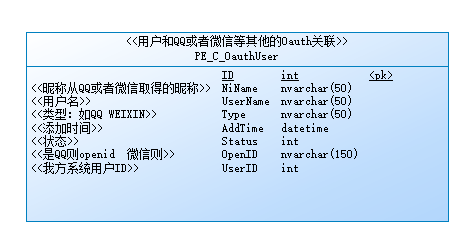
if exists(

   select 1 from sys.systable

   where table_name='PE_C_OauthUser'

     and table_type in ('BASE', 'GBL TEMP')

) then

    drop table PE_C_OauthUser

end if;

/*==============================================================*/

/* Table: PE_C_OauthUser                                        */

/*==============================================================*/

create table PE_C_OauthUser

(

   ID                   int                            not null,

   NiName               nvarchar(50)                   null,

   UserName             nvarchar(50)                   null,

   Type                 nvarchar(50)                   null,

   AddTime              datetime                       null,

   Status               int                            null,

   OpenID               nvarchar(150)                  null,

   UserID               int                            null,

   constraint PK_PE_C_OAUTHUSER primary key clustered (ID)

);

comment on table PE_C_OauthUser is

'用户和QQ或者微信等其他的Oauth关联';

comment on column PE_C_OauthUser.ID is

'主键ID';

comment on column PE_C_OauthUser.NiName is

'昵称从QQ或者微信取得的昵称';

comment on column PE_C_OauthUser.UserName is

'我方系统用户名';

comment on column PE_C_OauthUser.Type is

'类型:如QQ WEIXIN';

comment on column PE_C_OauthUser.AddTime is

'添加时间';

comment on column PE_C_OauthUser.Status is

'状态';

comment on column PE_C_OauthUser.OpenID is

'是QQ则openid  微信则';

comment on column PE_C_OauthUser.UserID is

'我方系统用户ID';

if exists(

   select 1 from sys.systable

   where table_name='PE_C_OauthUser'

     and table_type in ('BASE', 'GBL TEMP')

) then

    drop table PE_C_OauthUser

end if;

/*==============================================================*/

/* Table: PE_C_OauthUser                                        */

/*==============================================================*/

create table PE_C_OauthUser

(

   ID                   int                            not null,

   NiName               nvarchar(50)                   null,

   UserName             nvarchar(50)                   null,

   Type                 nvarchar(50)                   null,

   AddTime              datetime                       null,

   Status               int                            null,

   OpenID               nvarchar(150)                  null,

   UserID               int                            null,

   constraint PK_PE_C_OAUTHUSER primary key clustered (ID)

);

comment on table PE_C_OauthUser is

'用户和QQ或者微信等其他的Oauth关联';

comment on column PE_C_OauthUser.ID is

'主键ID';

comment on column PE_C_OauthUser.NiName is

'昵称从QQ或者微信取得的昵称';

comment on column PE_C_OauthUser.UserName is

'我方系统用户名';

comment on column PE_C_OauthUser.Type is

'类型:如QQ WEIXIN';

comment on column PE_C_OauthUser.AddTime is

'添加时间';

comment on column PE_C_OauthUser.Status is

'状态';

comment on column PE_C_OauthUser.OpenID is

'是QQ则openid  微信则';

comment on column PE_C_OauthUser.UserID is

'我方系统用户ID';
if (!oauthUserModel.IsNull)

                    {

                        //已经绑定过则登录

                        DealLogin(oauthUserModel);

                    }
 //进行绑定

                        this.TxtRegUserName.Text = nickName;

                        this.hidenNiName.Value = nickName;

                        this.hidenOpenID.Value = openID;

                        this.LabelNiName.Text = nickName;

                        this.LabelOpenID.Text = openID;

//添加到绑定表

            OauthUserModel oauthUserModelNew = new OauthUserModel();

            oauthUserModelNew.AddTime = DateTime.Now;

            oauthUserModelNew.NiName = this.hidenNiName.Value;

            oauthUserModelNew.OpenID = this.hidenOpenID.Value;

            oauthUserModelNew.Status = ;

            oauthUserModelNew.Type = "qq";

            oauthUserModelNew.UserID = usersInfo.UserId;

            oauthUserModelNew.UserName = usersInfo.UserName;

            if (!BLL.OauthUserBll.Add(oauthUserModelNew))

            {

                ShowError("绑定失败");

            }
登陆整合实现-QQ互联认证(ASP.NET版本)的更多相关文章
- 分享一下,PHP实现第四方QQ微信扫码登陆,不接入qq互联以及微信开发者平台就可以实现用户对接鹅厂,phpQQ微信扫码登陆
自己抓的QQ包以及整合了网上一些已经封装好了的代码具体如下:QQ: <?php class QQ extends Curl_Api { //获取登录验证码 public function QRc ...
- QQ 互联认证 回调地址提示说要http :// 但是事实不用
真奇怪 腾讯最近人手不够吧 这样的错误也会犯错....
- QQ登录整合/oauth2.0认证-02-跳转到QQ互联页
---------------------------目录---------------------------------- QQ登录整合/oauth2.0认证-01-申请appkey和appid ...
- QQ登录整合/oauth2.0认证-04-调整到QQ互联进行QQ登录
---------------------------------目录------------------------------------- QQ登录整合/oauth2.0认证-03-对第二节的代 ...
- QQ互联OAuth2.0 .NET SDK 发布以及网站QQ登陆示例代码(转)
OAuth: OAuth(开放授权)是一个开放标准,允许用户授权第三方网站访问他们存储在另外的服务提供者上的信息,而不需要将用户名和密码提供给第三方网站或分享他们数据的所有内容. QQ登录OAuth2 ...
- QQ互联OAuth2.0 .NET SDK 发布以及网站QQ登陆示例代码
OAuth: OAuth(开放授权)是一个开放标准,允许用户授权第三方网站访问他们存储在另外的服务提供者上的信息,而不需要将用户名和密码提供给第三方网站或分享他们数据的所有内容. QQ登录OAuth2 ...
- QQ互联登陆(Java)
一.准备部分 1.账户注册 腾讯开放平台网址: https://connect.qq.com/index.html 首先需要到开放平台注册QQ互联开发者身份.注册之后创建一个网站应用,注意,需要备案成 ...
- ASP.NET MVC QQ互联接入
ASP.NET MVC QQ Connect 介绍 ASP.NET MVC QQ互联接入Demo. 项目地址:https://gitee.com/Liu_Cabbage/ASP.NET-MVC-QQ- ...
- 第三方登陆-qq互联
看到很多网站都有第三方登陆,使用业余时间自己也要实现一个第三方登陆的功能: 1.登陆qq互联的网站:https://connect.qq.com/index.html 2.点击头像进行资料申请 --- ...
随机推荐
- ajax Session失效如何跳转到登录页面
在Struts应用中,我们发出的请求都会经过 相应的拦截器进行相关处理,一般都会有一个用户登录拦截(Session失效拦截):一般请求的话,如果Session失效时,我们会跳到登录页面,可是如果我们采 ...
- HDU 2393 Higher Math
#include <cstdio> #include <string> using namespace std; void swap(int& a,int& b ...
- 框架技术--Spring自动加载配置
今天项目中遇到一个问题,一个方法在服务启动后会自动被执行,查看了下配置未发现有定时的配置.但是后来发现是spring配置了启动时默认加载了方法. 代码: <?xml version=" ...
- tomcat配置没啥难的啊
总体上就是: 1.下载jdk并安装. 2.下载tomcat 3.分别设置好环境变量. 4.cmd java -version 如果成功,证明java jdk配置OK startup.bat 如果成功 ...
- 鼠标放上去图片慢慢变大js 或 变大
<!DOCTYPE html PUBLIC "-//W3C//DTD XHTML 1.0 Transitional//EN" "http://www.w3.org/ ...
- java线程池分析和应用
比较 在前面的一些文章里,我们已经讨论了手工创建和管理线程.在实际应用中我们有的时候也会经常听到线程池这个概念.在这里,我们可以先针对手工创建管理线程和通过线程池来管理做一个比较.通常,我们如果手工创 ...
- tasklet和工作队列
tasklet机制和工作队列 http://blog.chinaunix.net/uid-28236237-id-3450753.html tasklet原理 http://www.kuqin.com ...
- 解决gnuplot中'Terminal type set to 'unknown'不能显示绘图的问题
安装gnuplot: sudo apt-get install gnuplot 安装成功后,在终端输入gnuplot,进入gnuplot. 直接进行一个小测试: plot sin(x) 发现不能显示绘 ...
- c# 流程控制
using System; using System.Collections.Generic; using System.Linq; using System.Text; using System.T ...
- cygwin org/apache/zookeeper/KeeperException
以前用cdh3-0.20的hbase,在windows下面直接启动就行了,但是最近安装0.94以上的,就不行了. 报标题的错误,搜遍网络,几乎都是要加HBASE_CLASSPATH的,后来看老外的文章 ...