
Unit03: Spring Web MVC简介 、 基于XML配置的MVC应用 、 基于注解配置的MVC应用
Unit03: Spring Web MVC简介 、 基于XML配置的MVC应用 、 基于注解配置的MVC应用
springmvc
(1)springmvc是什么?
是一个mvc框架,用来简化基于mvc架构的web应用程序的开发。
注:springmvc属于spring框架的一部分。
(2)五大组件
DispatcherServlet 前端控制器
HandleMapping (请求地址与模型的对应关系)
Controller 处理器 (业务逻辑处理)
ModelAndView (封装处理结果)
ViewResolver 视图解析器 (处理结果与视图的对应关系)
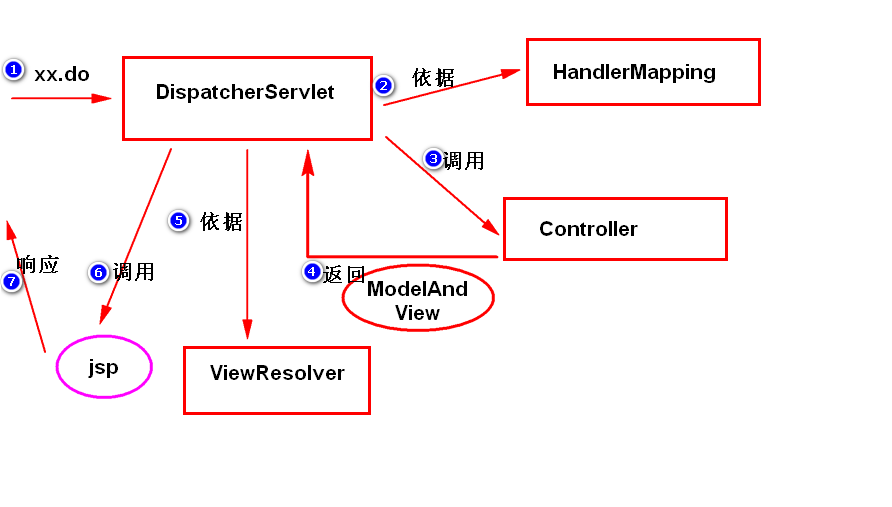
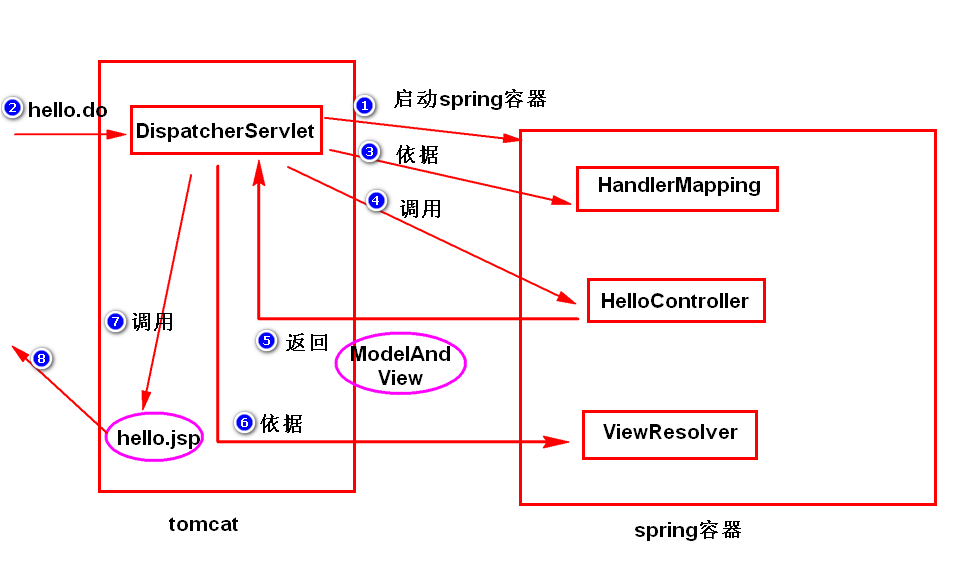
step1. DispatcherServlet收到请求之后,依据HandlerMapping的配置
调用对应的Controller来处理。
step2. Controller将处理结果封装成ModelAndView,返回给
DispatcherServlet。
step3. DispatcherServlet依据ViewResolver的配置,调用
对应的jsp来将处理结果进行展现。
(3)编程步骤
step1. 导包。
step2. 添加spring配置文件。
step3. 配置DispatcherServlet。
step4. 写处理器(Controller)。
step5. 写jsp。
案例:
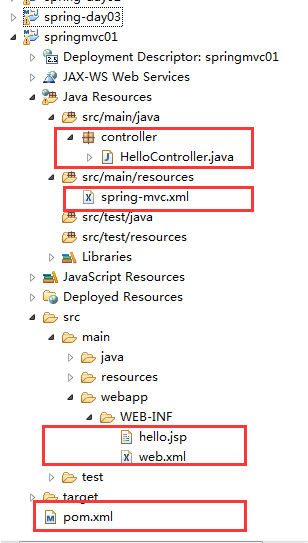
src/main/java/
controller
package controller;

import javax.servlet.http.HttpServletRequest;

import javax.servlet.http.HttpServletResponse;

import org.springframework.web.servlet.ModelAndView;

import org.springframework.web.servlet.mvc.Controller;

/**

 * 处理器类

 *

 */

public class HelloController implements

Controller{

    public ModelAndView handleRequest(

            HttpServletRequest req,

            HttpServletResponse res)

                    throws Exception {

        System.out.println("handleRequest()");

        /*

         * ModelAndView有两个构造器:

         * a. ModelAndView(String viewName)

         * b. ModelAndView(String viewName,

         * Map data)

         * 注:

         *         viewName是视图名(视图名会被

         *     ViewResolver解析成真正的视图对象,

         * 比如某个jsp)。

         *         data是处理结果。

         *

         */

        return new ModelAndView("hello");

    }

}
HelloController.java
src/main/resources
<?xml version="1.0" encoding="UTF-8"?>

<beans xmlns="http://www.springframework.org/schema/beans"

    xmlns:xsi="http://www.w3.org/2001/XMLSchema-instance"

    xmlns:context="http://www.springframework.org/schema/context"

    xmlns:jdbc="http://www.springframework.org/schema/jdbc"

    xmlns:jee="http://www.springframework.org/schema/jee"

    xmlns:tx="http://www.springframework.org/schema/tx"

    xmlns:aop="http://www.springframework.org/schema/aop"

    xmlns:mvc="http://www.springframework.org/schema/mvc"

    xmlns:util="http://www.springframework.org/schema/util"

    xmlns:jpa="http://www.springframework.org/schema/data/jpa"

    xsi:schemaLocation="

        http://www.springframework.org/schema/beans http://www.springframework.org/schema/beans/spring-beans-3.2.xsd

        http://www.springframework.org/schema/context http://www.springframework.org/schema/context/spring-context-3.2.xsd

        http://www.springframework.org/schema/jdbc http://www.springframework.org/schema/jdbc/spring-jdbc-3.2.xsd

        http://www.springframework.org/schema/jee http://www.springframework.org/schema/jee/spring-jee-3.2.xsd

        http://www.springframework.org/schema/tx http://www.springframework.org/schema/tx/spring-tx-3.2.xsd

        http://www.springframework.org/schema/data/jpa http://www.springframework.org/schema/data/jpa/spring-jpa-1.3.xsd

        http://www.springframework.org/schema/aop http://www.springframework.org/schema/aop/spring-aop-3.2.xsd

        http://www.springframework.org/schema/mvc http://www.springframework.org/schema/mvc/spring-mvc-3.2.xsd

        http://www.springframework.org/schema/util http://www.springframework.org/schema/util/spring-util-3.2.xsd">

    <!-- 配置HandlerMapping -->

    <bean

    class="org.springframework.web.servlet.handler.SimpleUrlHandlerMapping">

        <property name="mappings">

            <props>

                <prop key="/hello.do">helloController</prop>

            </props>

        </property>

    </bean>

    <bean id="helloController"

    class="controller.HelloController"/>

    <!-- 配置视图解析器 -->

    <bean

     class="org.springframework.web.servlet.view.InternalResourceViewResolver">

    <property name="prefix" value="/WEB-INF/"/>

    <property name="suffix" value=".jsp"/>

    </bean>

</beans>
spring-mvc.xml
src/main/java/webapp/WEB-INF/
<h1>Hello,SpringMVC</h1>
hello.jsp
<?xml version="1.0" encoding="UTF-8"?>

<web-app xmlns:xsi="http://www.w3.org/2001/XMLSchema-instance" xmlns="http://java.sun.com/xml/ns/javaee" xsi:schemaLocation="http://java.sun.com/xml/ns/javaee http://java.sun.com/xml/ns/javaee/web-app_2_5.xsd" version="2.5">

  <servlet>

    <servlet-name>action</servlet-name>

    <servlet-class>org.springframework.web.servlet.DispatcherServlet</servlet-class>

    <!--

         DispatcherServlet的初始化方法在执行时,

         会启动spring容器。

         contextConfigLocation负责指定spring

         配置文件的位置。

     -->

    <init-param>

        <param-name>contextConfigLocation</param-name>

        <param-value>classpath:spring-mvc.xml</param-value>

    </init-param>

    <load-on-startup>1</load-on-startup>

</servlet>

<servlet-mapping>

    <servlet-name>action</servlet-name>

    <url-pattern>*.do</url-pattern>

</servlet-mapping>

</web-app>
web.xml
<project xmlns="http://maven.apache.org/POM/4.0.0" xmlns:xsi="http://www.w3.org/2001/XMLSchema-instance" xsi:schemaLocation="http://maven.apache.org/POM/4.0.0 http://maven.apache.org/xsd/maven-4.0.0.xsd">

  <modelVersion>4.0.0</modelVersion>

  <groupId>com.tarena.spring</groupId>

  <artifactId>springmvc01</artifactId>

  <version>0.0.1-SNAPSHOT</version>

  <packaging>war</packaging>

  <dependencies>

      <dependency>

          <groupId>org.springframework</groupId>

          <artifactId>spring-webmvc</artifactId>

          <version>3.2.8.RELEASE</version>

      </dependency>

  </dependencies>

</project>
pom.xml
Unit03: Spring Web MVC简介 、 基于XML配置的MVC应用 、 基于注解配置的MVC应用的更多相关文章
- Spring Web Flow 简介
Spring Web Flow 简介 博客分类: 转载 SSH 最近在TSS上看到了一片介绍Spring Web Flow的文章,顺便就翻译了下来,SWF的正式版估计要到6月份才能看到了,目前的例子都 ...
- IDEA02 利用Maven创建Web项目、为Web应用添加Spring框架支持、bean的创建于获取、利用注解配置Bean、自动装配Bean、MVC配置
1 环境版本说明 Jdk : 1.8 Maven : 3.5 IDEA : 专业版 2017.2 2 环境准备 2.1 Maven安装及其配置 2.2 Tomcat安装及其配置 3 详细步骤 3.1 ...
- 基于XML文档的声明式事务配置
<!-- 配置事务切面 --> <aop:config> <aop:pointcut expression="execution(* com.atguigu.t ...
- springmvc——基于xml的异常映射和基于注解的异常映射
SpringMVC提供了基于XML和基于注解两种异常映射机制.这两种异常映射不能够只使用一个,他们需要一起使用.因为有些异常是基于注解异常映射捕获不到的. 在springmvc中,一个请求如果是由&l ...
- 1. Spring基于xml加载和读取properties文件配置
在src目录下,新建test.properties配置文件,内容如下 name=root password=123456 logArchiveCron=0/5 * * * * ? 一种是使用sprin ...
- 阶段3 2.Spring_05.基于XML的IOC的案例1_4 注解IOC案例-把自己编写的类使用注解配置
注解改造案例 复制之前的xml配置的pom.xml里面的依赖. 复制com文件 bean.xml配置文件也拷贝过来 测试类也复制过来 开始基于注解的IOC配置 右键项目,选择maven.选择更新 更新 ...
- Spring学习--基于 XML 的配置声明切面
正常情况下 , 基于注解的生命要优先于基于 XML 的声明. 通过 AspectJ 注解 , 切面可以与 AspectJ 兼容 , 而基于 XML 的配置则是 Spring 专有的.由于 Aspect ...
- 关于什么是SpringMVC,和SpringMVC基于xml配置、注解配置、纯注解配置
首先我们先要了解一下,什么是SpringMVC? SpringMVC是Spring框架内置的MVC的实现.SpringMVC就是一个Spring内置的MVC子框架,也就是说SpringMVC的相关包都 ...
- disconf实践(三)基于XML的分布式配置文件管理,自动reload
上一篇介绍了基于xml的非自动reload的分布式配置文件管理,这一篇介绍自动reload的方式(基于disconf实践二). 1. 修改RedisConfig.java package org.sp ...
- 吴裕雄--天生自然JAVA SPRING框架开发学习笔记:Spring使用AspectJ开发AOP基于XML和基于Annotation
AspectJ 是一个基于 Java 语言的 AOP 框架,它扩展了 Java 语言.Spring 2.0 以后,新增了对 AspectJ 方式的支持,新版本的 Spring 框架,建议使用 Aspe ...
随机推荐
- C++复习7.虚表的概念
C++ 类的虚表 20130929 关键技术:封装.继承.组合.虚函数.抽象基类.动态绑定.多态性等等 1.首先整理一下在阿里巴巴面试遇到的函数虚表的问题. 在C++中的Class中的函数式存储在Cl ...
- 转载:【Oracle 集群】RAC知识图文详细教程(三)--RAC工作原理和相关组件
文章导航 集群概念介绍(一) ORACLE集群概念和原理(二) RAC 工作原理和相关组件(三) 缓存融合技术(四) RAC 特殊问题和实战经验(五) ORACLE 11 G版本2 RAC在LINUX ...
- 使用Eclipse EE(汉化版) 创建一个JavaWeb工程
第一步:打开eclipse ee,单击“文件”-->单击“新建”-->单击“动态Web项目”. 若没找到“动态Web项目”,单击“其他” -->在弹出的窗口中打开“Web”下拉菜单 ...
- MySQL小误区:关于set global sql_slave_skip_counter=N 命令的一些点
背景知识1: 在主从库维护中,有时候需要跳过某个无法执行的命令,需要在slave处于stop状态下,执行 set global sql_slave_skip_counter=N以跳过命令.常用 ...
- Linux文件操作及管理
---恢复内容开始--- 一.Linux系统的结构 1.Linux是一个倒树型结构,最大的目录名称为“/”(根目录) 2.Linux系统的二级目录 /bin ##binary二进制可执行文件, ...
- SQL映射文件
SQL映射文件的几个顶级元素 mapper - namespace cache - 配置给定命名空间的缓存 cache-ref – 从其他命名空间引用缓存配置 resultMap –用来描述数据库结 ...
- Recording︱有价值的各类AI、机器学习比赛心得、经验抄录
今年kaggle华人优胜团队很多,所以经验.心得不少,都是干货慢慢收集. 一.[干货]Kaggle 数据挖掘比赛经验分享 github:https://github.com/ChenglongChen ...
- MySQL在本机无法基于localhost访问的问题解决
引言: 在本地访问数据库之时,一般使用localhost, 127.0.0.1来进行数据库访问,但是笔者这几天就碰到了只能通过127.0.0.1来访问,但是无法基于localhost来访问,非常之诡异 ...
- YXY的测试流程
不同的公司测试流程都会不一样
- LeetCode - Course Schedule 解题报告
以前从来没有写过解题报告,只是看到大肥羊河delta写过不少.最近想把写博客的节奏给带起来,所以就挑一个比较容易的题目练练手. 原题链接 https://leetcode.com/problems/c ...