
swagger2的接口文档
https://www.cnblogs.com/exmyth/p/7171857.html
以前见过一个swagger2的接口文档,特别好用,好看,对接口中入参描述的很详细;适合用于项目的开发
后来自己做项目的时候,没有找到这个swagger版本
        <dependency>

            <groupId>io.springfox</groupId>

            <artifactId>springfox-swagger2</artifactId>

            <version>2.9.2</version>

        </dependency>

        <dependency>

            <groupId>io.springfox</groupId>

            <artifactId>springfox-swagger-ui</artifactId>

            <version>2.9.2</version>

        </dependency>
这个版本的风格如下:
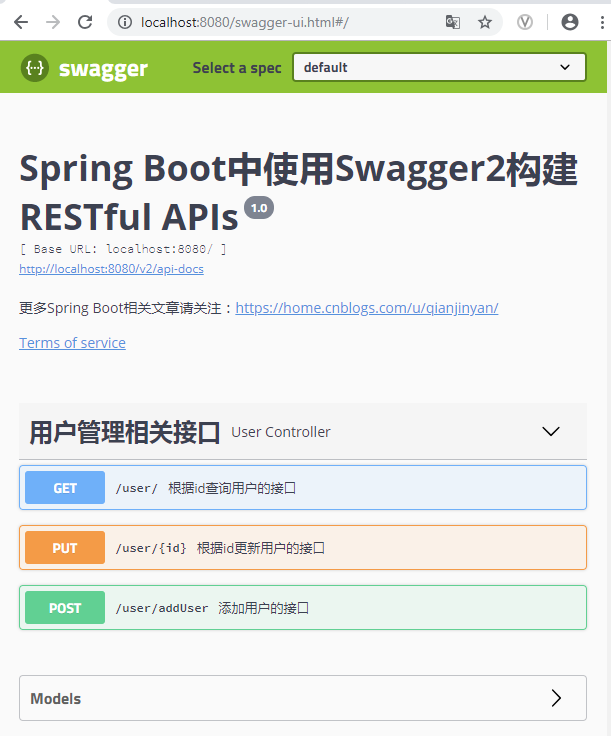
备注:
@Api: 描述类/接口的主要用途
@ApiOperation: 描述方法用途
@ApiImplicitParam: 描述方法的参数
@ApiImplicitParams: 描述方法的参数(Multi-Params)
@ApiParam:请求属性
@ApiIgnore: 忽略某类/方法/参数的文档
@ApiResponses:响应集配置
@ResponseHeader: 响应头设置
@ApiModelProperty:添加和操作模型属性的数据
        <dependency>

            <groupId>io.springfox</groupId>

            <artifactId>springfox-swagger2</artifactId>

            <version>2.2.2</version>

        </dependency>

        <dependency>

            <groupId>io.springfox</groupId>

            <artifactId>springfox-swagger-ui</artifactId>

            <version>2.2.2</version>

        </dependency>
换了个版本,三个2的版本,
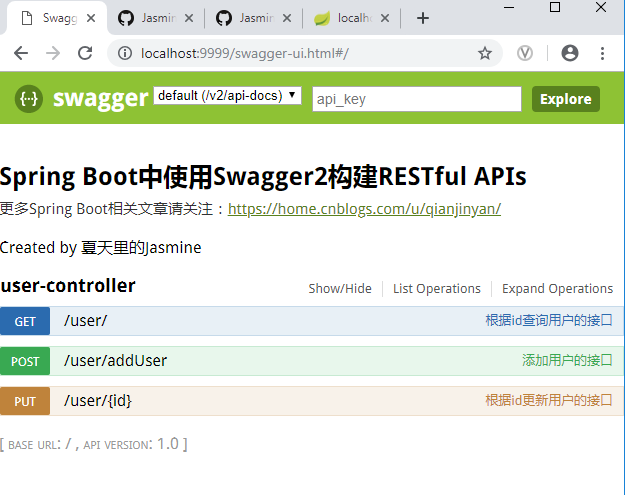
高版本UI展示变了,高版本能显示实体类中的对象属性
不是之前我看到的,还是要继续寻找更好的API接口文档展示方式。。。。
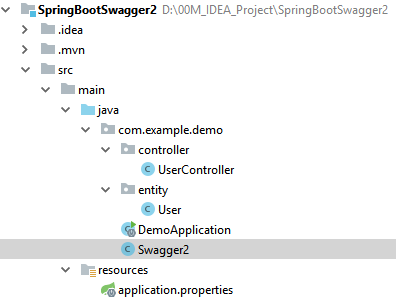
项目测试的代码
@Configuration

@EnableSwagger2  //通过@EnableSwagger2注解启用Swagger2

public class Swagger2 {

    @Bean

    public Docket createRestApi() {

        return new Docket(DocumentationType.SWAGGER_2)

                .apiInfo(apiInfo())

                .select()

                .apis(RequestHandlerSelectors.basePackage("com.example.demo"))

                .paths(PathSelectors.any())

                .build();

    }

    private ApiInfo apiInfo() {

        return new ApiInfoBuilder()

                .title("Spring Boot中使用Swagger2构建RESTful APIs")

                .description("更多Spring Boot相关文章请关注:https://home.cnblogs.com/u/qianjinyan/")

                .termsOfServiceUrl("https://github.com/JasmineQian/")

                .contact("夏天里的Jasmine")

                .version("1.0")

                .build();

        //配置一个Docket Bean,这个Bean中,配置映射路径和要扫描的接口的位置,

        // 在apiInfo中,主要配置一下Swagger2文档网站的信息,

        // 例如网站的title,网站的描述,联系人的信息,使用的协议等等。

    }

}
package com.example.demo.entity;

import io.swagger.annotations.ApiModel;

import io.swagger.annotations.ApiModelProperty;

@ApiModel

public class User {

    @ApiModelProperty(value = "用户id")

    private int id;

    @ApiModelProperty(value = "用户名")

    private String name;

    @ApiModelProperty(value = "用户地址")

    private String address;

省略getters and setters

    void addUser(int id,String name,String address){

        this.address=address;

        this.id=id;

        this.name=name;

    }

}
package com.example.demo.controller;

import com.example.demo.entity.User;

import io.swagger.annotations.Api;

import io.swagger.annotations.ApiImplicitParam;

import io.swagger.annotations.ApiImplicitParams;

import io.swagger.annotations.ApiOperation;

import org.springframework.web.bind.annotation.*;

@RestController

@Api(tags = "用户管理相关接口")

@RequestMapping("/user")

public class UserController {

    @PostMapping("/addUser")

    @ApiOperation("添加用户的接口")

    @ApiImplicitParams({

            @ApiImplicitParam(name = "username", value = "用户名", defaultValue = "李四"),

            @ApiImplicitParam(name = "address", value = "用户地址", defaultValue = "深圳", required = true)}

    )

    public User addUser(String username, @RequestParam(required = true) String address) {

        return new User();

    }

    @GetMapping("/")

    @ApiOperation("根据id查询用户的接口")

    @ApiImplicitParam(name = "id", value = "用户id", defaultValue = "1", required = true)

    public User getUserById(@PathVariable Integer id) {

        User user = new User();

        user.setId(id);

        return user;

    }

    @PutMapping("/{id}")

    @ApiOperation("根据id更新用户的接口")

    public User updateUserById(@RequestBody User user) {

        return user;

    }

}
swagger2的接口文档的更多相关文章
- Springboot集成swagger2生成接口文档
[转载请注明]: 原文出处:https://www.cnblogs.com/jstarseven/p/11509884.html 作者:jstarseven 码字挺辛苦的..... 一 ...
- Springboot+swagger2的接口文档开发
一.创建一个SpringBoot项目 1. 2. 3. 4. 把web里的web选中,SQL里选择自己需要的,点击next 二.创建各项所需的controller,configure等 1. 项目布局 ...
- SpringFox swagger2 and SpringFox swagger2 UI 接口文档生成与查看
依赖: <!-- https://mvnrepository.com/artifact/io.springfox/springfox-swagger2 --> <dependency ...
- SpringBoot 使用Swagger2打造在线接口文档(附汉化教程)
原文地址: https://www.jianshu.com/p/7e543f0f0bd8 SpringBoot + Swagger2 UI界面-汉化教程 1.默认的英文界面UI 想必很多小伙伴都曾经使 ...
- 接口开发-集成接口文档(swagger)
在正式进入主题之前,先说说实际工作中遇到的问题.不算是传统的原生APP开发,还是眼下的H5混合开发,只要是需要前后端通过接口配合的,往往都存在几个普遍的问题 (1)接口文档谁来写,尤其是跨部门,并且, ...
- SpringBoot整合Swagger2,再也不用维护接口文档了!
前后端分离后,维护接口文档基本上是必不可少的工作.一个理想的状态是设计好后,接口文档发给前端和后端,大伙按照既定的规则各自开发,开发好了对接上了就可以上线了.当然这是一种非常理想的状态,实际开发中却很 ...
- Spring Boot(九)Swagger2自动生成接口文档和Mock模拟数据
一.简介 在当下这个前后端分离的技术趋势下,前端工程师过度依赖后端工程师的接口和数据,给开发带来了两大问题: 问题一.后端接口查看难:要怎么调用?参数怎么传递?有几个参数?参数都代表什么含义? 问题二 ...
- springboot项目利用Swagger2生成在线接口文档
Swagger简介. Swagger2是一款restful接口文档在线生成和在线调试工具.很多项目团队利用Swagger自动生成接口文档,保证接口文档和代码同步更新.在线调试.简单地说,你可以利用这个 ...
- SpringBoot+rest接口+swagger2生成API文档+validator+mybatis+aop+国际化
代码地址:JillWen_SpringBootDemo mybatis 1. 添加依赖: <dependency> <groupId>org.mybatis.spring.bo ...
随机推荐
- select 标签判断value值相同 就selected高亮
我写的是里面嵌套php标签 <select name="bq_id[]" multiple="multiple"> <volist name= ...
- js设计模式(六)---组合模式
组合模式将对象组合成树形结构,以表示“部分-整体”的层次结构.除了用来表示树形结构之外,组合模式的另一个好处是通过对象的多态性表现,使得用户对单个对象和组合对象的使用具有一致性.基本图例 1.组合模式 ...
- TypeError: object() takes no parameters
1.定义了类,在类中实现函数功能,但是需要传参数,我在类中没有建立__init__(self,) 导致没法传参.
- python->读写excel
from openpyxl import load_workbook#将一个excel文档中的数据存放内存中,即变量wb保存了该excel的所有信息wb = load_workbook(r" ...
- Oracle11g 配置DG broker
在配置DG broker之前需要确保Dataguard配置正常且主库和备库均使用spfile. 1. 主库配置 配置DG_BROKER_START参数 检查主库dg_broker_start设置 SQ ...
- LeetCode 448 Find All Numbers Disappeared in an Array 解题报告
题目要求 Given an array of integers where 1 ≤ a[i] ≤ n (n = size of array), some elements appear twice a ...
- Java+selenium如何清理浏览器Cookie
一.场景:在未注销系统切换不同账号登录系统下,登录会有浏览器缓存,导致登录时间异常缓慢.跟开发浏览器缓存处理机制有关系. 二.解决方法: 获取浏览器Cookie,在Login方法前增加清除缓存的代码. ...
- ionic3.x版本-实现点击tab导航栏判断是否已经登陆然后加载不同页面,和退出登录功能。
html代码: <ion-tabs #myTabs> <ion-tab [root]="tab1Root" tabTitle="首页" tab ...
- echart 判断数据是否为空
formatter 判断数据是否为空
- [js]js中事件的3要素
js中事件的3要素 事件源 事件 事件处理程序 <!DOCTYPE html> <html> <head lang="en"> <meta ...